Software Update 2.48.16 (2025 November Rain release)
-
@atoponce said in Software Update 2.48.16 (2025 November Rain release):
@Stefan-Kersting This finally annoyed me enough that I did a factory reset last night and it worked. I now only have my Polar H10 and Stryd food pod in the paired devices list. No more ghost devices.
I did a factory reset as well with this latest firmware (Race). Unfortunately, my H10 (again) after some time all of a sudden turned into a ghost sensor.
So, the underlying bug is still there on the latest firmware and a hard reset only seems to fix the issue with ghost sensors (and battery drain) for a short time. At least that is my experience.
-
@duffman19 I too have the same problem with using already paired sensors of the same type (Polar Verity Sense and H10). Thanks for posting the work around, because I’d resorted to pairing and unpairing HR sensors, as we had to do originally before the ability to use multiple sensors of the same type was added (albeit imperfectly, as we have found).
It would be great if this could be fixed.
-
@Brad_Olwin Why in the name of god aren’t custom sports modes able to save to the app?
Seems like a huge own goal to have people set them all up again should a watch issue come up.
These along with custom zones, alarms, and general watch settings should all be backed up so a full restore can be done without having to set these things up every time.
-
I am now totally convinced that this update hasn’t fixed the battery drain issue for me, it maybe even made it worse, and that the cause lies in the connection to my heart rate belt.
After the last full charge and soft reset, I always unpaired the sensor after using it. The discharge after a running activity (typically in the morning) until bed time was around 3%. Today I forgot to do it, I finished my run this morning with 75% battery and it’s 67% at night. Phantom vibrations are occurring every time I “wake up” the hr belt by moving it. These were never present before the update. -
I have done 2 x separate hard resets on my vertical 1 . The battery drain seemed to improve only for a short while. As soon as the watch is being used in normal training again etc the battery drain resumes
-
same here, vertical 1
i see .5% burn per hr in smartwatch mode.i don’t use any connected sensors…
with 3 to 5 gps activities, i’m charging every 5 or 6 days. super frustrating.
-
Hi,
I continued monitoring the battery discharge and found an interesting twist.
If you look at my previous post, there was a turning point in the discharge rate -> faster discharge.said in Software Update 2.48.16 (2025 November Rain release):
The trend lines show consumption trends separated by activity (in the first case, charging and activity). It is clear that after the first activity, the steepness of the trend lines is significantly steeper.
Now I had the exact opposite effect: fast -> slow.
I have marked some of the things I did. After a soft reset, it changed. However, I also replaced the chest strap and removed the old paired strap (some activities worked with the new one without any problems, but one only started working after removing the old strap).
I had done soft resets before, so I think that removing the paired BT, or perhaps a combination of removing the BT and doing a soft reset, was what improved the battery drain.
I am attaching the graphs:
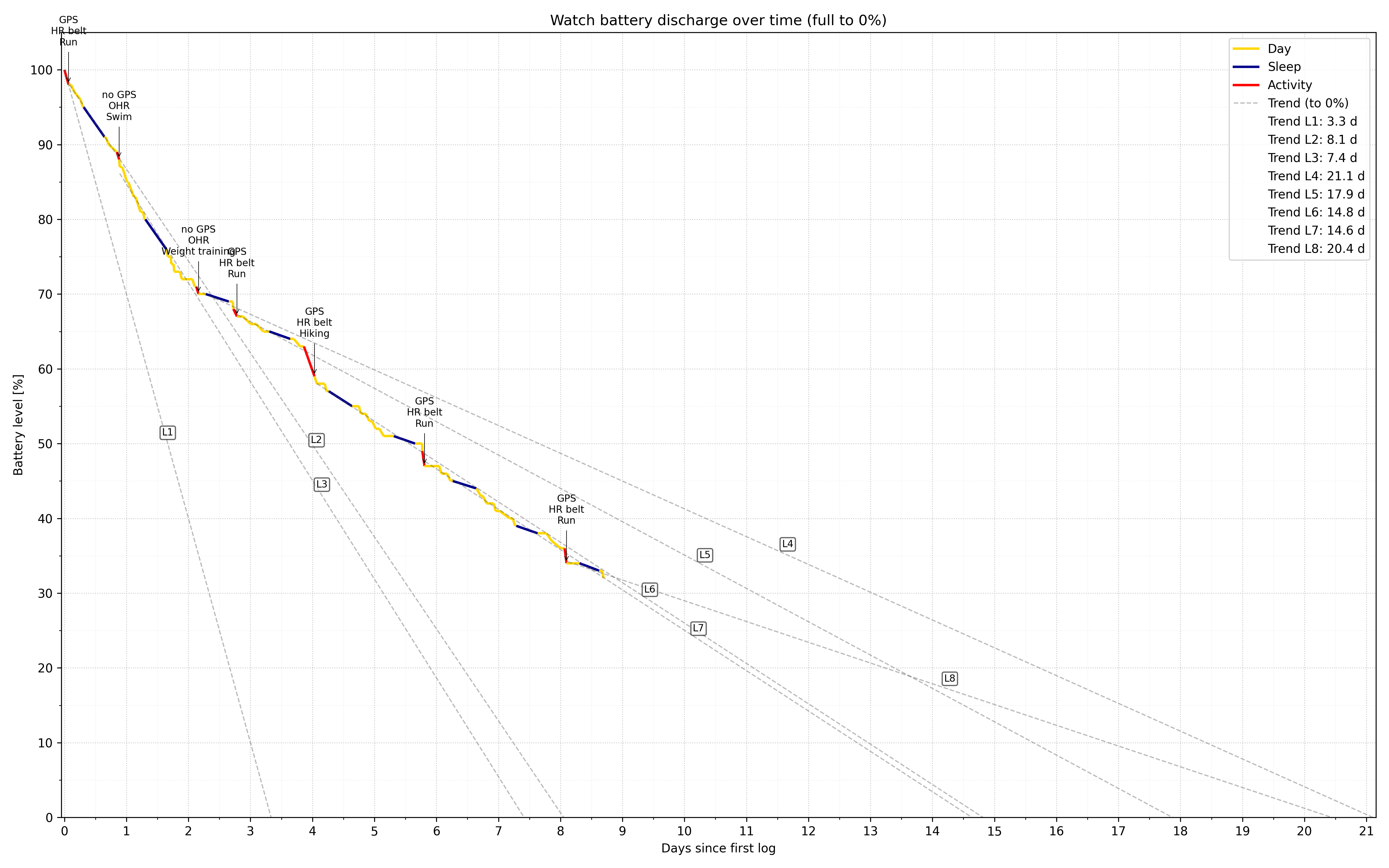
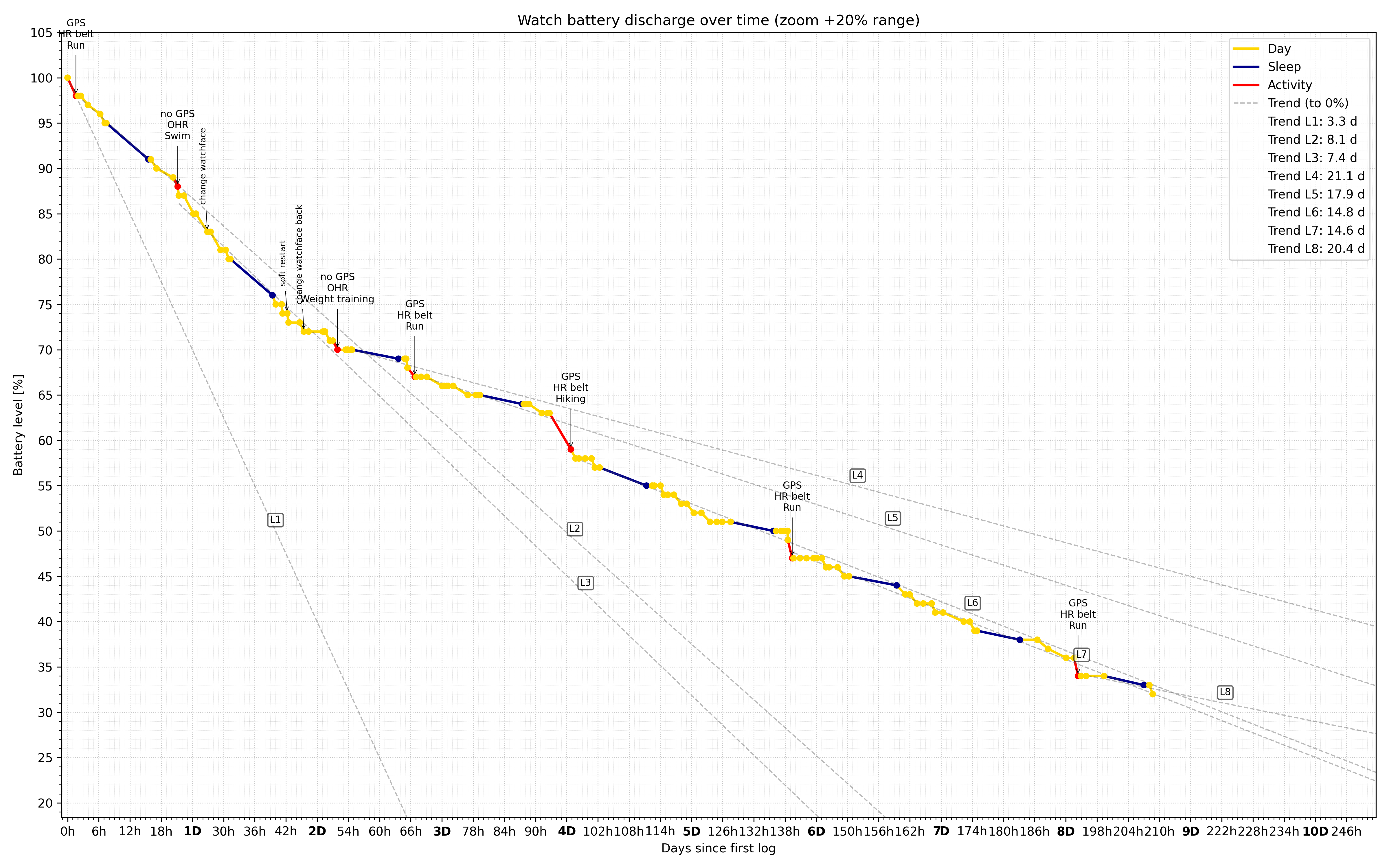
PS: I corrected the incorrect values in the legend for the trend lines.
-
@segi_pn wow nice job! Fascinating! I guess we all gotta do a strength workout after our runs now
 it’s a win win - we get stronger and the watch will last longer without charging
 -
Hi ! since last update (I’m under IOs) with either my SV and my SRs, routes created during an exercice are displayed has synced with watch, but if I want to change the route I’m navigating on in exercice settings, they are not visible.
The ability to send new route to watch without stopping exercice was on the most usefull function to me.
Do you have the same issue (iOS or android) ? -
Two things that I noticed in the new update on my Vertical 1.
-
The new report in the morning does not show when I fell asleep and woke up. For this I have to go into the “old” view. Where the x is missing.
-
When you finish an activity, I ride a bike, I see fewer values on the watch. Sure, I see the time, the kilometers and so on. What is definitely missing is the recovery time.
-
-
@Kaiphi said in Software Update 2.48.16 (2025 November Rain release):
The new report in the morning does not show when I fell asleep and woke up.
On Race S, they are shown under the sleep phases graph. Is it different on Vertical?