Need help connecting to the watch on macOS
-
@shaupt On the watch
Settings > Connectivity > Paired devices > MobileApp > Forget -
@Squirrel Thanks.
I have done all this:
Unpair in Suunto app
Forget in iOS bluetooth settings
Turned of Bluetooth
Set watch discoverable
Forget suunto app on watch
Soft reset the watch -
@shaupt did u do this
To enable Bluetooth pairing in macOS, you also have to set at least a partial serial number of the watch to macOS Bluetooth Serial in SuuntoPlus Editor extension settings. -
@ook Thanks, have also tried both full and partial serial numbers (removing digits at the end).
I am doing this:
-
Phone (iPhone 13, iOS version 26.3.x)
-
Suunto App > Manage connection > Forget
-
Terminated Suunto App
-
Settings > Bluetooth > “Suunto Peak 9 Pro xxx” > Forget this device
-
Settings > Bluetooth > Off
-
On the watch (Suunto 9 Peak Pro)
-
Connectivity > Paired Devices > Mobile App > Forget
-
Connectivity > Discovery On (is usually off)
-
On the computer (MacBook Pro, M3 Max, late 2023, macOS 26.3.x)
-
Once:
-
Given VsCode access to Bluetooth. macOS have asked that should approve, I have manually enabled it.
-
In VsCode settings, supplied the serial number of the watch (both full and partial)
-
Turned Bluetooth on (the watch has been paired with the computer but this only works when using LightBlue, bluetooth is usually off)
-
In VsCode > Suunto Watch > Refresh, nothing is found
-
-
Hmmm, now it works.
Toggling automatic/manual connection changed something. However, if this is a permanent fix I do not yet know.
-
@shaupt intresting I didn’t get it to work, but I was trying on a much older MacBook Pro.
I could connect the watch with BlueLight app from Appstore in macOs as a Bluetooth device but VSCode didn’t see it no matter what I did. Will check again cause I don’t think its an Hardware Issue if the Mac can connect.
I did already switch between auto / manuell but that didn’t help. But didn’t test with the version number. I got it working on Win but thats not my dev setup for private projects. -
@Ecki-D. I have tried many times and might have tried things in a different order.
In the bottom right corner of VsCode error message appear, do you get any of those?
-
If you run “SuuntoPlus: Open Log Files” command in VS Code, you might get some useful information from the logs
-
try also ble on off on the mac. I kinda remember having this issue long time ago or killing some process.
The @suuntopartnerteam maybe knows better ?
-
Just registered to let you know that I believe this is an issue with how SDS (the server interfacing w/ the IDE extension and the watch’s protocols ?) is spawned by the Suuntoplus Editor.
I’m facing the exact same issue, only on a macbook w/ an M4 Pro chip instead of an M3 Max one.
Running the following command starts SDS, which after a few seconds picks up the watch and starts the pairing process.
SDS_MACOS_BLE_SCAN=1 ~/.vscode/extensions/suunto.suuntoplus-editor-1.42.0/node_modules/@suunto-internal/sds-as/macos/SDSApplicationServer.bin 9801As a workaround, I tweaked my local version of Suuntoplus Editor to prevent it from starting SDS (via a coding agent, which worked surprisingly well from the first try), and I’m starting it manually in a terminal.
The relevant file is~/.vscode/extensions/suunto.suuntoplus-editor-1.42.0/node_modules/@suunto-internal/sds-as/dist/sds.jsThe watch is then displayed in VSC, and could be loaded with my app without any issue.
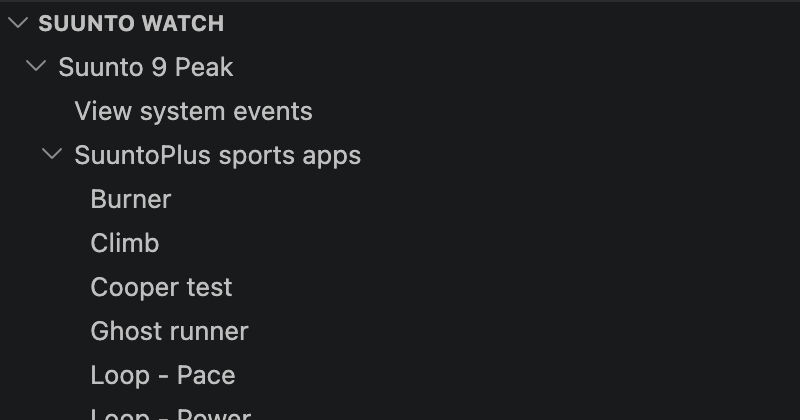
I hope that this info will let you debug and patch the Suuntoplus Editor

As a side note, I was quite happy to see this editor being available free of charge and without any signup process

-
@Starfish2045 Hi,
I Had a similar issue, getting an error inside VSC while trying to find the connected watch and found that manually running the SDSApplicationServer did work out, but after an update to the VSC Extension it stopped working because the extension closed the external instance i ran in the beginning.
Tried modifying the SDS.js with no success. Would you mind posting the change you’ve made?



Hello! It looks like you're interested in this conversation, but you don't have an account yet.
Getting fed up of having to scroll through the same posts each visit? When you register for an account, you'll always come back to exactly where you were before, and choose to be notified of new replies (either via email, or push notification). You'll also be able to save bookmarks and upvote posts to show your appreciation to other community members.
With your input, this post could be even better 💗
Register Login