Software Update 2.48.16 (2025 November Rain release)
-
I am now totally convinced that this update hasn’t fixed the battery drain issue for me, it maybe even made it worse, and that the cause lies in the connection to my heart rate belt.
After the last full charge and soft reset, I always unpaired the sensor after using it. The discharge after a running activity (typically in the morning) until bed time was around 3%. Today I forgot to do it, I finished my run this morning with 75% battery and it’s 67% at night. Phantom vibrations are occurring every time I “wake up” the hr belt by moving it. These were never present before the update. -
I have done 2 x separate hard resets on my vertical 1 . The battery drain seemed to improve only for a short while. As soon as the watch is being used in normal training again etc the battery drain resumes
-
same here, vertical 1
i see .5% burn per hr in smartwatch mode.i don’t use any connected sensors…
with 3 to 5 gps activities, i’m charging every 5 or 6 days. super frustrating.
-
Hi,
I continued monitoring the battery discharge and found an interesting twist.
If you look at my previous post, there was a turning point in the discharge rate -> faster discharge.said in Software Update 2.48.16 (2025 November Rain release):
The trend lines show consumption trends separated by activity (in the first case, charging and activity). It is clear that after the first activity, the steepness of the trend lines is significantly steeper.
Now I had the exact opposite effect: fast -> slow.
I have marked some of the things I did. After a soft reset, it changed. However, I also replaced the chest strap and removed the old paired strap (some activities worked with the new one without any problems, but one only started working after removing the old strap).
I had done soft resets before, so I think that removing the paired BT, or perhaps a combination of removing the BT and doing a soft reset, was what improved the battery drain.
I am attaching the graphs:
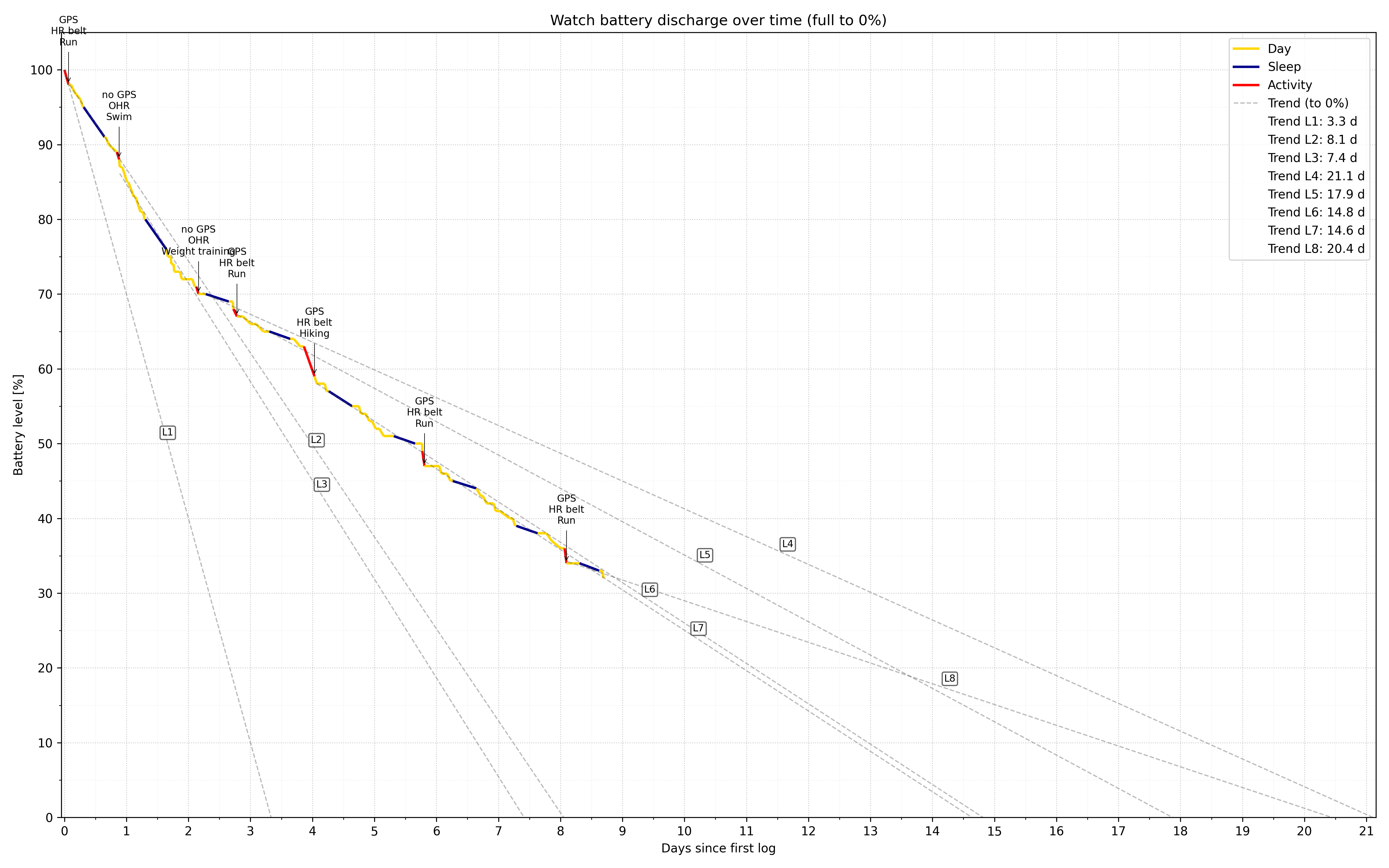
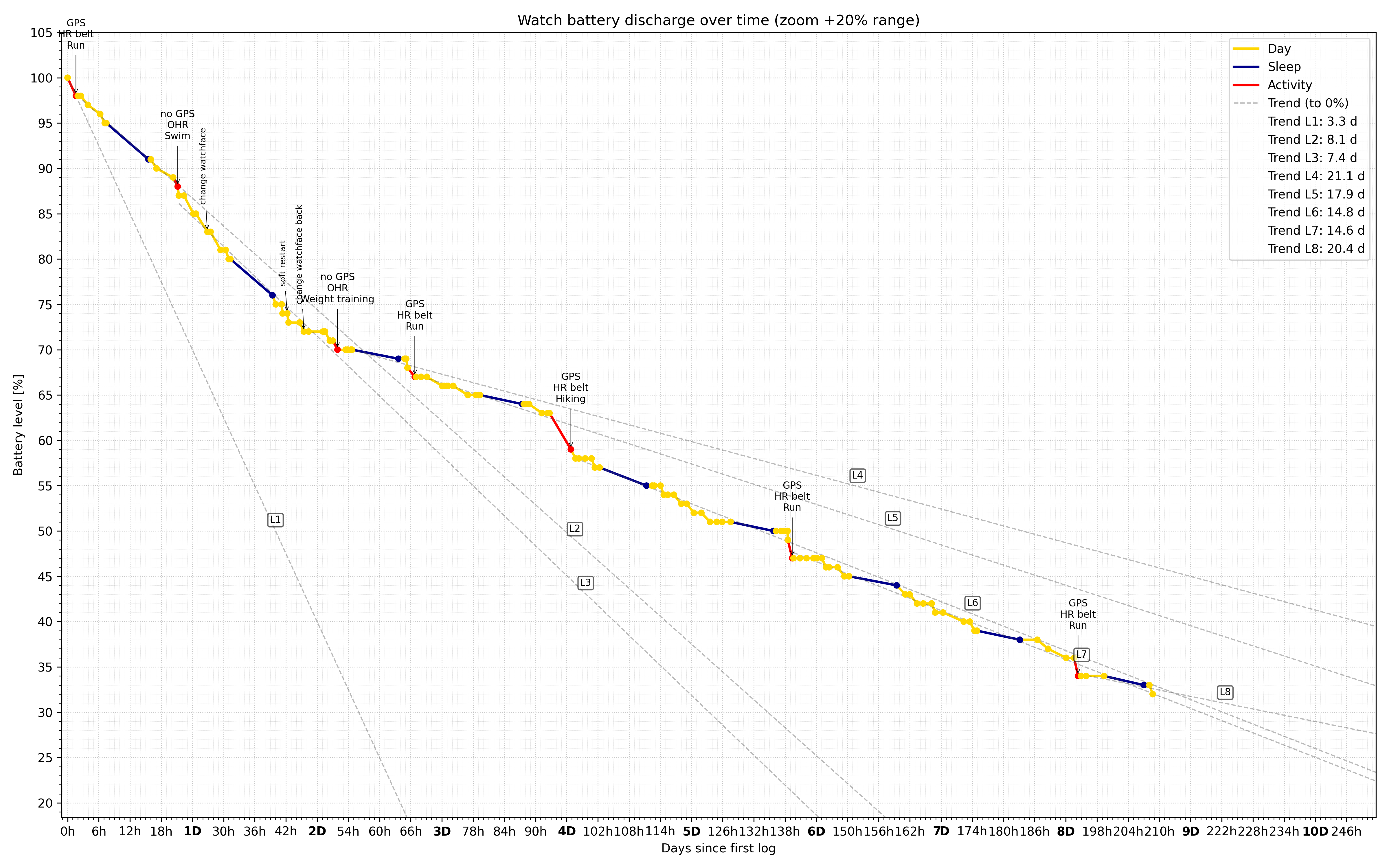
PS: I corrected the incorrect values in the legend for the trend lines.
-
@segi_pn wow nice job! Fascinating! I guess we all gotta do a strength workout after our runs now
 it’s a win win - we get stronger and the watch will last longer without charging
 -
Hi ! since last update (I’m under IOs) with either my SV and my SRs, routes created during an exercice are displayed has synced with watch, but if I want to change the route I’m navigating on in exercice settings, they are not visible.
The ability to send new route to watch without stopping exercice was on the most usefull function to me.
Do you have the same issue (iOS or android) ?Suunto’s devices at home :
Vertical titanium solar
Suunto Race S
S9pp titanium sand
Suunto Wing & Spark
S9B titanium Ambassador edition, A3P, X6 -
Two things that I noticed in the new update on my Vertical 1.
-
The new report in the morning does not show when I fell asleep and woke up. For this I have to go into the “old” view. Where the x is missing.
-
When you finish an activity, I ride a bike, I see fewer values on the watch. Sure, I see the time, the kilometers and so on. What is definitely missing is the recovery time.
Suunto 9 Peak Pro
Suunto Vertical Titanium Solar -
-
@Kaiphi said in Software Update 2.48.16 (2025 November Rain release):
The new report in the morning does not show when I fell asleep and woke up.
On Race S, they are shown under the sleep phases graph. Is it different on Vertical?
-
@Tieutieu Woaw… Thank you ! I was convinced it wasn’t possible to send new routes to the watch while a recording was in progress because Suunto App displayed “Watch is busy”. In fact, I realize that I had never tested this function and I just did the test now with my 9PP, it works fine under Android.
-
@Kaiphi said in Software Update 2.48.16 (2025 November Rain release):
Two things that I noticed in the new update on my Vertical 1.
- The new report in the morning does not show when I fell asleep and woke up. For this I have to go into the “old” view. Where the x is missing.
I noticed the same thing on Vertical 1 and 9PP ; the time I fell asleep and woke up isn’t visible in the first morning report. Now we have to check the sleep log to verify. It was more practical to have both information directly in the morning report to quickly check if the watch had recorded the sleep data accurately.
@Squirrel said in Software Update 2.48.16 (2025 November Rain release):
@Kaiphi said in Software Update 2.48.16 (2025 November Rain release):
The new report in the morning does not show when I fell asleep and woke up.
On Race S, they are shown under the sleep phases graph. Is it different on Vertical?
Yes, but not on the automatic morning report, you have to check manually after, on the sleep log.
I also noted that the “X” for the central button and allowing exit from the sleep menu does not work with all fields.
-
Here is my recent battery experience with my Vertical 2.
Over the past 14 days (and a bit) I managed to do 19.5 GPS+HR activities and drain 91% of my battery.
I built a simple prediction model for battery drainage rate assuming that there are three different drainage rates: During GPS+HR activity (running and cycling in my case), during sleep (DND) and while idle (with notifications and raise to wake variations). Under these assumptions I tried to approximate the drainage model as close as possible to the battery levels and activity times I recorded during the day and came up with the following numbers (they imply slightly less than 5% per day without activities and more than the spec 65 GPS hours):
Sleep tracking rate: 0.11%/h
Non activity rate: 0.25%/h
Activity rate: 1.16%/hThe above model worked very well during most of the two weeks until the last day or so when the battery got to about 20%. From that point it seems to drain faster than my model allowed. In fact, until that point, the model showed about 1.07% drainage per GPS hour which I updated to the higher number above to compensate for the end.
Settings:
AOD OFF
Raise to wake: Display only
247 HRM
Notifications ON
No external BT connections except Android Suunto App (6.4.7)
Wireless OFF
BT discovery OFF
Brightness LOW
Sleep (DND) from 22:00-5:40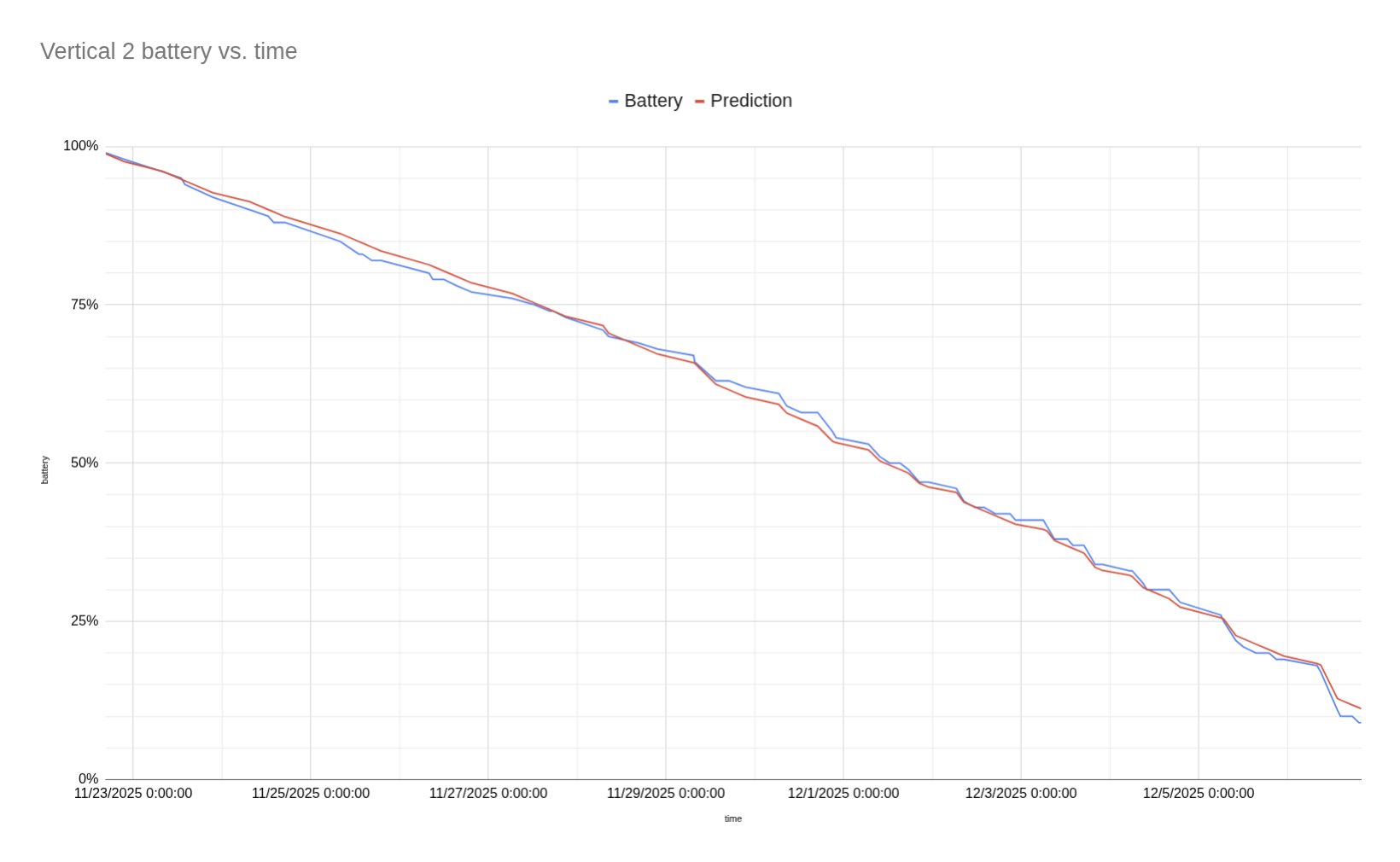
-
@fondueaufromage said in Software Update 2.48.16 (2025 November Rain release):
Yes, but not on the automatic morning report, you have to check manually after, on the sleep log.
Unlike the sleep log those times are not individual lines, but rather the left and the right end of the graph. In the automatic report and the sleep log they look both the same. But there are additional lines for the time fall asleep and wakeup in the sleep log.
Suunto Race S
Garmin Fenix 8 -
said in Software Update 2.48.16 (2025 November Rain release):
Hi ! since last update (I’m under IOs) with either my SV and my SRs, routes created during an exercice are displayed has synced with watch, but if I want to change the route I’m navigating on in exercice settings, they are not visible.
The ability to send new route to watch without stopping exercice was on the most usefull function to me.
Do you have the same issue (iOS or android) ?Beta iOS 3.6.1 is out and issue seems to be fixed ! Happy
-
@gkaempfer Hi! Amazing data! I suppose this is good
.I made a thread to harvest all battery data. Hopefully we’ll see usefull patterns.
Are you using an external HRM like the H10, by the way?
-
Are we done for this year? Or Santa has something in the bag for us, like software goodies?

-
According with other forums we aren’t done yet and Q4 should arrive in a few days

-
@cosme.costa woohoo you are Santa’s little helper keeping us in the loop

-
No, now seriously, I do not have any inside information but in the Spanish Forum there are more hints than here and some more valid information that I haven’t seen here.
For exemple, I have deduced that the flight mode bug is solved, that R2 and V2 will have, at least, and extra Suunto App during exercise (I do not know if even more or if this will also come to R1 and V1), that if you go to the SA, your profile/feedback you can also report errors there,…
-
@cosme.costa I hope its a Stability Edition for Christmas - new features come with new problems…
Race S
Vertical Titanium Solar
Ambit3 Vertical
Eon Core -
@VoiGAS Well, yes and I think is part of the game. I mean, as an example, Suunto didn’t have multiple sensors, they have just implemented it some months ago, so in part is expected that they have some errors and in next iterations all it is polished. For me the important things is that they acknowledge the bugs and work on them, things that I consider that Suunto is doing, maybe not with the pace that I would like but they do.













Hello! It looks like you're interested in this conversation, but you don't have an account yet.
Getting fed up of having to scroll through the same posts each visit? When you register for an account, you'll always come back to exactly where you were before, and choose to be notified of new replies (either via email, or push notification). You'll also be able to save bookmarks and upvote posts to show your appreciation to other community members.
With your input, this post could be even better 💗
Register Login