Desktop route planner thoughts
-
I don’t know exactly which category is best to post this under. Because there is a route planner in the mobile app, maybe this is the best place?
Recently Suunto announced https://routeplanner.suunto.com for your desktop browser. I love that it’s integrated with my Suunto account and I can trivially send routes from my desktop to my phone without needing to download a GPX and send it to myself to import in the mobile app later. It even preserves turn-by-turn for complex routes, which is great.
But there are some oddities that I would love to see addressed:
- Loading the map is very slow.
- I must always authorize the route planner to have access to my account when logging in.
- When giving my browser location permission, it still defaults to Helsinki, Finland.
- The site does not remember if I set imperial or metric.
- While I can undo route changes, I cannot clear the entire route without refreshing the page.
Some of those points above tell me that the site isn’t taking advantage of JavaScript’s
localStorage.As a Stryd user, if I download a GPX file of my route, I cannot import it into my personal courses on Stryd’s PowerCenter. Stryd complains that the route is less than 1.5 km and refuses to import it. Yet I can import the same GPX file in both Strava and Plot-a-Route. So I don’t know if this is an oddity with the GPX generated by Suunto, a bug with Stryd’s PowerCenter, or a combination of both.
This has the potential to replace https://onthegomap.com for me. It’s a great tool, just has some wrinkles that need ironing out I think.
Suunto Race S / 9 Baro / Ambit 3 Peak / Observer
Suunto SHRB2 / Polar H10 / Verity Sense / OH1
Stryd Duo / Wind
r/suunto mod -
I imported a GPX file from my Suunto account, but the waypoints are missing from the map.
-
@atoponce said in Desktop route planner thoughts:
But there are some oddities that I would love to see addressed:
Loading the map is very slow.
I must always authorize the route planner to have access to my account when logging in.
When giving my browser location permission, it still defaults to Helsinki, Finland.
The site does not remember if I set imperial or metric.
While I can undo route changes, I cannot clear the entire route without refreshing the page.I agree on all points. There is definitely room for improvement. But it’s a great tool for planning on desktop. Thanks to Suunto for this.
Garmin Vivoactive 5 | Garmin Epix | Garmin Fenix 8 | Suunto Race S | Suunto Race 2 | Suunto Vertical 2 | Coros Pace Pro | Coros Apex 4
-
@atoponce said in Desktop route planner thoughts:
I don’t know exactly which category is best to post this under. Because there is a route planner in the mobile app, maybe this is the best place?
Maybe here ? https://forum.suunto.com/post/176277
-
@tuxbuster said in Desktop route planner thoughts:
But it’s a great tool for planning on desktop
I’ve been running iOS Suunto app, including route editor, in full screen mode on a MacBook laptop. So that is an alternative option. Usually I plan a route on laptop and save it, then simply force a sync on my phone, and the route gets synced to the watch via the cloud. There is no need to manually copy any files, so the experience is even more streamlined than with the web route planner.
Also, Android Suunto app should run on Chromebook and offer a similar experience, and it might be possible to run it on Windows OS or at least it was possible in the past.
Alternatively, if you are a Strava user, integration with Strava route editor is equally streamlined. Basically, I add a route on Strava and save it. Then I force sync in the Suunto app on the phone, and Suunto app pulls it directly from Strava and syncs it to the watch. Very simple!
-
@Bigb0zz
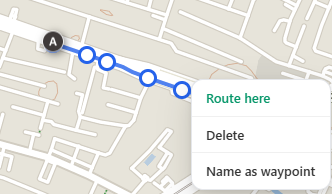
i did not find out how to add the WP to the map -
@vinc14 Click on a waypoint to see more options.
-
@atoponce said in Desktop route planner thoughts:
Loading the map is very slow.
When giving my browser location permission, it still defaults to Helsinki, Finland.In my case, these two points have been fixed since yesterday. The map opens quickly and starts at my destination. I haven’t tried the other things yet.
-
@atoponce I’m sorry but without route slope gradient graph this whole planner is basically useless. For me. Typically the route is pretty and shine but I never know if I can ride it (on bike). 30% ascend… no thanks.
Funny, that app planer already has it.
It shouldn’t be big challenge to implement this feature? -
@Lazyjones Do you mean something different from the bottom bar that you can click to open and see the elevation changes of the route?
-
@atoponce yes, the gradient in %
-
P pavel.samokha locked this topic on
-
Locked, use this topic to discuss https://forum.suunto.com/topic/14564/suunto-routeplanner






Hello! It looks like you're interested in this conversation, but you don't have an account yet.
Getting fed up of having to scroll through the same posts each visit? When you register for an account, you'll always come back to exactly where you were before, and choose to be notified of new replies (either via email, or push notification). You'll also be able to save bookmarks and upvote posts to show your appreciation to other community members.
With your input, this post could be even better 💗
Register Login