Suunto 2.50.26 – Q4 2025 Release Notes
-
@Mads-Hintz-Madsen I have the Race1, too. The time before and after work was registered as inactive, the time at work was registered as recovery.
Lucky us that work does not stresses us out.

-
@sky-runner The Suunto Ocean is so far behind in terms of updates that what you saw was most likely due to the watch running an old firmware version. I use an Ocean myself and have been following Ocean-related posts for a while. Dive users are very dissatisfied with the delays. According to unofficial statements, this is because the diving functions require additional safety testing, but doubts are increasingly growing about this explanation. Many features are lagging behind, even though the Ocean’s hardware is very capable and its price reflects that. It seems that there is at least one advantage to the delay — in some cases, the older version actually works better.


-
@borgelkranz I’ve also a Race 1 and I also notice a different behavior because it reports more “Recovering” during the day than before. At the same time I also noted that the built-in sensor no longer falsely measures too high HR during the day. The values were often too high, now they are quite comprehensible.
Which behavior is more correct from the “Resources” widget point of view I don’t know to be honest. I don’t care that much about the Resource thing but I assume always showing values >90% would probably miss the point. -
@Calando This is great to hear. I had a previous Sunnto watch, which I would have nights in the 30% range (after a couple drinks) up to 100%. When I got the SRs my quality fell in line with yours (78% to 82%) and hardly ever fell outside that, so I stopped believing it. Seems they fixed this.
-
@ISztárek said in Suunto 2.50.26 – Q4 2025 Release Notes:
The Suunto Ocean is so far behind in terms of updates that what you saw was most likely due to the watch running an old firmware version.
Isn’t that what he was talking about? The updated firmware and not the maps are the source of the trail removal, as both watches likely have updated maps…
-
@2b2bff said in Suunto 2.50.26 – Q4 2025 Release Notes:
as both watches likely have updated maps
or outdated maps, because I heard some regions have not been updated since maps came out

-
@MarkusG said in Suunto 2.50.26 – Q4 2025 Release Notes:
Which behavior is more correct from the “Resources” widget point of view I don’t know to be honest. I don’t care that much about the Resource thing but I assume always showing values >90% would probably miss the point.
Good point. The Resources metric may actually be more “correct” now if there is such a thing. Like you, I don’t really pay much attention to the Resources and Recovery metrics - I trust my feelings more
 ️
️ -
@rooldaa said in Suunto 2.50.26 – Q4 2025 Release Notes:
The screen brightness wouldn’t go off during time. The screen keeps to be illuminated and a watch doesn’t go to sleep mode. The soft reset didn’t help.
“Stand by” illumination is off.
Well, my 9PP is affected by a similar issue and yes, I’ve already checked what suggested below:
@Egika said in Suunto 2.50.26 – Q4 2025 Release Notes:
@rooldaa have you checked the backlight setting in the control panel?
Earlier than the update, all the settings related to the display light were OFF, and so after the update (
 after the update, I’ve soft reset the watch). But, during the first run after the update, I’ve noticed that somehow the raise to wake setting was ON.
I troubleshot the issue and:
-
all the settings related to the display light are still OFF, so backlight, standby and raise to wake;
-
however, when I start any (default) activity, the raise to wake setting somehow turns ON;
-
once the activity is stopped and I return to the watch face, the backlight stays ON;
-
furthermore, once passed the locking time, so the touch is disabled, the light is still ON!!
-
in order to somehow “reset” the display light, I have to trigger any light command, so the watch returns to work properly.
I’ve tried to reproduce what described above several times and the watch behaviour is still the same.
-
-
@Matúš I noticed something similar after the update on my 9PP. I updated in the morning and I think the raise to wake kicked in outside of activity, but I’m not too sure as I was in the office with bright lights. In the evening it definitely turned on during an activity. Then all I did was click again on OFF (Settings -> General -> Display -> Raise to wake) even though it was already set up that way before. It seems resolved. No reset.
-
Is there somewhere I can read up on the changes to the interval training integration. It’s clearly changed but none of it is making sense to me. In particular what does “Correct visualisation of all workout phases” mean?! is it a new screen on the watch?
I’m hopeful! I would love to see the interval workouts created on the app be improved, this is main reason why I went back to Garmin - intervals and guides screens on the watch, and the limitations on the data fields were really poor.
-
It appears that the issues with bluetooth sensors still persist. I have a Verity sense and H10. Many times the sensor will be detected, but there will be no heart rate reading shown. So I have to go start another activity with that sensor, then go back to the original activity. It is a bit of an annoyance and should be fixed.
Related - I also started a run today with the live t S+ app, and my verity sense was also connected. About 30 minutes into the run, I noticed that the live t app was displaying an error message on my phone (it said not connected). So I went in and reestablished the bluetooth connection through the S+ app on the watch. I didn’t stop the activity for this. However, this reconnection caused the connection to the Verity sense to terminate - so there was no heart rate shown after the reconnect to live t.
The first issue is the one that’s more important. I mention the second because it might shed light on other problems.
-
After this Q4 2025 update, I guess I’ll need to buy a Suunto Run as a dedicated road-running watch. The new running features and training data finally make it worth having a separate watch just for the road.
-
was heisst das genau ??
#speedup #race2 #karoo3
Triathlon und Trailrunning 👿 -
hope sleep tracking got better
i wake up to toilette midnight and race 2 says im in REM sleep
WTF
i lay on couch - Race 2 says u sleep-- going up to bed- says wake up OK i belive… but hope got beettter
-
@dani_degi was meinst du genau?
-
@Francesco-Pagano, could you try to reproduce it?
After my yesterday testing and done what you did (
“Then all I did was click again on OFF”), the problem seemed to be solved, temporarily.However, as expected, I’ve just tried launching some random “ghost” activities, i.e., it is enough to enter the activity starting page, and the outcome is still the same, the watch light crashes.
-
@matthinsh it’s in the app. Intervals are not treated as manual laps anymore
Extract from Joaquin Perez video :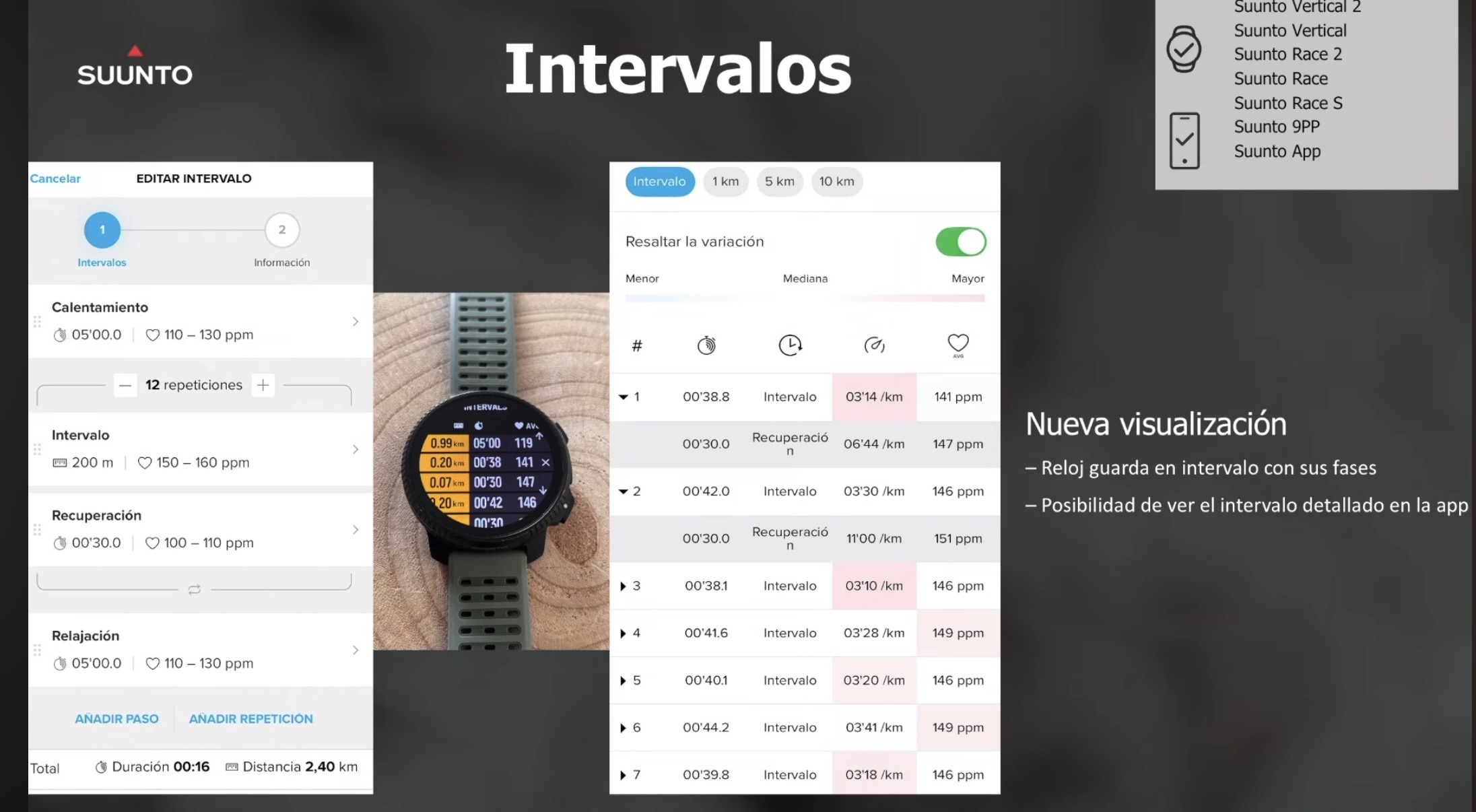
Suunto’s devices at home :
Vertical titanium solar
Suunto Race S
S9pp titanium sand
Suunto Wing & Spark
S9B titanium Ambassador edition, A3P, X6 -
-
-
I am facing an issue with the Weather widget on my SVTiSolar. It shows it was updated 3 hours ago, however the forecast starts with midnight, despite it was 6AM. The same situation repeated at 7AM and 8AM (also the info it was updated 3 hours ago). Anybody else facing the same problem?









Hello! It looks like you're interested in this conversation, but you don't have an account yet.
Getting fed up of having to scroll through the same posts each visit? When you register for an account, you'll always come back to exactly where you were before, and choose to be notified of new replies (either via email, or push notification). You'll also be able to save bookmarks and upvote posts to show your appreciation to other community members.
With your input, this post could be even better 💗
Register Login