My Vertical 2 Wishlist for Next Update in 2026
-
This has perhaps been discussed already so I apologise if this is the case. Is there a way to have the watch beep for the start and end of an interval in an activity whilst having tones and vibration turned off in settings-general? I prefer having all tones and vibrations off by default. I do not run with headphones.
It is useful for tones during a workout so you don’t need to look at the watch to see when the current interval starts and ends but it is quite inconvenient if the only way to enable this is to turn on tones in settings before starting the activity each time.
If it can’t be done currently I think it would be a good thing to include in future software updates.
-
This is not limited to the vertical 2 and I note other comments on the same issue previously. More detail when zoomed out on the maps at 1, 2 and 5km would be really helpful. Particularly some contour lines to give an idea of the terrain and some points of interest like hill summits.
The map for Scotland is one file, I would happily have smaller areas covered by a map but with more detail to maintain the responsiveness on the watch. A lot of the terrain in my country is featureless so when zoomed out on the watch all I can see on the maps are green or grey which doesn’t give you a sense of the environment you are in to help orientate yourself. This an issue when exploring without using a downloaded route to aid navigation.
-
@MikeC30 said in My Vertical 2 Wishlist for Next Update in 2026:
More detail when zoomed out on the maps at 1, 2 and 5km would be really helpful.
Particularly some contour lines to give an idea of the terrain and some points of interest like hill summits.Well, for now we don’t even have trails when zooming out beyond 200m, although reportedly some improvements are coming soon. And while we are there, please improve the contrast so that trails aren’t rendered as dark green on light green. Please render trails with black color on the default map and with other higher contrast colors on other types of maps! Or least least make them wider lines.
Seeing summits on the map would be great!
Suunto: Ambit, Ambit 3 Peak, 9 Baro, Race S, Race Ti, Vertical 2 Ti
Garmin: Forerunner 210, Forerunner 610, Fenix 6X, Fenix 7X Ti -
Also, it would be nice to have option to choose if I want turn notifications 20m before turn like now, good for running but too late for cycling, or 100m like it was before
-
@sky-runner said in My Vertical 2 Wishlist for Next Update in 2026:
@MikeC30 said in My Vertical 2 Wishlist for Next Update in 2026:
More detail when zoomed out on the maps at 1, 2 and 5km would be really helpful.
Particularly some contour lines to give an idea of the terrain and some points of interest like hill summits.Well, for now we don’t even have trails when zooming out beyond 200m, although reportedly some improvements are coming soon. And while we are there, please improve the contrast so that trails aren’t rendered as dark green on light green. Please render trails with black color on the default map and with other higher contrast colors on other types of maps! Or least least make them wider lines.
Seeing summits on the map would be great!
User requests are heard and changes are coming…
Vector/T6c/Vertical 2 Ti
-
Map changes have been mentioned (also from Suunto), but I’d also agree wtih those.
Notifications for training events in training separate from notifications from smartphone (and in daily use) would be the big thing for me. I didn’t much appreciate it when I could only train after my usual bedtime, for which I had auto DND turned on, and then didn’t get any notifications (except with the screen pop-up) for the next step in my training…
-
@Brad_Olwin I look forward to a watch face design for people without eagle sharp sight.
Watch: Suunto Race S
-
For my part, I would like to see the following introduced:
- Re-calculation of data in the app if you have edited, for example, elevation (treadmill running), to include this in the statistics.
a. For example, I also do treadmill workouts. For example, I do 700 up for 11km uphill. After editing the workout and entering 700 up in the field, the watch and the app still say I have 0 m. up.
b. For example, Suunto recently announced a competition for the number of ascents. I can’t break records if I can’t transfer the data from the treadmill to the app

c. The same applies to calories when integrating with bike navigation systems such as Garmin or Karoo. The number of calories is 0 after synchronization, although you can edit the workout and enter your data from Garmin/Karoo. Unfortunately, the Suunto app does not re-calculate this and does not synchronize with the watch.
-
Bug fixes.
-
Introducing new features
-
Improving what already exists.
-
@Adrian.S agree on treadmill elavation gain, would be nice if one could edit it on the watch after the run, like distance
but at least we have elevation gain in the app now for treadmill, so step by step.Suunto Race 2 (Titanium Trail)
Suunto Vertical (Titanium Solar Forest) -
Improving notifications representation. It is ridiculous to not have possibilities to read entire message.
-
@aiv4r Unfortunately, after editing the elevation in Suunto app, it still isn’t re-calculated, which I reported in this thread:
https://forum.suunto.com/topic/14776/new-feature-add-elevation-treadmill-training-adjust-elevation
-
Having changed to a new watch: That’s not a watch-specific thing, but I really wished data were also synced from the app to the watch.
Any change of watch means that an HRV baseline has to be established anew, the on-watch logbook is emptied, etc.
-
@zhangschmidt It’s a glaring omission - I thought it would be quite obvious that some kind of cloud based back-up system is needed.
-
@zhangschmidt said in My Vertical 2 Wishlist for Next Update in 2026:
Any change of watch means that an HRV baseline has to be established anew
That is even the case with Garmin. I guess the hardware variations are big enough that it is not meaninful to apply the baseline of an older watch to a newer one…
-
@2b2bff Interesting; I hadn’t noticed. Sounds like a point I should remember when/if I can manage to start talking watches, not as a reviewer…
Still, I do concur that, where the majority of data is concerned, it is a glaring omission. Why does my training log have to be empty just because I switched watches?
-
Very happy with performance, layout, build quality and info gathered through watch.
May I suggest these improvements if any Suunto rep checks forum for user feedback:
-
Stopping an activity recording with one button. At the moment this is the workflow to stop an activity: short press top button (to pause) - short press bottom button - short press bottom button again. Maybe a long press of top button would end activity (short press of top button can still remain dedicated to pausing activity).
-
Ending an activity from the map view currently is not possible.
-
I would prefer that when watch is locked, long press top button overrides locking. I think that most users will dedicate this button to flashlight. As things stand, if watch is locked, one has to first unlock watch to then switch on flashlight.
These suggestions are only meant as improvements for eventual future upgrades. As said before, really happy with what Suunto achieved with SC2.
-
-
@Wenzudeg This is a more complex issue than it seems. In my opinion, it’s currently too easy to accidentally end an activity (e.g., by putting on a jacket, gloves, etc.), and the obvious solution for me is to use the map screen, which doesn’t offer an option to end the activity.
Suunto could reconcile these two different philosophies, allowing for quick and convenient activity termination without the risk of accidentally ending it too soon, which currently happens.
-
@Wenzudeg said in My Vertical 2 Wishlist for Next Update in 2026:
Stopping an activity recording with one button. At the moment this is the workflow to stop an activity: short press top button (to pause) - short press bottom button - short press bottom button again. Maybe a long press of top button would end activity (short press of top button can still remain dedicated to pausing activity).
I would want the opposite - to make it as difficult as possible to accidentally stop an activity. There is nothing more frustrating than to realize in a middle of a multi-hour ultramarathon that the watch is no longer recording. In fact, with earlier Suunto watches I always used button lock while in activity, but doing so with the current generation of Suunto watches makes map zooming impossible, which I think is an oversight. The way I’d prefer it to work ideally is that with the button lock all non-destructive watch functions are still available except pausing and stopping activity. But I am not opposed to have an option to let a user decide which behavior they prefer.
Also, I’d like to have an option to permanently disable touch outside of activity and have it available only for map panning and similar non-destructive functions. Recently when I was taking a shower my watch decided to turn airplane mode on its own. Later in that day I spent a lot of time figuring out why my external HR sensor didn’t connect. There was no indication that the airplane mode was on.
-
@sky-runner said in My Vertical 2 Wishlist for Next Update in 2026:
Also, I’d like to have an option to permanently disable touch outside of activity and have it available only for map panning
I always set my Garmins that way. Would love this on the Race S as well…
-
@2b2bff I wanted to say that in the shower the watch almost always enters the widgets part of the UI because droplets tend to swipe the screen from the bottom to the top because of how the watch is positioned on the hand. Occasionally droplets swipe from the right to the left to enter the control panel.
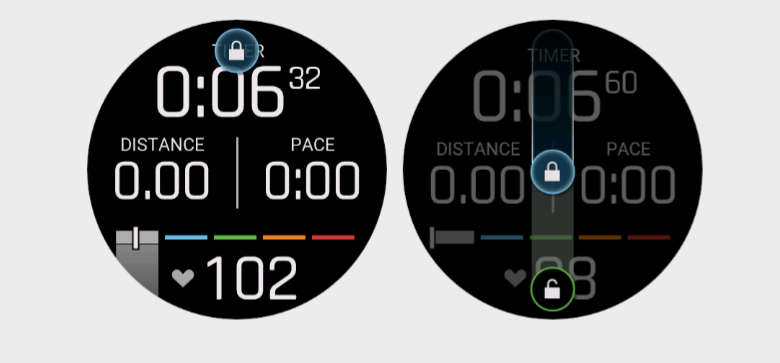
It is rare for droplets to swipe the screen in other directions. A decent solution would be to introduce an optional touch auto-lock with the gesture to unlock it that requires to swipe the screen from top to bottom. That is the direction that is unlikely to happen naturally in rain or shower - you’d have to tilt the watch unnaturally.That’s what Garmin has done and that works effectively! I’d really like such touch auto-lock feature! Buttons should continue to work even when the touch is locked.
Suunto: Ambit, Ambit 3 Peak, 9 Baro, Race S, Race Ti, Vertical 2 Ti
Garmin: Forerunner 210, Forerunner 610, Fenix 6X, Fenix 7X Ti




Hello! It looks like you're interested in this conversation, but you don't have an account yet.
Getting fed up of having to scroll through the same posts each visit? When you register for an account, you'll always come back to exactly where you were before, and choose to be notified of new replies (either via email, or push notification). You'll also be able to save bookmarks and upvote posts to show your appreciation to other community members.
With your input, this post could be even better 💗
Register Login