GPX Turn by turn?
-
@maszop Thanks! I guess I’ll take a look at komoot. I understand it sometimes recreates the route after it’s own liking? Sounds like a way to get disqualified at a race.
-
@elbee Thanks! I’ll take a look at Komoot even if I think it sounds a bit more complicated than necessary.
I didn’t use the tbt feature much om my Garmin Fenix from 2021, but as I remember it it was like downoad the file, sync the watch, start running… -
@Chewtube Just import the GPX route into the Komoot app. When it asks if you want to edit (modify) it, select no, save it, and that’s it.
After a few minutes, you’ll automatically see it in the Suunto app, along with the turn-by-turn.
Requires one of the Komoot Premium versions.
-
@maszop Thanks for the suggestion, and it solves a few problems. Adding the frustrating step of using another service does get me the elevation profile and turn-by-turn guidance that are missing when I import an official race GPX file. But Komoot seems to lose all the waypoints along the route (official aid station locations and details). Frustrating.
-
@davemaps yes. Waypoints are lost, and there are other issues when using Komoot, as explained here:
https://forum.suunto.com/topic/15071/several-navigation-issues-feedback
-
someone on the forum built this tool, but I haven’t tried it yet.https://github.com/GitjoPowershell/suunto-tbt-web
-
Hi, I had the same problem and built a small free tool for it: https://turnbyturn.apert.be.
Drop in any GPX and it adds turn waypoints in Suunto’s format, so turn-by-turn works after import. It runs in your browser and nothing is uploaded. Please note it’s a side project, offered as is.
-
@Tom-Van-Sichem
Thanks. This tool is not checking against real paths forks, correct?
Can it convert a gpx containing other Tbt data into Suunto’s one?
Would appreciate this
-
The tool mentioned that routes that come from Komoot don’t have tbt notifications but I do get tbt notifications with routes from Komoot. For suunto it’s even the recommended way.
And tbh, and I hope you don’t find this offensive, I don’t like routes where the tbt are based on bends in the road. Garmin also does this to a certain extent, and it’s quite annoying, specially in the mountains where there are quite a few zigzag paths up the mountains.
-
-
@Mff73 Real paths are being checked in this https://dushino.github.io/addturngpx/ tool. Again, no cloud, no data to be sent anywhere, but you need free API key for https://graphhopper.com for route planning. Yes, this is my attempt for getting work a field “distance to next POI / WP” in custom screen. I excercised AI quite a lot for planning proper TbT navigation points. Try it and you will see. Real paths are taken from vectorised OpenStreet maps, which sometimes differ for few meters from bitmap tiles used in the application. This discrepancy sometimes leads to different turn instructions than one would expect. Anyway, you are free to add or delete any waypoints including turn navigation points.
By the way, I still did not succeed getting the filed “Distance to next WP/POI” working. That is why I just a while ago modified gpx format to one in https://turnbyturn.apert.be/ hoping it will work.
Please let me know if the application is useful for you - any feedback is highly appreciated. I do not want some AI slop but usefull tool for everyone.Suunto Race 2 Titanium
Garmin Forerunner 255 -
Well, I was wrong - when planning a route, your route points are being sent to graphhopper.com to find a path between two points. Also, OpenStreet maps are being loaded as bitmap, if you generate turns, also vectorised OSM map is being downloaded.
-
Try it and you will see.
I have just tried it. It seems to work fairly well! I tried one of official race course GPX files and it has generated over 70 turns. Turns seem to be accurate although a bit excessive. But as you said, extra turns can be deleted.
By the way, I still did not succeed getting the filed “Distance to next WP/POI” working. That is why I just a while ago modified gpx format to one in https://turnbyturn.apert.be/ hoping it will work.
Is that why all waypoints seem to be duplicated? For example for each turn point such as
<wpt lat="48.3939" lon="-122.6483"><name>Turn left</name><type>Left_turn</type></wpt>there is also a non-turn waypoint such as
<wpt lat="48.3939" lon="-122.6483"><name>Waypoint 1</name><desc>Auto-generated</desc><type>Waypoint</type></wpt>Personally I would prefer to not have that because I suppose that would make zooming of the elevation profile (climb guidance) by waypoints quite unusable.
Furthermore, on the map screen there is already an option to configure a data field to show distance to next turn.
-
Thanks for the feedback! I really appreciate it—it’s great to hear. Would you mind sending me the GPX file? Ideally, please also send a version where you’ve removed the turn-by-turn (TbT) points that you find unnecessary. That would help me set parameters for the turn generator.
To be honest, I’m not entirely sure what the optimal GPX format is to ensure the fewest possible issues for Suunto (and for us). My initial motivation for building this app was to find a way to get the “Remaining distance to POI/Waypoint” data field—on a custom screen—to show the distance to the next waypoint and/or turn. So far, I haven’t managed to get it working; the field usually displays the distance to the end of the route, only showing the distance to the next turn for a few meters right when the turn notification pops up. It’s likely a bug in the watch itself.
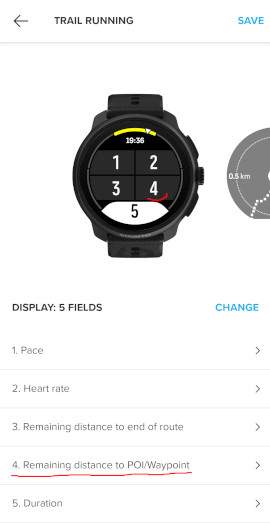
In any case, I’m happy to adjust the generated GPX file to ensure it works as well as possible. -
@sky-runner I have removed generated Waypoints as they seem to be useless. and harmful. (I added them to generate the same format as https://turnbyturn.apert.be/) I also added fork and bearing sensitivity into options. For now, best results for me are when set both to Low.
Please let me know if https://dushino.github.io/addturngpx/ works better for you now.


Hello! It looks like you're interested in this conversation, but you don't have an account yet.
Getting fed up of having to scroll through the same posts each visit? When you register for an account, you'll always come back to exactly where you were before, and choose to be notified of new replies (either via email, or push notification). You'll also be able to save bookmarks and upvote posts to show your appreciation to other community members.
With your input, this post could be even better 💗
Register Login