Suunto Software update Q2 (2.56.18) - July 14th, 2026 - Vertical 2 and Race 2
-
It is also hard to pick out trails which are green on background of lighter green sometimes when outside so a different colour or a thicker line would be useful
Yes, that is exactly what I have complained about many times. Trails are too thin and the contrast between similar colors isn’t good enough. That is less of a problem when having a navigation route, but using the map without a navigation route is problematic due to poor contrast of “green on green” trail rendering. This applies to both Light and Dark maps. Also this partially applies even to High Contrast maps because trails are too thin and still not high contrast enough.
-
If font outline on streets was choosen better. It would be easyli readable for most people. Currently choosen outline make that font harder to read than necessary. I don’t have problem to read it with my eyes but i agree clarity is really bad on street names. With other fonts and text on suunto map i don’t have much problem. Maybe just green paths on green background could be more wide to be better seen too.
-
@Svenning I have the same issue with ages and loosing close up eyesight and use sunglasses with built in ready lens. It works well.
Even if Sunnto changed all the fonts increase size on map etc sooner or later glasses will be needed.
Same for me, I’m using Oakley glasses with +2 lens built in, that works very well, but I still need to use dark mode to be able to reed it easily. So there is room for improvement.
-
Maybe Suunto could make some examples of few new variants and we could vote for what we want :-).
-
@Steven-Hambleton that is a very strange argument. I had perfect vision up to 50. Now I need 2.5 readers at approaching 60.
They would never have a font big enough to read on a map crammed into a watch without readers for me now.
And I guess for you also as you age

-
@Audaxjoe I just need 0.5x glasses but it’s the system messages which bug me the most. I run at night a lot and the fonts are small and thin which makes them blurry against a white background.
Bumping them up to a font size similar to the menu and with a black background would make them far easier to read - it wouldn’t affect those with good eyesight but would benefit those without.
-
The question you have to ask yourself is: does everything really need to be readable on a tiny watch screen – and while running, no less? To me, it’s obvious that some things just can’t be done or seen properly. But maybe my expectations are too low.
For me, certain compromises are just obvious -
@maszop I agree basically but the Garmin solution is reported to be better readable. Since we have seen just the next stage in Suunto’s map design, I think it is likely that they will improve this in the next release.
-
@Gunnar My friend recently got lost in the woods while relying on a Garmin map, and it turned into a major rescue operation.
-
@Speed-Man my post was in context of street names being not readable enough. He got lost because the street names were not readable?
-
@maszop Yes because the guide information is completely unreadable - fonts are thin, small and on a white background. I’d prefer them to be at least bold and a bit bigger so I can glance and follow the instructions.
-
@maszop Yes because the guide information is completely unreadable - fonts are thin, small and on a white background. I’d prefer them to be at least bold and a bit bigger so I can glance and follow the instructions.
Everyone has different preferences. For me, the ideal solution is one where a quick glance at the map tells you everything about the terrain (in this case, Suunto’s maps are better than Garmin’s) – the landscape features – while checking street names and similar details is a lower priority. You can always stop and take a closer look if you need those specifics.
It’s the same with paper maps – most of the time, the map on your watch or phone is enough, but if you want more detail, you pull out the paper map – which also takes a bit of time.
-
@Dimitrios-Kanellopoulos
Hello,With this update I can’t use guided workouts in my suunto race 2 created either in the app or by third parties at the same time as ZoneSense. When it switches to a random interval, the watch restarts. To be clear: without ZoneSense it works fine on the new version, but with ZoneSense it doesn’t work. I’ve tested with and without an external HR sensor, done a hard reset, reinstalled the firmware version, everything. I went back to the previous version and I don’t have any issues at all. Do you have this case identified on your end?
Thanks.
-
@pmporta are you referring to the ZoneSense SuuntoPlus app or to the intensity zones set to ZoneSense?
-
@2b2bff I refer to the suunto plus zonesense app. In the activity options when I start an exercise, If I enable zonesense and guided work, at random interval change the watch crash and reboot. If only enable the guided workout then the exercise ends right.
-
@pmporta why would you use the zonesense app anyway?
With some of the recent updates all the zone sense information is fully baked into the firmware and is available as regular datafields. -
@Egika With the app, I already have the data I want pre-configured; I don’t need to configure any more screens. It’s just a matter of preference. Anyway, if the app exists, it should work the same as it always has. If they want to discontinue it, they should announce it and remove it. I await an official response.
-
I recently got Suunto Race 2 and did only few activities before this update, but after update it seems to me that GPS lock is slower than before? Before update my watch would lock immediately on GPS but after it neeeds some time even longer than I’m used on my old Suunto 9 peak … so is it just me or anybody else noticed the same issue? It is not dramatic, but definitely longer than expected.
-
@bbx100 on Vertical 2 the lock to GPS is no different to before the update. It locks normally in seconds.
-
Hi,
T
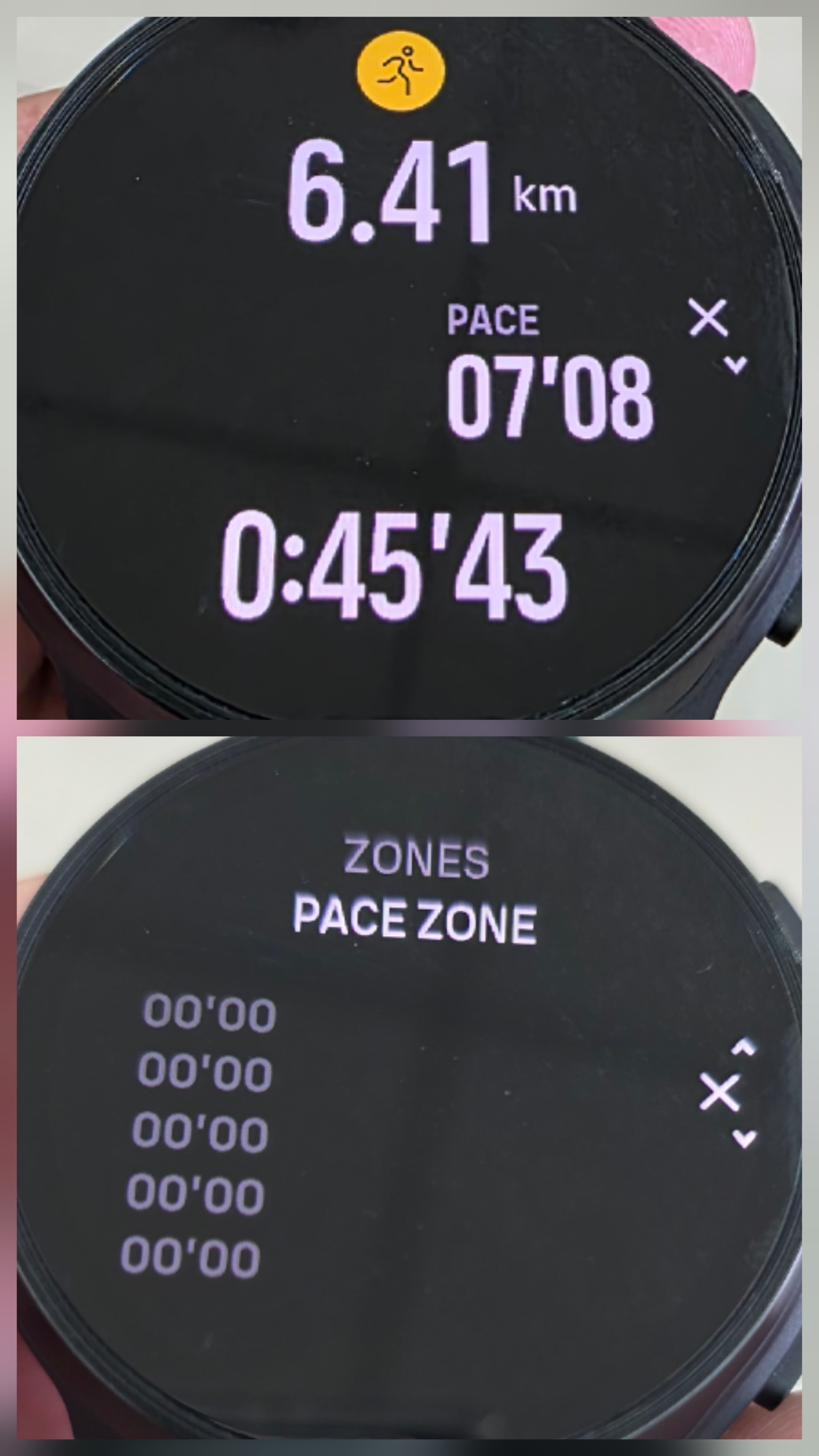 oday my watch unexpectedly shut down at 6.41 km during my run. I was using SuuntoPlus Fused Zone together with a Suunto Heart Rate Belt.
This is the first shutdown I’ve experienced since updating to software version 2.56.18.
Could you please advise if there is anything I can do to prevent this from happening again? I’m concerned because I don’t want my watch to shut down during a race.
Thank you!






Hello! It looks like you're interested in this conversation, but you don't have an account yet.
Getting fed up of having to scroll through the same posts each visit? When you register for an account, you'll always come back to exactly where you were before, and choose to be notified of new replies (either via email, or push notification). You'll also be able to save bookmarks and upvote posts to show your appreciation to other community members.
With your input, this post could be even better 💗
Register Login