Gustin is now available in the Suunto app
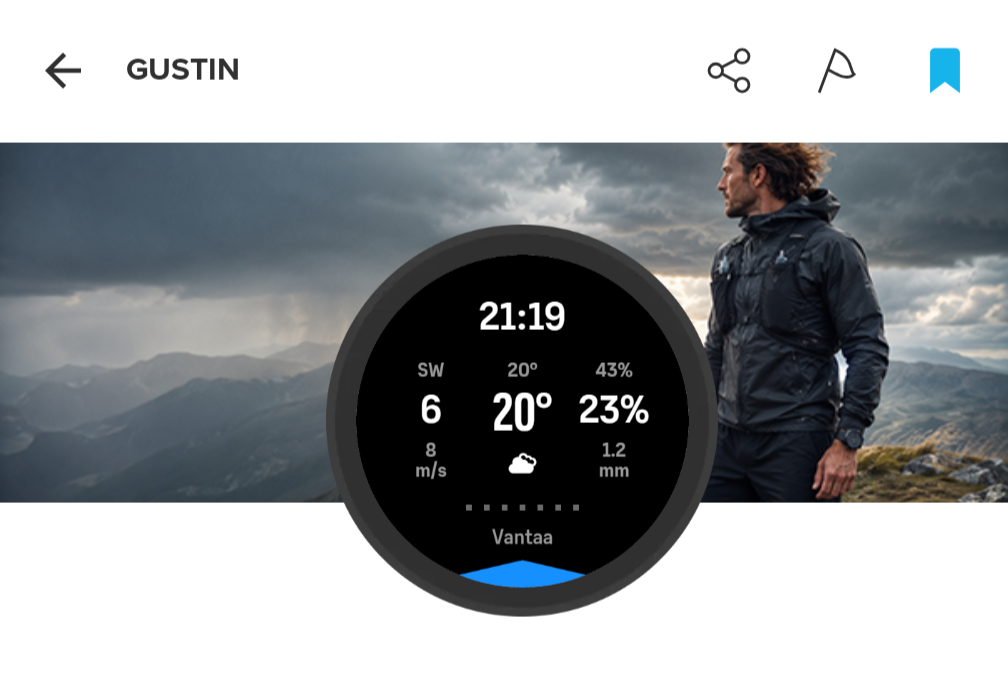
-
@Łukasz-Szmigiel Haha! We were writing the same thing at the same time. Sorry I jumped in.
-
Thanks both of you for explaining!
The requirement that you need to keep the watch aligned with the direction of travel was unknown to me (I never use the maps)

On a road bike, I usually check the watch at a 30 degree angle to the direction I’m going so I either need to change that habit or make the correction in my head
 Either way I am happy that I now know how it works!
 -
Thank you for developing a really useful app - I’m sure a lot of developer/testing hours went into it. There was a note in your online notes that the units followed the watch settings. However, I am finding that the wind speed is showing as m/s rather than mph, as shown for the speed in an activity or the windspeed in the weather widget.
I probably have some unusual units settings:
General units = Metric
Distance = mi,ft,in
Elevation = ft
Weight = kg
Temp = deg C
Pressure = hPaSo it’s a mixture of metric and imperial. Is there a way to show the wind speed in mph? Thanks!
-
@RichardM thanks, I’ll take a look into it but I’m having a rather difficult time right now, so it’ll have to wait.
-
@Łukasz-Szmigiel Of course - no rush, and appreciate you are doing this voluntarily. I can always roughly convert speeds in my head - mph is roughly double m/s. By the way, it’s a Vertical 2 watch. And thanks again for the app!
-
I’ve uploaded Gustin v1.08 to Suunto Api Zone but I’m not sure when it’s going to be public as there are some issues in Api Zone related to app updates.
This is mainly performance and bugfix release.
Changelog
1.08 (2026-09-09)
- Widened the precipitation probability field to give the 100% value more room on one line while keeping the same text size and alignment.
- Start with Current weather and +1 h, then load just one hour ahead as you browse the forecast.
- Reuse cached hours and stop loading forecasts that are no longer needed after changing views.
- Avoid unnecessary refreshes at the half-hour mark. Refresh after 30 minutes, when the hour changes, or when the clock moves backwards.
-
@RichardM I’m afraid I’m unable to test such settings as in S9PP that I have access to I can only change units between imperial and metric. There are no granular controls as you’ve specified. I’m not even sure how to access it via the S+ api the watch provides. The documentation states only imperial/metric for units.
After setting my S9PP to imperial I can see wind speeds in mph and temperature in Fahrenheit.
-
Gustin 1.09
FYI: The update may not yet be public in the apizone.
This update reduces unnecessary clock and weather-icon processing while keeping the wind pointer responsive to changes in heading. The controls and forecast views remain unchanged.
Full details and the changelog are available at gustin.szmigiel.design.
-
Gustin 1.10 is out
A lighter, simpler release focused on running smoothly alongside other SuuntoPlus apps and route navigation.
What’s new
- Smaller and lighter. The app’s screen code is about 18% smaller, so it needs less watch memory each time you switch to the Gustin screen. This should help when Gustin runs together with other SuuntoPlus apps and navigation.
- Loads only what you look at. Current weather loads when you open the screen, and each forecast hour loads when you first open it. Nothing loads in the background.
- Smarter refresh. Every 15 minutes Gustin checks whether the watch has received new weather, and reloads only if it has. A new hour still refreshes the forecast.
- Steadier wind pointer. The pointer and graphics update at most once per second.
Good to know
- The wind pointer follows your heading: your GPS direction of travel above about 2 km/h, and the compass when you move slower or stand still.
- Current weather often has no gust value on the watch, so the gust shows
--there. - Opening a forecast hour for the first time takes a second or two.
More details and the full changelog: https://gustin.szmigiel.design/
Feedback is very welcome, especially if you use Gustin with other apps and route navigation.
-
@Łukasz-Szmigiel Did a two hour trail run with navigation and Gustin (on 1.10). Everything worked great on both my 9PP and SV1 (had them both on for comparison’s sake). The app loaded quickly on the first screen and the forecast screens only took a second to load as you described. I only checked through the forecast screens once during the activity and there was no apparent hit to battery life.
-
@duffman19 thanks for testing and I’m happy it works as intended. I’m only worried about Vertical 2 and Race 2 - and whatever comes next. There were some issues with 3 S+ running at the same time. I hope that it’s fixed too.


Hello! It looks like you're interested in this conversation, but you don't have an account yet.
Getting fed up of having to scroll through the same posts each visit? When you register for an account, you'll always come back to exactly where you were before, and choose to be notified of new replies (either via email, or push notification). You'll also be able to save bookmarks and upvote posts to show your appreciation to other community members.
With your input, this post could be even better 💗
Register Login