Watch not connecting to wifi for map download
-
@isazi Thanks, and yes, you are right, I tried that yesterday, when it wasn’t yet clear that it might be a server issue… I’ll stay patient

-
@BrunoH yes, map operations are all dependent on the server
-
@9ppuser it should be fixed soon
Watch: Suunto Vertical 2 Titanium Black
Blog: isazi's home
-
I can confirm the same issue on a Suunto Vertical 2 running firmware 2.56.28.
The first offline map downloaded a couple of days ago, no problem. But every attempt today reports “Connection to wireless network failed.” Removing and re-adding the network, rebooting the watch and retrying manually did not help.
I pulled the watch’s system-event logs, they show that the message on the watch is misleading:
Known network: [redacted]
Conn: [redacted] (-49 to -55 dBm)
Https aborted:4
Try resume https (1/10) …
…
Try resume https (10/10)
DL (0%)
DL GET resultCode=500
The watch is therefore successfully associating with the Wi-Fi access point, with a strong signal. The failure occurs afterwards, when starting the HTTPS request.The same Https aborted:4 error also appears when the watch tries to download ephemeris and weather data. This suggests a general HTTPS/TLS or backend-service problem rather than incorrect Wi-Fi credentials, weak signal, map storage, or a specific map region.
The logs shows the earlier map download completed with HTTP 200 responses on the same network and the same firmware, so the network configuration has previously worked.
-
@Johan-Mer That’s a great explanation, thanks

-
@isazi Are you sure ?, because I have the same problem since few weeks on my Vertical V1, and nothing comes

-
@ninours the fact that the problem affects also the Vertical, that has not been updated in 2026, points in the direction of this not being firmware related.
Watch: Suunto Vertical 2 Titanium Black
Blog: isazi's home
-
Hello everyone, same issue here with my Race 2, I cannot download any maps since yesterday. I tried with my WiFi and my Phone as a Hotspot but same error message “map download paused ….” Having done a factory reset of the watch trying to fix the issue I’m left with no maps now. Hoping it will be fixed quickly…
-
Just want to add in that I am experiencing the same problem. Did all sorts of debugging to eventually land here. Glad to have found this as I was going in circles trying ot debug.
-
Chat suunto response
We are currently experiencing a known technical issue affecting the downloading of offline maps on all Suunto products. Our engineering team is fully aware of the situation and is actively working on a solution to restore full functionality as quickly as possible.
We sincerely apologise for any inconvenience this may cause to your daily routine. No further action or troubleshooting is required on your part at this stage, and downloads will resume automatically once the fix has been rolled out.
-
Fixed via cloud updates than you for the report
Community Manager / Admin @Suunto
Creator of quantified-self.io — a next gen training dashboard with MCP access, cross-service activity and route sync
-
@Dimitrios-Kanellopoulos
Great job, and many thanks to the team! -
@Dimitrios-Kanellopoulos said:
Fixed via cloud updates than you for the report
Map updates are still failing and maps deletions are still stuck in permanent loop.
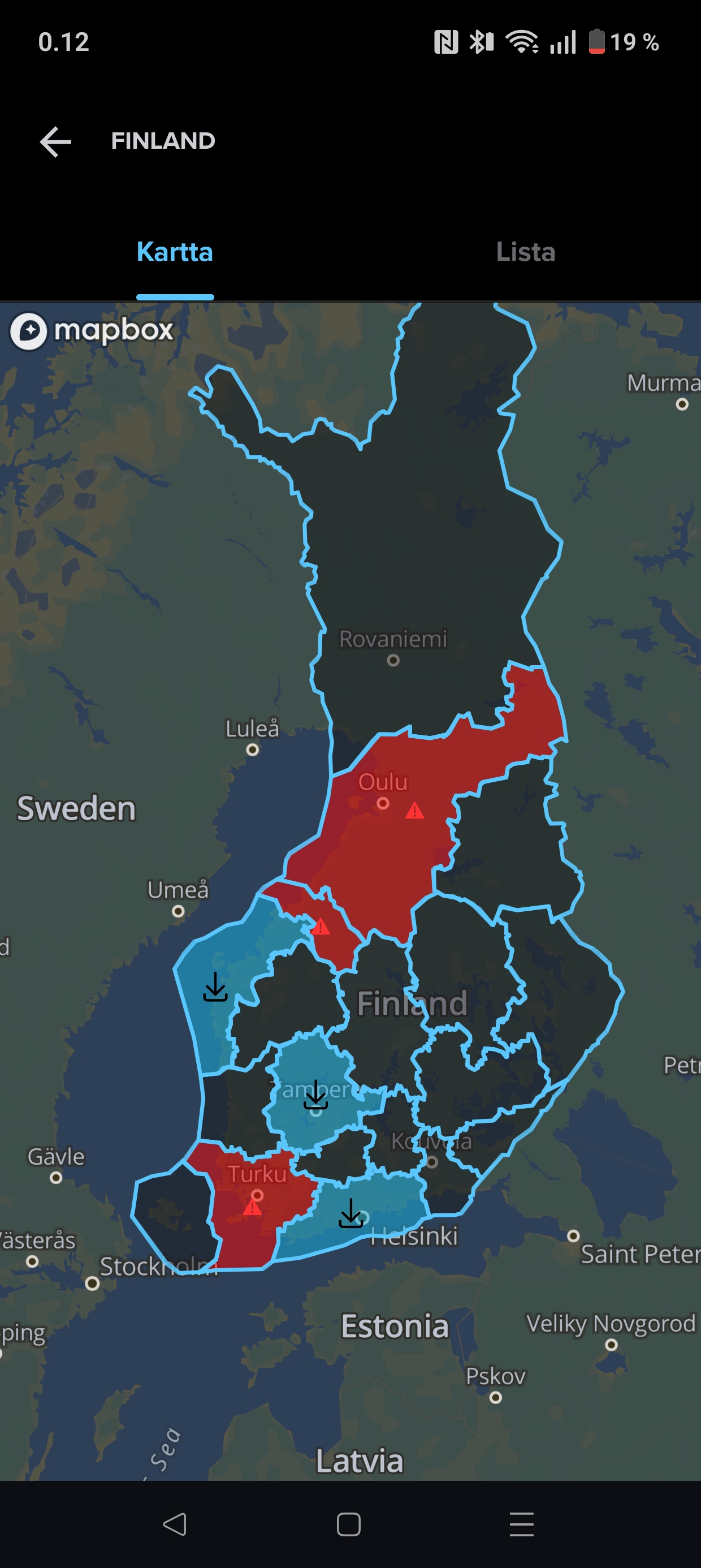
-
Seems to be working now

Thanks everyone
-
I have tried today for my Vertical (2.50.28) and I get the error while trying to download Attica map:
MAP DOWNLOAD PAUSED
Failed to connect wireless network.but I can see that the watch is connected to the device list of my Laptops 2.4GHz hotspot with device name Suunto-FCC6 with an actual ip and a mac address…
Settings for Wireless network Automatic is ON and Discovery is ON.I know its working because it has synced all location, weather and other data.
The watch faces download happened without any issue.Don’t know what else to do. Can you help?
-
I know its working because it has synced all location, weather and other data.
The watch faces download happened without any issue.All that is done through Bluetooth via Suunto app.
Discovery is ON
Also Bluetooth related, nothing to do with WiFi.
Regarding map downloads, your watch being connected to whatever hotspot doesn’t automatically mean it has connectivity to the internet.
You could try creating hotspot on your phone and connect the watch to that, as described for example here: https://forum.suunto.com/post/172821 -
@Squirrel Fair enough for bluetooth data sharing and weather and watch faces.
The hotspot Im reffering to my laptop HAS connectivity to the internet because is the same 2.4GHz hotspot I use to connect my phone and download the offline map to my phone so the hotspot is actually healthy and working. I can actually see connected devices to the hotspot in my case both my phone OnePlus and the actual watch with device name Suunto-FCC6.
Now the solution you are proposing (which I have tested) is problematic with my suunto app on my phone because I have created the 2.4GHz hotspot to my phone and I have tested it’s connectivity with another device(its discoverable and seen by another Xiaomi phone connecting and surfing). After I established the healthy and working hotspot on my phone I went to the proposed suunto app network list to add it to the watch BUT it’s not there it’s not “seen” by the suggested networks list of the Suunto App…
Finaly after 2 days of trying tonight 18.09.2026 at 08:58 pm the suunto servers responded and downloaded with the exact same Laptop 2.4GHz hotspot connection … now I know it was a service unavailability problem or issue with the greek maps or issue with requests made from greece or who knows what …
Thank the universe I managed to download because the moderator approval time is about 12hours which makes any communication slow and frustrating…






Hello! It looks like you're interested in this conversation, but you don't have an account yet.
Getting fed up of having to scroll through the same posts each visit? When you register for an account, you'll always come back to exactly where you were before, and choose to be notified of new replies (either via email, or push notification). You'll also be able to save bookmarks and upvote posts to show your appreciation to other community members.
With your input, this post could be even better 💗
Register Login