Suunto SHRB2 Firmware 3.2.6.8 Update
-
@snow interesting, maybe I didn’t use enough water… do you wear polyester shirts or natural stuff like cotton, merino or tencel?
-
@snow interesting, maybe I didn’t use enough water… do you wear polyester shirts or natural stuff like cotton, merino or tencel?
At the moment, I’m using the lcebreaker Tech Lite,
made of 100% merino wool. -
@snow I guess this also helps preventing artifacts
-
Tried it today with wet belt and Merino Shirt. No artifacts

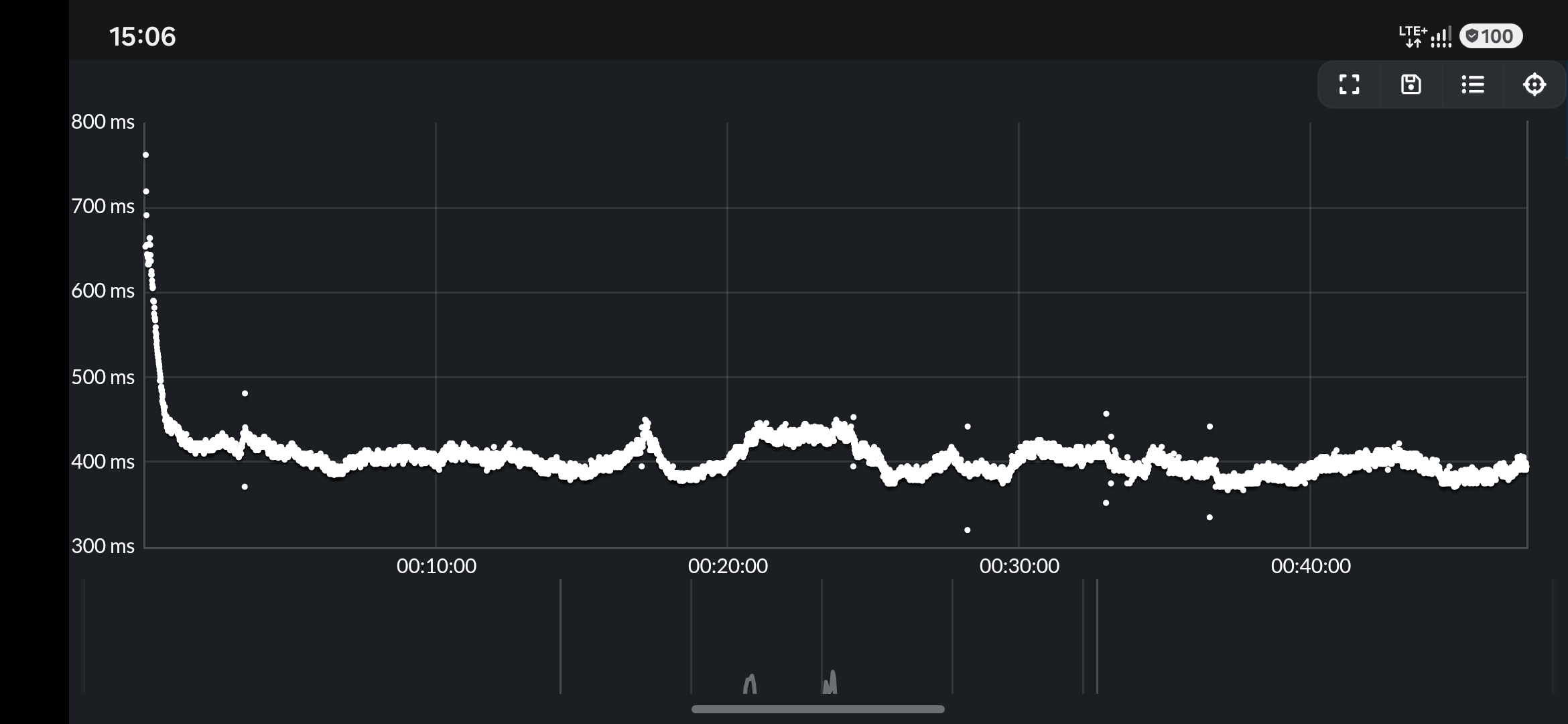
Unfortunately my skin doesn’t like Merino too much. Hopefully there will be a way to get good quality with polyester too… -
Tried it today with wet belt and Merino Shirt. No artifacts
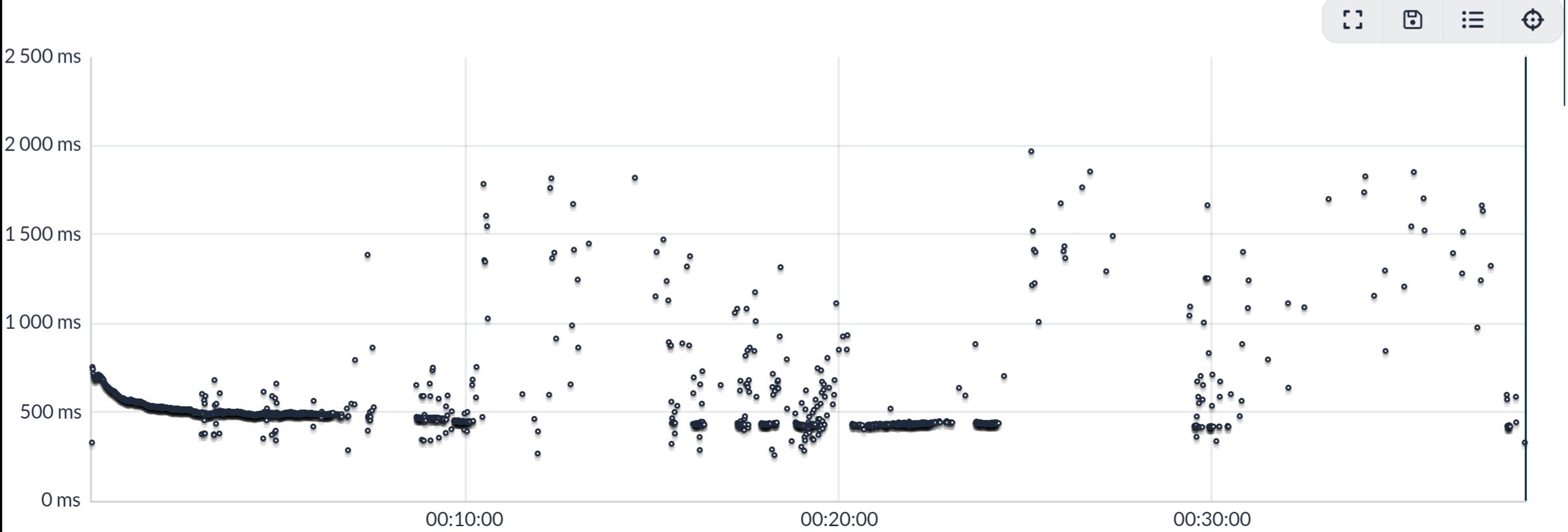
While my latest running session got totally destroyed by HRV faults! OK, I used three layers of polyester on the torso (autumn is starting to bite), but also a 70 mm length of rubber tubing as ESD shielding - the length still doesn’t interfere with the strap electrodes.
I had done a factory reset of the SHRM2 to see if the Flight Time impossibility numbers would correct themselves. The did not on today’s trail run (Avg. 2 ms FT over 6 km…), though I’ll make a separate post about a couple of experiments yesterday.
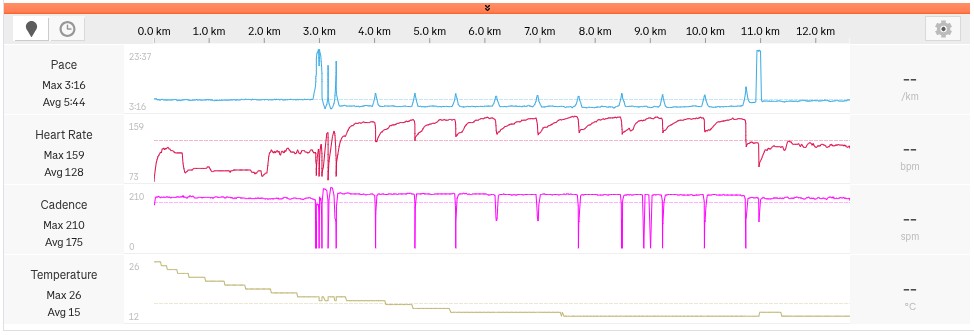
Even if some ESD circumvented my rubber tube, the disturbance should not have disrupted the HRV readings in such a severe manner as below. My guess is that the HR monitor suffers from major bugs in the software.
Anomalies 22.5%
Artifacts 37.6%Runalyze R-R graph:
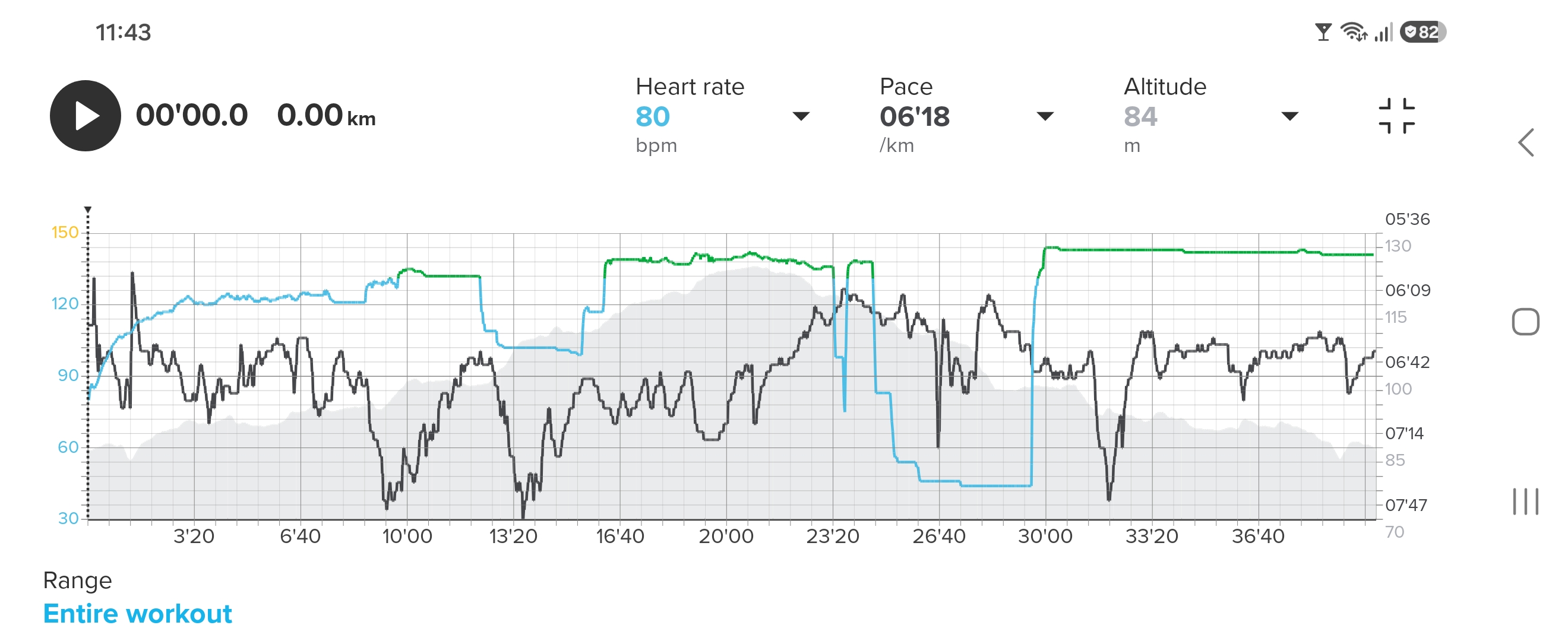
Suunto App. Most of the HR also got corrupted:
Garmin Forerunner 955 control watch. Correct HR:
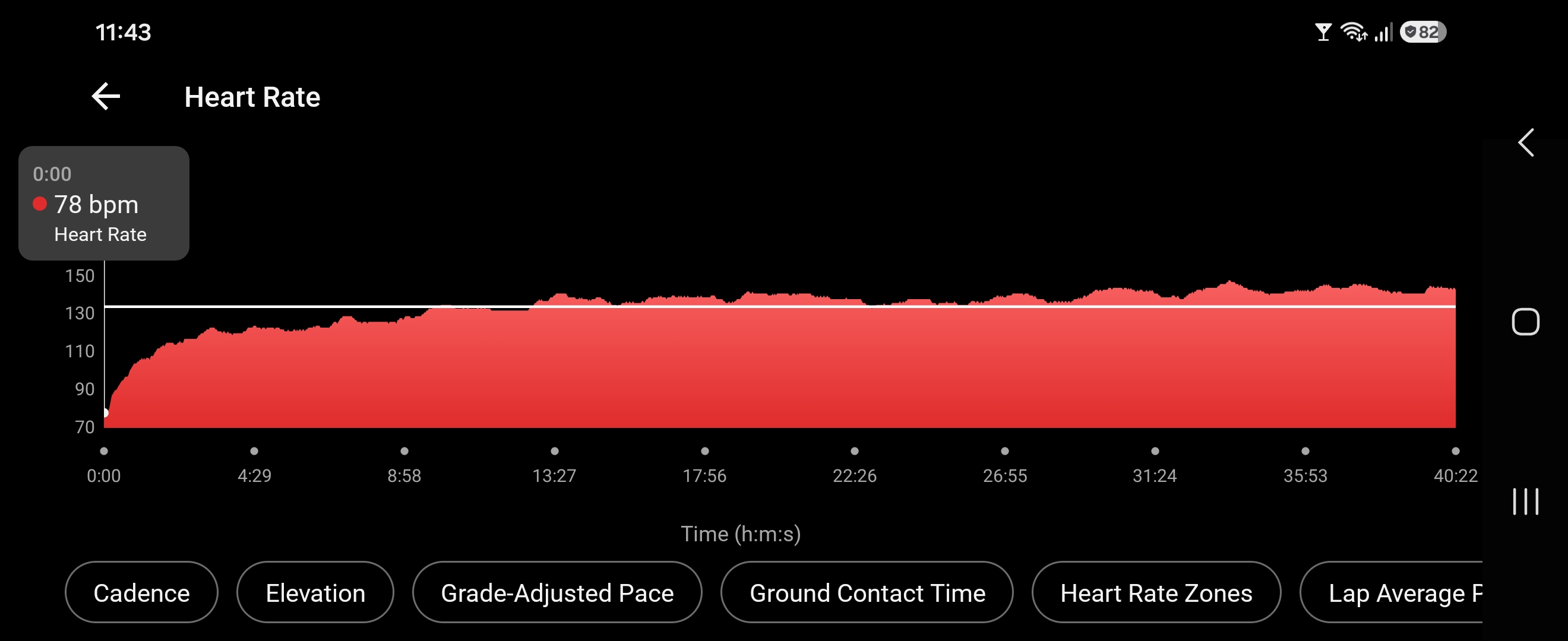
Suunto Race S
-
@Inge-Nallsson Wow, thats even worse than everything I produced with the first Gen Smart Sensor. Really seems to be the Shirts material, but even then I don’t think Gen2 works better than Gen1. More likely to be the other way round which raises the question what’s behind the claim of having a better signal quality with the new belt
-
@Inge-Nallsson As much as the data was pointing to the module itself, I’ve started wondering if the strap is picking up ESD. Despite every effort I’ve thrown at the problem to eliminate ESD at the module, it still shows up in the R-R interval data.
Regardless, if the ESD is picked up at the module or at the strap, the marketing promised that this would be mitigated in the firmware, but I’m not seeing it. I specifically purchased this HRM because I was battling this with my Polar H10, and the feature that artifacts would be removed was promising! In practice though, where the rubber meets the road, it’s not doing anything any other HRM on the market isn’t doing.
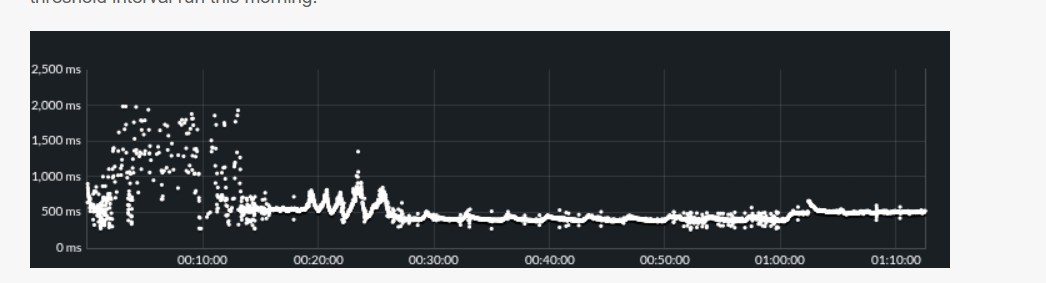
As it sits, ZoneSense isn’t trustworthy for me. When the first 12-15 minutes look like this, how do I know ZoneSense has a good baseline for the rest of the run? This was a 10×3:00 threshold interval run this morning.
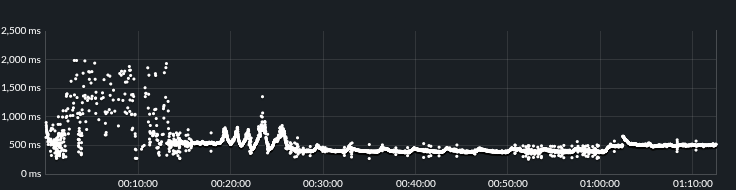
Suunto Race S / 9 Baro / Ambit 3 Peak / Observer
Suunto SHRB2 / Polar H10 / Verity Sense / OH1
Stryd Duo / Wind
r/suunto mod -
@atoponce where do you find this graphic?
-
@stromdiddily Runalyze…
Suunto Race S
Garmin Fenix 8 -
As it sits, ZoneSense isn’t trustworthy for me.
Exactly. Also, never knowing if base HR figures are correct or not (without using a control watch) takes the pain too far. Today I packed the SHRM2 up, this my second unit to try, and shipped to the seller asking for a refund. I lack the stamina necessary to continue experimenting and wondering.
-
@stromdiddily Runalyze…
haha yeah, got that…there are 500 different tabs and analytics links in Runalyze, which one shows this? The closest thing I can find is aerobic estimation but it doesn’t look like this graph.
Always carry a flaggon of whiskey for snakebite; and furthermore, always carry a small snake.
User of pretty much every watch since the Ambit 3 Peak. Now back in the family w SV2 :)
-
@stromdiddily If you want to take a quick and easy look at R-R data, I recommend
https://smlanal.szmigiel.design/
Just upload the activity’s .json file, and you’re all set
-
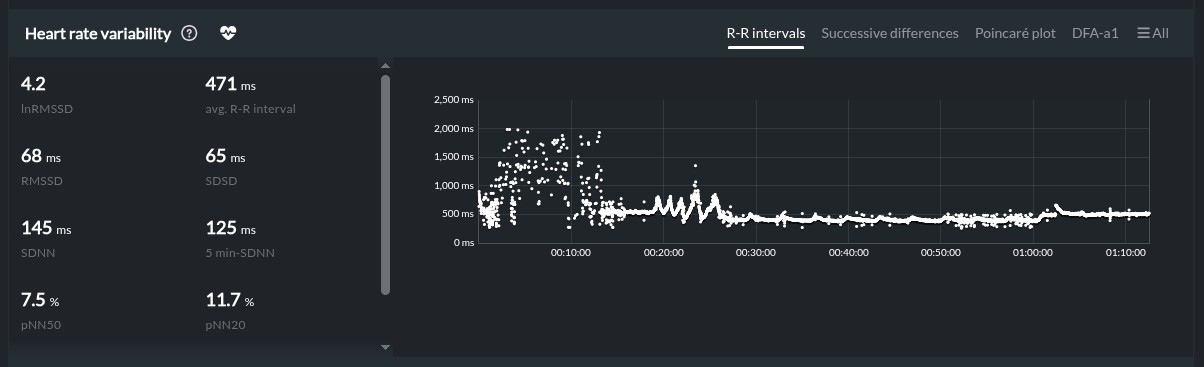
@stromdiddily When clicking on an activity, scrolling to the bottom there is a “Heart Rate Variability” box. This is in the new site redesign.
-
@atoponce thanks!! I somehow had “hide hrv plot” checked so wasn’t seeing that
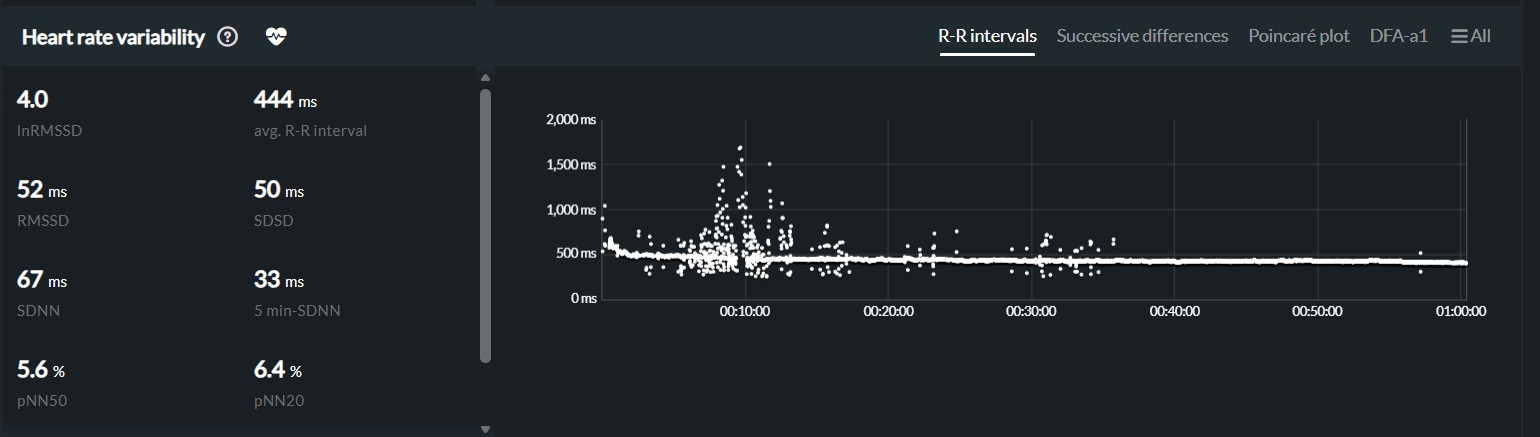
this…doesn’t look great for a completely steady treadmill effort
-
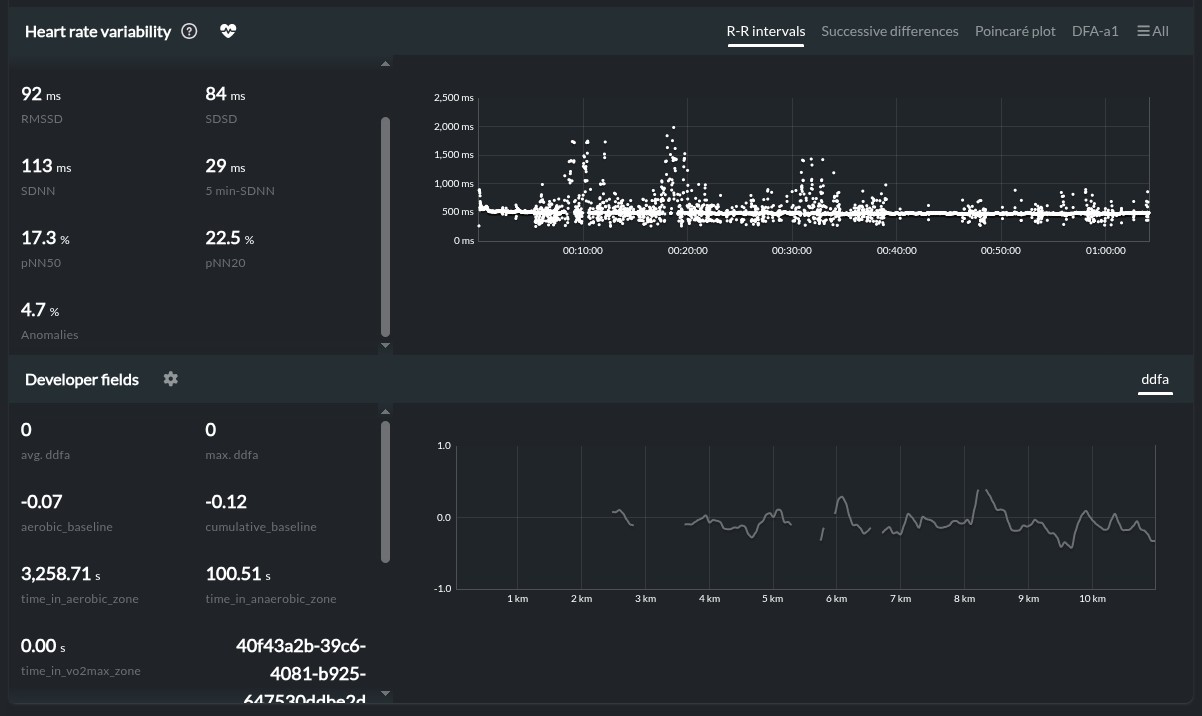
@stromdiddily Yup. I have no idea how to fix this. Chest strap HRM’s should be “plug-n-play”, but that’s definitely not the case with this one.
I use electrode gel with the strap, spritz the front of my shirt, and have a anti-static bag taped over the module, and I still get data that looks like this:
-
If you want HRV analysis also quantified-self.io offers this for free FYI
just upload a normal fit file
Screenshot 2026-10-23 at 18.18.46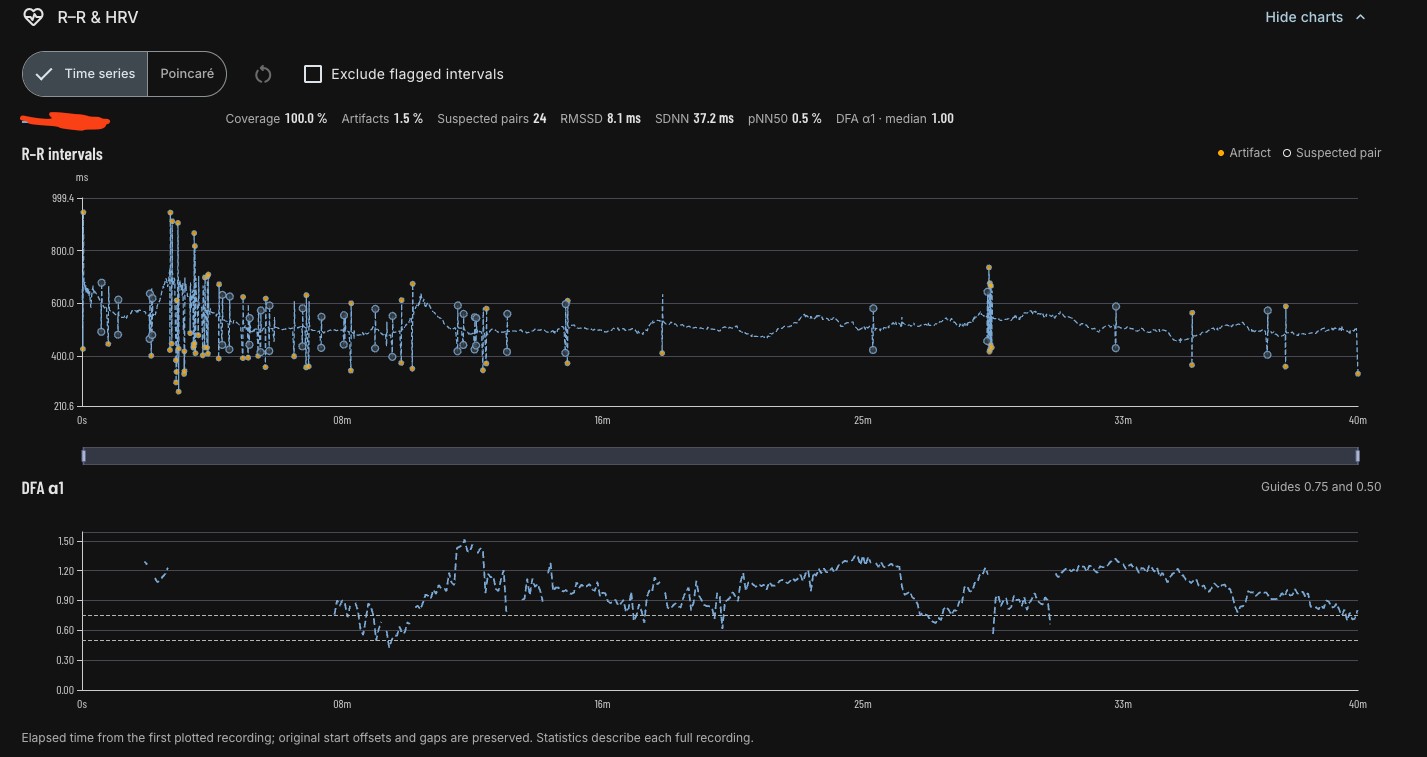
Screenshot 2026-10-23 at 18.19.16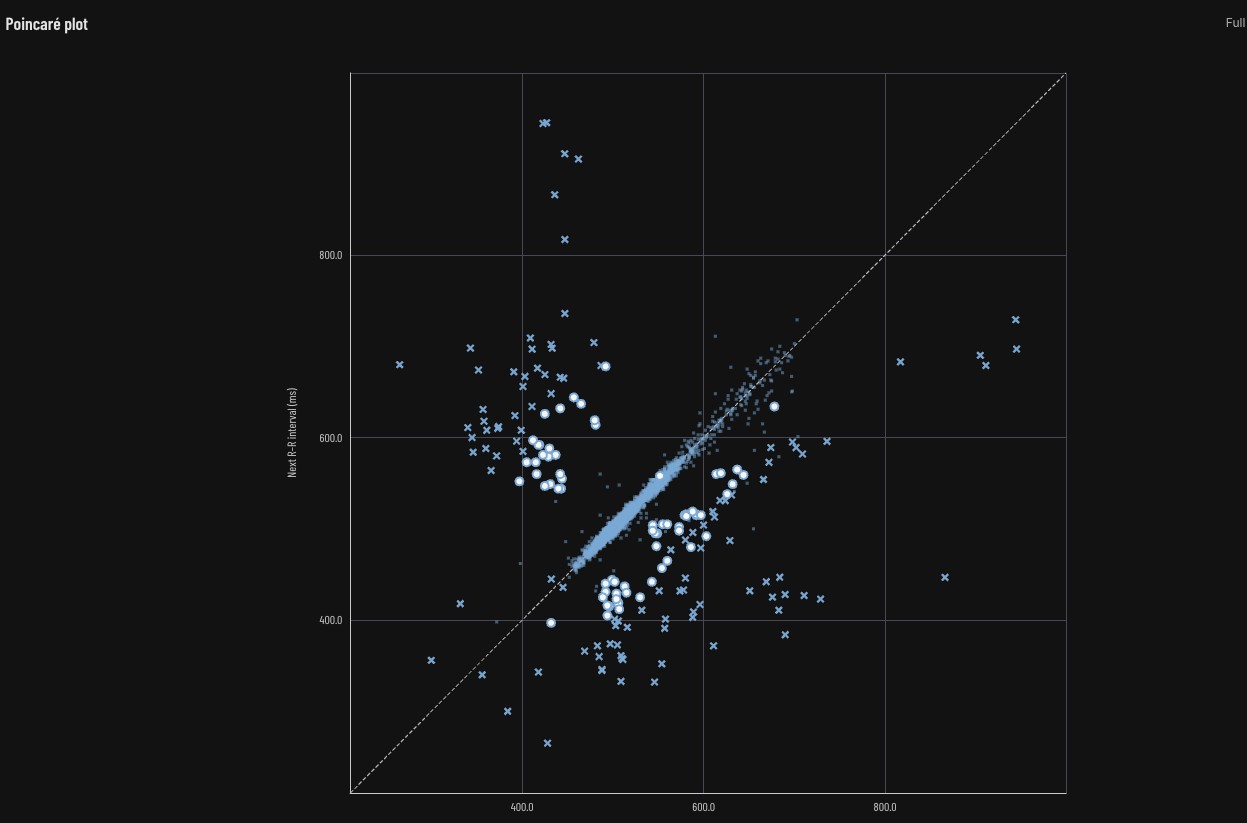
Screenshot 2026-10-23 at 18.20.34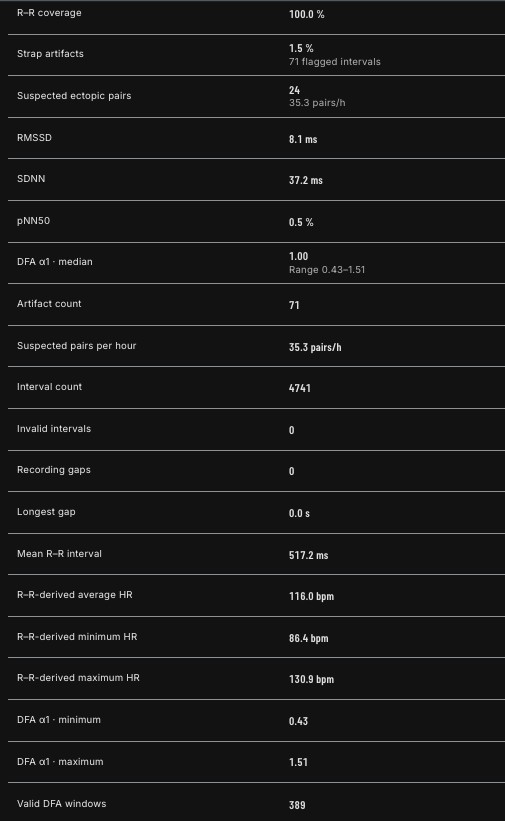
Community Manager / Admin @Suunto
Creator of quantified-self.io
-
My contribution from a very short test run today.
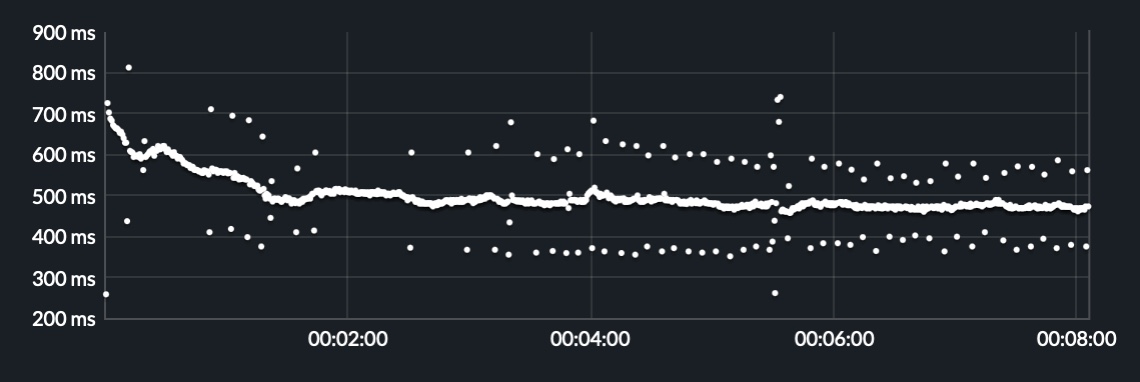
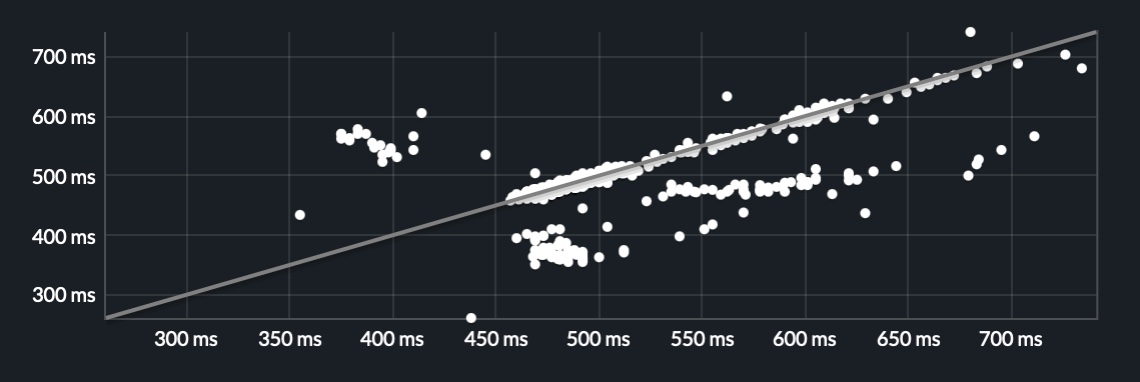
Running top is 97% Polyester.
-
@matram Now thats a strange pattern
-
And a run from later today. This run is with an IceBreaker 200, Merino Wool, top. It does not seem to improve things.
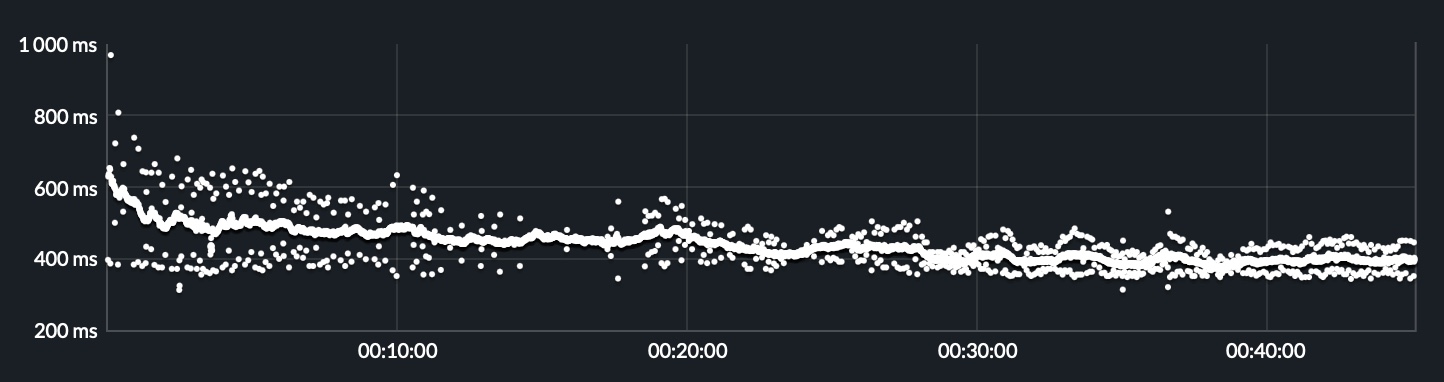
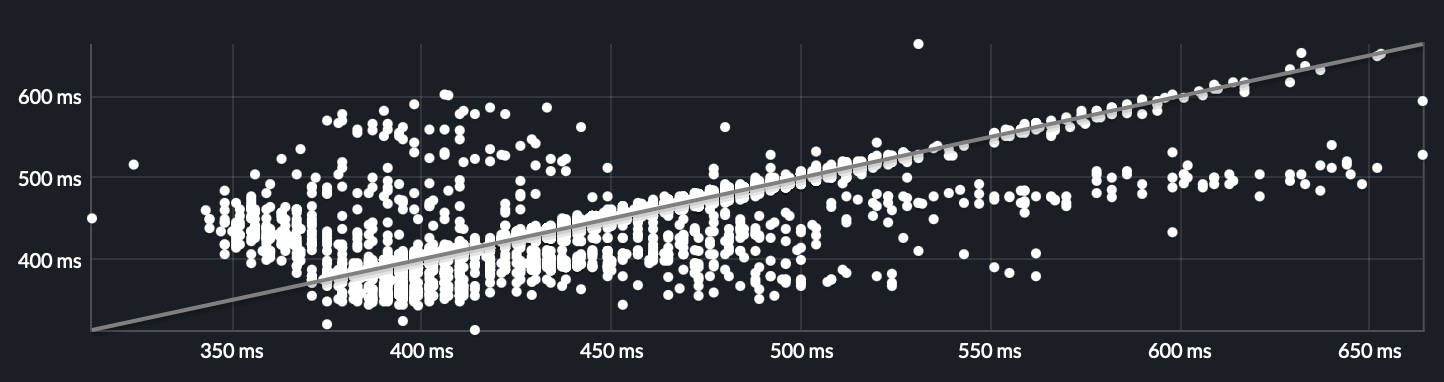
The watch is a Race 2, and Stryd Duo pods are synced as foot pods.
-
@matram Very strange. From what I’ve seen of your previous posts regarding the SHRM2, you usually have good data from the unit (judging by hearsay; think this is the first screenshot you post).
My first thought went to the old Suunto pod (Smart Heart Rate Belt ‘version 1’) where I discovered “fuzzy ‘ripple’ or ‘echo’ areas” when the module was snapped on upside down:
Suunto Smart HR Belt - Beware module orientation - HRV and ZoneSense
https://forum.suunto.com/topic/13372/suunto-smart-hr-belt-beware-module-orientation-hrv-and-zonesense/9But, I’ve tested the reverse orientation with the SHRM2 as well, on a short 1 km run, and got perfectly valid HRV data…
Very strange.






Hello! It looks like you're interested in this conversation, but you don't have an account yet.
Getting fed up of having to scroll through the same posts each visit? When you register for an account, you'll always come back to exactly where you were before, and choose to be notified of new replies (either via email, or push notification). You'll also be able to save bookmarks and upvote posts to show your appreciation to other community members.
With your input, this post could be even better 💗
Register Login