S9PP stuck in saving screen
-
And it happened again today…

-
@jthomi @twekkel @Parra-Antonio-J Next time this happens, send logs if you can to Suunto. PM me, provide your Suunto App log in username, the time and time zone you sent logs. I will file a bug report.
Vector/T6c/Vertical 2 Ti
-
@Brad_Olwin I must have jinxed it, as mine doesn’t turn on anymore. Picked it up from the charger and as dead as can be. No response to soft reset or anything else, only a black screen. Sent it back to the reseller…
-
@jthomi
After Hard Reset It doesn,t happend again. It has save several long training without problems. I supposed its related wiht memory.
Anywahy, if its happend again I will send you the log. How can I acces to the log? -
@Parra-Antonio-J in the Suunto App, click the watch icon, and then the “three dots”
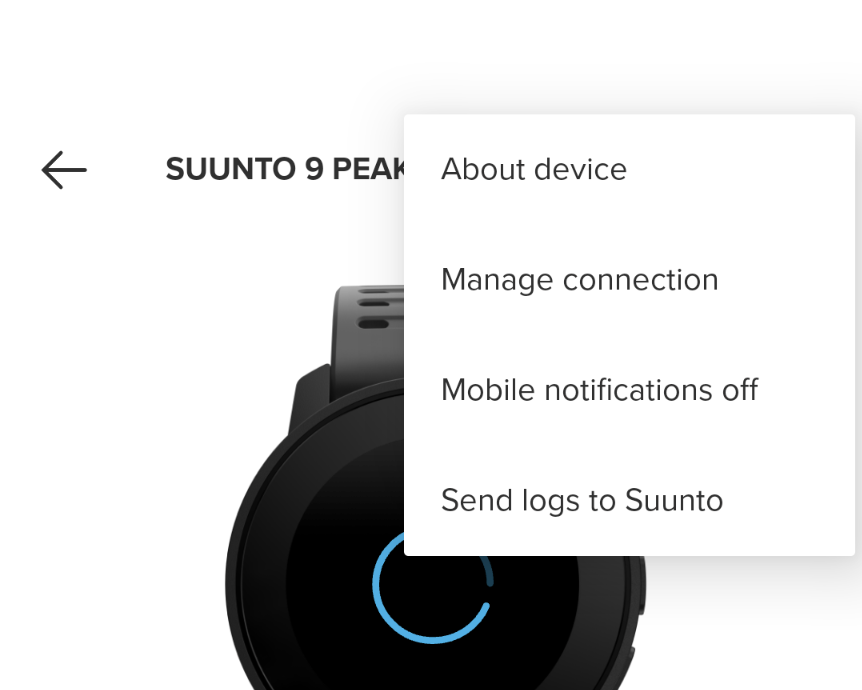
-
@Brad_Olwin And it happened again… man, this so annoying.
-
Very quick description of an experience I had yesterday going for a run where I needed to switch the SportApp. When stopping the current run after less than 30 seconds runtime, it took something like 3+ minutes of the watch spinning on the Getting HR and Saving screens before I could delete the current training. The HR monitor is a bluetooth Suunto SmartHeart variety with a battery that has been used for a couple of hundred hours.
I don’t recall this happening before on the S9PP, but I do have somewhat long-ish save times after a training ( 30 seconds to one minute ).
I’ve never had the watch fail to save a training or re-start, only unusually long save times.
-
I guess I need to do a factory reset, I have two or three other errors that occur from time to time.
-
Sometimes when selecting a sport mode some list items are blank, like the first two and the fourth.
-
When starting the Strength Training activity, the watch acknowledges it with a beep about 3-5 seconds long.
-
When erasing activites in the logbook, the watch shows the erase succesful screens sometimes longer than 15 seconds, no matter how long the activity was.
Right now, really not so happy with my S9PP, while design and form factor is perfect for me, but this faulty software…hm, a bummer.
-
-
Got this problem just now, after a short ride I do on daily base. S9PP.
No changes in configuration.
Did not answer the “Feeling” question.
Latest softwareupdate installed.
It is circling since about 50 minutes now.
How could I provide more details about the issue? Is there a log in the watch? I am a software developer, maybe I could attach some debugger?
Interesting fact! The watch is still receiving notifications while showing the saving circle.
And I can press the <empty> button. -
More than two years after the latest post (which wasn’t answered) I just had the same issue.
Bought the S9PP end of last years as it was in sale and I thought meanwhile all SW Bugs should have been fixed.Send logs to Suunto.
How to rely in that watch for things like Everesting?
During the last three months three soft-resets were necessary.
My son bought it about four weeks ago and in last week he deserted it four times.As said a few posts above: this is annoying




Hello! It looks like you're interested in this conversation, but you don't have an account yet.
Getting fed up of having to scroll through the same posts each visit? When you register for an account, you'll always come back to exactly where you were before, and choose to be notified of new replies (either via email, or push notification). You'll also be able to save bookmarks and upvote posts to show your appreciation to other community members.
With your input, this post could be even better 💗
Register Login