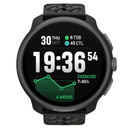
FW 2.50.26 Demo Mode has a poor menu position
-
The new for FW 2.50.26 - Q4 2025 “Demo mode” menu option has usurped the previous “Power off” position. The old ‘easy’ way to turn off a Suunto Race S watch was:
Long press crown to SETTINGS. Then crown press on General followed by a mighty finger swipe to the bottom of the menu list; ending with a crown press and a confirmation upper button press.
Well, it was at least more easy than now having to fiddle with a back finger swipe, or crown turn back, to reach the “Power off” positioned above “Demo mode”
I would imagine that far, far more people frequently utilise the watch off option than they do a demo mode… To me the watch is a pure exercise tool, and already with just three sessions per week this fiddly shut down sequence is starting to grate on my nerves.
-
I am never powering off any of my watches.
They go into DND if I don’t need them.
Plus when they sit on the shelf, they go into some super low power mode so that the battery last weeks.
Still there might be more people using power off than demo, but I guess there are not many at all.Do you think the most used menu items should be at the top and at the bottom of a list?
t6, S6, Elementum Terra, Ambit 3 Sapphire, Spartan Ultra Copper, Traverse Alpha, S7 Graphite LE, S9B Ambassador, S9P Granite Blue Titanium, S9PP Titanium Sand, Vertical All Black, Race Titanium Charcoal, Race S All Black / Titanium Courtney, Run Lime
-
@Egika I don’t see the demo mode. It doesn’t really interest me anyway.
-
@Egika said in FW 2.50.26 Demo Mode has a poor menu position:
I am never powering off any of my watches.
They go into DND if I don’t need them.
Plus when they sit on the shelf, they go into some super low power mode so that the battery last weeks.
Still there might be more people using power off than demo, but I guess there are not many at all.Do you think the most used menu items should be at the top and at the bottom of a list?
I pressed demo mode twice when fast scroll and accept when wanted to do soft reset. I forgot it’s not last option anymore