Battery drain
-
For the Suunto Vertical is there an option to display the battery % or hours remaining during an activity such as running?
I’ve looked at the Sport Mode Customisation options and could not see it there.
I need this option for some events so I can plan for re-charging the battery in good time.
-
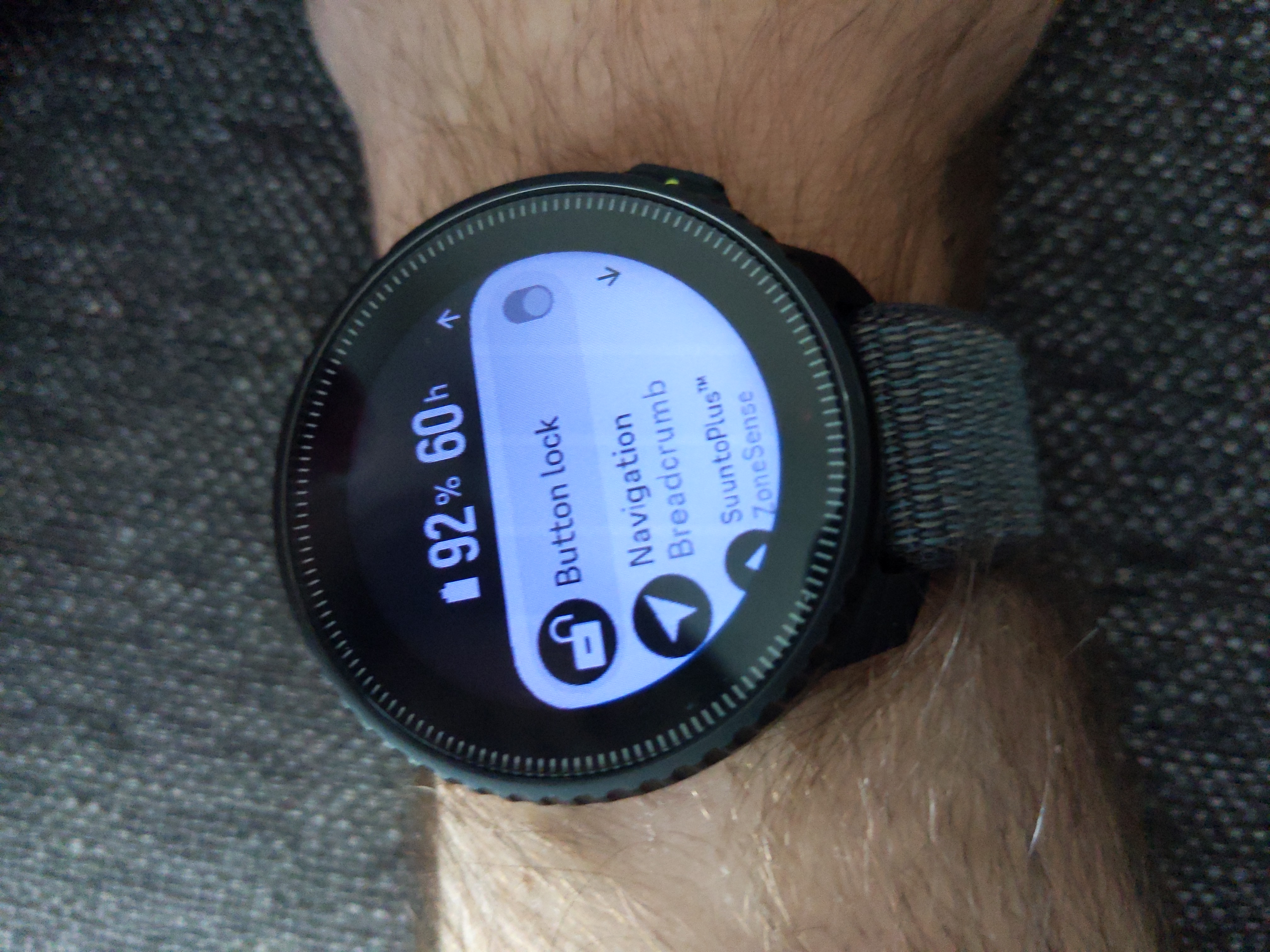
@GKnoll just long press the lower button to acces the “control panel”. It shows “battery %” and “hours left”
Vertical All Black
Ambit 3 Peak
Suunto smart sensor -
@Samuel-Pirttikangas a quick reminder. Not all of us have Control Panel configured to the lower button long press. I used to have, but I had to change it because of the Control Panel carousel rendering problem. The problem stopped when I moved it to mid button short press. Weird, I know!
Compasses: M-311, A-10, SK-7
Diving: Finnlight Navy 90, Vyper
Sports: Metron, S7, S9B and Vertical -
@BrunoH er meint wenn du die untere Taste während einer laufenden Aktivität gedrückt hälst.
-
@BrunoH i ment if you hold down the bottom button during an ongoing activity then you get battery stats.

-
@Samuel-Pirttikangas Thank you!
-
@OnlyoneKenobi Oops, sorry. Mine goes to technical support on Tuesday. I’ll cross my fingers.
-
@Klaane said in Battery drain:
The battery on my Suunto Vertical Solar has dropped from fully charged to 55% in only two days. Last night it dropped by 15% while I was sleeping with the watch on.
I have mobile notifications and 24/7 HR turned on but it still shouldn’t drain that fast, right? Standby backlight is off and I’ve used GPS for less than 10 minutes during those two days.
Do I have a defective battery or could this be some other issue?It sounds frustrating! While mobile notifications and 24/7 HR can drain the battery, a 15% drop overnight seems excessive. Try resetting your watch or updating the firmware. If the issue persists, contacting Suunto support might help.

-
This post is deleted! -
Hello everyone, since last firmware update to 2.50.26 version battery drain issue is strongly back ! Almost 10% per day ! This was a solved issue since months…
Do you know any way to rollback to a former firmware. The previous one was perfect from my point of view. -
@Nicolas-Marseille bonjour Long press the middle button to access the settings.
• Select general.
• Select about.
• Scroll down until you see data privacy at the end.
• Long press the bottom button to access the interface.
Scroll down and select
“Select the OTA package”.
You can see the current version and the previous version here.
Select the previous version to update
-
Re software 2.50.26: During last week’s Spine Challenger North I found that, after maybe a day of continuous tracking, when I had the navigation screen showing the backlight would turn on, often at high intensity, if I apparently raised my wrist - but I had disabled this function under General Settings and confirmed this post-event. Wrist raises occurred often because of the terrain so the backlight kept turning on. This caused me great concern because of the obvious effect on battery life and the need for good navigation at night up on the mountains in bad weather.
I also note that if I select ‘endurance’ gps accuracy (that is, ‘good’ rather than ‘best’) only breadcrumb navigation is now available, whereas in the previous software version I could select outdoor mapping for navigation for ‘good’ gps (that, I found, is perfectly adequate for navigation in open countryside). Was this change a bug fix or was it to remove an apparently better battery life than the Vertical 2 in the good/endurance gps mode?
-
-
@duffman19 Thank you, I’ll review the links you kindly provided.
-
@GKnoll I created a separate topic for this here: https://forum.suunto.com/topic/14502/backlight-bug-2.50.26
Maybe you can post about your experience so it’ll gain some traction and attention from Suunto. It’s odd that they haven’t recognized this yet.
-
My Vertical titanium solar has battery draining from the biginning, more than two and half years ago. I don’t use notification from phone, but I use hr and sleep monitor. Of course backlight off and rise on low.
My best results with some firmware where 7-8% for 24 hours whitout activity, maximum with some activityes from fully charge to 5-6% was two weeks, sometimes 15 or 16 days.
Now after last two or three update I’m on 11- 12 days maxymum, about 8-9% per day. I tried everithing in the past: discharge till 0%, soft reset, soft reset pressing for a long period (also one minute), hard reset. Never changed.
After last update and this worst performance, I tried to recalibrate, but now it is impossible to totally discharge, because at 2% the watch enter in a safe mode and you have to wait many hours to drain the last enerergy, without can using it (before this energy saving mode I used to switch on the torch to quick discharge from 1% to 0).
Probably there are lucky and unlucky watch for battery… -
@GKnoll How did your race go in that horrendous weather & did your Suunto last the distance (to keep the mods at bay for going off topic) ??
A friend of mine did the Challenger South & said it was some of the worst weather he’s experienced in this country, he finished in just over 53hrs

-
@franky23 You should have sent it for battery replacement at the beginning while under warranty. There certainly are faulty batteries with much smaller capacity than designed out there, or it could also be another hardware problem causing excessive power consumption.
-
@duffman19 said in Battery drain:
Maybe you can post about your experience so it’ll gain some traction and attention from Suunto. It’s odd that they haven’t recognized this yet.
Maybe, they’re still deciding if taking this bug seriously or just replying “I’m not affected by this bug.”, just saying…
-
@Squirrel
You are probably right, but I asked to a firned of mine, tester for Suunto, and is opinion was that suunto probably would sent me back my watch without any change, because battery fault has to be very serious to have warranty replacement. Anyway, now I’m in late…






Hello! It looks like you're interested in this conversation, but you don't have an account yet.
Getting fed up of having to scroll through the same posts each visit? When you register for an account, you'll always come back to exactly where you were before, and choose to be notified of new replies (either via email, or push notification). You'll also be able to save bookmarks and upvote posts to show your appreciation to other community members.
With your input, this post could be even better 💗
Register Login