Suunto 2.50.26 – Q4 2025 Release Notes
-
I’m using Suunto Race S with firmware 2.50.26 (Q4 2025) and I’m having serious doubts about sleep tracking accuracy.
Examples:
-
Night sleep:
I was in bed from 19:11, awake and actively using my phone until ~20:00, but the watch still detected sleep starting at 19:11. -
Nap:
I napped from 12:41–13:05, then stayed in bed using my phone until 14:28.
The watch recorded continuous sleep from 12:41–14:28, even though I was clearly awake for over an hour.
It seems the algorithm relies too much on inactivity and lying position, and cannot distinguish between real sleep vs. lying still while awake (phone usage).
As someone who relies on sleep data for training and recovery, this makes the sleep metrics hard to trust.
-
-
In my tests, I found that many issues have been fixed.
However, two things have gotten worse.- Sleep tracking: I wake up at 6 AM, walk 3 km in the campsite. The watch was active. Then I came to my tent. My alarm, which I set for 7 AM, went off. I stopped the alarm, and it said “Good morning.” It doesn’t realize I’m awake unless I physically touch the watch. Functions like step counting and location don’t contribute. 2. Increased battery consumption. I think, partly due to the added features, my battery life has dropped to 6 days with daily use.
These are my observations for now.
-
@Dimitrios-Kanellopoulos thanks for the explanation. I understand the intended behavior and I have tested exactly this setup multiple times.
Unfortunately, my real-world experience is different:
• When using GPS activity profiles, the watch still seems to prefer GPS-derived pace and distance, even when Stryd is paired as a footpod and enabled (autocalibration off).
• This is very noticeable right after activity start:
I can clearly see pace reacting to wrist movement, even though Stryd is connected and active. That strongly suggests pace is coming from the watch, not from the pod.
• On the treadmill, everything works exactly as expected — pace, distance, and power all come from Stryd consistently.I also regularly experience what looks like a silent connection degradation:
• Stryd appears connected and active
• But during the activity, power is not taken from Stryd
• Example from today:
In Suunto App I see avg power 202 W, while in Stryd PowerCenter (after offline sync) the same run shows 223 W
• The only workaround seems to be:
Forget Stryd → re-pair before the run
Even then, I get power only, while pace/distance still come from GPS.Another odd thing:
• Autocalibration can only be enabled/disabled immediately after pairing.
• When I later go to Paired Devices, the option is no longer available — I can only see battery status, etc.
This doesn’t feel like intended behavior.At the moment, the only reliable workaround seems to be using the SuuntoPlus Stryd app, but that comes with limitations (missing other native data fields).
So overall:
• Treadmill = works perfectly
• GPS activities = inconsistent data source selection + connection instabilityI agree this probably deserves a deeper look. It is a little bit tricky to test so I may be wrong with some of those use cases. That comes only from my own testing. However I’ve seen very similar reports here on the forum and on Reddit, so I don’t think this is an isolated case or user error. But still might be

Happy to test further if needed and provide logs or comparisons.
Thanks for taking this seriously

-
@Zdeněk-Hruška I got asked
Two simple tests? Alternatively, anyone with a Stryd can help verify this.
Test setup (outdoor activity, GNSS fixed, Stryd paired as footpod):
1… Watch on the ground, Stryd on the shoe
Start the activity and leave the watch stationary on the ground. Wear the Stryd on a shoe and run around the watch.
Expected result: distance should continue to increase.
2… Stryd on the ground, watch on the wrist
Start the activity and leave the Stryd stationary on the ground. Wear the watch and run around the Stryd.
Expected result: distance should not increase. -
@Dimitrios-Kanellopoulos I don’t know why nobody else has said this. It is brilliant.
-
said in Suunto 2.50.26 – Q4 2025 Release Notes:
@atoponce before update :
- intervals set in the directely in the watch were only available in sport modes that had a interval screen
- guides (structured workouts) created in app and sync to watch were available in any sport mode (native or not, having interval screen or no)
Since update interval screen is needed in sport mode in both case
Well it’s seems that if structured workout session has a date set, interval screen may not be needed. To be confirmed, not tested myself yet
Suunto’s devices at home :
Vertical titanium solar
Suunto Race S
S9pp titanium sand
Suunto Wing & Spark
S9B titanium Ambassador edition, A3P, X6 -
@Dimitrios-Kanellopoulos I gave this a try. I’m currently injured, so I’m not running, but I can walk and the test results should come to the same conclusion.
For the test, I attached a bag to a 1-meter pole and placed the pole in the center of a sand volleyball court at a city park. I need a tight enough loop to maintain a Bluetooth connection between the watch and Stryd, but large enough to be outside of random GPS noise. I had a clear, unobstructed view of the sky.
The dimensions of the volleyball court at its widest is roughly 11 m × 22 m for a circumference of 66 m (according to Google Maps, and Suunto Raceplaner). So, 15 loops around the perimeter should yield approximately 990 m.
- Stryd attached to pole, watch on wrist: https://maps.suunto.com/move/aarontoponce/696ee80180e2ab73f69ae67d
- Watch attached to pole, Stryd on shoe: https://maps.suunto.com/move/aarontoponce/696eebc8eb45b7069143f5b0
Completed 15 complete laps for both tests. With the Stryd attached to the pole and the watch recording GPS track, 0 meters were traveled.
With the watch attached to the pole and the Stryd recording foot motion, 952 meters were traveled. I might have miscounted and walked 14 laps instead of 15. The online measurement tools could be off also.
I’m both surprised and confused by this conclusion. Surprised, because given the communication I’ve had with Stryd support and my own analysis of the collected data, I expected to see distance when the was watch in motion and the Stryd stationary.
I’m confused however because of that analysis. When I’m on the treadmill, Suunto and Stryd agree 100% on distance and pace. When I’m outdoors, they always disagree. Why?
Suunto Race S / 9 Baro / Ambit 3 Peak / Observer
Suunto SHRB2 / Polar H10 / Verity Sense / OH1
Stryd Duo / Wind
r/suunto mod -
said in Suunto 2.50.26 – Q4 2025 Release Notes:
said in Suunto 2.50.26 – Q4 2025 Release Notes:
@atoponce before update :
- intervals set in the directely in the watch were only available in sport modes that had a interval screen
- guides (structured workouts) created in app and sync to watch were available in any sport mode (native or not, having interval screen or no)
Since update interval screen is needed in sport mode in both case
Well it’s seems that if structured workout session has a date set, interval screen may not be needed. To be confirmed, not tested myself yet
=> just checked : indeed it works ! If you set the date for your structured workout (and if it’s the day), you can use you structured workout session in any sport mode even if it doesn’t has an interval screen set.
Suunto’s devices at home :
Vertical titanium solar
Suunto Race S
S9pp titanium sand
Suunto Wing & Spark
S9B titanium Ambassador edition, A3P, X6 -
Hello,I had the Suunto Vertical 1 and the Stryd 5, sold the V1 because there were problems, bought the Race 2, and now I’m experiencing the same problems you describe. I’ve done everything that corresponds to your tests and got the same result. During calibration, I keep getting asked to enter my pedal distance, when i select the Stryd pod
-
@Tieutieu said in Suunto 2.50.26 – Q4 2025 Release Notes:
said in Suunto 2.50.26 – Q4 2025 Release Notes:
said in Suunto 2.50.26 – Q4 2025 Release Notes:
@atoponce before update :
- intervals set in the directely in the watch were only available in sport modes that had a interval screen
- guides (structured workouts) created in app and sync to watch were available in any sport mode (native or not, having interval screen or no)
Since update interval screen is needed in sport mode in both case
Well it’s seems that if structured workout session has a date set, interval screen may not be needed. To be confirmed, not tested myself yet
=> just checked : indeed it works ! If you set the date for your structured workout (and if it’s the day), you can use you structured workout session in any sport mode even if it doesn’t has an interval screen set.
Yes, this is true and known. And once you decline the answer if you want to use it, you still cannot enable the guide later…
t6, S6, Elementum Terra, Ambit 3 Sapphire, Spartan Ultra, Traverse Alpha, S7 Graphite LE, S9B Ambassador, S9P Titanium, S9PP Titanium, Vertical All Black, Race Titanium, Race S Titanium Courtney, Run Lime, Race 2, Vertical 2 Titanium, Race 3s
-
@atoponce I guess init time? I assume it might take a few till stryds considers something a run? Not very sure. Or are you using the app ?
What you could do:
get both fit files.
use https://quantified-self.io/ ( use promo SuuntoForumWelcome20First if you want pro or free will do)
upload the 2 fit files. (one from stryd one from SA)
Select the 2 activities. Press > < buttions to merge them
open the activity (the merge). Select show all data, select probably the time axis and select the distance data chart. You will plot basically the 2 distances over the abs time. Then maybe you can find why , which one started faster / slower?
-
@Egika said in Suunto 2.50.26 – Q4 2025 Release Notes:
=> just checked : indeed it works ! If you set the date for your structured workout (and if it’s the day), you can use you structured workout session in any sport mode even if it doesn’t has an interval screen set.
Yes, this is true and known. And once you decline the answer if you want to use it, you still cannot enable the guide later…
Well I guess I missed something.
But just checked again : I started an exercice after refusing to use my training session. Then started another exercice : the session is still proposed.I also tested to created two guides scheduled today. Only one (the first created ?) is proposed at start of exercice
-
@Tieutieu said in Suunto 2.50.26 – Q4 2025 Release Notes:
@Egika said in Suunto 2.50.26 – Q4 2025 Release Notes:
=> just checked : indeed it works ! If you set the date for your structured workout (and if it’s the day), you can use you structured workout session in any sport mode even if it doesn’t has an interval screen set.
Yes, this is true and known. And once you decline the answer if you want to use it, you still cannot enable the guide later…
Well I guess I missed something.
But just checked again : I started an exercice after refusing to use my training session. Then started another exercice : the session is still proposed.Correct. I mean, If you decline the guide and then try to add it in the options of that same activity without starting a new one -> not possible.
-
@Egika ok got it. But as I see it usefull to use on exercices where I don’t have interval screen set, I could not select it anyway in options for now.
-
@Dimitrios-Kanellopoulos
I haven’t had much time for proper testing so sorry for information which aren’t so detailed.1/ I re-paired the pod and tested exactly the setup you suggested — and in this case, it did work as expected.
It’s very possible that some of my previous tests were flawed, so I want to apologize for any misinformation and thank you for your patience and help. That part is on me.2/ That said, there is still a real issue I can consistently observe.
Please have a look at this activity from yesterday: I had Stryd connected, everything set up correctly, yet power was clearly not taken from the pod.https://quantified-self.io/user/EqrKRGu7FvcCJIvp9DW3lDyVB3Y2/event/rYCU1nlJSo26nPXBJjoC
This seems to match what I occasionally experience in practice:
• Stryd appears connected and active
• But during the activity, power (and sometimes other data) is not sourced from the pod
• Re-pairing before the run often fixes it, which suggests a connection or data-source fallback issueSo while the intended behavior works in some cases, there still seems to be an intermittent reliability problem, especially across sessions.
Happy to help with further testing or provide additional examples if needed.
Thanks again for looking into this — much appreciated. -
@Zdeněk-Hruška I put a mark to check this. Thank you
-
@Christoph-Van-Laethem hi, please contact Stryd support. It has been fixed by their update
-
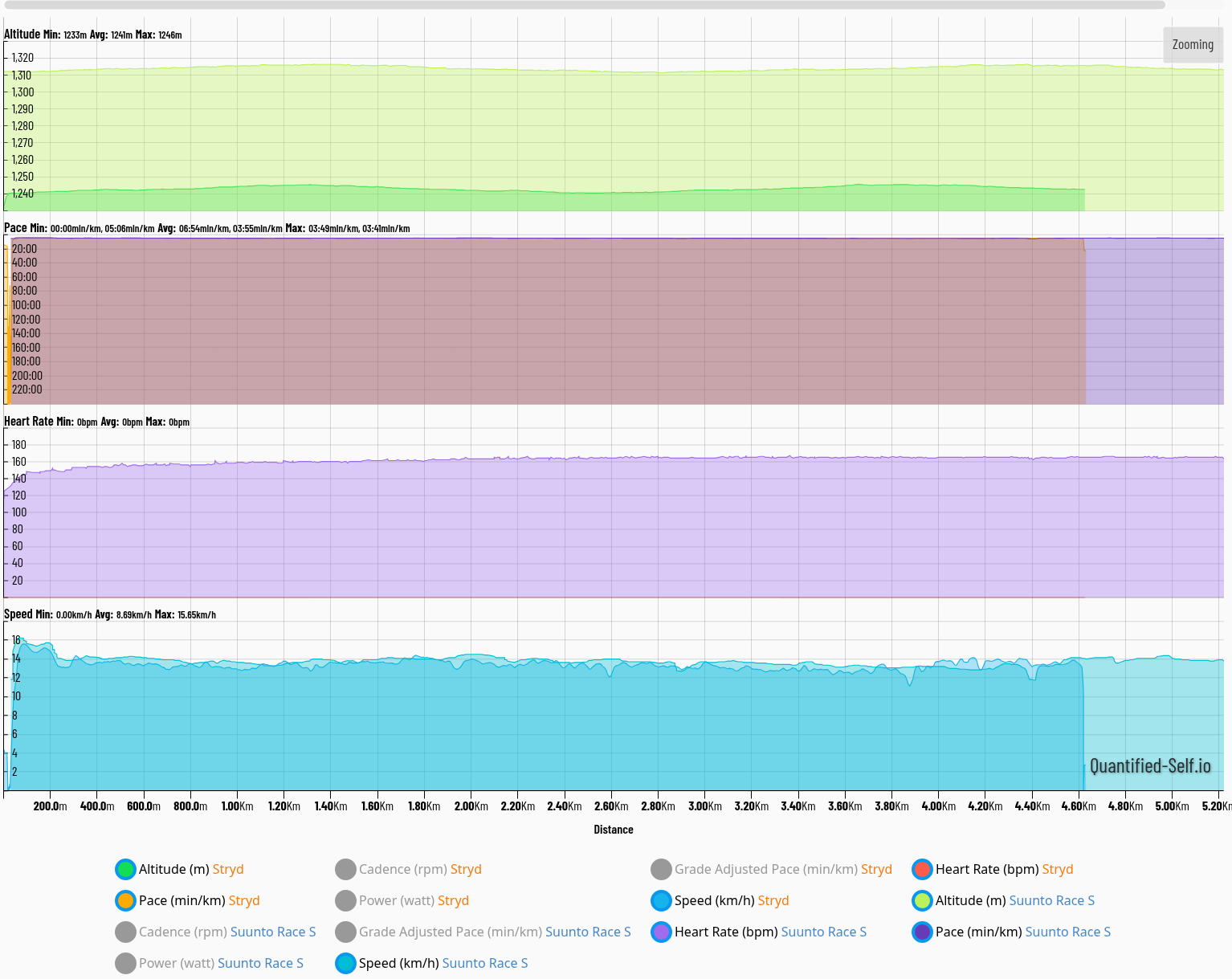
Hmm. Here’s the 5k race that alerted me to this issue. Interesting Suunto had a significantly higher elevation estimation than Stryd.
Suunto Race S / 9 Baro / Ambit 3 Peak / Observer
Suunto SHRB2 / Polar H10 / Verity Sense / OH1
Stryd Duo / Wind
r/suunto mod -
@atoponce that is ok. Stryd does not know refs
-
This post is deleted!







Hello! It looks like you're interested in this conversation, but you don't have an account yet.
Getting fed up of having to scroll through the same posts each visit? When you register for an account, you'll always come back to exactly where you were before, and choose to be notified of new replies (either via email, or push notification). You'll also be able to save bookmarks and upvote posts to show your appreciation to other community members.
With your input, this post could be even better 💗
Register Login