Live location S+ app
-
@Nikolai-Simonov Sad too hear that, hope there will be a solution some day.
-
@egika unfortunately, yes. however, as a workaround, the latest version (still in appstore review) adds a restore session feature.
so briefly
you will be able to turn off live.τ for a minute, sync with the suunto app (to update a route or something), and then turn live.τ back on, the app will let you continue your session without interruption.it’s kinda hacky and not ux friendly solution, but it could works for non frequent things like an route update.
-
2 2b2bff referenced this topic on
-
Hi everyone!
I want to make the development process and feature planning a bit more transparent for those interested. I also want to ensure the product solves real user problems, so I’ve decided to try launching a public feature request board for the project. - https://athletica.userjot.com
I think this approach will bring more clarity from my side and help me better understand actual needs. So please, jump in, vote for features, submit your own feature/bug requests, and feel free to share the link with anyone else who might be interested!
P.S. first time using userjot, hope it works smooth.
-
Has anyone measured the battery drain with live tracking? I’ve noticed it’s consuming about 3% per hour.
-
@Antoine I had an idea to measure this, but haven’t gotten around to it yet.
Honestly, measuring power consumption properly is not as simple as it looks. Battery percentage is a very subjective metric, especially just on-eye observation.
To do it right, we would need to use a multimeter and run controlled A/B tests (baseline vs. tracking in background/UI) across different devices multiple times.
That’s the only way to get real consumption milliamp numbers instead of just rough estimates.
But 3% per hour looks great for continuous live tracking.
-
@Nikolai-Simonov said in Live location S+ app:
@Antoine I had an idea to measure this, but haven’t gotten around to it yet.
Honestly, measuring power consumption properly is not as simple as it looks. Battery percentage is a very subjective metric, especially just on-eye observation.
To do it right, we would need to use a multimeter and run controlled A/B tests (baseline vs. tracking in background/UI) across different devices multiple times.
That’s the only way to get real consumption milliamp numbers instead of just rough estimates.
But 3% per hour looks great for continuous live tracking.
@nikolai-simonov : thanks for aswer.
Of course. It wasn’t a criticism. I just wanted to get a rough idea of the battery drain on the Suunto Vertical. My measurement isn’t super precise, but I’m usually at around 1.6% per hour during an activity (100% ≈ 65h). With the SuuntoPlus Live Tracking app enabled, it’s around 3%, but i just want to confim that (or not). My goal is simply to estimate the overall battery life of my suunto vertical 1 for a long race while using live tracking. -
Hey everyone!
A couple of exciting updates are now live for those who enjoy following athletes via the web version.
Here is what’s new:
Smoother camera tracking: The camera following modes have been significantly improved - they now work seamlessly without any jerky movements. This is especially noticeable in the “dronie” view, where the movement physics have been tweaked to “realistically” simulate a flying drone.
Camera switcher: The camera mode switcher has also been refreshed to make it cleaner.
3D character: A useful… or at least a very fun new feature has been added! Instead of a simple plug/arrow on the map, it is now possible to switch to a running 3D character. (3D button in the right-bottom corner)
A quick heads-up about the 3D character:
Right now, it’s a basic stock model and it only knows how to run. So don’t be surprised if an athlete is speeding along on a bike while their character still running. There are plans to make these avatars much more interesting and customizable in the future… now just try it out.Of course would be great to hear your or your spectator thoughts!
Suunto Race 2 Ti
Suunto Race
Suunto 9 BaroSuunto Aqua
Suunto Wings -
@Nikolai-Simonov hey i use the android Version 1.0.12 ext
I had the message today NOT CONNECT 99
i cannot update this Version at Google Play Store. Can you Help me?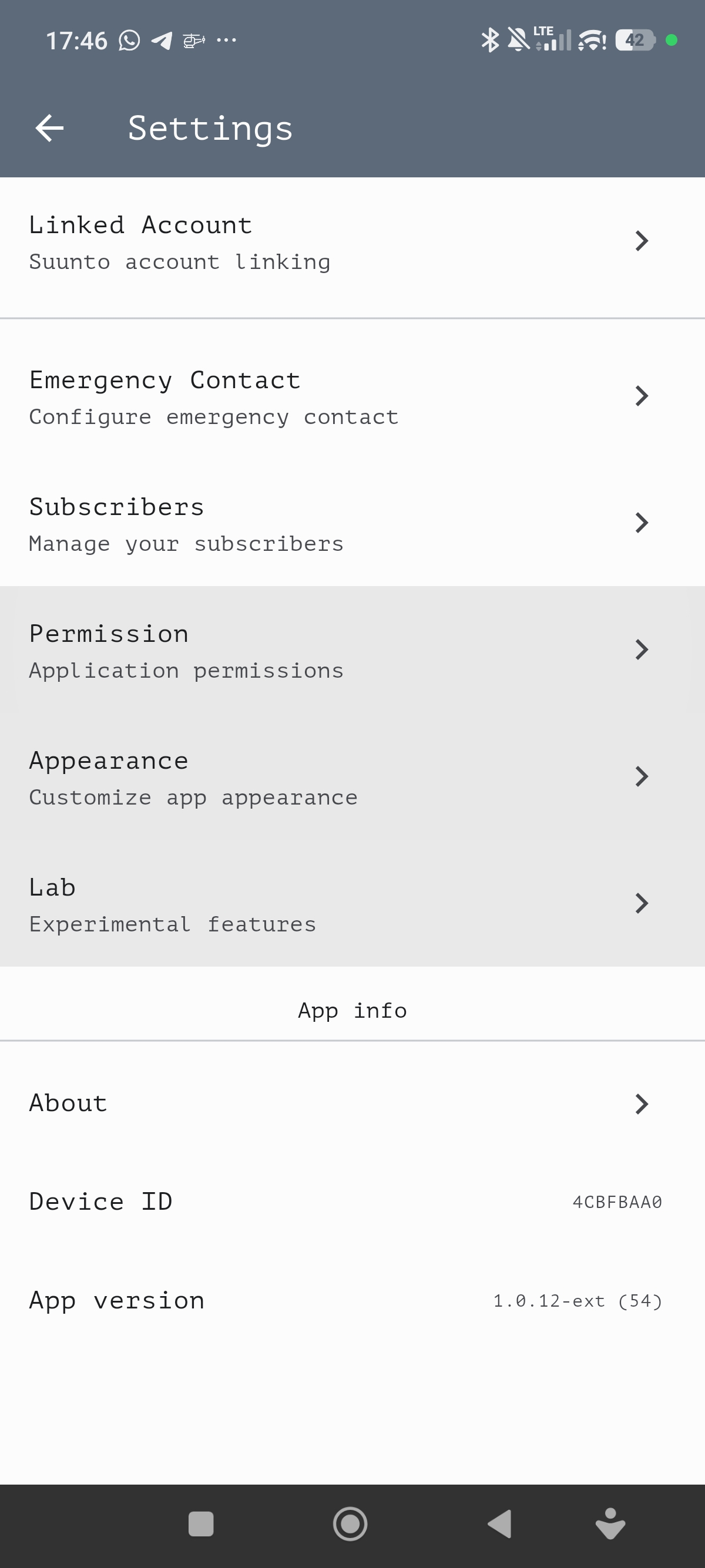
-
Hey @gipfelkind !
there are two ways to update non google play version:
there should be 1.0.13 (77)
1.0.13+ brings signaficant improvement to reconnection handle, so hope it solve 99 problem!
-
Hey everyone!
Glad to announce that Live Groups is finally in the early preview stage, and you can try it out right now.
You don’t even need the latest version to get started. Group setup can be done entirely through the web interface.
Here is all you need to do:
- Connect your Suunto account in the app.
- Confirm your email via your web profile (don’t worry, I won’t send any spam).
- Create a group and manually add your partners.
You can also invite people via an invite link, but that’s currently only available in the TestFlight version.
You able to add to group any user with linked Suunto accountThe link to watch the group live will look like this:
live.athletica.one/live/+group-nameI’ve recorded a short walkthrough video to show how it all works:
https://drive.proton.me/urls/8RA2GZJHFC#3SfMbzrSV8sRAnd quick demo how it looks for spectators:
https://drive.proton.me/urls/0NXMP4BV1R#zxaE0CLPdcwhSince this feature is in early access, I would be REALLY grateful for any feedback! Let me know how it works for you or your club.
-
@Nikolai-Simonov Have you thought about other datasources for the livetracking app. When it comes to groups, my first thought is - how to add that G. users to our group.
Further on my last ride I had to re-route on the watch during recording an activity. How can this be achieved in the moment? I couldn’t work it out without loosing the live track and stopping the activity to reconnect the watch to the suunto app. So I did just switch to directly back to start and let me route further with komoot and google maps.
-
@Ecki-D.
Regarding other ecosystems: Yes, expanding to users from other ecosystems is definitely in our plans for future growth. There is a lot to investigate regarding how best to implement this. One idea we are considering is a “guest account” feature that would allow users to join a group using just their phone’s GPS on demand. It’s one of directions, but there are still many details to work out before we can make it happen.
Regarding re-routing during an activity:
If I understand correctly, you want to maintain your live tracking session even if you need to stop an activity to adjust your route mid-workout.So, here is how the system currently works: if you completely end an activity on your watch, it sends a “stop” message, which tells our service the session is finished. However, if the connection is simply lost without that “stop” signal, the service keeps waiting for new data until a timeout occurs. Even if the service on the phone is turned off during this time, there will be a “stalled” session in the app. If you start the app again, it should ask you whether you want to continue the previous session or start a new one. Because this involves several edge cases, it hasn’t been exhaustively tested, but it should work.
As a workaround for your specific situation, you could try this:
- During your activity, hold down the bottom button to enter the settings.
- Go to SuuntoPlus and turn off live tracking. (It would looks like a dropped connection for phone).
- Stop activity
- Set up your new route.
- Once you are ready, re-enable live tracking as usual.
- The live session should then pick up right where it left off!
So, hope it helps! And let me know if it works for you!
Suunto Race 2 Ti
Suunto Race
Suunto 9 BaroSuunto Aqua
Suunto Wings -
While we wait for the app stores to approve version 1.0.14, I want to share an early preview of a new feature I think you’ll find useful.
Introducing Sensor Bridge! or sensor forwarding, decide later…
You can use this during indoor sessions to share your heart rate, cadence, and power directly to apps like MyWhoosh or Zwift, or simply broadcast your HR to your bike computer, or other Suunto watch…
Here is a quick video showing it in action: https://drive.proton.me/urls/STJ4XA016R#DVBaMPzj9cLt
I also prepared an early Android build so you can try it yourself: https://artifact.fra1.cdn.digitaloceanspaces.com/live-t/apk/sensor-forward/live-t.apk
Please give it a run and let me know if it works for you!
I will release the iOS TestFlight build later this week.
Well…
To try this out in the Android build, simply follow these steps:
Go to Settings -> Lab and turn Sensor Forwarding to ON.
Start the service and connect your watch as usual.
Once your watch connects, you can pair your other device to the sensor.
Look for a Bluetooth device named SF-ATHL. It will broadcast your HR, Power, and Cadence/Speed data.
-
First of all : THANK for this app. I love it (great design too :))
Small question : i try to log me https://live.athletica.one/profile and link it with the app. It said : Open the Live.τ app on your phone and scan this QR code. But there is no possibility on the app to scan the QR Code. When i open the camera on my phone (app already open), i’m blocked on the account page. If i close the app and scan the QR Code, the app doesn’t open.
I’m on iOS (and I’m using Safari for the web).
Thanks!
Best
-
@Nikolai-Simonov Yeah I think it works to draw a new route and sync it to the watch without stopping the activity.
- Generate new Route on Suunto App
- Stop Livetracking in Suunto Plus
- Restart Suunto App (iPhone)
- Add Route to watch - this sync works will still in activtiy so you don’t have to stop it
- Choose new route on watch
- Enable livetracking in Suunto Plus
- Connect it with the Livetracking app.
-
@Heyhoheyho Oh! Thanx for point out! Looks like i broke iOS deeplinks in the latest builds


Will fix in the next release.
-
It looks like the application can also download offline maps, but how do we actually use this feature?

-
Yep, it can sound odd to have offline maps for a live tracking app (since that means you probably should be online).
It’s not a game-changer feature, but it can still be really helpful for things like:
-
Reducing traffic and battery usage: Transmitting a live data package is fast even on a low-end connection, but downloading map tiles requires a much broader channel + battery consumption could be increased especially on bad network condition. Pre-downloading maps just helps free up your network channel so it doesn’t struggle with loading graphics.
-
Offline navigation: Sometimes your network goes offline, but your watch GPS is still fine. In those cases, it could be helpful to use the map on your larger smartphone screen to navigate, or looking around.
-
-
@Nikolai-Simonov If this feature can also help reduce the phone’s battery consumption, that would be amazing. Sometimes when we go deep into the forest, the phone keeps trying to search for a signal, which can drain the battery faster.
I really like this feature and I hope it continues to improve. Keep up the great work with the development!

-
Hello,
I’ve noticed that running a guided route simultaneously with the Suunto+ Live Tracking feature triggers frequent “off-route” alerts, even when I’m on the right path.





Hello! It looks like you're interested in this conversation, but you don't have an account yet.
Getting fed up of having to scroll through the same posts each visit? When you register for an account, you'll always come back to exactly where you were before, and choose to be notified of new replies (either via email, or push notification). You'll also be able to save bookmarks and upvote posts to show your appreciation to other community members.
With your input, this post could be even better 💗
Register Login