Wahoo Kickr Core 2 speed and distance
-
@raven On my run this morning, I realized a simple test could be starting the standard cycling sport mode and disabling GPS to see if it collected speed from the trainer. The theory being that the indoor cycling mode is specifically ignoring it. But with GPS disabled on the standard cycling mode, no speed was recorded.
So at this point, it seems the best way forward would be to record the activity with the Wahoo mobile app, which does record speed, then use the Suunto API to import the activity, given that the Suunto mobile app doesn’t support importing FIT files directly. Worth a test tonight.
-
@atoponce said in Wahoo Kickr Core 2 speed and distance:
@raven On my run this morning, I realized a simple test could be starting the standard cycling sport mode and disabling GPS to see if it collected speed from the trainer. The theory being that the indoor cycling mode is specifically ignoring it. But with GPS disabled on the standard cycling mode, no speed was recorded.
So at this point, it seems the best way forward would be to record the activity with the Wahoo mobile app, which does record speed, then use the Suunto API to import the activity, given that the Suunto mobile app doesn’t support importing FIT files directly. Worth a test tonight.
When I got my Race S last year, I used the app HealthFit to import some older activities recorded by the Apple Watch, basically “filling things out” to make the start of year 2025. However it didn’t seem to do all the things that would be done if these had been native Suunto activities. Right now I can go to calendar view and see back to Jan 2025, but if I go to Training Zone, my CTL/ATL/TSB graphs are “wonky” until after the point I started using the watch.
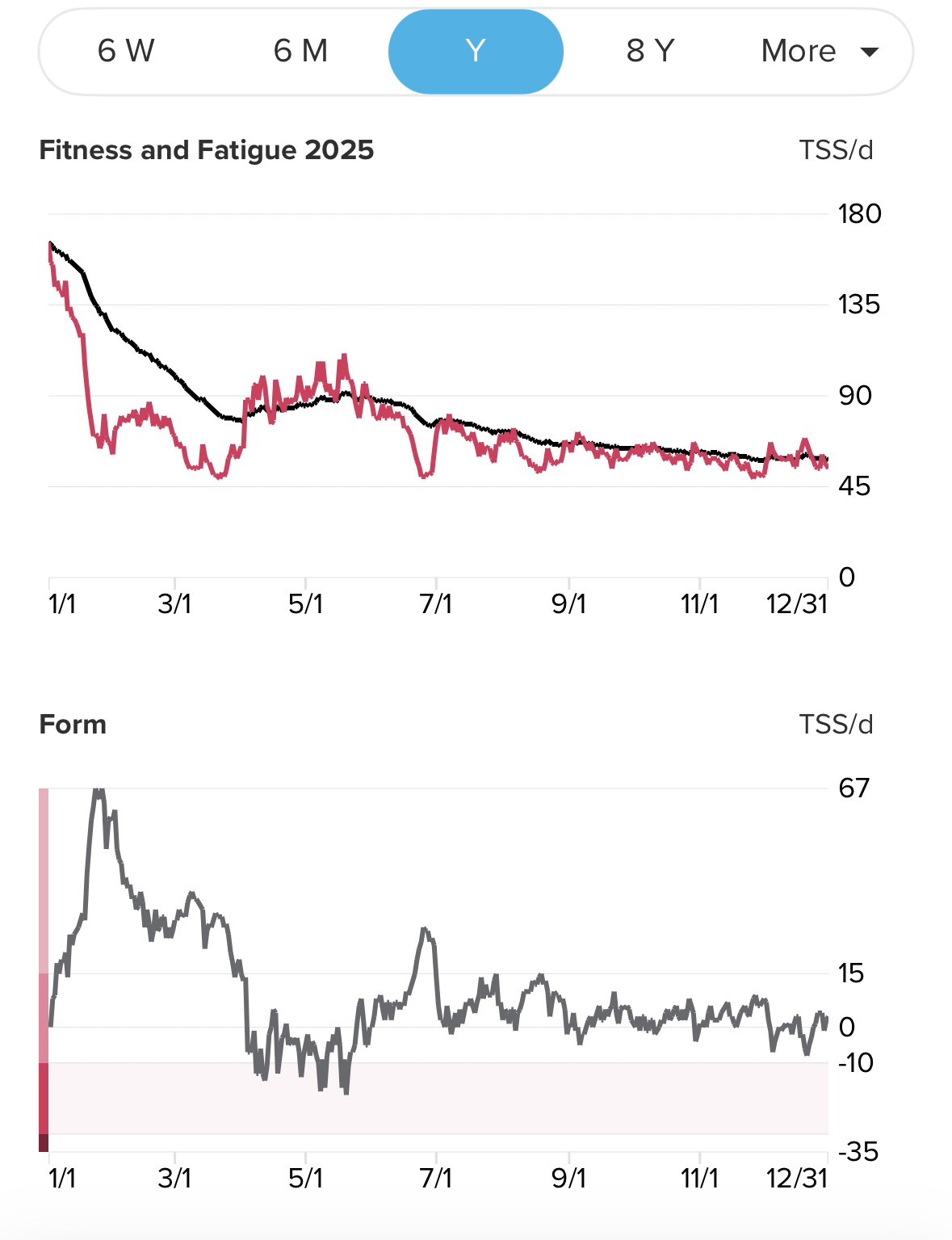
Perhaps I did something wrong, but this experienced convinced me of something I’ve learned with other ecosystems — companies prefer sessions to be recorded with them whenever possible. For Apple, any session recorded by a third-party makes the “Active Calories” and “Total Calories” the same value, whereas with the Apple Watch they differ, with Total including BMR while Active does not. Imports to Garmin might not update their load and recovery metrics. I don’t know the extent to how Suunto treats “non-native” sessions, but my instinct is to try to avoid that.
I assume your Core 2 can send two distinct signals? If so, then my recommendation is to have one go to Suunto watch and the other to Wahoo app or whatever, then edit the “Distance” field on the Suunto session to match your app.
However, my perspective may be a bit skewed as I don’t do all my analysis on Suunto. I use the site intervals.icu as I can break out my intervals for running, cycling, and most importantly rowing. For my indoor rowing I want to look at my power (watts) and cadence (rpm) data, and Suunto cannot connect to rowing machines at all so I can’t get power there, and it guesses at cadence rather than reads it from the machine.
Here’s an example, a short ten minute warm up session I did today:

Notice I have two pushes of one minute each where I average 171w and 177w. At the timestamp I’ve reached my HR peak of 149bpm.
Meanwhile, I dual record with Suunto, and it gives me less info, only a HR graph and a fake “speed” graph that uses the reported distance (Suunto guess at it and always overestimates this but I edit it to match) and no ability to see power at all, much less get defined intervals.
As I need to use intervals.icu anyway for these sort of things, my motivation with the Suunto app is to get as much relevant data to it as I can natively. So I wanted so the Wahoo import you’re proposing. Even at intervals.icu I don’t show the “speed” graph in my analysis as I don’t see how it can provide me with anything actionable. The session I showed above from Wahoo, here’s how it looks at intervals.icu:

I could turn on a speed graph, but what purpose would it serve me?
-
@raven said in Wahoo Kickr Core 2 speed and distance:
@Dwartus Ah, using it for “wear” info makes sense. With my Stages SB20 bike, I have a belt drive and it’s pretty low maintenance. Could you use simple cumulative elapsed time for this? Either just “do X work after Y hours,” or convert hours to whatever you think your “average speed” is? Or even use cumulative kilojoules?
As I noted above, if you also use an app that gives you a distance metric, then you can try adding/editing that into the final session results. You can do this in the app post-session.
Hello,
Usually, my Home Trainer Wahoo activities are recorded by Wahoo Roam computer. Where I can get the power, cadence, distance.
Also, I used the Suunto watch to record the activities only to track my recovery, ressources, and so on …The activities are synchronised with an external platform named “Nolio” (I do like this for different personnal reason, one of them is the case where I am cycling outside without my watch…).
Now, I am in an intermediate state without any Wahoo computer (due to the new one not yet buy), therefore only the watch can record the Home Trainer Wahoo activities.
As I don’t want to use Zwift data for the reason you mentionned (elevation, gradient, …), today I have no cadence and distance data.Also, I don’t want to do a relation with cycling time, due to time in a freewheel outside …-> mixed information, sorry. Because In fact the distance still increase
My only question here is to now “How the watch can record distance (also cadence if possible) from the Wahoo Kickr Core” ?
No other alternative question raisedThanks a lot for your support
-
@Dwartus said in Wahoo Kickr Core 2 speed and distance:
My only question here is to now “How the watch can record distance (also cadence if possible) from the Wahoo Kickr Core” ?
No other alternative question raisedThanks a lot for your support
I don’t think it can do this by connecting to the Core. You can manually adjust distance in the session record though. You’re not missing a setting; it simply does not have the ability you desire.
(This leads to a question of “what distance to use” if you’re using Zwift and don’t “trust” that distance. In that case, what I might do is use Wahoo app and record a single ride of a simple distance, say 10km. I’d then find additional data to “marry” that with, likely total revolutions (average cadence * elapsed minutes). Let’s say you did this in 20m, for an average speed of 30kmh, and assuming average cadence of 80rpm that’s (80 * 20) = 1,600 revolutions. Then use that for Zwift conversations; every 1600 revolutions = 10km, not whatever Zwift says, and editing the Suunto record appropriately.)
-
Another thing one might try is buying a separate cadence sensor.
https://us.suunto.com/pages/suunto-race-user-guide
Note under “Pairing pods and sensors” the Race lists “power POD” and “bike POD” as two different things. Power POD uses CPS (Cycling Power Service) but bike POD uses CSCS (Cycling Speed and Cadence Serivce). You’re already connecting the Wahoo Core as a power POD to get the power data, and unfortunately it is not getting “speed” data from it.
Buy a separate cadence sensor and connect that as a “bike POD” then the Race will have that additional source of data.
-
@Dwartus said in Wahoo Kickr Core 2 speed and distance:
Also, I don’t want to do a relation with cycling time, due to time in a freewheel outside …
I realize you likely don’t care about this train of thought, but I’m recording it in case anyone else is interested. You previously stated the goal was to use distance as a way to know when to do cycling maintenance. This goal has different criteria than measuring one’s performance. You want a decent estimate of when to do things and don’t want to “wait too late” and have something break.
With this in mind, I still think using “elapsed time” works, even though with freewheeling some of that time doesn’t have the bike operating in the same way as when pedaling. As long as your overall “maintenance target” isn’t too high such that components break, swapping something a little early won’t hurt anyone. Let’s say you use “100 hours” just to have an easy, simple target. Let’s define this as “if all 100 hours is riding at FTP in constant pedaling motion, then we need to do X, Y, and Z for safety.”
If you’re adding up your hours and you get to 100, and in actuality only 85.6 hours was in that “stress level” with the rest of the time freewheeling, then so what if you performed your maintenance early?
I have a system of retiring my running shoes, which uses both distance (as I run almost exclusively outdoors) and time elapsed, as either condition can work; it’s also partially based on “feel” of the run over time in the same shoes. If I only used elapsed time it would be fine, as long as I retired the shoes at a proper time. As it is, recommendations for retiring shoes have a big range (say 450km to 800km) and different people may go longer or shorter before switching them out. Whether they use distance, time, or a combination matters less than having a good system.
-
@raven said in Wahoo Kickr Core 2 speed and distance:
Another thing one might try is buying a separate cadence sensor.
https://us.suunto.com/pages/suunto-race-user-guide
Note under “Pairing pods and sensors” the Race lists “power POD” and “bike POD” as two different things. Power POD uses CPS (Cycling Power Service) but bike POD uses CSCS (Cycling Speed and Cadence Serivce). You’re already connecting the Wahoo Core as a power POD to get the power data, and unfortunately it is not getting “speed” data from it.
Buy a separate cadence sensor and connect that as a “bike POD” then the Race will have that additional source of data.
Thank you for your proposal, for that topic when I run outside with my bike, I add a Suunto “Bike POD” which provide to the watch cadence and speed.
Also, I remember that during the run the average speed and speed is given by the “Bike POD”, but at the end of the actvity, GPS data are used to give average speed and distance.Nevertheless, you understood that I didn’t connect/used this Suunto “Bike POD” for Home Trainer activity (also save “Bike POD” battery because unmount).
Thanks
-
@raven said in Wahoo Kickr Core 2 speed and distance:
@Dwartus said in Wahoo Kickr Core 2 speed and distance:
Also, I don’t want to do a relation with cycling time, due to time in a freewheel outside …
I realize you likely don’t care about this train of thought, but I’m recording it in case anyone else is interested. You previously stated the goal was to use distance as a way to know when to do cycling maintenance. This goal has different criteria than measuring one’s performance. You want a decent estimate of when to do things and don’t want to “wait too late” and have something break.
With this in mind, I still think using “elapsed time” works, even though with freewheeling some of that time doesn’t have the bike operating in the same way as when pedaling. As long as your overall “maintenance target” isn’t too high such that components break, swapping something a little early won’t hurt anyone. Let’s say you use “100 hours” just to have an easy, simple target. Let’s define this as “if all 100 hours is riding at FTP in constant pedaling motion, then we need to do X, Y, and Z for safety.”
If you’re adding up your hours and you get to 100, and in actuality only 85.6 hours was in that “stress level” with the rest of the time freewheeling, then so what if you performed your maintenance early?
I have a system of retiring my running shoes, which uses both distance (as I run almost exclusively outdoors) and time elapsed, as either condition can work; it’s also partially based on “feel” of the run over time in the same shoes. If I only used elapsed time it would be fine, as long as I retired the shoes at a proper time. As it is, recommendations for retiring shoes have a big range (say 450km to 800km) and different people may go longer or shorter before switching them out. Whether they use distance, time, or a combination matters less than having a good system.
I apologize for that sentence. It was a wrong information. I fixed it in my original message.
-
@Dwartus said in Wahoo Kickr Core 2 speed and distance:
I apologize for that sentence. It was a wrong information. I fixed it in my original message.
No worries. I’m sorry it seems Suunto cannot easily do what you want. I’ve added to my first message with what I might do in your case.
Overall, as I see it, these are your options:
- Don’t use speed / distance for what you want, but another criteria like elapsed time or work energy in kJ.
- Have a “conversion” system to take another criteria to make it your distance.
- Only use apps that have “trusted distance” (i.e. they think you’re in a velodrome, and not trying to “game” speed/distance). Basically, use Wahoo app and don’t use Zwift.
With options 2 and 3, you’ll edit the Suunto record to put in distance and it should use that to determine average speed.
- Buy a speed/cadence sensor and connect it as a “Bike POD” while keeping the Core as a “Power POD”.
This should do what you want, but you need to spend more money to do this. For me, I don’t think that’s worth the effort, but this theoretically resolves your issue.
-
@Dwartus said in Wahoo Kickr Core 2 speed and distance:
Thank you for your proposal, for that topic when I run outside with my bike, I add a Suunto “Bike POD” which provide to the watch cadence ans speed.
Also, I remember that during the run the average speed and speed is given by the “Bike POD”, but at the end of the actvity, GPS data are used to give average speed and distance.Nevertheless, you understood that I didn’t connect/used this Suunto “Bike POD” for Home Trainer activity (also save “Bike POD” battery because unmount).
Thanks
Oops, I missed this in my last reply. If you already have a speed/cadence sensor you use outdoors, then yes try that as an additional sensor for your indoor rides and it should work.
-
@raven said in Wahoo Kickr Core 2 speed and distance:
@Dwartus said in Wahoo Kickr Core 2 speed and distance:
Thank you for your proposal, for that topic when I run outside with my bike, I add a Suunto “Bike POD” which provide to the watch cadence ans speed.
Also, I remember that during the run the average speed and speed is given by the “Bike POD”, but at the end of the actvity, GPS data are used to give average speed and distance.Nevertheless, you understood that I didn’t connect/used this Suunto “Bike POD” for Home Trainer activity (also save “Bike POD” battery because unmount).
Thanks
Oops, I missed this in my last reply. If you already have a speed/cadence sensor you use outdoors, then yes try that as an additional sensor for your indoor rides and it should work.
Yes !
Thanks for the hint, I didn’t think about that because actually not installed because Home Trainer periodAs a conclusion, the Suunto watch Race/Race S (perhaps other models) are not able to catch all the data broadcasted by Wahoo trainer, only power meter can be read (but not as a Suunto “Power POD” because not possible to calibrate it), it’s too bad

Thank you