[Question] No stupid questions - ask anything here
-
@SuuntoPartnerTeam
Hi, one question regarding date calculations. I saw in the Suunto Reference that Date is not supported in the standard built in objects.
So I need to do all date calculations based on seconds? Is this true?Thanks
-
@suuntopartnerteam I’m still a little bit confused about the
setText()behavior.For example
I create two template files, both with a<div id="testid" ....>section.
In the main.jsevaluate()function I set the textsetText('#testid', 'testvalue');This put’s the text in th div-section. If the text is changed, the div-section updates accordingly.
However, when I change the template to the second tempate (and call
unload('_cm');) the div-section on the new template, which has the same id, isn’t updated at all.Do you have any advise on how to handle this?
-
-
As with web development, ids are meant to uniquely determine an element. You shouldn’t use the same id for different elements. This is true even when those elements are inside different HTML templates, if both templates may be active at some point during the runtime of the app
-
You cannot change a template that is not active. The uiViewSet might be something worth looking at, depending on what you’re trying to achieve
-
-
Hey @hitriy .
You can fetch data from any device which supports being in peripheral mode – even a laptop. In your case, you would need to write an application for your phone which communicates with the watch using Bluetooth Low Energy.
-
Hi @harry08 .
That is right, you can only get precise current time or the day of the week. The rest needs to be calculated manually
-
Is it possible to get the Suunto Plus Guide a user has selected for the current workout? The goal would to the show a graphic representation (for example bar chart) to show all intervals of the workout and vertical ruler showing the current point in the workout.
-
@SuuntoPartnerTeam said in [Question] No stupid questions - ask anything here:
The uiViewSet might be something worth looking at
Thanks for the hint! This worked for my case.
-
Awesome, works fine for me. Worth buying new watches then!
-
Connect watch to macbook - VSCode
Should this work?
I have a older (rather old
 macbook running monterey. I couldn’t connect the watch to deploy my app on it.
Maybe it failed cause the watch hasn’t been properly disconnected from the phone see my other thread over here: -
Does the watches JS-runtime support WASM by any chance?
-
Hello, can anyone help, I am trying to display Graph for HearthRate.
I am using this code for displaying graph, it is taken from one of examples just modified input path for current hearth rate:
<graph style="position:absolute;
              left:0px; top:0px; width:100%; height:100%;
              box-sizing: border-box;
              padding-right:90px; padding-top:60px; padding-bottom:60px;
              font-size:21px;"
       valueFormat="HeartRate_Fourdigits"
       type="line"
       grid="three lines"
       inputType="subscribe"
       input="/Activity/Move/-1/HeartRate/Current"
       min="0.6666666667"
       max="3"
       slack="0.1"
/>
and it works fine in simulator and I see this:
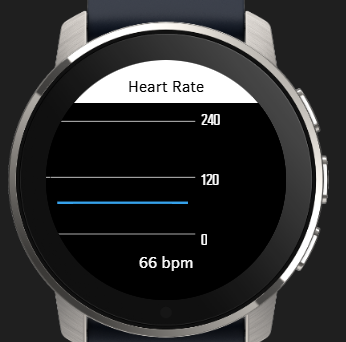
but when I upload app to watch (Suunto 5 or Race 2), than there is no graph line for Heart Rate:
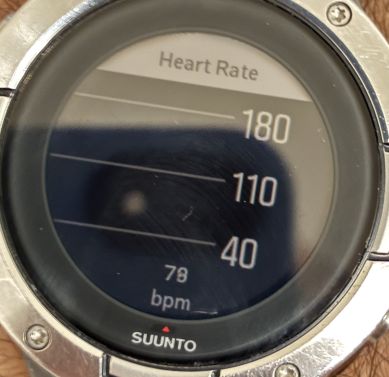
Suunto Ambit 2 > Suunto 5 > Suunto Race 2
-
guys I need help, anyone know how to use the crown/middle button to scroll to the next ui?
-
@ook i would try “onEvent(input, output, eventId)” and display value of eventId on screen and than see if crown produce some events.
-
@Tomas5 thanks Tomas I tried your method, it just return 0 to me, but i find out if ur ui is big enough it will able to scroll down,dont have to do anything.
-
Hello,
What I want to do is quite simple but I do lack experience with JS, and it has been a long time since I developed in HTML.
I would appreciate your help :). I want to override down button press to make a lap type 24, but only if activity is ongoing. If it is paused I want the default behavior (stop activity).
In my html:
<userInput>
      <pushButton name="down" onClick="$.put('/Zapp/{zapp_index}/Event', 123, null, 'int32');" />
</userInput>
In my js:
function onEvent(input, output, eventId) {
  if (eventId == 123) {
    // Down button was pressed
    $.put('Activity/Trigger', 24);
  }
}
I was thinking of conditioning the HTML onClick but do not really know how to access necessary variables, etc. I have tried a few things but I am lost.
-
@Thibault-B. There is an example in the examples collection. Essentially have a global variable that is set in the start-handler and unset in the stop-handler and then handle the condition in you event
-
@Unpaired8373 Not sure to get what you mean.
function onEvent(input, output, eventId) {
  if (eventId == 123 && output.isPaused == 0) {
    // Down button was pressed
    $.put('Activity/Trigger', 24);
  }
}
It is not triggering the lap but it is not doing anything else and I wanted to default to initial behavior (so I didn’t want an explicit call to stop, which seems anyway not available?).
-
I think the issue is that I override the onClick action, so I should keep it empty if in pause. But I do not know how to do it.
-
I’m working on an app for speedsurfers :
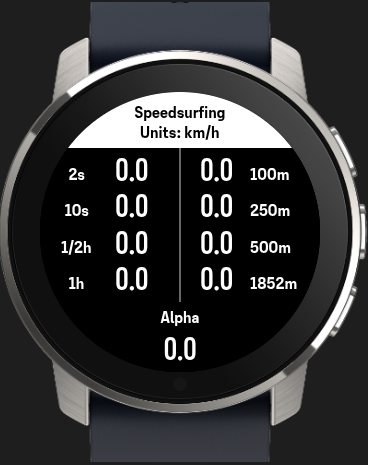
I struggle a little bit with the Alpha category.
According to the gps-speedsurfing rules the Alpha category is the speed over 500m, including a gybe (180 degree turn), and the start and endpoint needs to be within 50m of eachother.To determine if there was a gybe, I thought about recording the direction for each second, but I noticed that isn’t available as parameter.
So the only other option I see is derive the direction from the coordinates, but that includes some calculations.Any other ideas?
-
Is it expected that even an example app crashes the watch with a
Syntax Error?After having my own app crash - and almost brick the watch or at least having it perform a fault recovery for a couple of minutes - I thought I reduce the app to a bare minimum and work from there but even that crashes the watch. I then copied the
Dynamic Iconsexample but still get the crash log below:#2670816 22.03.2026 18:43:43 : ERR UI_FRAMEWORK : JS:0x8258be29:SyntaxError: 5 #2670817 22.03.2026 18:43:43 : ERR APPLICATION : Thread state: name:ui #2670818 22.03.2026 18:43:43 : ERR APPLICATION : CtxDog n:ui s:0 pc:0 lr:0 #2670819 22.03.2026 18:43:43 : ERR APPLICATION : CtxDog n:UI s:1 pc:78e9c lr:81ab1 #2670820 22.03.2026 18:43:43 : ERR APPLICATION : CtxDog n:ID s:1 pc:9b6d6 lr:84a15 #2670821 22.03.2026 18:43:43 : ERR APPLICATION : CtxDog n:BL s:2 pc:6c324 lr:6c15b #2670822 22.03.2026 18:43:43 : ERR APPLICATION : CtxDog n:nV s:2 pc:6c324 lr:6c15b #2670823 22.03.2026 18:43:43 : ERR APPLICATION : CtxDog n:Nt s:2 pc:6c324 lr:6c15b #2670824 22.03.2026 18:43:43 : ERR APPLICATION : CtxDog n:WI s:2 pc:6c324 lr:6c15b #2670825 22.03.2026 18:43:43 : ERR APPLICATION : CtxDog n:lo s:2 pc:84020 lr:84051 #2670826 22.03.2026 18:43:43 : ERR APPLICATION : CtxDog n:Po s:2 pc:6c324 lr:6c15b #2670827 22.03.2026 18:43:43 : ERR APPLICATION : CtxDog n:WB s:2 pc:9b6d6 lr:84a5b #2670828 22.03.2026 18:43:43 : ERR APPLICATION : CtxDog n:Ap s:2 pc:9b6d6 lr:84a5b #2670829 22.03.2026 18:43:43 : ERR APPLICATION : CtxDog n:me s:2 pc:9b6d6 lr:84a5b #2670830 22.03.2026 18:43:43 : ERR APPLICATION : CtxDog n:Tm s:2 pc:b6aca lr:84a15 #2670831 22.03.2026 18:43:43 : ERR APPLICATION : CtxDog n:Se s:2 pc:6c324 lr:6c15b #2670832 22.03.2026 18:43:43 : ERR APPLICATION : CtxDog n:hc s:2 pc:6c324 lr:6c051 #2670833 22.03.2026 18:43:43 : ERR APPLICATION : CtxDog n:DS s:2 pc:6c324 lr:6c051 #2670834 22.03.2026 18:43:43 : ERR APPLICATION : CtxDog n:us s:2 pc:6c320 lr:6c051 #2670835 22.03.2026 18:43:43 : TRC UI_FRAMEWORK : wuiDump Assert peFunctionCombiner.cpp:302 #2670836 22.03.2026 18:43:43 : EVT MAPS : Tile sz=29840, x17435, y11374, z15 #2670837 22.03.2026 18:43:43 : TRC MAPS : Req[0] result: Code=OK #2670838 22.03.2026 18:43:43 : TRC MAPS : Req[0] handle: clientID=1, handle=1153598804039951724, r #2670839 22.03.2026 18:43:43 : EVT TRAININGLAB : TLab: Input source 0 timeout #2670840 22.03.2026 18:43:43 : EVT TRAININGLAB : TLab: Active input source 3 #2670841 22.03.2026 18:43:45 : EVT EXT_FLASH : ExtFID 0xc2,0x25,0x39 #2670842 22.03.2026 18:43:45 : ERR FAULT : A302:duktapeFunctionCombiner.cpp #2670843 22.03.2026 18:43:45 : EVT BOOTLOOP : Faultcom c:fa017c01 ts:1774201322 n:1774201425As a side-note: I really like the naming of the internal code files






Hello! It looks like you're interested in this conversation, but you don't have an account yet.
Getting fed up of having to scroll through the same posts each visit? When you register for an account, you'll always come back to exactly where you were before, and choose to be notified of new replies (either via email, or push notification). You'll also be able to save bookmarks and upvote posts to show your appreciation to other community members.
With your input, this post could be even better 💗
Register Login