Suunto app Forum Suunto Community Forum
    • Recent
    • Tags
    • Popular
    • Users
    • Groups
    • Register
    • Login

    [Discussion] Share your projects

    Scheduled Pinned Locked Moved Suunto Plus Development
    discussionpeer-support
    72 Posts 28 Posters 5.9k Views 26 Watching
    Loading More Posts
    • Oldest to Newest
    • Newest to Oldest
    • Most Votes
    Reply
    • Reply as topic
    Log in to reply
    This topic has been deleted. Only users with topic management privileges can see it.
    • surfboomerangS Offline
      surfboomerang
      last edited by surfboomerang

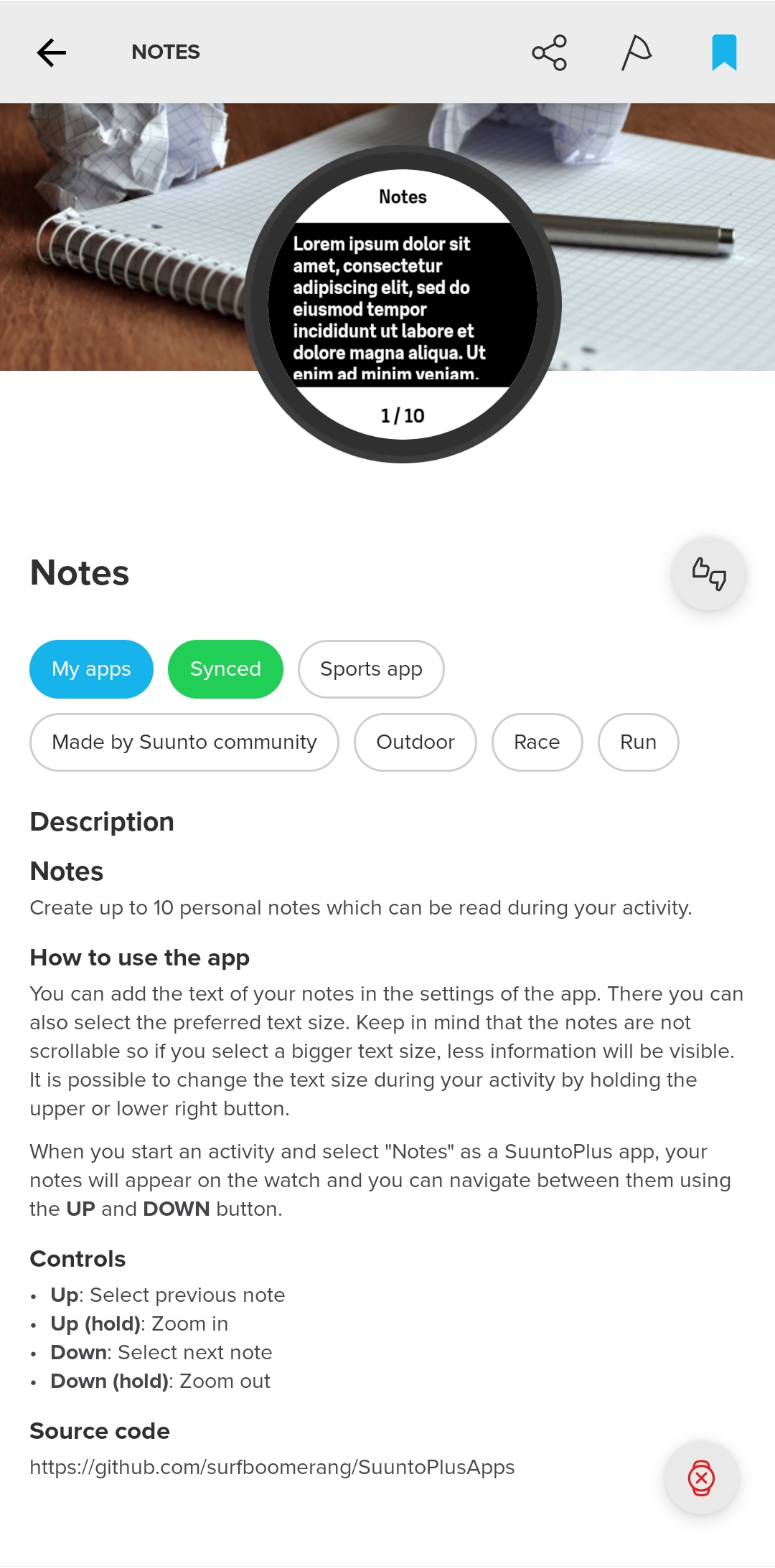
      Today my app was approved šŸ™Œ
      1000015276.jpg

      There seems to be a bug in the manifest config for some reason. The text size dropdown list is correctly populated with values from an array but when I select another value the Suunto App crashes. The SuuntoPlus app works fine however.

      Data.json

          "textSize": {
              "sizes": [
                  "Small",
                  "Medium",
                  "Large"
              ],
              "size": 1
          }
      

      Manifest.json

      {"shownName": "Text size", "path": "textSize.size", "type":"enum", "valuePath": "textSize.sizes"},
      

      Does anyone have a clue?
      Unfortunately I cannot test this in the simulator.

      Edit:
      Entering the values directly seems to work.

      {"shownName": "Text size", "path": "textSize", "type":"enum", "values": ["Small", "Medium", "Large"]},
      

      Suunto Vertical Titanium Solar
      OnePlus Nord 4

      R safariS 3 Replies Last reply Reply Quote 9
      • G Offline
        guderaber @Unpaired8373
        last edited by

        @Unpaired8373 I tried the image based implementation, but its not viable as i the image has to be baked in the source code, although it worked on the watch as well. The canvas based was working, but i still have to test some more complicated topos with a lot more objects, then i’ll try to get it approved, because otherwise i cannot not use it.

        Still have to play a bit more with UX as my app has 3 screens (selector + topo + pitch notes) and also some minor QoF improvements.

        U 1 Reply Last reply Reply Quote 0
        • R Offline
          runyx17 @surfboomerang
          last edited by

          @surfboomerang Perfect. Very useful. Thanks

          1 Reply Last reply Reply Quote 0
          • safariS Offline
            safari @surfboomerang
            last edited by safari

            @surfboomerang I think I’m mistaken… I can’t find where to add a note šŸ™‚

            Correction… the relevant part appeared after synchronization :).
            I’m testing it. Thanks.

            history:
            Suunto Vertical 2 titanium Black (new:) )
            suunto vertical solar titanium
            suunto 9 baro
            suunto ambit 3
            suunto ambit 2
            Suunto Smart Heart Rate Belt

            suunto App: apple iphone 14

            1 Reply Last reply Reply Quote 0
            • P Offline
              Pottu @Nikolai Simonov
              last edited by

              @Nikolai-Simonov, @unpaired8373
              I played around with canvas and found that you can quite easily go around the draw limit just by splitting the drawing to multiple canvas with their own build functions.

              1 Reply Last reply Reply Quote 1
              • U Offline
                Unpaired8373 @guderaber
                last edited by

                @guderaber interested in your results.

                I had some issues with the canvas and Nikolais comments made me explore the sprite-map appoach, which seems to work although giving a different set of challenges. Let’s see where this leads. Maybe a hybrid sprite+canvas approach is the solution.

                1 Reply Last reply Reply Quote 1
                • Jan KrejčƭJ Offline
                  Jan Krejčƭ @oleksandr
                  last edited by

                  @oleksandr this looks awesome šŸ˜ we definitely need more weight lifting apps

                  Suunto Vertical 1 Solar Titanium

                  O 1 Reply Last reply Reply Quote 0
                  • safariS Offline
                    safari @surfboomerang
                    last edited by

                    @surfboomerang

                    The app is generally good. I needed an app like this.
                    It reminded me of my Casio Databank from my childhood šŸ™‚
                    There are just a few issues.

                    1. It would be nice if old notes could be deleted from the watch.
                    2. Entering and editing long notes is difficult on the phone. I save them to a notepad and then copy and paste. It’s a bit impractical.
                    3. You can’t use the buttons on the watch to pause or end the exercise while on this screen. There’s fast forward/rewind and zoom in/out. You have to move to the next part.

                    Finally, it’s a great app, thank you. This should definitely be a widget. It would be great to be able to define it as a shortcut to access notes. Wishing you continued development.

                    history:
                    Suunto Vertical 2 titanium Black (new:) )
                    suunto vertical solar titanium
                    suunto 9 baro
                    suunto ambit 3
                    suunto ambit 2
                    Suunto Smart Heart Rate Belt

                    suunto App: apple iphone 14

                    surfboomerangS 1 Reply Last reply Reply Quote 1
                    • surfboomerangS Offline
                      surfboomerang @safari
                      last edited by

                      @safari said in [Discussion] Share your projects:
                      Thanks for the feedback!

                      It would be nice if old notes could be deleted from the watch.

                      I guess this could be done, but what is the usecase? You still need the Suunto App to add new note text.

                      Entering and editing long notes is difficult on the phone. I save them to a notepad and then copy and paste. It’s a bit impractical.

                      I totally agree. Unfortunately this is a limitation of the SuuntoPlus store. It only allows single line textfields. (@suuntopartnerteam, please correct me if i’m wrong)
                      It would be nice if the use of multi-line textfields is supported in the future.

                      You can’t use the buttons on the watch to pause or end the exercise while on this screen. There’s fast forward/rewind and zoom in/out. You have to move to the next part.

                      True, the buttons are mapped to actions with the notes app, this means you can’t use the buttons for the exercise options anymore.

                      Suunto Vertical Titanium Solar
                      OnePlus Nord 4

                      safariS 1 Reply Last reply Reply Quote 1
                      • safariS Offline
                        safari @surfboomerang
                        last edited by

                        @surfboomerang
                        We take notes during long-term nature walks and camping trips. For example, in area 1, contact this person. In area 3, the radio frequency changed to xxx, etc. For instance, if we delete areas 1 and 2 while in area 3, screen usage will be more efficient. These are some examples of our usage.

                        history:
                        Suunto Vertical 2 titanium Black (new:) )
                        suunto vertical solar titanium
                        suunto 9 baro
                        suunto ambit 3
                        suunto ambit 2
                        Suunto Smart Heart Rate Belt

                        suunto App: apple iphone 14

                        safariS 1 Reply Last reply Reply Quote 1
                        • H Offline
                          harry08 Bronze Member
                          last edited by

                          I am currently developing an app called Checkpoints

                          Idea:
                          Create up to 3 time checkpoints which will be shown during your activity

                          How to use the app
                          In the settings of the app up to 3 time checkpoints can be defined.
                          Each checkpoint consists of.a title and a time.
                          When starting the activity and Checkpoints is selected as a SuuntoPlus App, the checkpoints appear in their timely order with an indication how much time is left.
                          Once the time of a checkpoint is reached, the next checkpoint is displayed automatically.
                          One can navigate through all checkpoints with the Up and Down button.
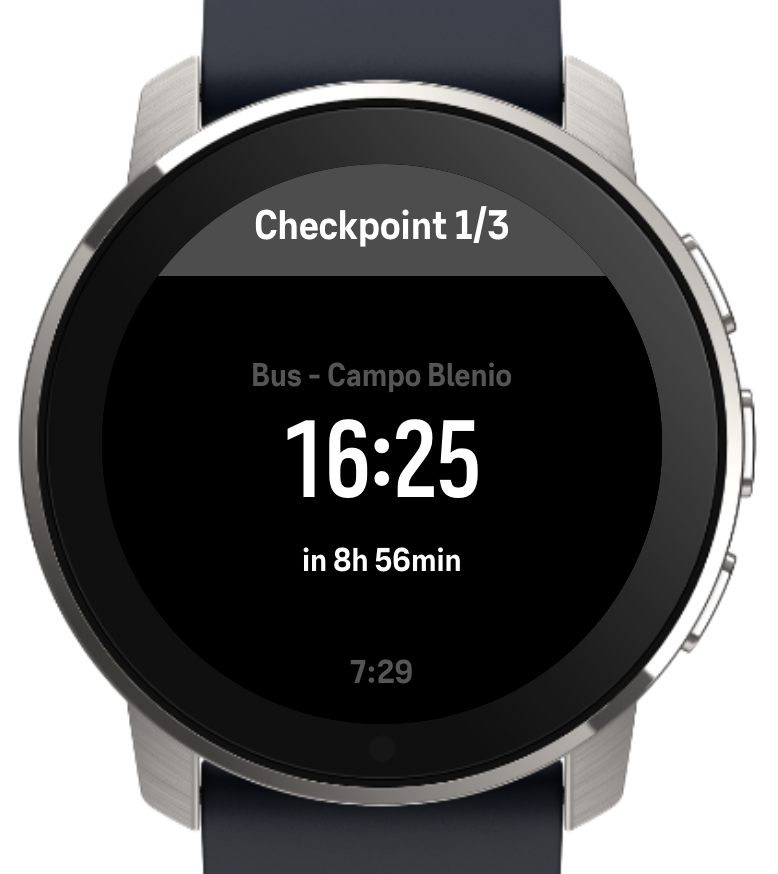
                          Screenshot Checkpoints.png

                          1 Reply Last reply Reply Quote 0
                          • O Offline
                            oleksandr @Jan Krejčƭ
                            last edited by

                            @Jan-Krejčƭ Thank you! I applied for the Partners Program, can’t wait for the response to get a chance to publish it

                            Watch: Suunto Race 2

                            1 Reply Last reply Reply Quote 0
                            • safariS Offline
                              safari @safari
                              last edited by

                              I’m encountering this situation today. The notes aren’t arriving.
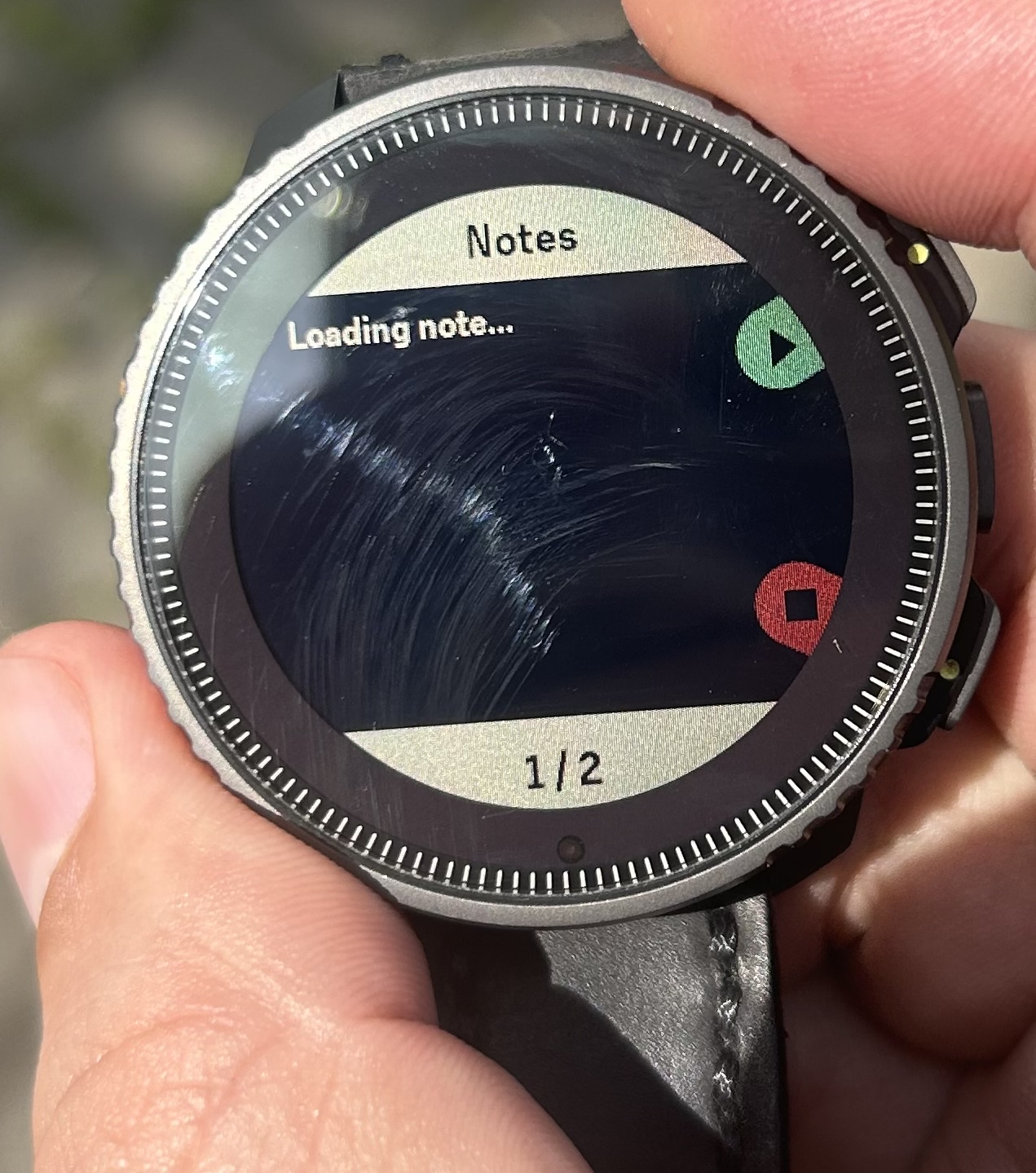
                              IMG_5761.jpeg

                              history:
                              Suunto Vertical 2 titanium Black (new:) )
                              suunto vertical solar titanium
                              suunto 9 baro
                              suunto ambit 3
                              suunto ambit 2
                              Suunto Smart Heart Rate Belt

                              suunto App: apple iphone 14

                              surfboomerangS 1 Reply Last reply Reply Quote 0
                              • surfboomerangS Offline
                                surfboomerang @safari
                                last edited by

                                @safari does the note show if you try a different text size by holding the up- or down button?

                                Suunto Vertical Titanium Solar
                                OnePlus Nord 4

                                safariS 1 Reply Last reply Reply Quote 0
                                • safariS Offline
                                  safari @surfboomerang
                                  last edited by

                                  @surfboomerang
                                  The keys weren’t responding. Here’s how I solved it:
                                  I canceled the exercise (I had just started it anyway).
                                  I resynchronized the phone and started the exercise again. It’s fixed now.

                                  history:
                                  Suunto Vertical 2 titanium Black (new:) )
                                  suunto vertical solar titanium
                                  suunto 9 baro
                                  suunto ambit 3
                                  suunto ambit 2
                                  Suunto Smart Heart Rate Belt

                                  suunto App: apple iphone 14

                                  surfboomerangS 1 Reply Last reply Reply Quote 1
                                  • surfboomerangS Offline
                                    surfboomerang @safari
                                    last edited by

                                    @safari Please let me know if you encounter other issues

                                    Suunto Vertical Titanium Solar
                                    OnePlus Nord 4

                                    1 Reply Last reply Reply Quote 1
                                    • EgikaE Offline
                                      Egika Platinum Member
                                      last edited by

                                      I am not really good at coding, but my idea would be to program an S+ for the Woo kite sensor.
                                      Maybe it’s possible to show the jump data right on the watch?
                                      How can do this?

                                      https://www.woosports.com/

                                      t6, S6, Elementum Terra, Ambit 3 Sapphire, Spartan Ultra Copper, Traverse Alpha, S7 Graphite LE, S9B Ambassador, S9P Titanium, S9PP Titanium, Vertical All Black, Race Titanium Charcoal, Race S Titanium Courtney, Run Lime, Race 2, Vertical 2 Titanium

                                      Raimo JƤrviR 1 Reply Last reply Reply Quote 0
                                      • Raimo JƤrviR Offline
                                        Raimo JƤrvi @Egika
                                        last edited by

                                        @Egika I don’t know anything about the Woo kite sensor, but I guess you would want to connect to it using BLE. You would need specification of their BLE data format to write an app for it, at least I couldn’t find any documentation for it.

                                        Pragmatic Programmer

                                        EgikaE 1 Reply Last reply Reply Quote 1
                                        • EgikaE Offline
                                          Egika Platinum Member @Raimo JƤrvi
                                          last edited by

                                          @Raimo-JƤrvi thank you, Raimo!

                                          I’ll check with them. Let’s see.

                                          t6, S6, Elementum Terra, Ambit 3 Sapphire, Spartan Ultra Copper, Traverse Alpha, S7 Graphite LE, S9B Ambassador, S9P Titanium, S9PP Titanium, Vertical All Black, Race Titanium Charcoal, Race S Titanium Courtney, Run Lime, Race 2, Vertical 2 Titanium

                                          1 Reply Last reply Reply Quote 0
                                          • A Offline
                                            aenzed
                                            last edited by aenzed

                                            Hello all, I’m currently mostly vibe coding an app because my programming skills are too low for what I want. I am type 1 diabetic since recently so been looking for a way to track blood sugar without having to constantly look at my phone. Was finally able to get it somewhat working so that the values are being received correctly, just needs some polishing to make it all look a bit better.
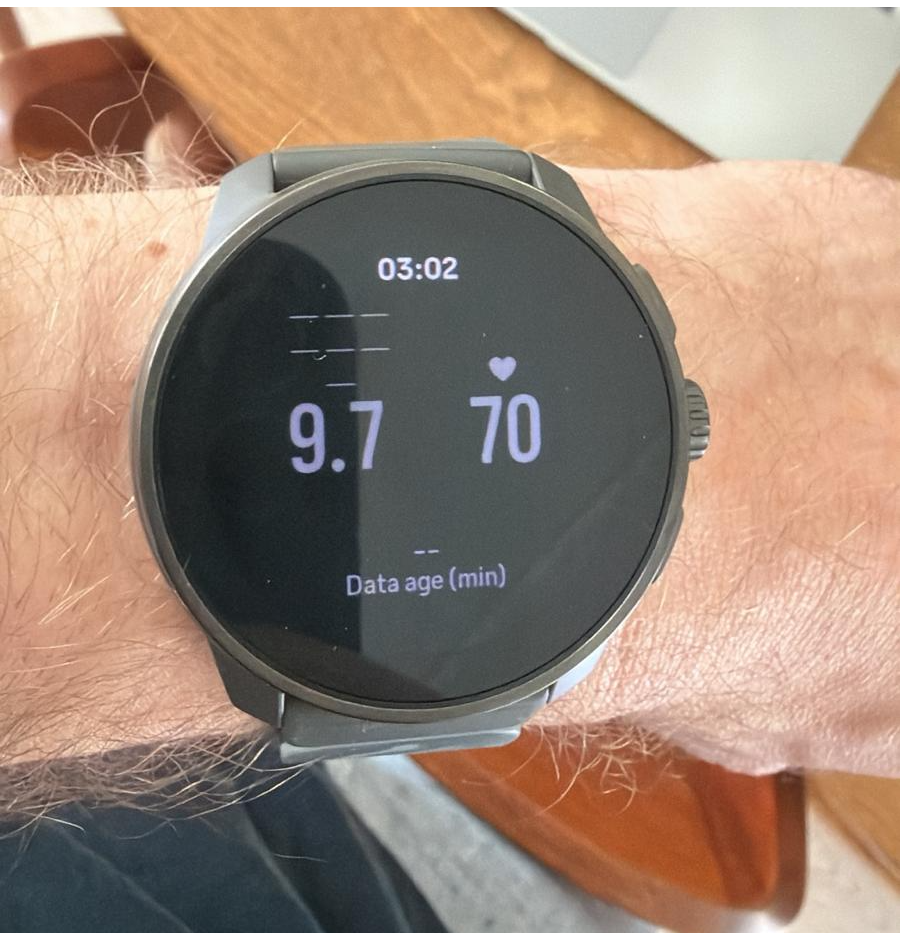
                                            WhatsApp Image 2026-04-03 at 15.10.48.png

                                            Raimo JƤrviR 1 Reply Last reply Reply Quote 3
                                            • First post
                                              Last post

                                            Suunto Terms | Privacy Policy