[Question] No stupid questions - ask anything here
-
Hi, I tried to get offline maps data from some Caribbean islands but I cannot get them from the maps download. I was looking for st. Maarten or Saba for example. Can these maps be added to download please? They are visible on the maps itself, but not as offline map.
-
Does anyone tried to display array of values in <graph> element? I tried output array as variable and show it in graph using get compilation type but i am not suceasfull yet.
-
I try to get thedistance, bearing and coordinates of a POI
For the distance I use “/Navigation/Poi/Active/Distance” which indeed returns the distance.
For coordinates I try to use “/Navigation/Targetlocation/Coordinates”. This works in the simulator but no results on the watch
For bearing I use “/Navigation/Targetlocation/Bearing” which is undocumented, but suggested by the intellisense. This one also doesn’t report any values.Is it possible to get the bearing and coordinates of a selected POI?
-
@assaf1007 You are using two different strings for
getObjectandsetObject.This should be a minimal working example which pushes
settings.activeup by 1 whenever you start an exercise:var settings = null; function onLoad(input, output) { settings = { maxPace: 12, timelapse: 123, active: 0, }; loadSettings() } var loadSettings = function () { var loaded = localStorage.getObject("appSettings"); if (loaded != null) settings = loaded; // else localStorage.setObject("appSettings", settings); settings.active++; localStorage.setObject("appSettings", settings); }; function evaluate(_inp, _out) { setText("#active", String(settings.active)) } function getUserInterface() { return { template: 't' }; }and the html:
<uiView>
  <div>
    <div id="active" class="p-m">
      0
    </div>
  </div>
</uiView>
So:
but i wish to be able to set values at the watch itself (if possible) … in such case, i need (= user need) some kind of a preliminary UI (before app starts) to be able to update settings…
Possible indeed! The ‘tennis score pro’ application has a start screen which saves the settings for the next time.
-
@suuntopartnerteam maybe not a stupid question, but is it possible to add two icons (a left and right arrow) to the f-ico classes in the style of F266 and F267? I was looking for something similar, but I wasn’t able to find it so I’ve just used F394 and F402 for now.
-
Hi everyone,
I have a quick question regarding BLE connectivity that might save me (and hopefully others) some time and unnecessary experimentation.
I’m currently working on a small add-on that retrieves and displays data from an external third-party device via BLE. Thanks to the documentation, I’ve already built a basic prototype that proves the core concept works.
However, I’ve hit a roadblock: the external device requires a PIN to establish a secure Bluetooth connection. When testing with devices that don’t require a PIN, the connection works flawlessly.
My issue is that I cannot find any mention in the documentation on how to explicitly handle PIN entry during the pairing process.
Does the current Suunto SDK support manual PIN entry pairing? If so, could someone point me toward the right methods or a code snippet?
Any insights would be greatly appreciated!
-
It is me again with new questions

- Can we get current ZoneSense zone information? I have not found the key of such data.
1.bis. Can we get user configuration regarding Intensity Zone he is interested in? - I struggle to make the “PREV INT” data slightly bigger (not as big as current rest/int data - which is sp-d-s -).
“PREV INT” data is currently sp-d-xs for which I tried to override font size, rescale. Note that on simulator it might looks fine but not on the watch (can be bigger but then uses a default font which includes big spaces between numbers, etc). Can someone help me for that? Thanks!
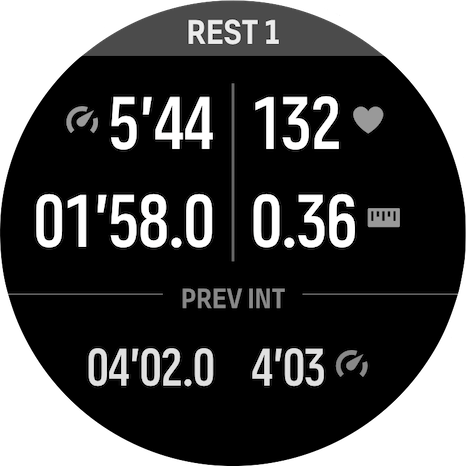
- Can we get current ZoneSense zone information? I have not found the key of such data.
-
@AYamshanov were you able to connect to your device? I try to connect to garmin speed and cadance sensor.
Problem: suunto can register both of them (but also allows wheel radius setting on cadance sensor…) but in the end it cannot connect to both of them at the same time during workout.
Now with a custom suunto app, i try to do that, but it always fails to connect to any of them.
Line 175 always fails.
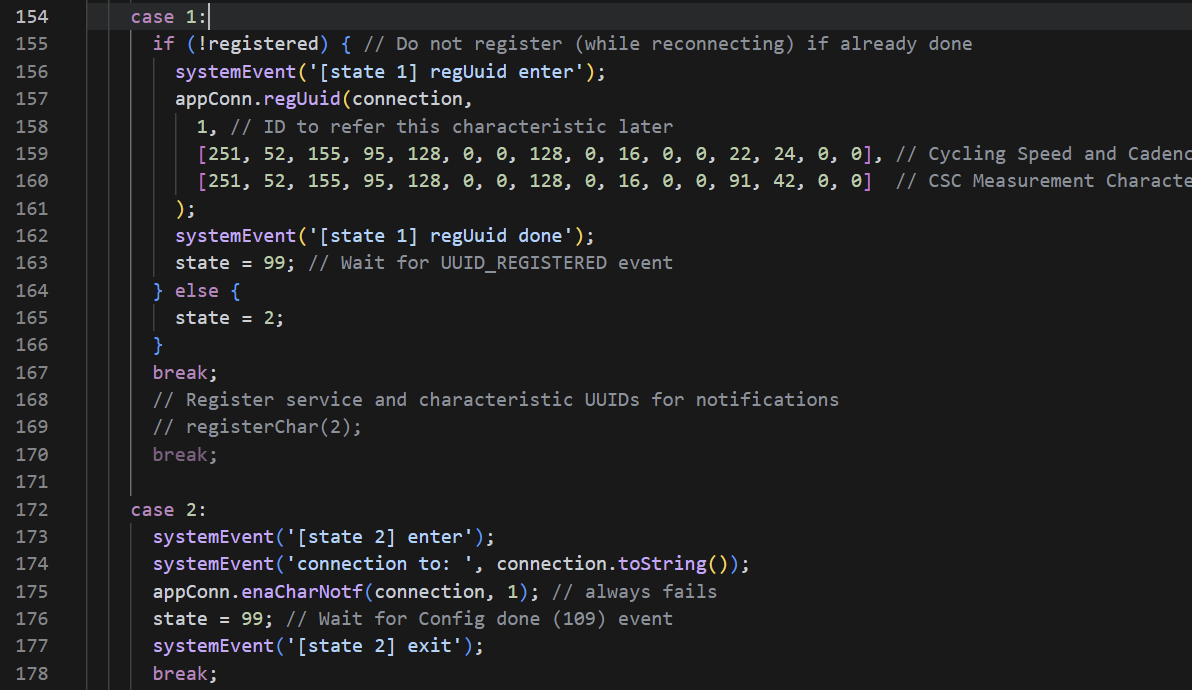
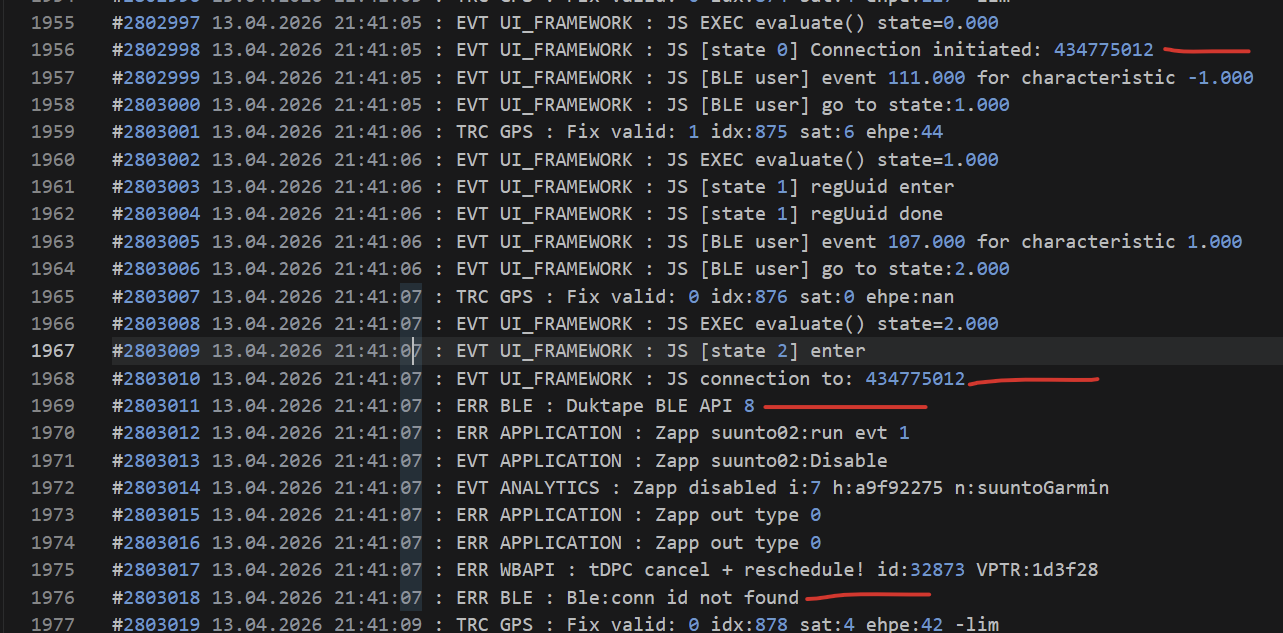
-
Im trying to make a copy of ErgSync but for my Merach R50. So far its actually working pretty well aka Im getting Strokes, power etc onto the watch and into the the activity file.
My question is. Can I use that data as the primary source instead of the guesstimate that the watch makes itself?
One of the short test rows I did went like this
Via the watch:
Distance: 577m
Strokes: 57while the rower reported:
Distance 0.52km
Strokes: 56Can we replace the watch data with SuuntoPlus app data? Because I trust the distance reported by my rower more than the watch
Edit: can we also change the suffix for pace? And make the distance always say in meters?
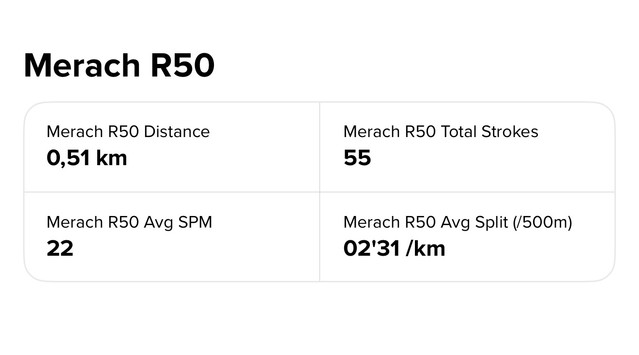
-
@Thibault-B. said in [Question] No stupid questions - ask anything here:
- Can we get current ZoneSense zone information? I have not found the key of such data.
It’s not mentioned in documentation, but editor’s autocomplete shows there’s
/Fusion/Ddfainput resource. I’m not sure how that value maps to zones.- I struggle to make the “PREV INT” data slightly bigger (not as big as current rest/int data - which is sp-d-s -).
“PREV INT” data is currently sp-d-xs for which I tried to override font size, rescale. Note that on simulator it might looks fine but not on the watch (can be bigger but then uses a default font which includes big spaces between numbers, etc).
Watch has only a predefined set of font sizes (unless there’s been some improvements to font support). For numbers you should use one of the
sp-d-CSS classes, those already cover the available font sizes.Documentation has this somewhat vague sentence: “The older watches do not support every possible font size and thus using the css classes for font sizes (shown below) can generally lead to less errors.” This hints that there might be better font support in some watches, but I don’t know what “older watches” means here. In any case, if you want to support all watches, you’re probably limited to
sp-d-classes. -
@Raimo-Järvi
Thanks for your answer!-
I hadn’t thought about exploring the autocomplete suggestions—great idea! It works really well. I mapped values to zones based on what I’ve observed in my previous activities using ZoneSense.
-
OK. Then, personally, I really miss an intermediate size between sp-d-xs and sp-d-s

You seem to confirm that there’s no way to slightly increase the size (I was about to experiment with canvas…). Easily supporting all watches wasn’t my main concern anyway—I would have been fine defining this intermediate font size per watch model if needed. -
Regarding older watches: does it still make sense to support watches older than the Suunto 9 Peak Pro, or is the information in the documentation confirmed?
“Note: SuuntoPlus is no longer maintained for UI1 (s, m, l).”
Does this mean that my app simply cannot be installed on those watches?
-
-
@brechtvb I had an option to switch my device to NO_PIN mode and I followed this approach to continue development and do not stuck ¯(ツ)/¯
-
@Thibault-B. said in [Question] No stupid questions - ask anything here:
- Regarding older watches: does it still make sense to support watches older than the Suunto 9 Peak Pro, or is the information in the documentation confirmed?
“Note: SuuntoPlus is no longer maintained for UI1 (s, m, l).”
Does this mean that my app simply cannot be installed on those watches?
Information in documentation is a bit vague again, but I think it’s trying to say that UI1 watches don’t get any updates to SuuntoPlus features. If you don’t use any SuuntoPlus features that have been added to UI2 watches (e.g. settings), I think apps should still work in UI1 watches. Older watches also have less JavaScript memory, that’s another potential cause for app incompatibility. But since I’m not aware of the latest SuuntoPlus developments, I may be interpreting the documentation incorrectly.
- Regarding older watches: does it still make sense to support watches older than the Suunto 9 Peak Pro, or is the information in the documentation confirmed?
-
@Raimo-Järvi Make sense thanks.
Other question: how to make a pop-up like the multi-sport one when long pressing a button (progress ring, etc)? I saw the reference in documentation regarding the lock pop-up but it also lock the button which is not what I want. I want to use such pop-up as toggle for an option.
@suuntopartnerteam can you provide support on that? Thank you. -
@Thibault-B. You can catch long press with
onLongPressinpushButtonelement. And maybe Popup example in SuuntoPlus editor could work for toggling an option. But I don’t know how to get the progress ring. I don’t know if it’s part of the multi-sport popup, or if it’s generic functionality that can also be used elsewhere. In theory, you could catchonLongPressStartand implement your own progress ring view, but that would probably be difficult to implement. -
Can a CSS guru help me out?
I want to show the current speed in the center of the screen. This works fine without a postfix, but as soon as I add a postfix, the speed fields shifts slightly to the left because both <span> elements are centered together.
How do I center the first <span> element and put the postfix right of it?
<div class="sp-d-s p-hc" style="top:calc(87% - 50%e)"> <span> <eval input="/Activity/Current/Speed" outputFormat="{zapp_speed_format}" default="--" /> </span> <span class="cm-mid sp-t-s" style="padding-top:6px; padding-left:4px"> <postfix /> </span> </div> -
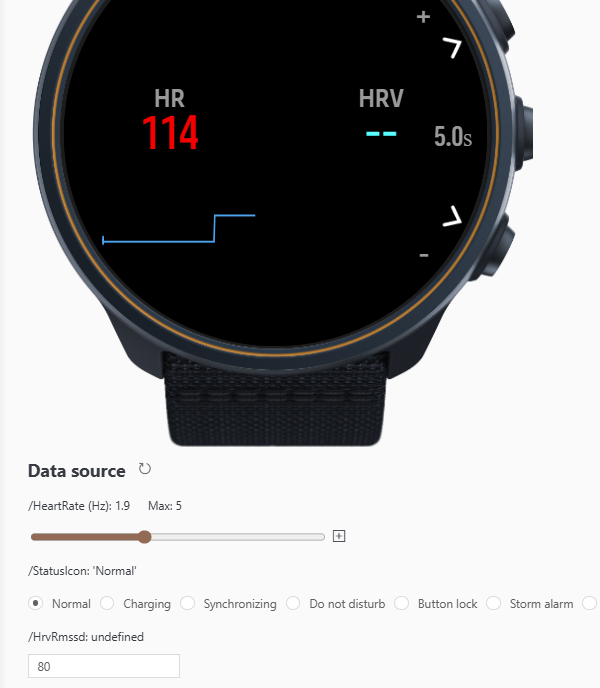
Hey guys, could someone make HRV reading work?
I do not get the values, even tough the Suunto Smart Belt is conencted.
In the SImulator it says “undefined” for /HrvRmssd
-
Hi guys!
Is there any solution to get the NGP values?
I tried two different syntaxes: /Activity/Move/-1/NormalizedGradedPace/Current and /Activity/Move/-1/NGP/Current but both are unrecognized.
Thanks a lot -
I tried to investigate a bit more about my own question.
I’ve been able to find two files in SuuntoPlus Editor that are listing all the available ressources:- .vscode/extensions/suunto.suuntoplus-editor-1.42.0/node_modules/@suunto-internal/suuntoplus-tools/lib/project/resource-common.js <= for generic ressources, not depending on parameters <= big array
- .vscode/extensions/suunto.suuntoplus-editor-1.42.0/node_modules/@suunto-internal/suuntoplus-tools/lib/project/resource.js <= for parametric ressources <= multiple regexes, still readable
Can’t find anything related to NGP, so I might conclude this is not available?
-
Tried to develop my own data screen.
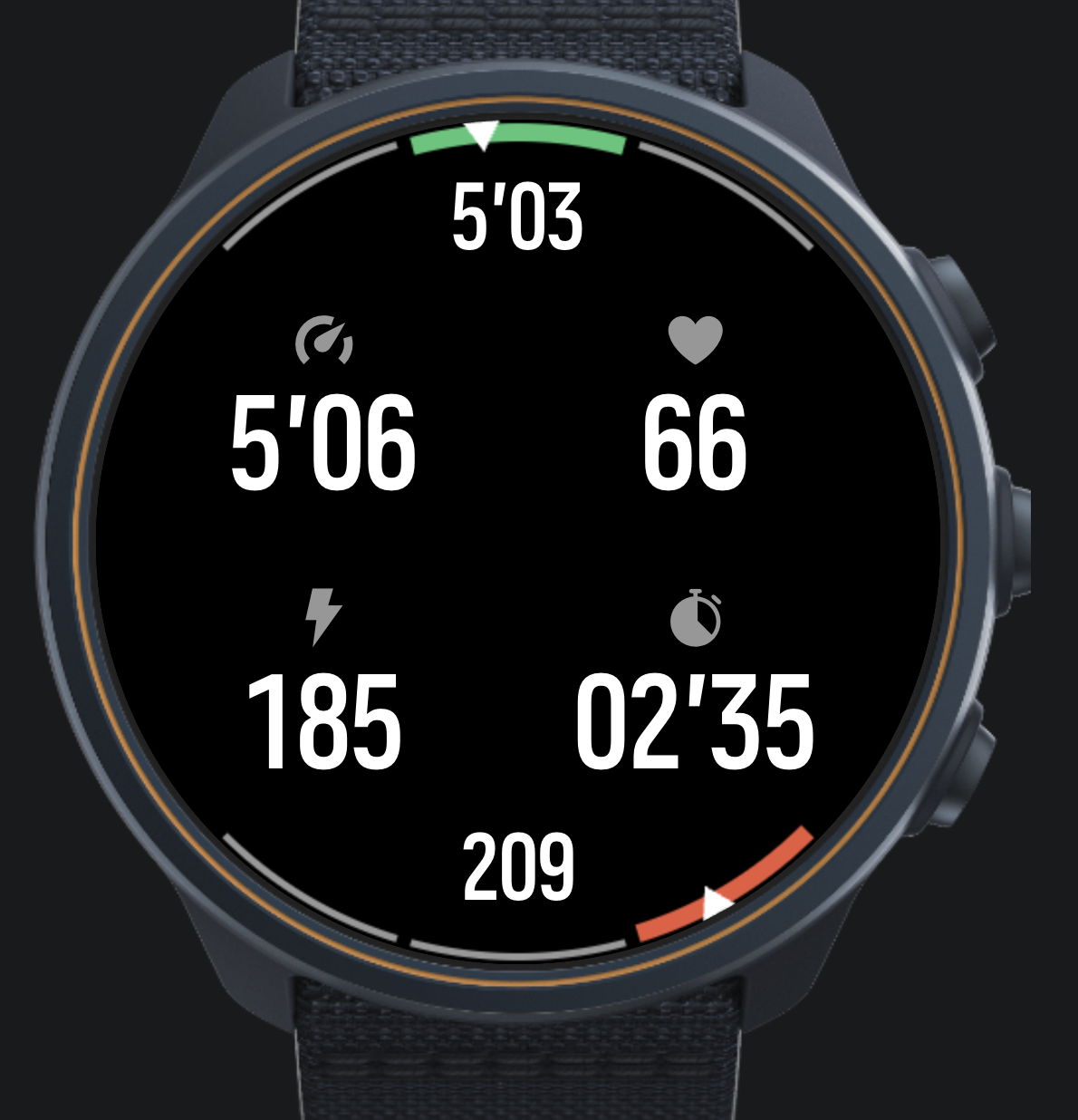
Nice experience so far, many thanks to the devs for making this possible.
My question comes to the “big picture”. I want to do structured trading with my own data screen(s). Currently I am using intervals.icu although I have been hacking on my own FIT file editor. When intervals upload training session, I get an extra data screen from intervals which I cannot modify and I also have my normal data screens which are not aware of the structure of the training.
Any hints on the best way forward to combine my data screen with structured training?




Hello! It looks like you're interested in this conversation, but you don't have an account yet.
Getting fed up of having to scroll through the same posts each visit? When you register for an account, you'll always come back to exactly where you were before, and choose to be notified of new replies (either via email, or push notification). You'll also be able to save bookmarks and upvote posts to show your appreciation to other community members.
With your input, this post could be even better 💗
Register Login