new Vertical 2 - auto vs manual laps
-
OK - brand new Vertical 2 - first run with it today - it’s a beautiful watch
(coming to Suunto from Coros Vertix2)Took a while to figure out how to drive this watch - the default data fields for Run are not that great, and changing them is not all that intuitive- but anyway I got there
The Spots Mode Customisation screen shows that the 7 Field display has Time of Day at the top, plus 7 selectable fields - great that’s exactly what I want to duplicate the scree I had on the Coros Vertix2 for 4 years -
 YAY
YAY
But no, the Time of Day does not appear on the watch… tho there is a selection in the data fields for it, but I can’t have 8 fields … BOO
… BOOAnd you can only have 4 screens in this customisation - why? another
BOOThe Lap Table is a great thing…
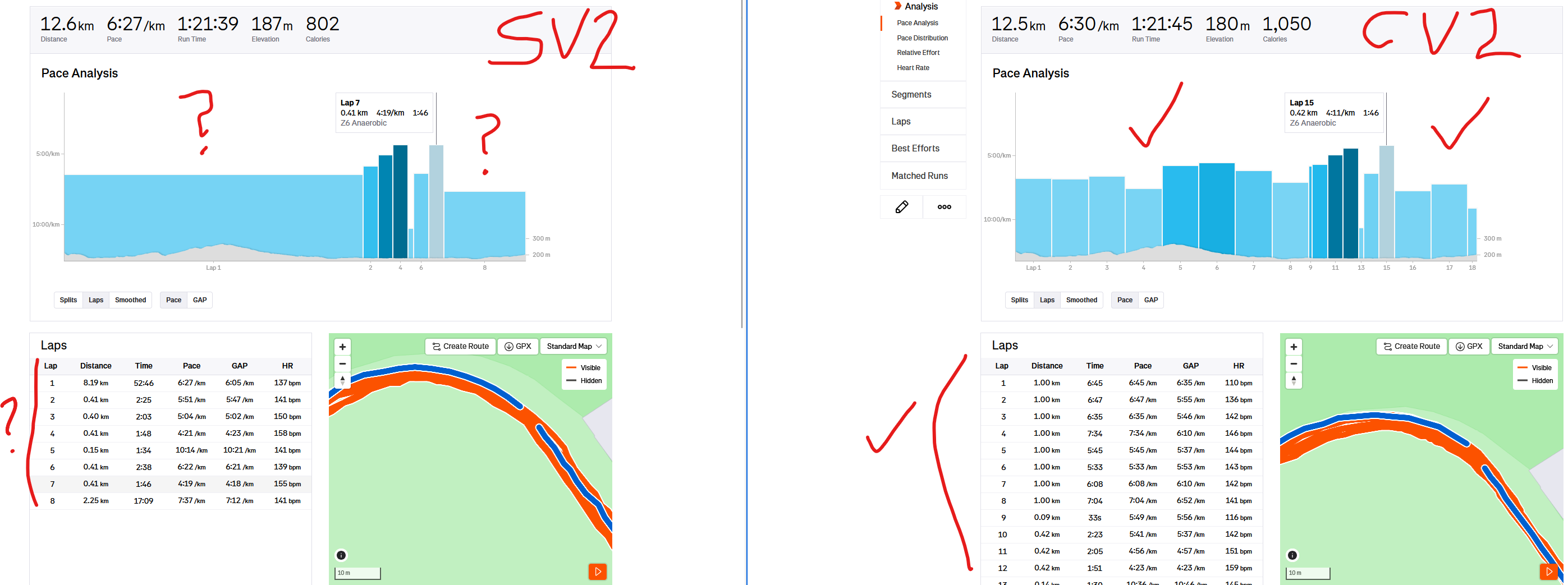
YAY … until you discover that only Auto-Laps (eg. 1km) appear there, and no manual Laps … BOOAnd then when you see the resultant run auto-synched to Strava, there is ONLY manual laps and no auto laps …
BOO, because they’re not in the FIT data synched I guess (they’re certainly not in the FIT export) - so the Strava display is rather odd - unlike the Coros equivalent which appears as you would expect, with a mixture of auto and manual lapsShould I assume that I have simply not yet discovered how to make all these things work without ungainly work-arounds, or am I right in what I have “discovered”?
-
Time above data fields: This has been discussed quite a few times here. The time can only be shown, if the topmost data fields do not extend in height. If you have an “AVG” data field in the top row it will take the space. Try re-arranging your data fields -> time will show.
-
@PhilBee said in new Vertical 2 - auto vs manual laps:
And then when you see the resultant run auto-synched to Strava, there is ONLY manual laps and no auto laps … BOO, because they’re not in the FIT data synched I guess (they’re certainly not in the FIT export) - so the Strava display is rather odd - unlike the Coros equivalent which appears as you would expect, with a mixture of auto and manual laps
With Suunto there are two overlapping lap schemas happening. One are the automatic laps and another are manual or Guide created ones. Thoses do not interfere with each other.
FIT file format as such is developed by Garmin what does not know this concept. If you press the lap button, the next auto lap will be 1km after this (if set to 1km laps). Most likely Strava uses one or the other, not both.Best you can see this, if you export the workout as FIT file in the Suunto App and use a tool like fitfileviewer.com to look into the content.
