-
The original Suunto Core had a dedicated weather trend indicator right on the main screen. I really can’t understand why this feature was removed in the second generation
Maybe because it wasn’t?
Trend is there. There is no massive downgrade.
Sometimes it helps to ask first, before drawing conclusions from wrong assumptions.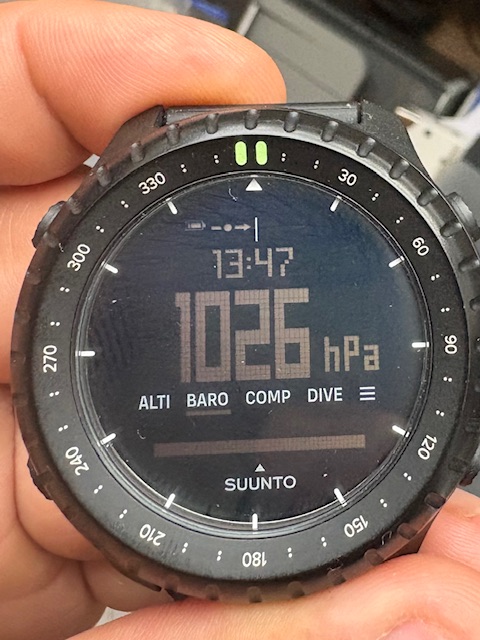
-
@Egika Yes, the indicator is displayed, but only after you switch to the “BARO” page. You obviously don’t stay on that screen 24/7 (if only because button lock and additional views don’t work on that view).
On the original first-generation Suunto Core, that indicator in the top-left was visible right on the main locked screen. The huge advantage was that when you were at a camp, for example, a quick glance at the watch told you how the weather was developing without having to switch over to the barometer— but this feature has disappeared.
Don’t worry, I’m not jumping to conclusions; I’ve gone through the whole watch and read plenty of reviews, also I’m owner of first generation for years.
The feature I’m talking about simply isn’t there. Besides, on the BARO screen itself, that trend indicator is practically useless anyway since you already have a detailed graph right below it.
-
I fully agree with this feature request, and i ask you to approve it.
I have owned the original Suunto Core All Black and one of the features I valued the most was the Weather Trend Indicator being visible directly on the main watch face.
This was extremely useful because you could simply glance at the watch and immediately see whether atmospheric pressure was rising or falling, without having to switch to the BARO screen. For me, this is one of the main reasons to own a Suunto Core rather than a regular digital watchOn the Core 2, the weather trend indicator still exists, but having it only on the BARO screen significantly reduces its usefulness. When you are already on the BARO screen, you also have the pressure graph, so the indicator is much less valuable there
Could Suunto please consider adding Weather Trend as an option for the lower secondary field on the main watch face, alongside Sunrise/Sunset, Moon Phase, Steps, Dual Time, etc.?
This seems like a relatively simple firmware/UI change, and it would make the Core 2 much closer to the original Core experience.
Please bring this back in a future firmware update. It would make a big difference for long-time Core users.
-
Besides that… the pressure trend graph is still flat! How is it for you guys?! I’ve been reporting this to Suunto support for a month now, and it still hasn’t been fixed in version 1.13.44. I’ve been monitoring and comparing the pressure trend with my Suunto Core Alpha and Suunto Traverse Alpha, which I wear on my other wrist at the same time. I haven’t seen any graph other than a flat one with no pressure changes in various online reviews either.
The numerical pressure display on the Core 2 is accurate based on the trend. But the graph is still flat. The Core 2 is, to put it mildly, “strange.” They’ve added a “Dive” feature, but they’ve reduced the diving depth compared to the Core 1, from 10 m to 2 m.
Where are the logs? The battery isn’t replaceable without a screwdriver. It has a narrow 22 mm ladies’ strap instead of a 24 mm one. It features delicate quick-release pins instead of a durable screw-down NATO strap, and the bezel’s luminescence lasts shorter than on the Core 1… -
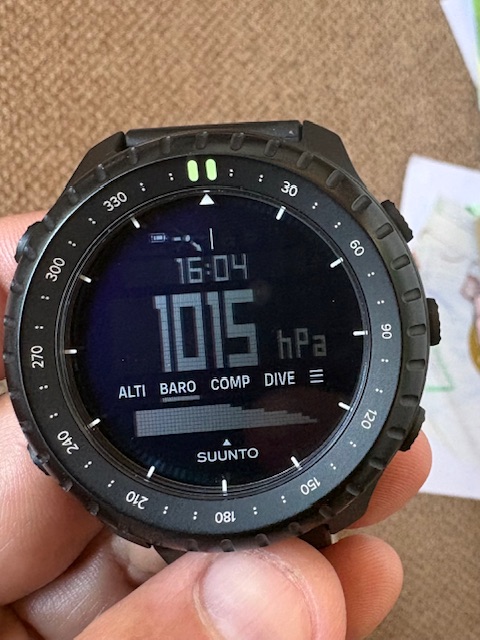
@Alpha just now the trend shows this for me
I don’t see an issue
-
I have same problem with low pressure sensor indication - but i dont think the problem is with sensitivity itself, its just showing on bottom low row display (its 7 or 8 pixels height, middle one is double) instead of middle (i dont really know why they showing in on lower resolution row) - i have both Suunto Core 1 and 2 for comparison.
Btw - trend indicator still not on main watch face in new firmware. I read the manual and it even says there should be…

-
There seems to be a problem…
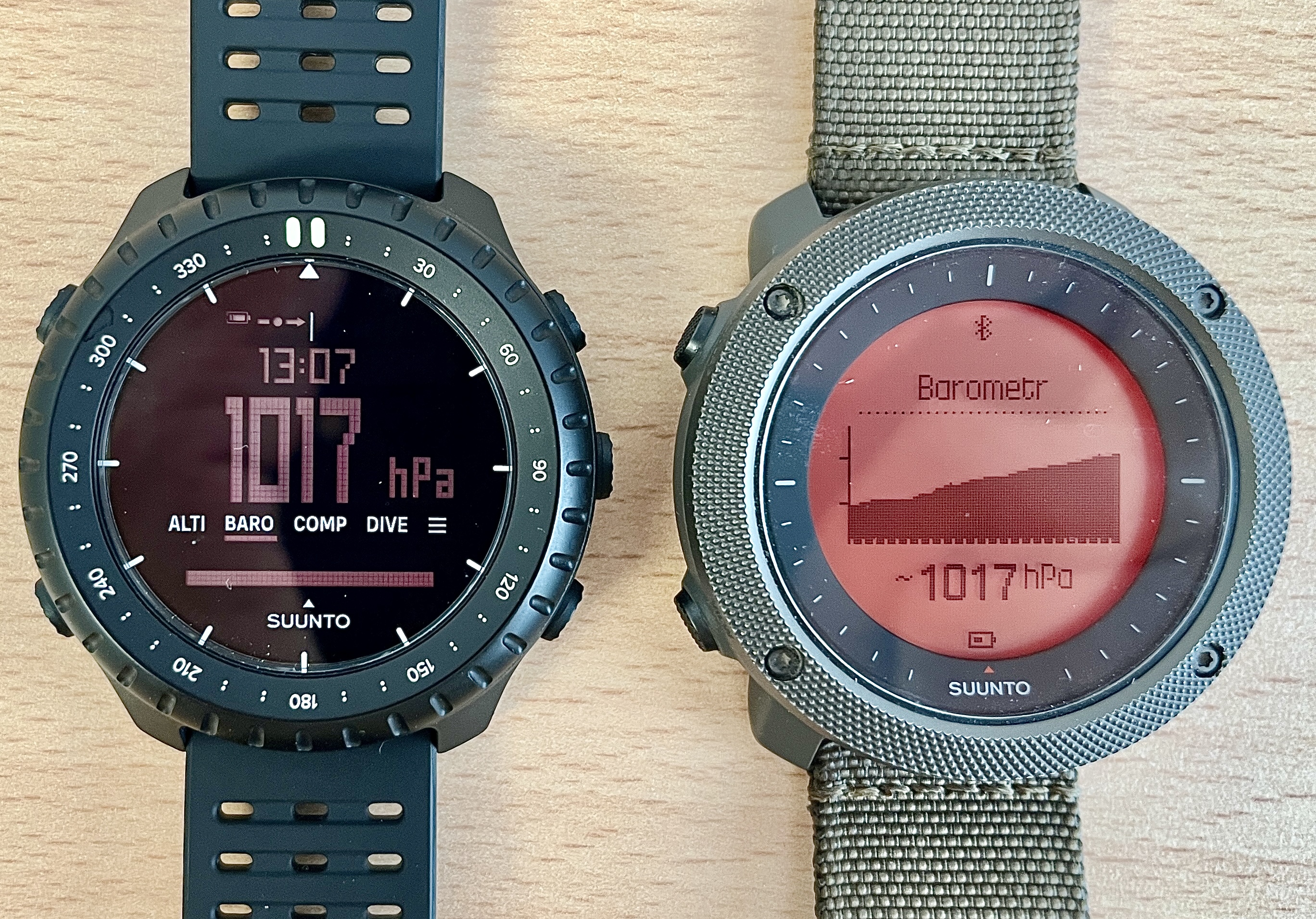
I’m currently wearing two Suunto watches—one on each wrist—so I can compare barometric pressure trends. But the Core 2 watches still show a flat graph, even though the numerical pressure values change just like they do on the Traverse watches. So the problem isn’t with the pressure sensor. It’s probably a software bug.
I’ve been working with Suunto support on this since the watch was released. But even after updating to version 1.13.44, there’s still no change.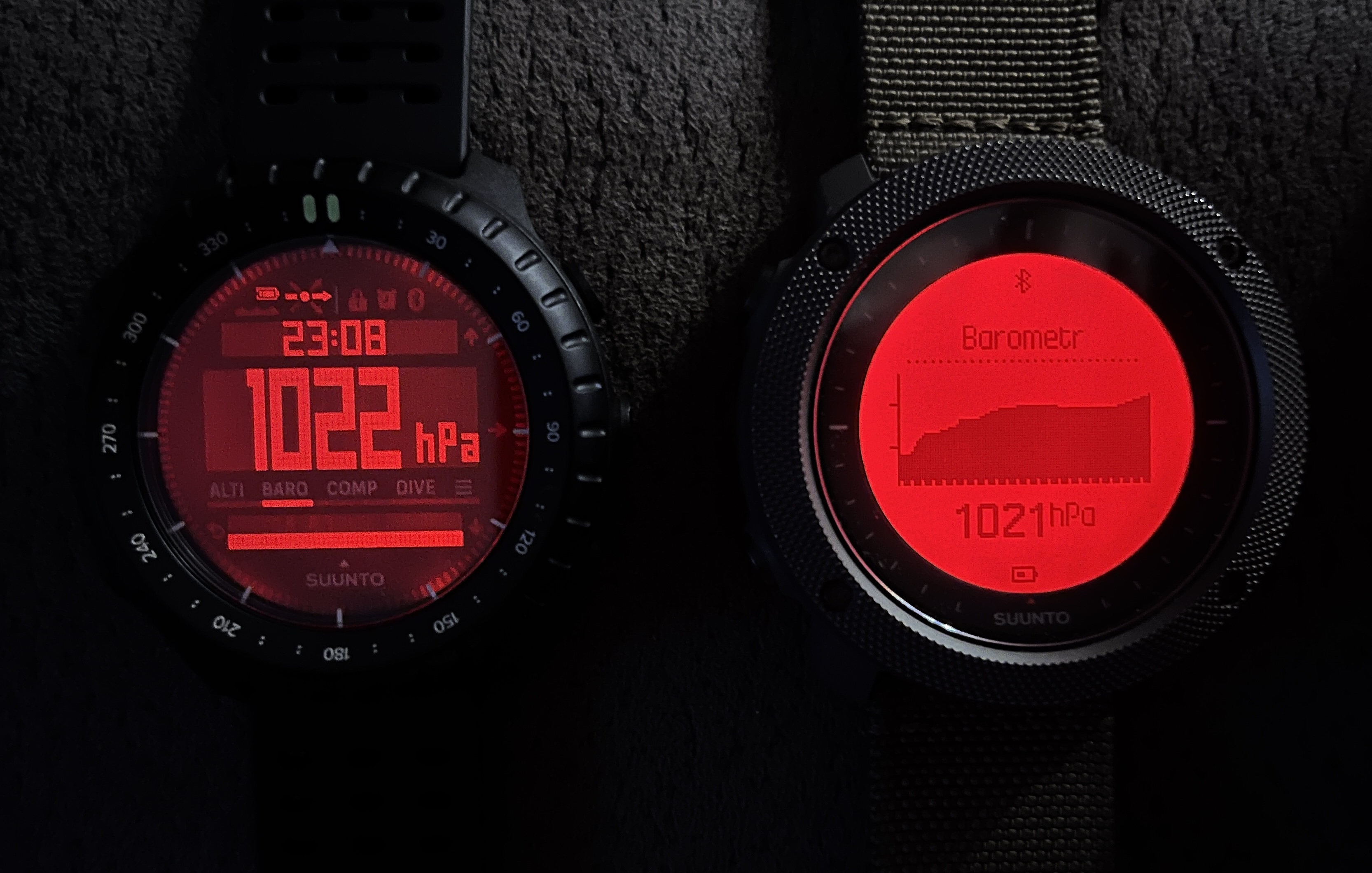
-
It won’t be due to the display’s lower resolution. It’s sufficient to show an increase of a few hPa (as in the attached images).
-
Yes please make this feature a reality- we need the wx trend indicator on the home screen! I love my Core Alpha specifically for this feature and honestly, wouldn’t have “upgraded” if I knew this feature wasn’t there.
-
@John-B. @egika forwarded the request to Suunto already
-
@Egika
What software version do you have? Yours is the only watch where I see movement in the graph! I haven’t seen this in any YouTube videos either. I don’t know which version it was when I bought it; I updated to 1.13.38 in August and to 1.13.44 in September, but the graph is still flat! 🫤 The storm alarm has never gone off either. And I have it set to ON. The authorized service center couldn’t help me either. They told me to wait for the next update or come in to return it.Traverse Alpha Stealth
Traverse Alpha Foliage
Traverse Alpha Concrete
Core Alpha Stealth
Core 2 All Black -
@Alpha IU am on 1.13.44 as well. There is no newer version in test atm
-
@Egika
Okay. Thank´s. I’ll wait! By the way, www.suunto is probably still down. It lists version 1.13.38 as the latest!

-
@Alpha Are you locking the barometer? I realized Core 2 had to be locked in baro mode screen to get weather trends and show changes in baro graph. Since I’ve been staying in baro mode overnight my baro graph matches exactly that of my other ABC watch.
Before I realized this, I had the Core 2 in time mode mostly, so all changes were considered changes in alti and therefore the baro graph was flat/unchanged.
Core 2 doesn’t have auto baro/alti switch, so you have to remeber to switch out of baro mode when leave the house or camp and proceed with an activity. That said, if you drive while locked in baro mode, it’s a good way to test if your baro alarm is working (as it’s assuming changes are related to weather not altitude)!
Its also why Im guessing Core 2 doesn’t display baro trend arrow on the main watch screen - because as soon as you are on the main screen, it’s forced into alti mode and baro readings are disabled?
Past Suuntos: X-Lander/Observer/T6/X9/X10/X6HR/CORES/Ambits/Spartan/9P/9PP Ti/Vertical Ti
Current: Suunto Race Ti
Past other GPS watches: Polar Vantage V; Garmin 6X Pro Solar; Coros Vertix 2
Suunto App running on Google Pixel 8/Android 14
-
@mikekoski490
Well, you’ve got me there! It seems logical, but it actually isn’t! Who came up with this?! Why would anyone change something that works (in Core Alpha)?! Yes, I can either set the feature manually, or if I don’t want to deal with it, I can set it to “Auto” and not have to worry about a thing. As soon as I start moving, the watch switches over. The developer in question should come up with some kind of explanation for this. I don’t know how, though. Or maybe they should find another job. 🫤
My English isn’t very good…
Am I understanding this correctly (that can’t be true)—that if I want to track barometric changes, I have to stay on the “baro” screen the whole time?!Traverse Alpha Stealth
Traverse Alpha Foliage
Traverse Alpha Concrete
Core Alpha Stealth
Core 2 All Black -
@Alpha I really hope a firmware fix is in the works. I’ve also noticed that if I leave the watch in barometer mode, the graph moves—which is, unfortunately, completely useless. It kind of annoys me that the firmware is being designed by someone who likely hasn’t spent much time outdoors.
I could live with the fact that sunrise and sunset times aren’t calculated on the watch itself—requiring a Bluetooth sync—or even the lack of an altimeter log, even though it makes no sense (the hardware is undoubtedly far superior to what existed 20 years ago); however, the absence of an automatic barometer makes absolutely no sense—if only because the failure to switch modes or detect the current state significantly compromises altitude accuracy during transitions.
-
@Alpha That is my understanding of how it currently works, so yes the only way to track barometric changes against the 24 hour graph is when the Core 2 screen stays in baro mode. As soon as you switch to time mode, it assumes all atmospheric changes are related to altimeter.
And if you forget and leave it in baro mode and change elevation, it assumes the change is weather related and will adversely impact the baro history graph and trend arrows and no way to reset them until time does.
Its too bad, as the auto baro/alti switch feature was a big breakthrough with the Core, and is now pretty standard on all current gps ABC watches by Suunto and others like Garmin/Coros etc, so not sure why they went backwards here. The only reason I can think , is to ensure extreme accuracy, as the auto mode could get knocked out of baro mode and into alti mode if there was an extreme change in air pressure, but that was rare and definitely outweighed the convenience of auto mode.
Now Im back to treating my Core 2 same as my old Suunto Observer, but at least even with the Observer you could be locked in Baro mode and still use the main watch screen.
Im hoping this gets fixed in a future update.
-
Its also why Im guessing Core 2 doesn’t display baro trend arrow on the main watch screen - because as soon as you are on the main screen, it’s forced into alti mode and baro readings are disabled?
Are you sure about this?
I just checked my Core 2. It was sitting on the desk untouched for a couple of days in time mode.
Still I get a baro trend:
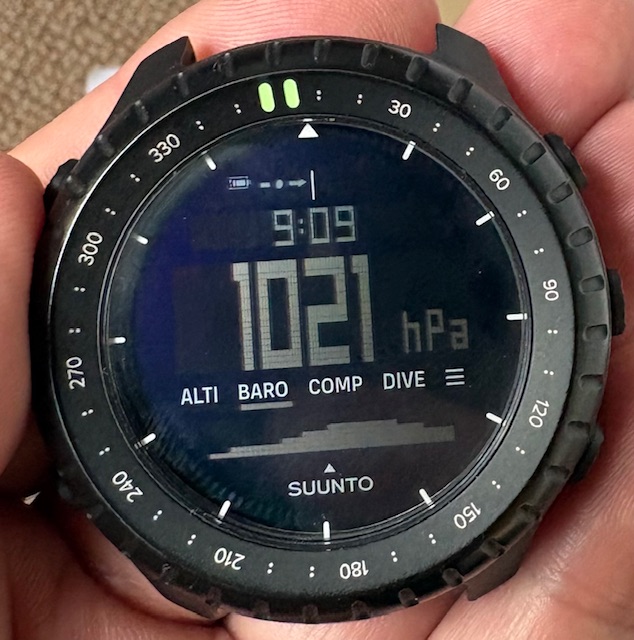
t6, S6, Elementum Terra, Ambit 3 Sapphire, Spartan Ultra, Traverse Alpha, S7 Graphite LE, S9B Ambassador, S9P Titanium, S9PP Titanium, Vertical All Black, Race Titanium, Race S Titanium Courtney, Run Lime, Race 2, Vertical 2 Titanium, Race 3s
-
@mikekoski490
Thank´s! I’m hoping for a major update. I just don’t understand this change.
On my Traverse Alpha, I rarely adjust the altimeter settings. It works great there. As far as accuracy goes (without adjusting the values), the Core Alpha falls somewhere between the Core 2 and the Traverse.
I just want to use the watch—not constantly monitor and adjust it to tell if I’m moving up, down, lying down, or swimming…
I’d at least like to have the option to choose a setting mode again. -



Hello! It looks like you're interested in this conversation, but you don't have an account yet.
Getting fed up of having to scroll through the same posts each visit? When you register for an account, you'll always come back to exactly where you were before, and choose to be notified of new replies (either via email, or push notification). You'll also be able to save bookmarks and upvote posts to show your appreciation to other community members.
With your input, this post could be even better 💗
Register Login