Suunto Smart Heart Rate Belt 2
-
Eduardo Mateos reviews the SHRM2 and sees similar spikes and dropouts early in the run, including stuck data paired with different watches, including the Run 2.
From what I could see, he never had the SHRM2 paired with the Run 2, only with devices from competitors. And one of the stuck data segments he specifically pointed out was from the Run 2 using internal optical HR capture. He called it cadence lock, but I’m sceptical since the HR was down at 130 - 140 bpm while he was doing a 5 km run with a fast climbing HR on the other devices (sincerely hope his cadence isn’t that low, in order to salvage the knees).
He blamed the bad data from the SHRM2 on “software”, but considering that all his exercises were done on the 3, 4, 5 and 6 September and my own first (bad) unit was sent the 11:th, while this my second (and seemingly good) unit got dispatched the 29:th, they all most likely have the same firmware version. I know that my two units were manufactured the same week (25) and had the same firmware upon receipt. And no new version is publicly available.
In my mind this raises the question of how fragile the electronic components in the pod are. Could there be Good, Average and Bad units in circulation from the manufacturing process? And can units decline by themselves? As early adopters we do take some risks…
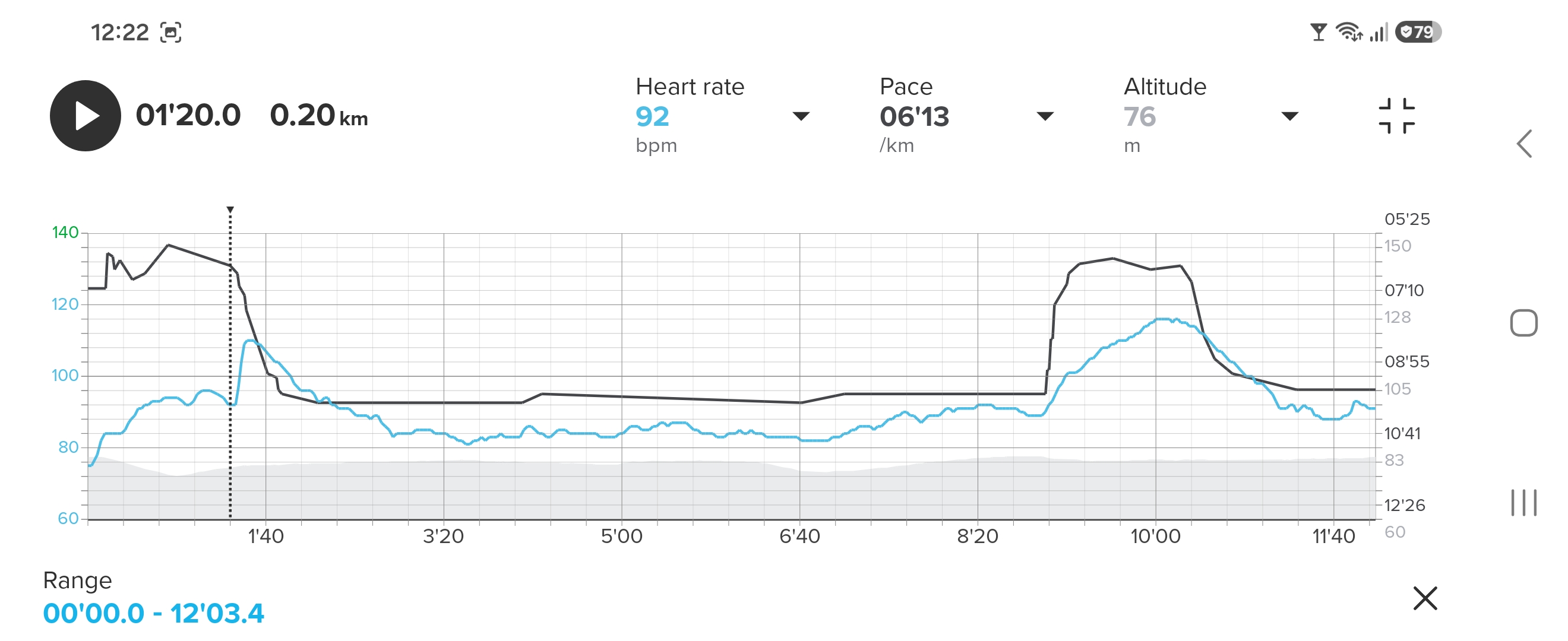
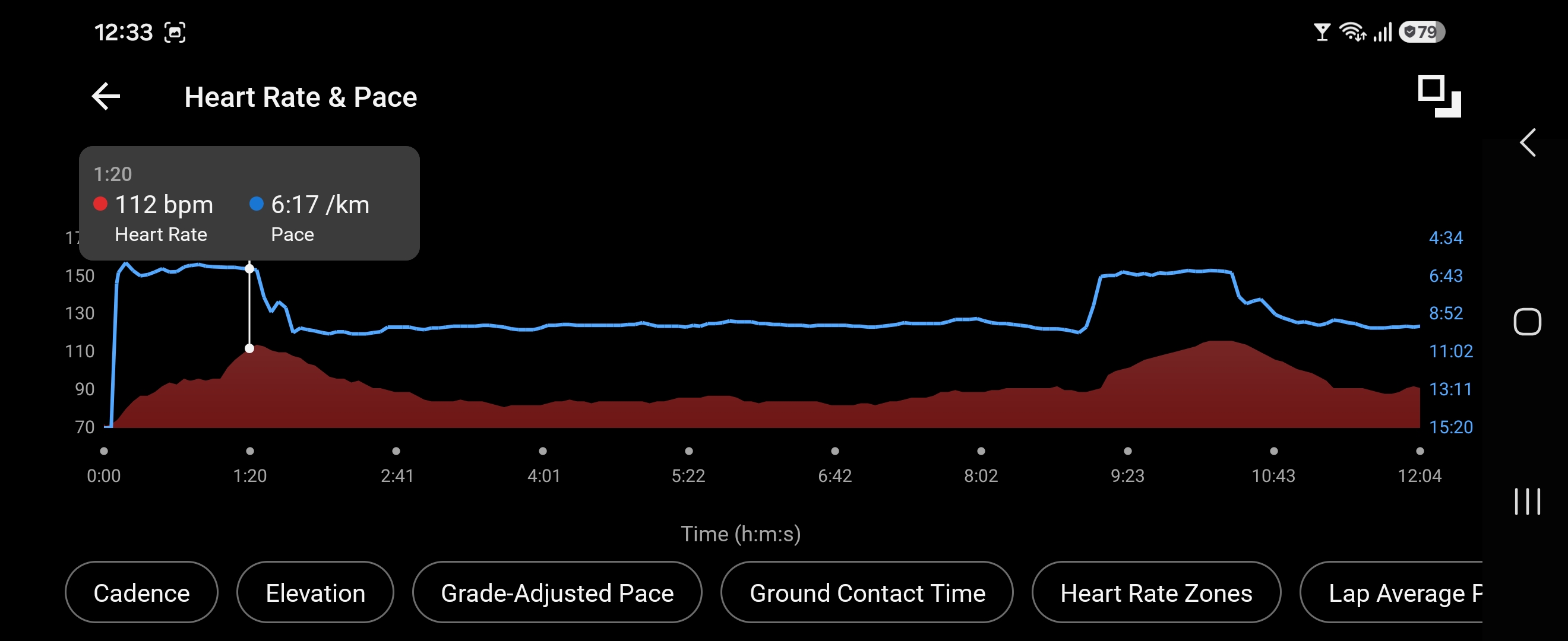
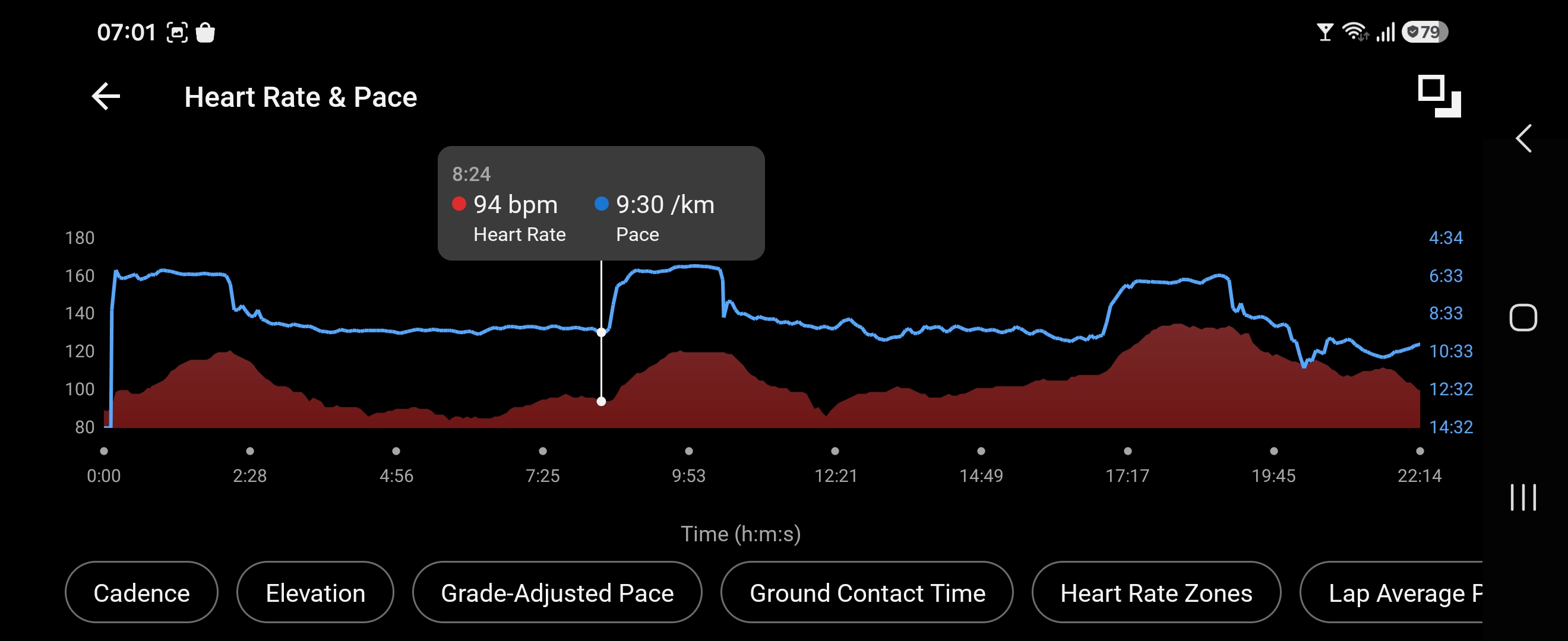
I’m touching wood here while declaring a second exercise as a success with the new unit. There was one minor hiccup in the first 1.5 minutes but the rest seems spot on. I used the Garmin Forerunner 955 as a control (the OHR there usually stays +1-2 bpm higher than HR belts) and Interval alarm (you can program Intervals directly on the watch based on time or distance). Doing 10 * 200 metres running / 800 metres walking with the main part on a skiing path, here’s the first two intervals zoomed in. Running downhill the first 120 metres the, wet and firmly fastened, SHRM2 (connected to the Race S) has the general idea, but not until the run portion is over, after 200m /ca 1:20, does it suddenly jump up to a correct HR. The jump is from 92 to 110 bpm. Suunto:
Garmin has the correct data from start. Note that what seems like a sudden climb in HR reflects the terrain; going downhill and then slightly up:
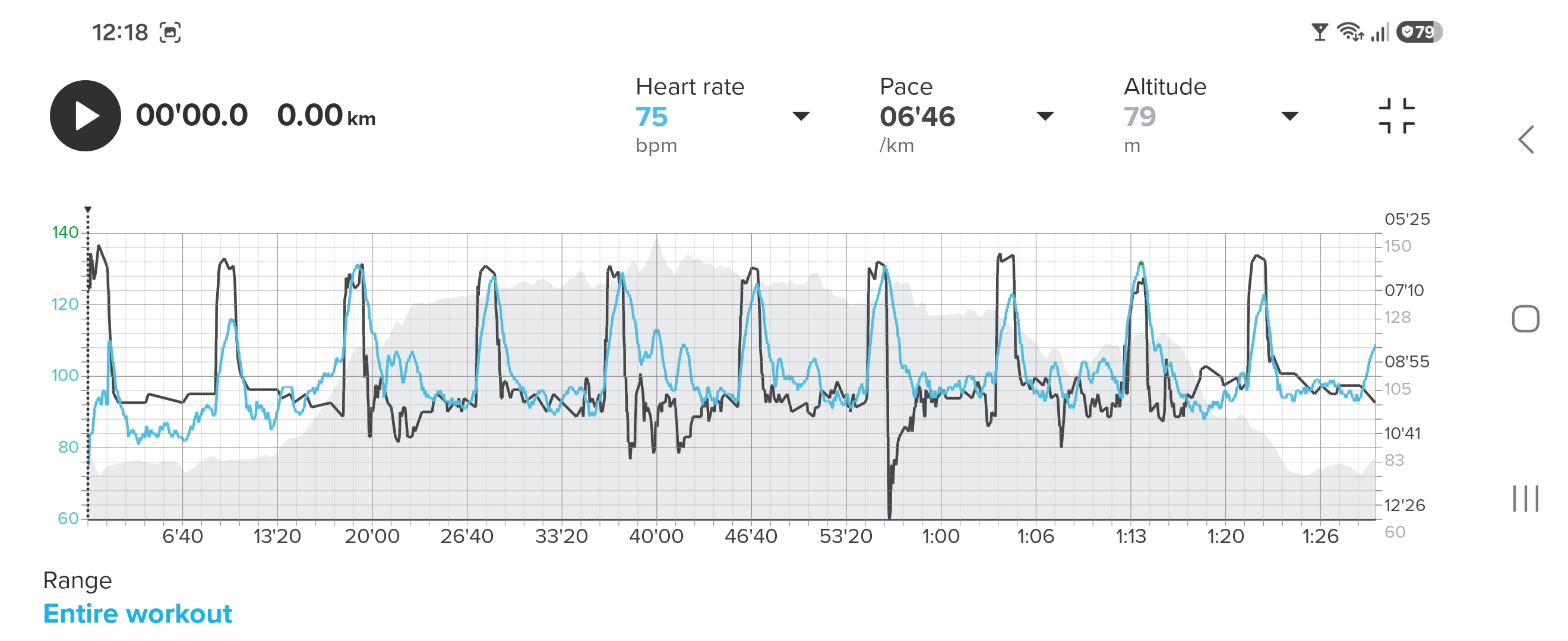
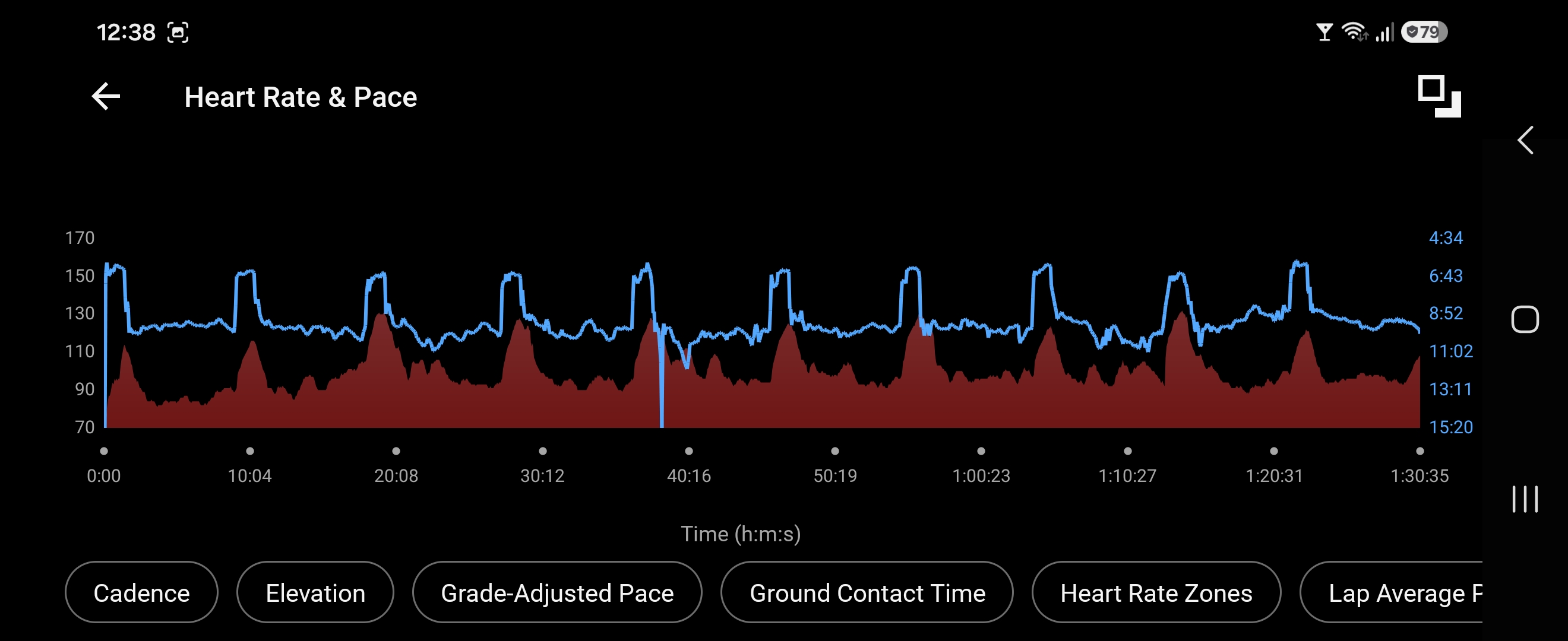
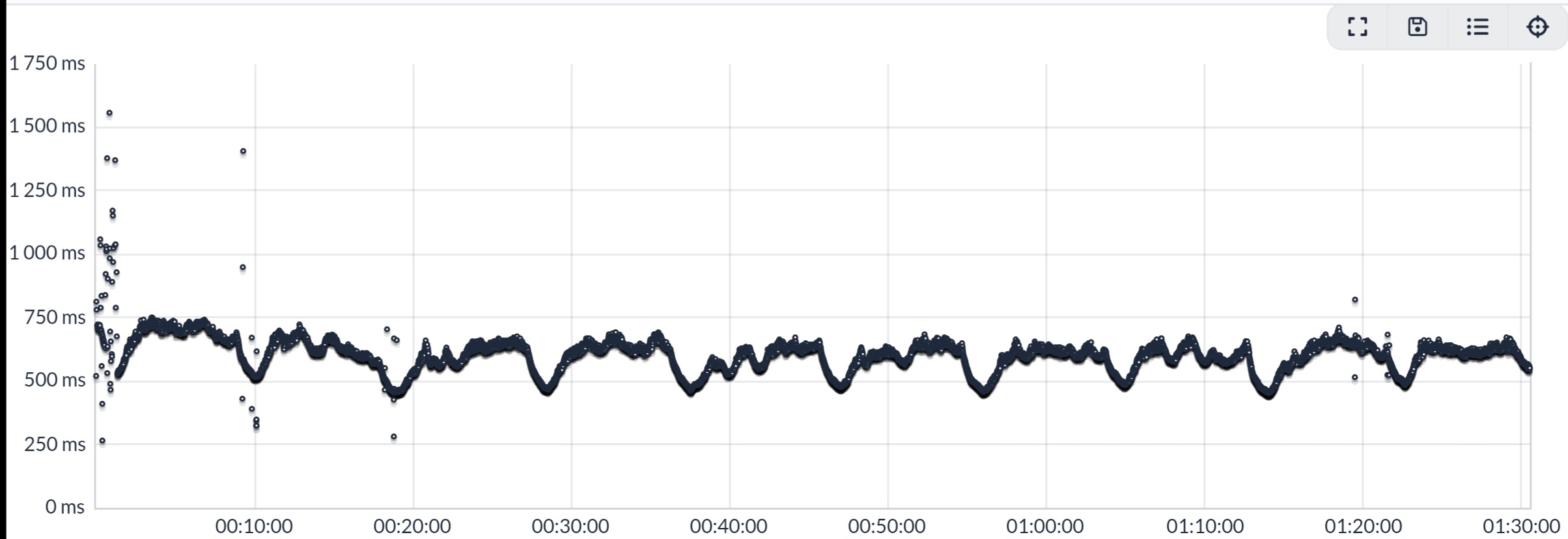
As I said previously, the rest of the exercise was captured exemplary by the SHRM2. During the whole 1 hour and 30 minutes I frequently, almost manically, glanced at the Race S, counted off two seconds (to give the OHR a chance to catch up) and then looking at the FR955 it would have the same (or being 1 bpm off) Heart Rate value. The HR was, and felt, correct for both terrain and paces. Suunto:
Garmin:
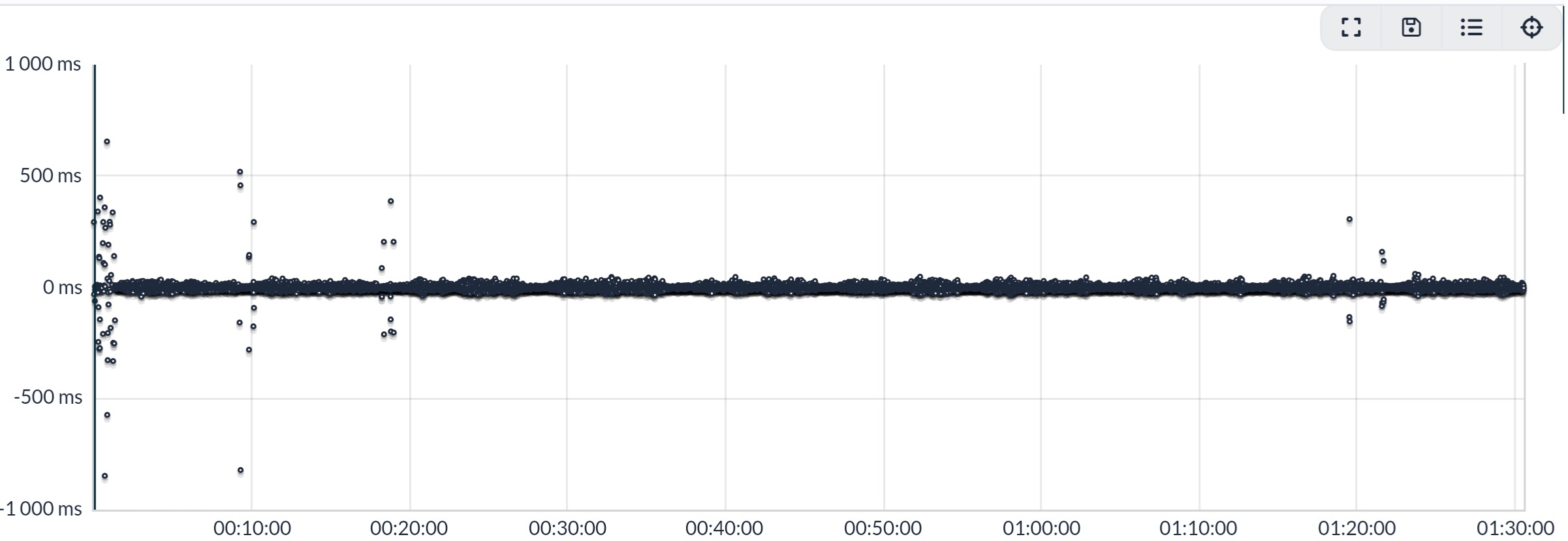
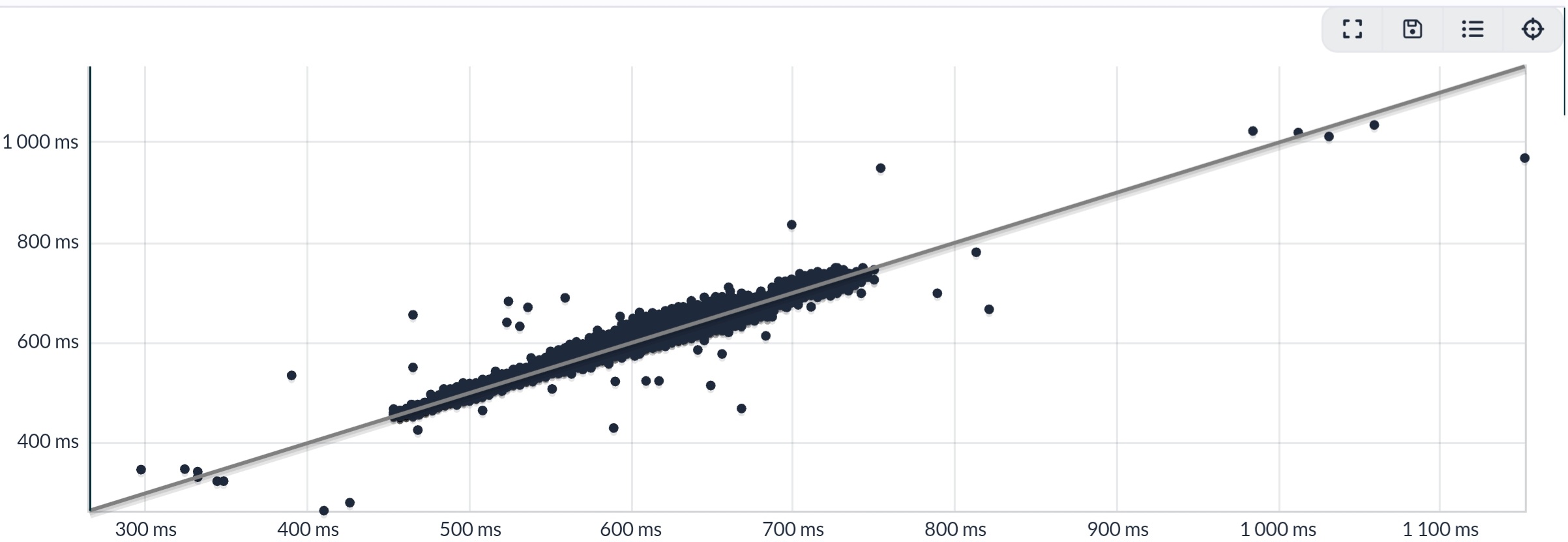
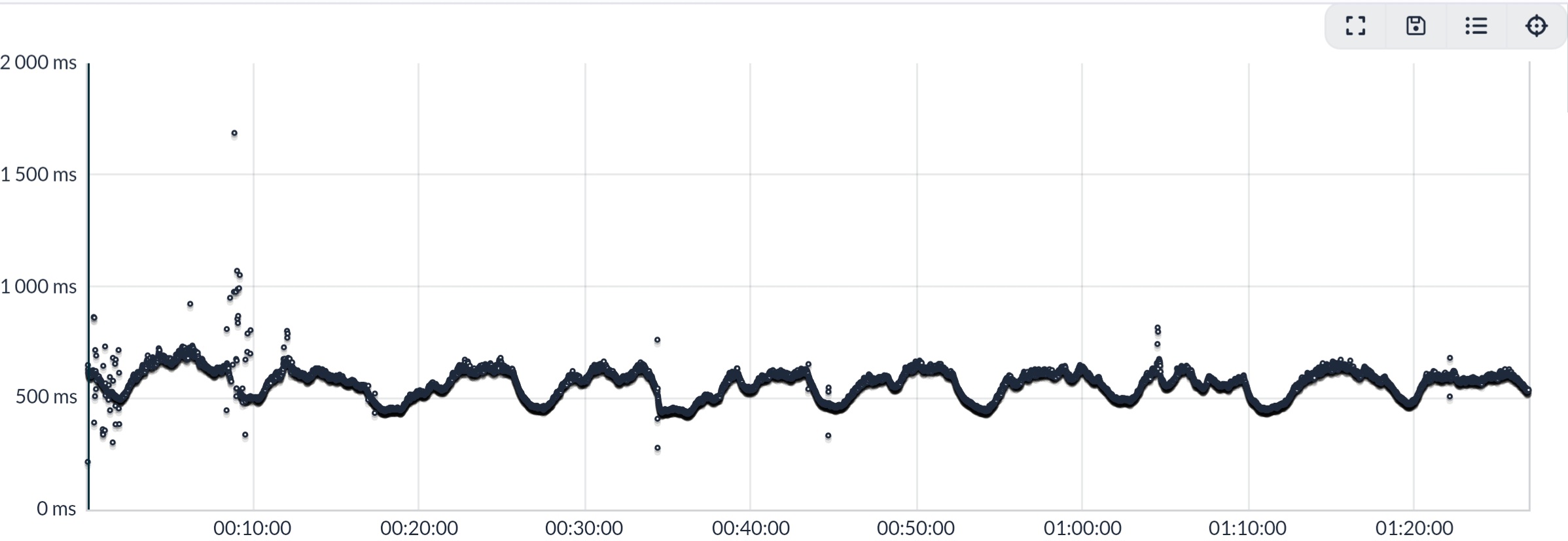
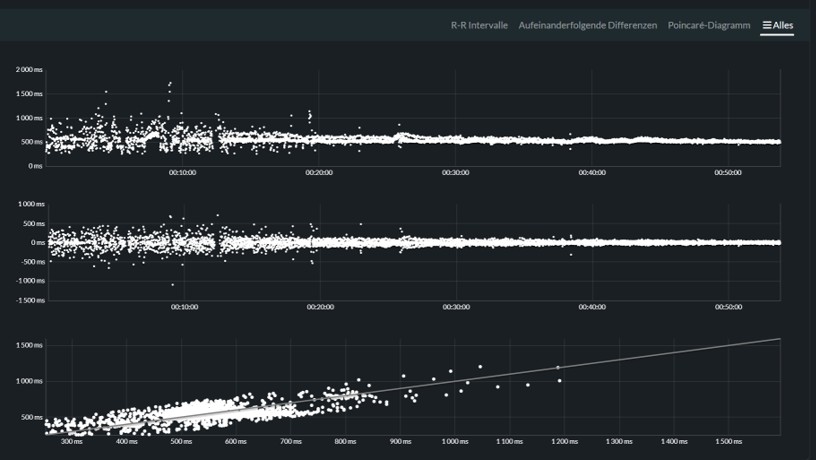
To conclude this report, here is the R-R data from the Runalyze site. Total Anomalies were only 0.4% with the main scatter occurring during the first 1.5 minutes - the bad HR episode:
If things deteriorate with this SHRM2 unit I will report it here, naturally.
Edit: For the whole session, the FR955 had Avg HR 101 bpm and Max 132. The SHRM2 Avg HR was 100 and Max 132.
-
I can confirm that HRM factory reset, removing it from the Suunto app, watch and the bluetooth list helped. Pair again and the data looks fine today.
-
@martintrail Well, I won’t do a factory reset (yet) on this unit, which I think is fundamentally sound hardware wise. But the algorithm does have problems, so I’m hoping for a firmware update - eventually…
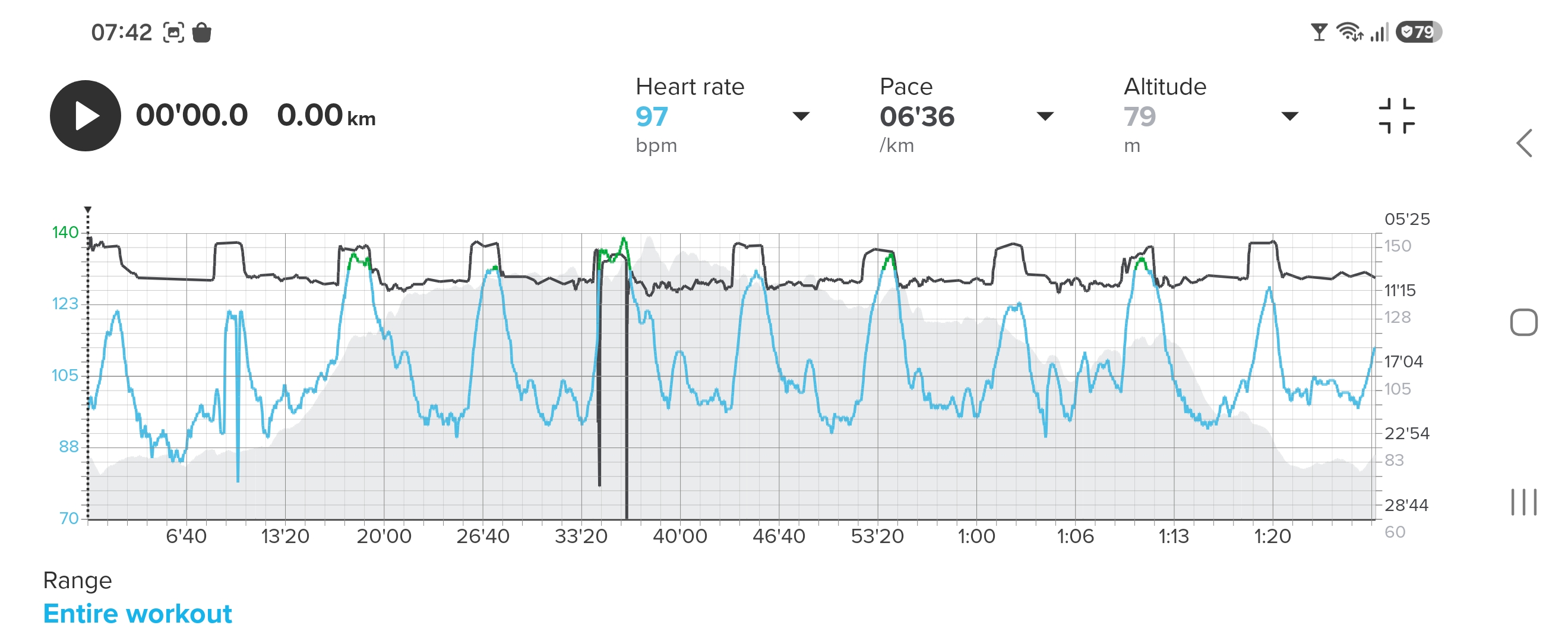
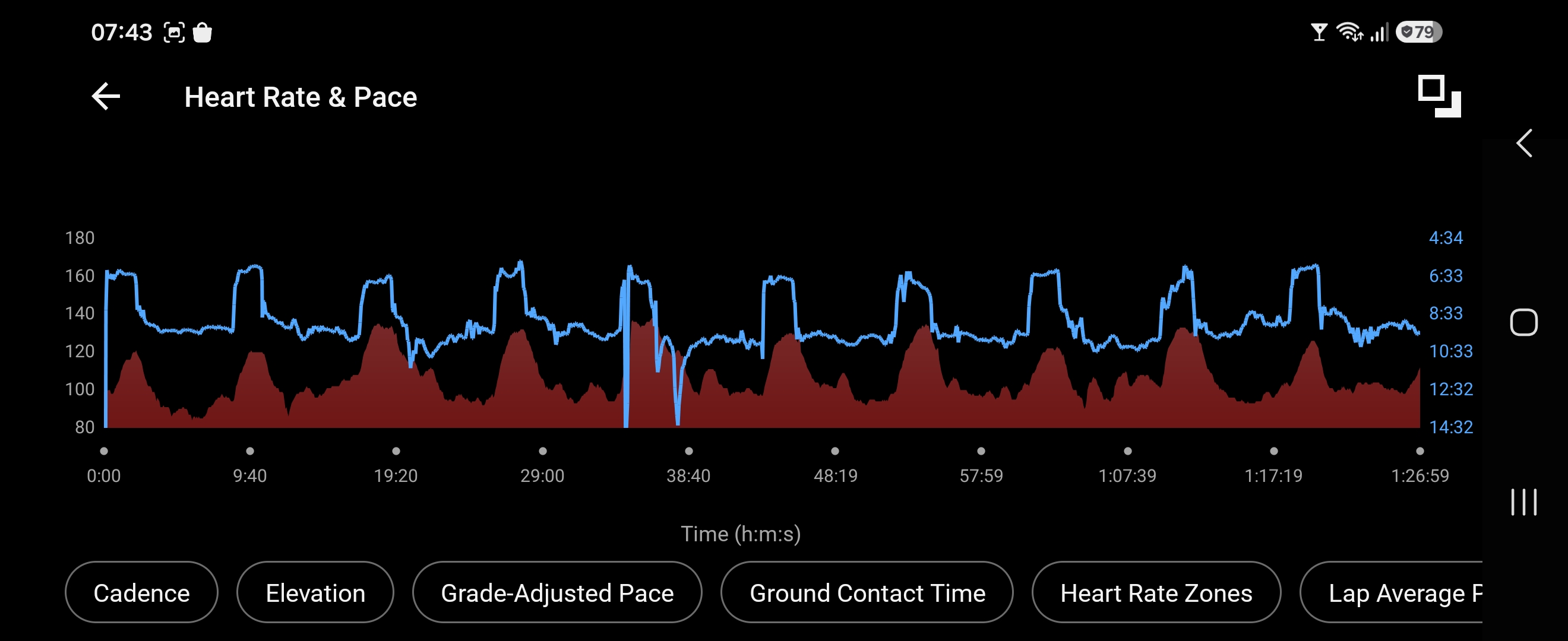
Continued with my Run/Walk sessions yesterday, slightly increasing the run portion; 10 * 300 metres running / 700 metres walking. Garmin FR955 (with own OHR) still as control and Interval alarm. Preparation for the exercise was to spray both chest and strap with a high saline solution (1/2 a teaspoon table salt in 250 millilitre of tap water) and doing a minute of slow running as warmup. Therefore the HR begins at 97 bpm.
Didn’t see it during the run, but the second interval fell victim to some algorithm shenanigans. Zooming in here to show the faulty interval registration between two good ones. The rest of the exercise was OK, even giving good data during and after a fall at the fifth interval at 34 minutes in (bloody knees and palms) showing up only as a few scatter readings in the R-R stream. I was up and running again within 20 seconds…
Algo fault in Suunto:
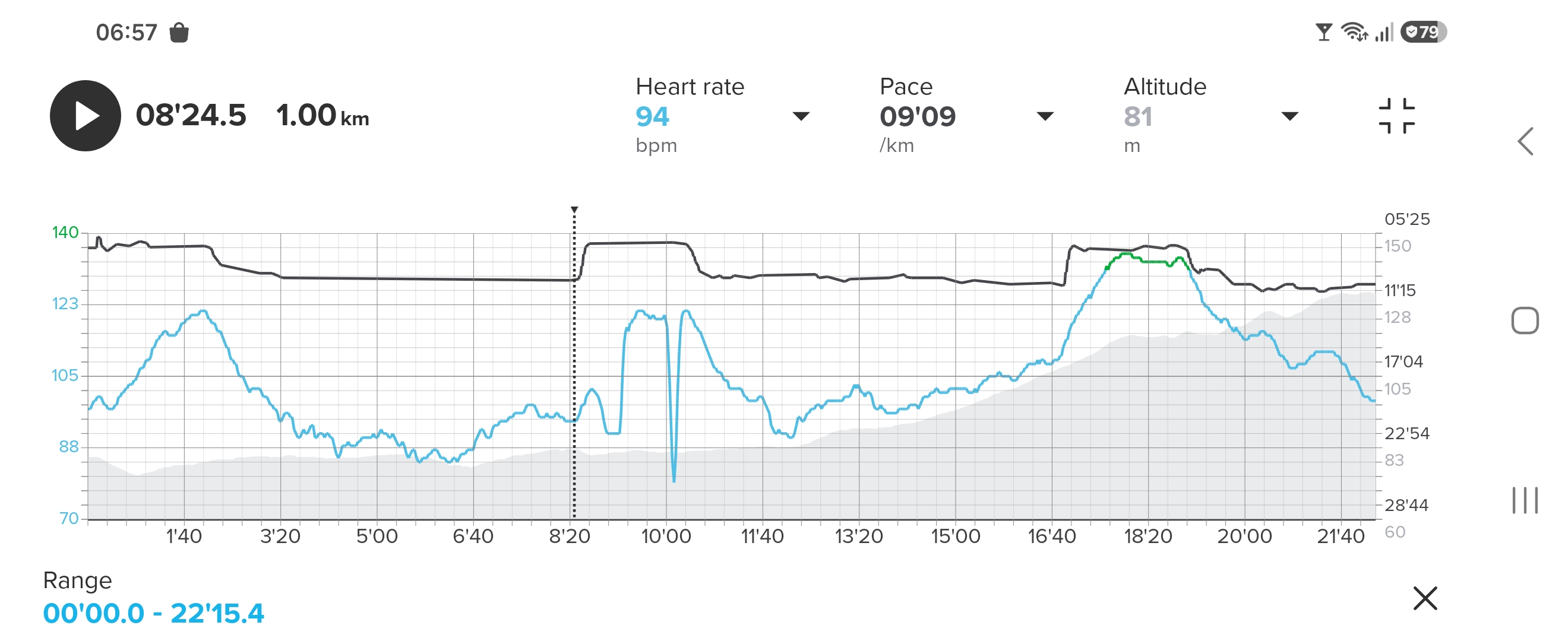
Reality in Garmin:
Whole exercise, Suunto:
And Garmin:
R-R data Runalyze (total of 0.5% Anomalies):
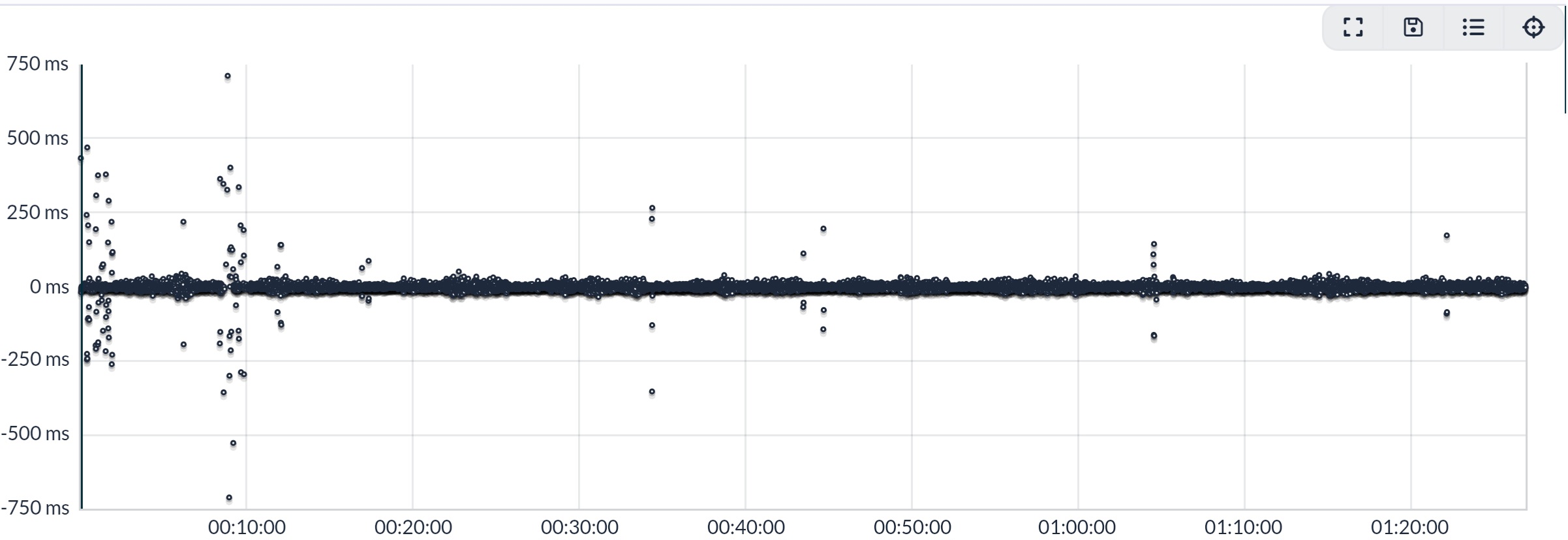
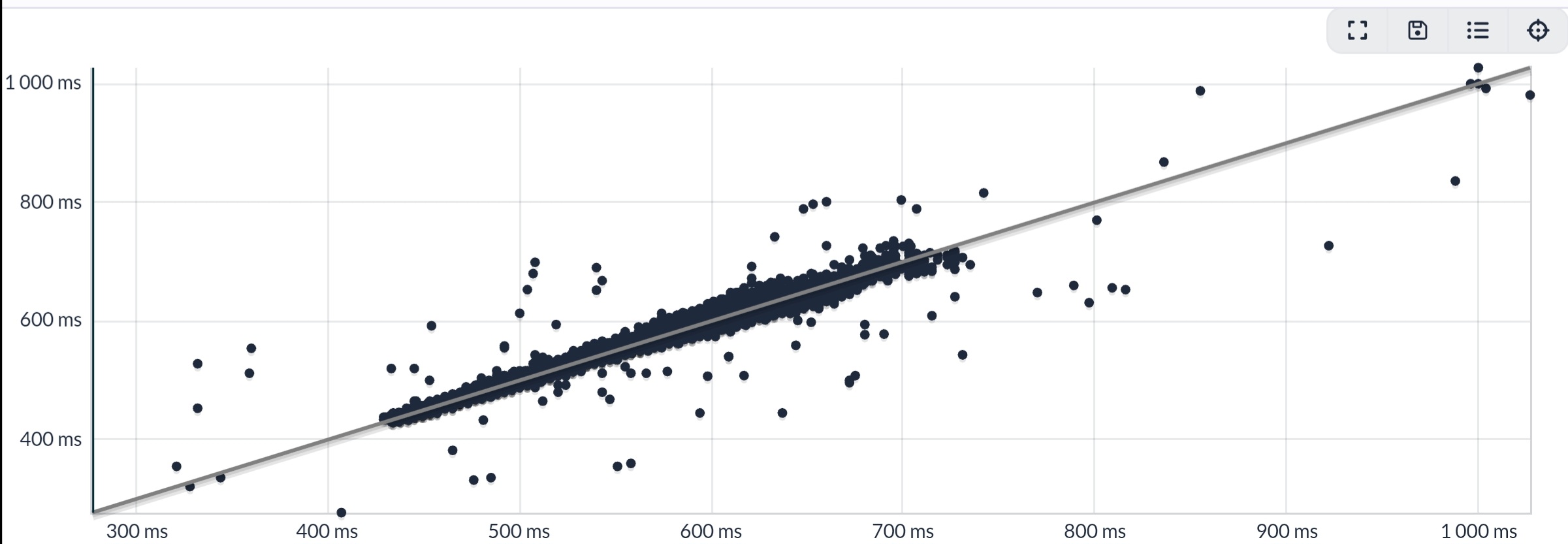
Whole session: FR955 (OHR) Avg HR 107 bpm, Max 139. SHRM2 Avg HR 107 bpm, Max 139.
-
Well, I won’t do a factory reset (yet) on this unit, which I think is fundamentally sound hardware wise. But the algorithm does have problems, so I’m hoping for a firmware update - eventually
I was having those issues before I performed a factory reset (btw, I have the same sn 2625) and it hasn’t happened since then so I’m not sure if it’s an algorithm-related issue. Let’s see if @martintrail has anything to say about it.
Run 2
SHRM2
Spark -
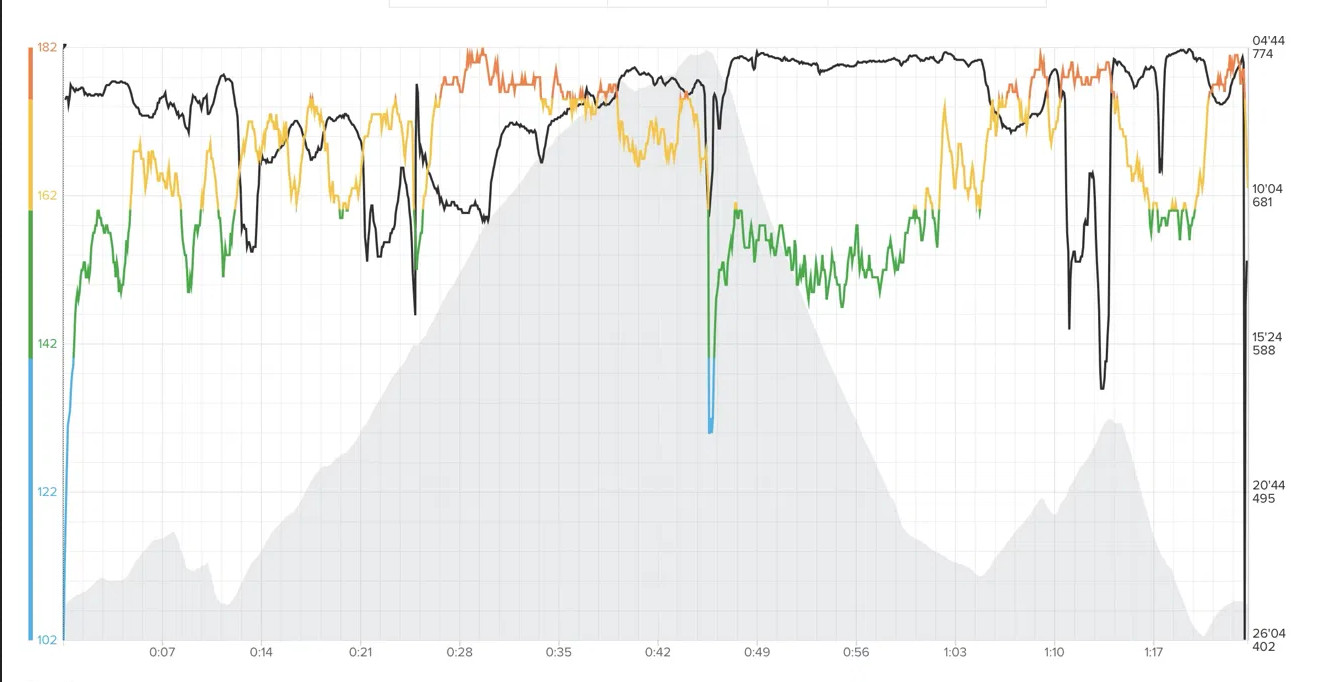
@snow My last run after the factory reset looked good. 80-minute was clean: HR follows the terrain naturally, no flat sections, no dropouts. If I’m seeing this right

Since so many people seem to have the same issue, it looks more like a pairing or firmware problem than faulty hardware. Hopefully Suunto can look into it, and in the meantime this might save someone a return. I’ll report back if the dropouts come back.
HR, Pace, Elevation
-
regarding resetting the sensor:
When I received the testing units, we were advised to factory reset the device after a firmware update, and then start pairing devices again.
While I would have thought that this was related to the BT connections, it still might play a role here…?
Just guessing. -
@Egika I think so too, and it might have, because it really helped.
-
Good morning Ladys and Gentlemen,
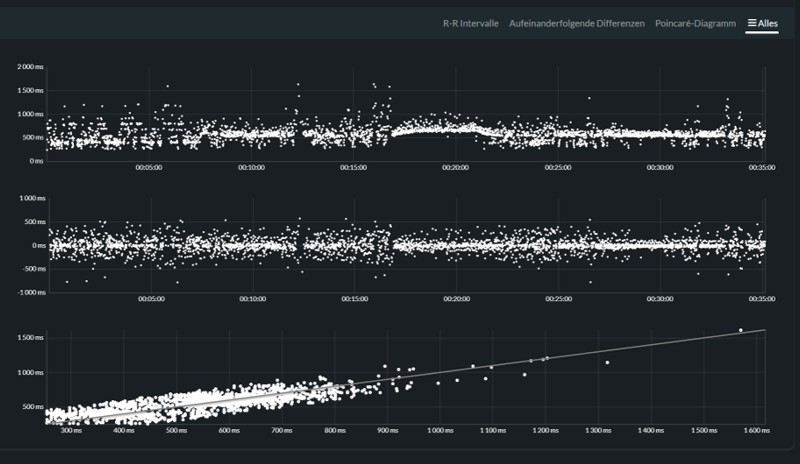
during the last two weeks I made two runs with the new SHRM2. First run, 4,4 km with old firmware. Second was with new firmware, deleted conections, reset and repairing (Only the watch, not the phone). The V2 was the only connection, running analyses switched off.
-
-
Hello @snow,
maybe I made a mistake. Thought the sensor was origin on a firmware 3.2.6.1. After the reset the phone said: New firmware 3.2.6.2. If that´s the original firmware. I apologize. -
-
I’m not sure if it’s an algorithm-related issue.
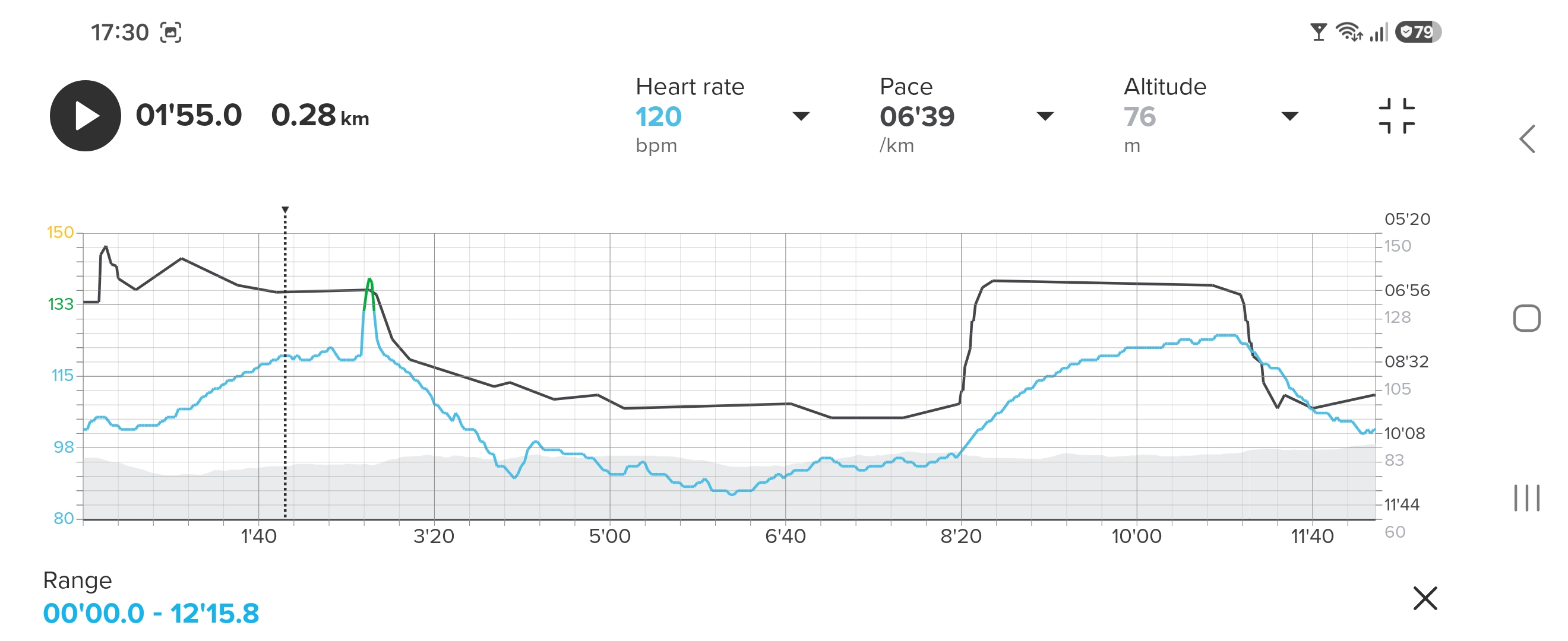
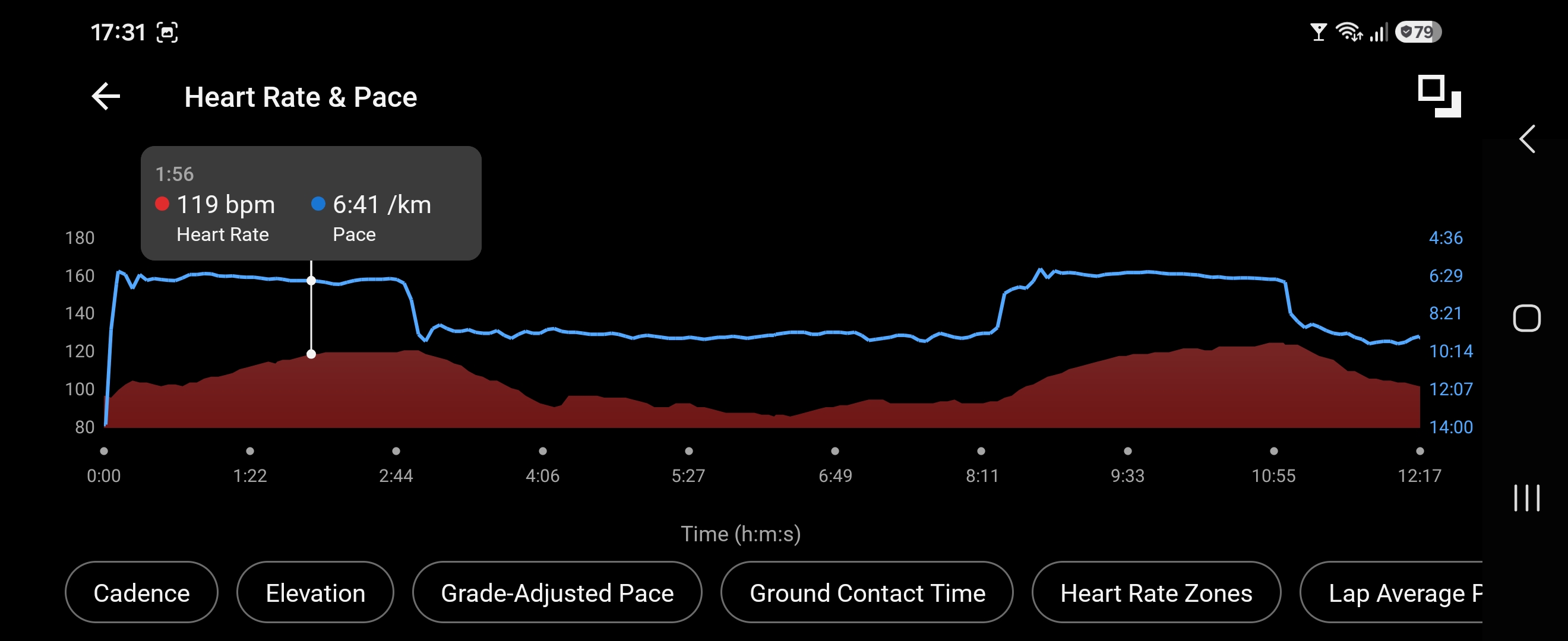
Well… You all made me do it also on this unit; the darn factory reset. With zero change. The SHRM2, for me, in this specific exercise, starts off vacillating… This can not be a straightforward reading of the HR, but an algorithmic interpretation. In today’s first interval all is fine until 1 minute 55 seconds. My control watch (Garmin FR955 with OHR) shows, correctly I believe, that the next 40 seconds running was done at 120 bpm. The SHRM2 won’t believe such a flat HR and so starts to look a couple of bpm below and above - finally shooting up to a spike of 139 bpm just as I stop running. Rest of exercise is without spikes or otherwise mangling of the HR curves.
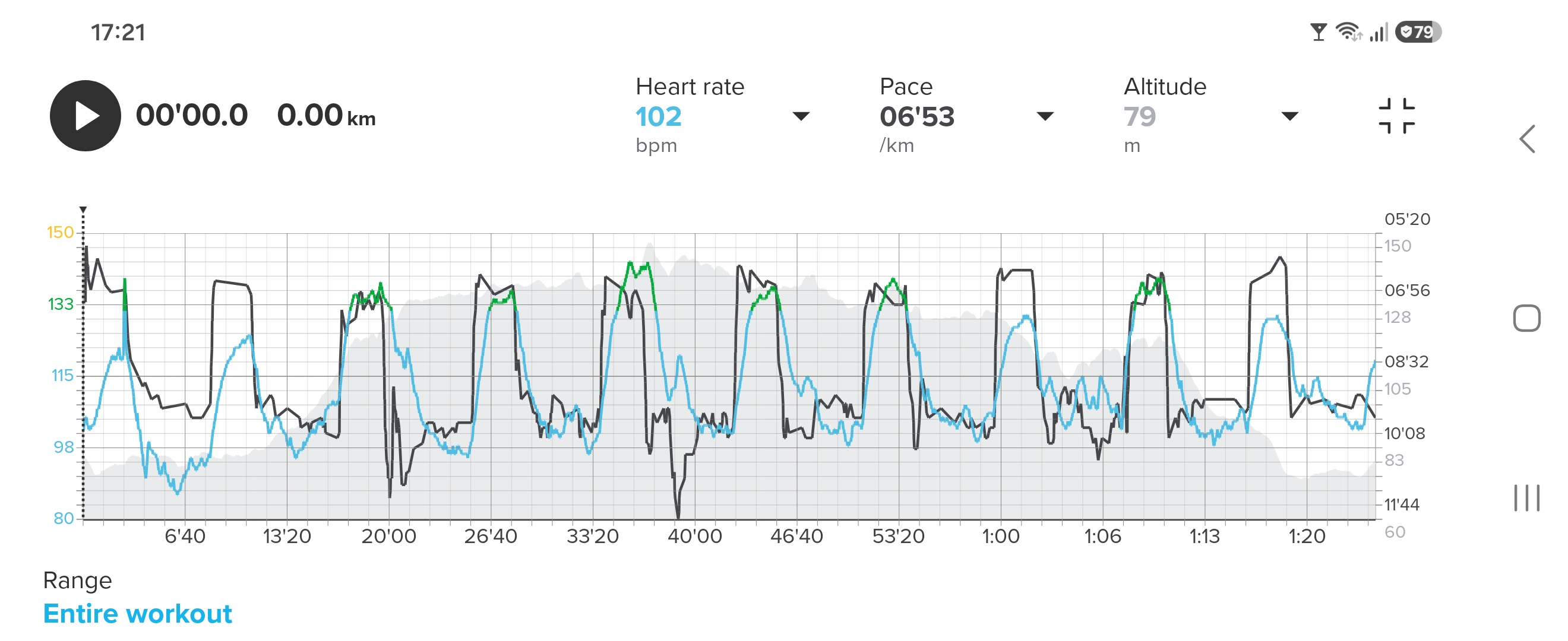
Chest and strap sprayed with high saline solution beforehand. Slow running as a warmup until HR was at 102 bpm. Then did 10 * 400 metres running / 600 metres walking on same course as previous.
Start point of vacillating SHRM2:
Confident FR955 (can’t place marker closer):
Whole exercise Suunto:
Whole exercise Garmin:
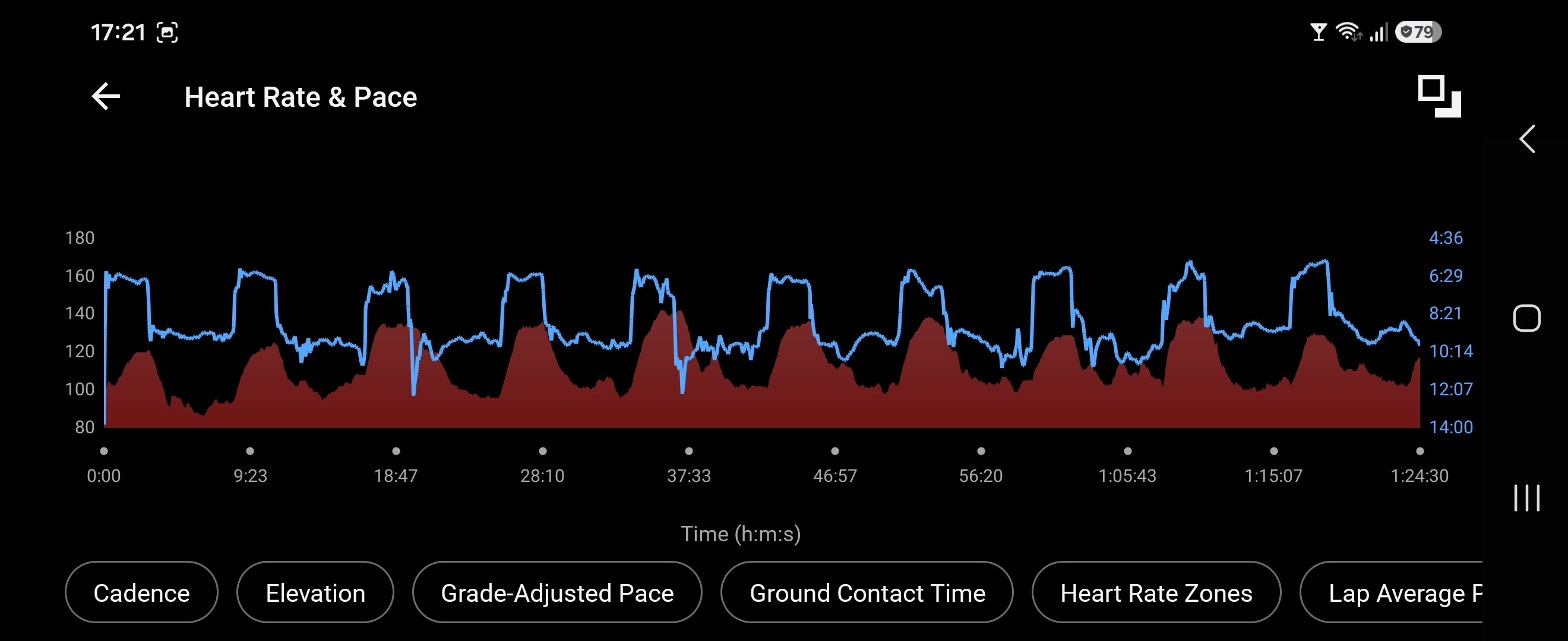
Runalyze R-R data (total of 0.3% Anomalies):
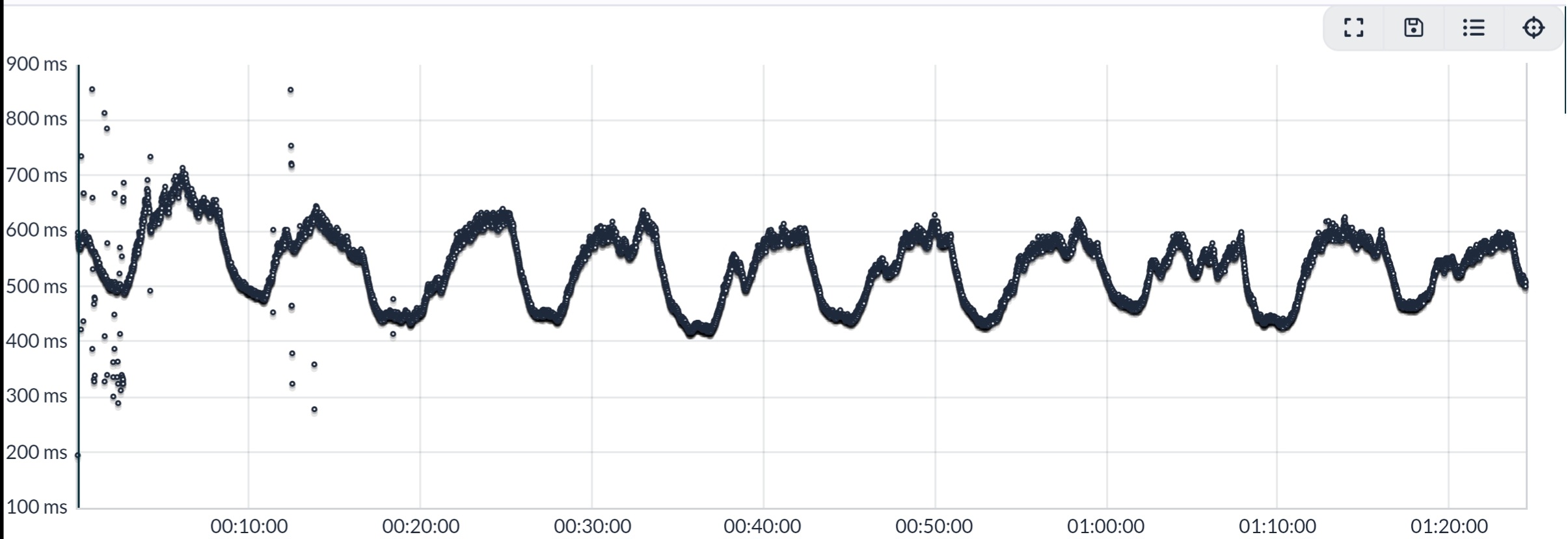
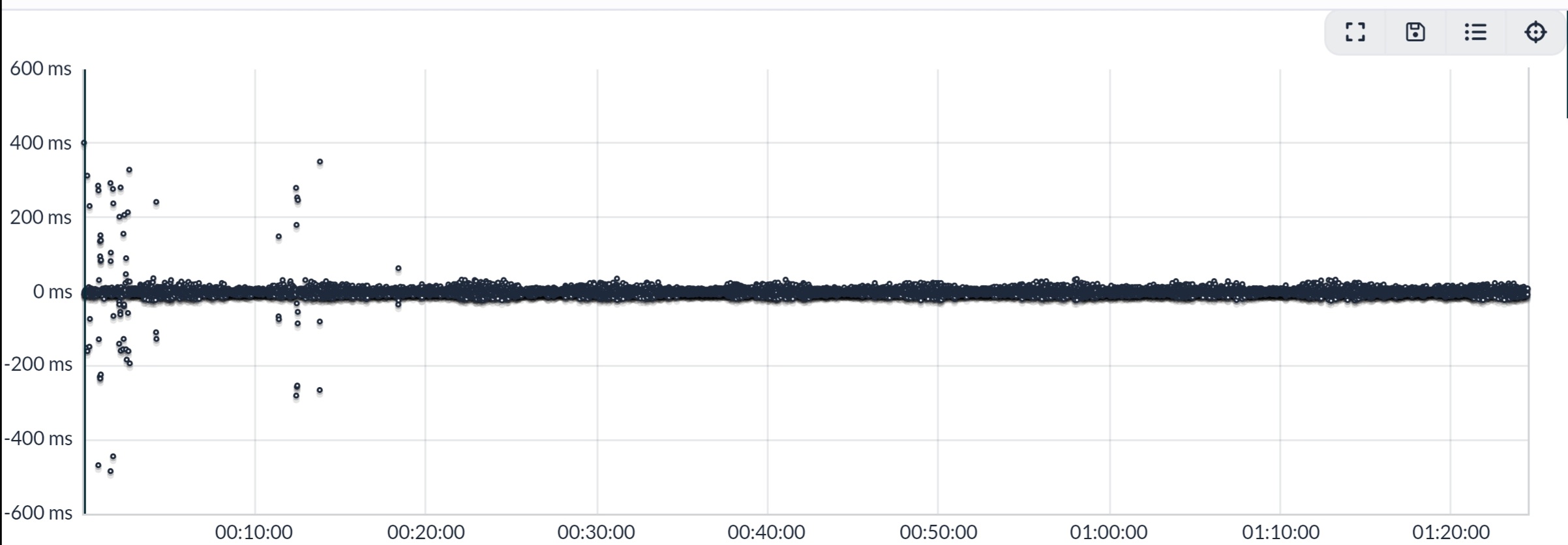
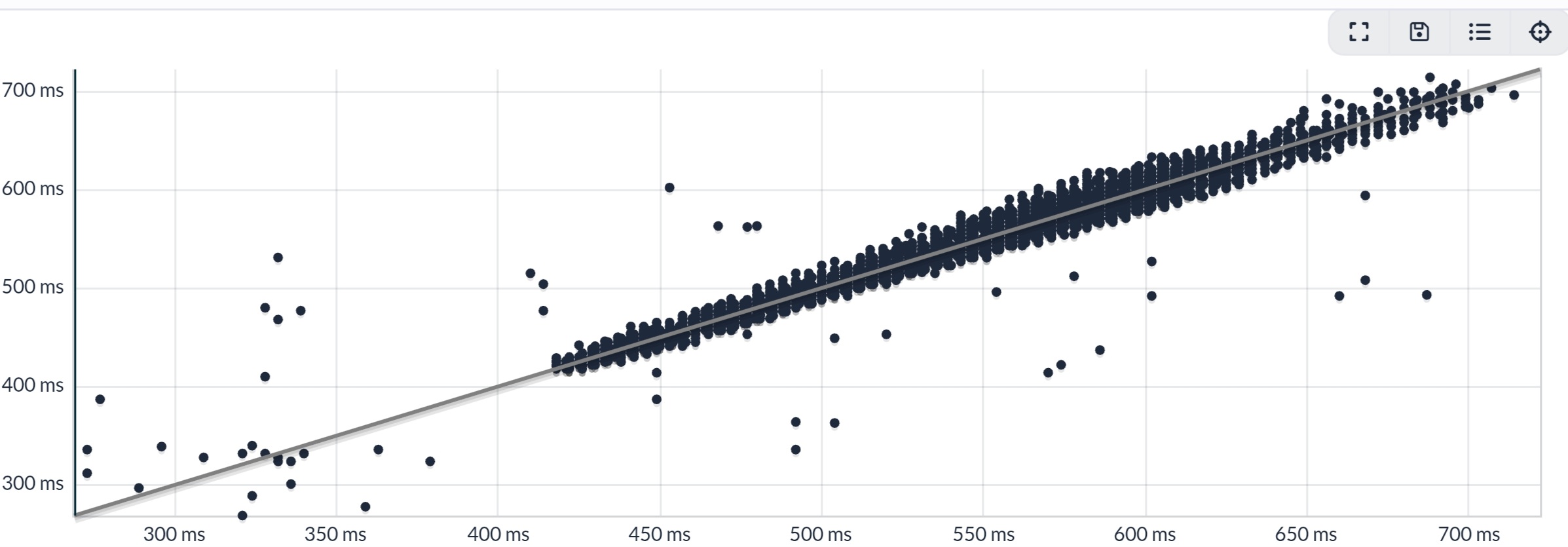
Whole session: FR955 (OHR) Avg HR 113 bpm, Max 143. SHRM2 Avg HR 113 bpm, Max 143.
-
@Inge-Nallsson Hi, would you mind sending me the fit file for this activity via PM? Thanks!
PS
If gps data is a privacy concern, you could export only the timestamp and heart_rate fields from the record messages for hr, and the time field from the hrv messages for the r-r intervals.Run 2
SHRM2
Spark -
I went for another run today, no problems with the belt and data.
-
Hi I have just used my new Suunto Smart Heart Rate Belt 2.
I have connected belt to Suunto App, it is showing power in device details. When I paired it for the first time, it showed 100%, but after my first and only ride (30km, 1:15hour of sensor usage) it shows 80% now. Does it mean that sensor goes down with energy 20% per 1 hour and 15 minutes???
I used sensor with my Vertical during a ride and I saw HR rate. I have paired HR2 belt with Garmin Edge as well, but I did not see any HR data, even the belt it is shown in Edge’s sensor list. Does anybody know, why it could it be so please?
I have clicked na User guide link in SuuntoApp in HR2belt details, but this returns Page not found

T3c, Quest, Ambit3 Peak, 9PP, Vertical
-
@thailon not sure what you wanted to say about battery level. It seems some informatino is missing.
Manual is here:
https://www.suunto.com/Support/Product-support/suunto_smart_heart_rate_belt_2/suunto_smart_heart_rate_belt_2/ -
@thailon not sure what you wanted to say about battery level. It seems some informatino is missing.
Manual is here:
https://www.suunto.com/Support/Product-support/suunto_smart_heart_rate_belt_2/suunto_smart_heart_rate_belt_2/My wrong, post updated.
Thank you for link to manual. -
@thailon I had this with all kinda sensors. Sometimes its 100% sometimes 80%. These batteries / readings are not really reliable.
Community Manager / Admin @Suunto
Creator of quantified-self.io — a next gen training dashboard with MCP access, cross-service activity and route sync
-
@Dimitrios-Kanellopoulos said:
@thailon I had this with all kinda sensors. Sometimes its 100% sometimes 80%. These batteries / readings are not really reliable.
ok, thank you for update. I was curious about battery consumption, 20% per 1 hour and 15 min sounded horrible

-
@thailon The LiPo cells in the watch has a charge meter, that monitors pretty well how much energy goes in and out of the battery.
Sometimes a calibration is needed to tell the charge meter, where the 0 and where the 100% ar lying.The HR strap is powered by a simple button cell. There is no charge meter in place (it it would not make sense, unless there were batteries with a certified charge built in.).
Thus the capacity is simply derived from the cell voltage. Temperature and other factors play a role here as well so that the battery information is a rather coarse one.




Hello! It looks like you're interested in this conversation, but you don't have an account yet.
Getting fed up of having to scroll through the same posts each visit? When you register for an account, you'll always come back to exactly where you were before, and choose to be notified of new replies (either via email, or push notification). You'll also be able to save bookmarks and upvote posts to show your appreciation to other community members.
With your input, this post could be even better 💗
Register Login