Suunto Smart Heart Rate Belt 2
-
Well, I won’t do a factory reset (yet) on this unit, which I think is fundamentally sound hardware wise. But the algorithm does have problems, so I’m hoping for a firmware update - eventually
I was having those issues before I performed a factory reset (btw, I have the same sn 2625) and it hasn’t happened since then so I’m not sure if it’s an algorithm-related issue. Let’s see if @martintrail has anything to say about it.
Run 2
SHRM2
Spark -
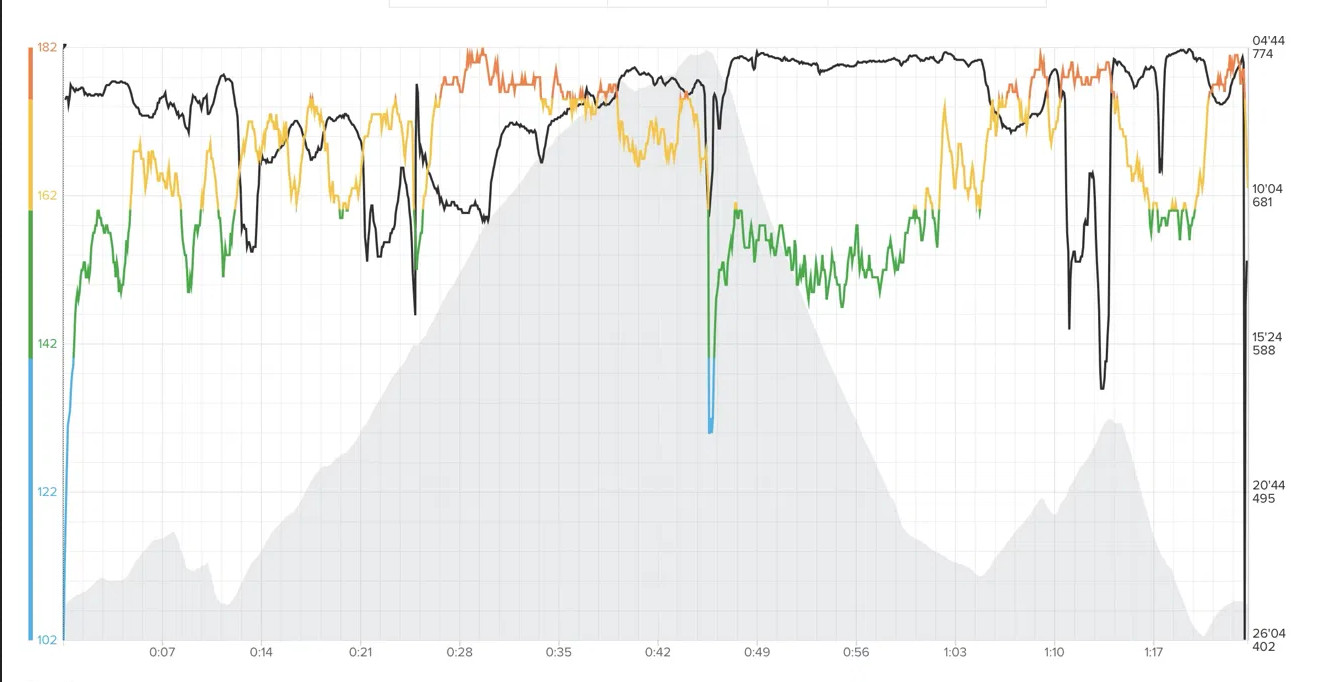
@snow My last run after the factory reset looked good. 80-minute was clean: HR follows the terrain naturally, no flat sections, no dropouts. If I’m seeing this right

Since so many people seem to have the same issue, it looks more like a pairing or firmware problem than faulty hardware. Hopefully Suunto can look into it, and in the meantime this might save someone a return. I’ll report back if the dropouts come back.
HR, Pace, Elevation
-
regarding resetting the sensor:
When I received the testing units, we were advised to factory reset the device after a firmware update, and then start pairing devices again.
While I would have thought that this was related to the BT connections, it still might play a role here…?
Just guessing. -
@Egika I think so too, and it might have, because it really helped.
-
Good morning Ladys and Gentlemen,
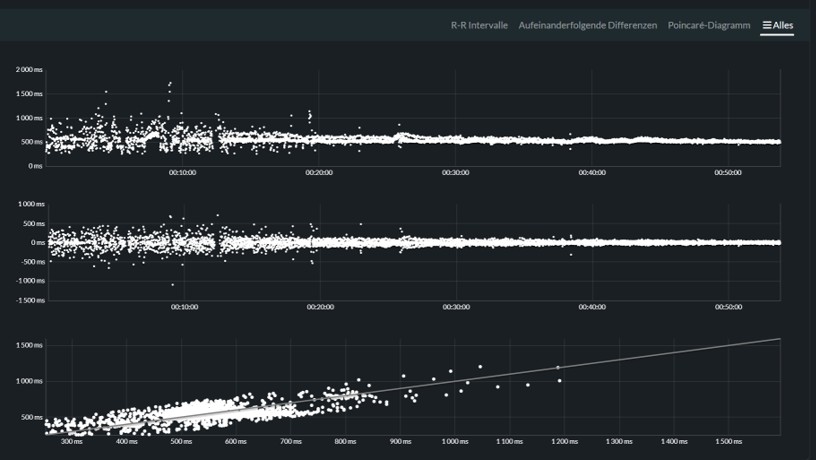
during the last two weeks I made two runs with the new SHRM2. First run, 4,4 km with old firmware. Second was with new firmware, deleted conections, reset and repairing (Only the watch, not the phone). The V2 was the only connection, running analyses switched off.
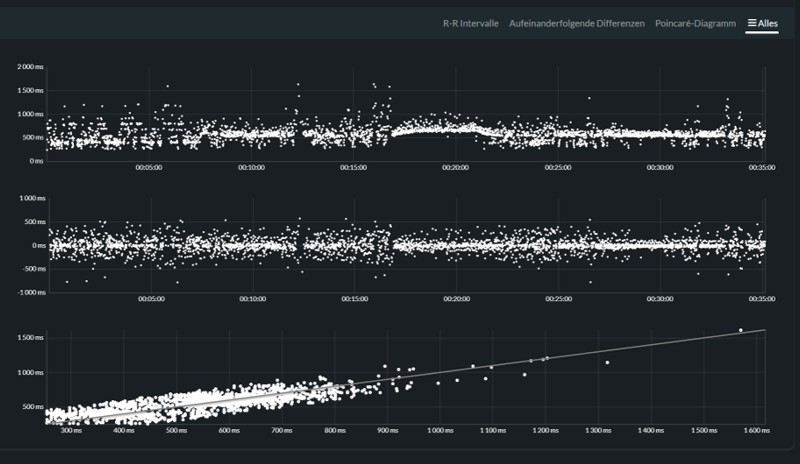
-
-
Hello @snow,
maybe I made a mistake. Thought the sensor was origin on a firmware 3.2.6.1. After the reset the phone said: New firmware 3.2.6.2. If that´s the original firmware. I apologize. -
-
I’m not sure if it’s an algorithm-related issue.
Well… You all made me do it also on this unit; the darn factory reset. With zero change. The SHRM2, for me, in this specific exercise, starts off vacillating… This can not be a straightforward reading of the HR, but an algorithmic interpretation. In today’s first interval all is fine until 1 minute 55 seconds. My control watch (Garmin FR955 with OHR) shows, correctly I believe, that the next 40 seconds running was done at 120 bpm. The SHRM2 won’t believe such a flat HR and so starts to look a couple of bpm below and above - finally shooting up to a spike of 139 bpm just as I stop running. Rest of exercise is without spikes or otherwise mangling of the HR curves.
Chest and strap sprayed with high saline solution beforehand. Slow running as a warmup until HR was at 102 bpm. Then did 10 * 400 metres running / 600 metres walking on same course as previous.
Start point of vacillating SHRM2:
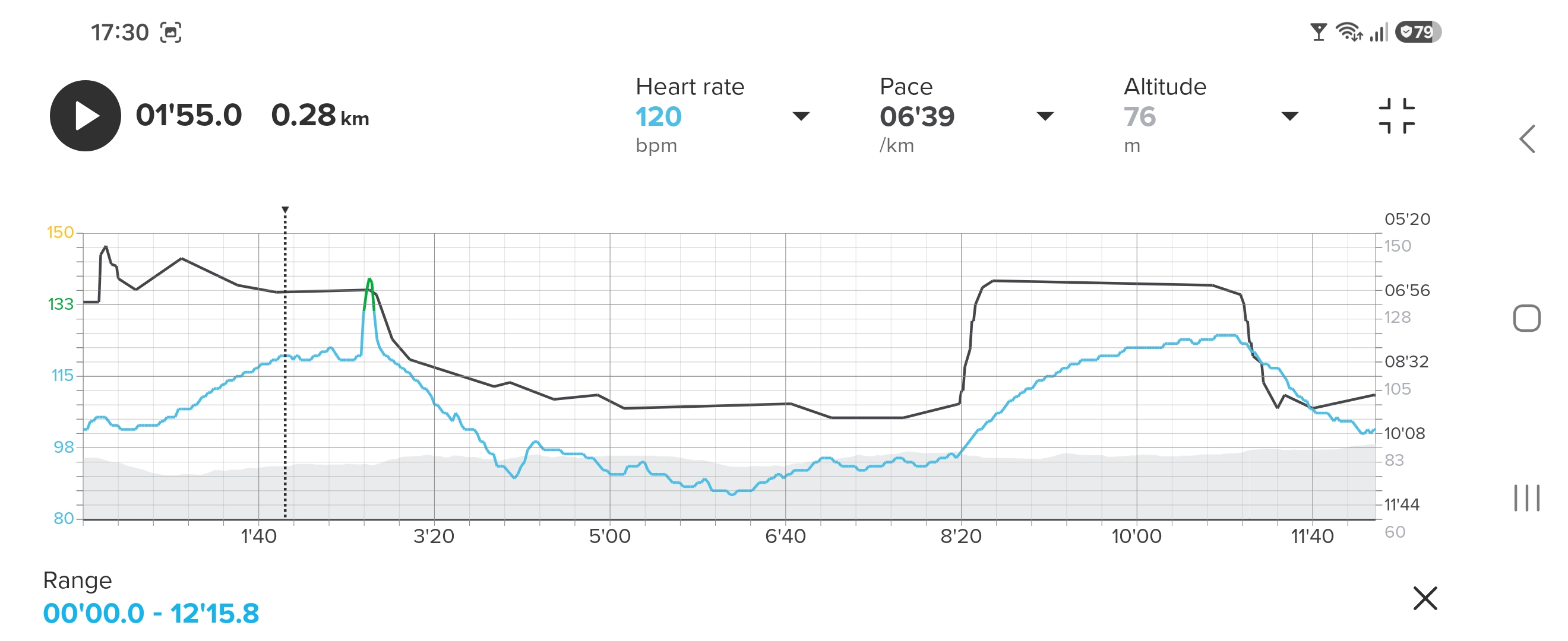
Confident FR955 (can’t place marker closer):
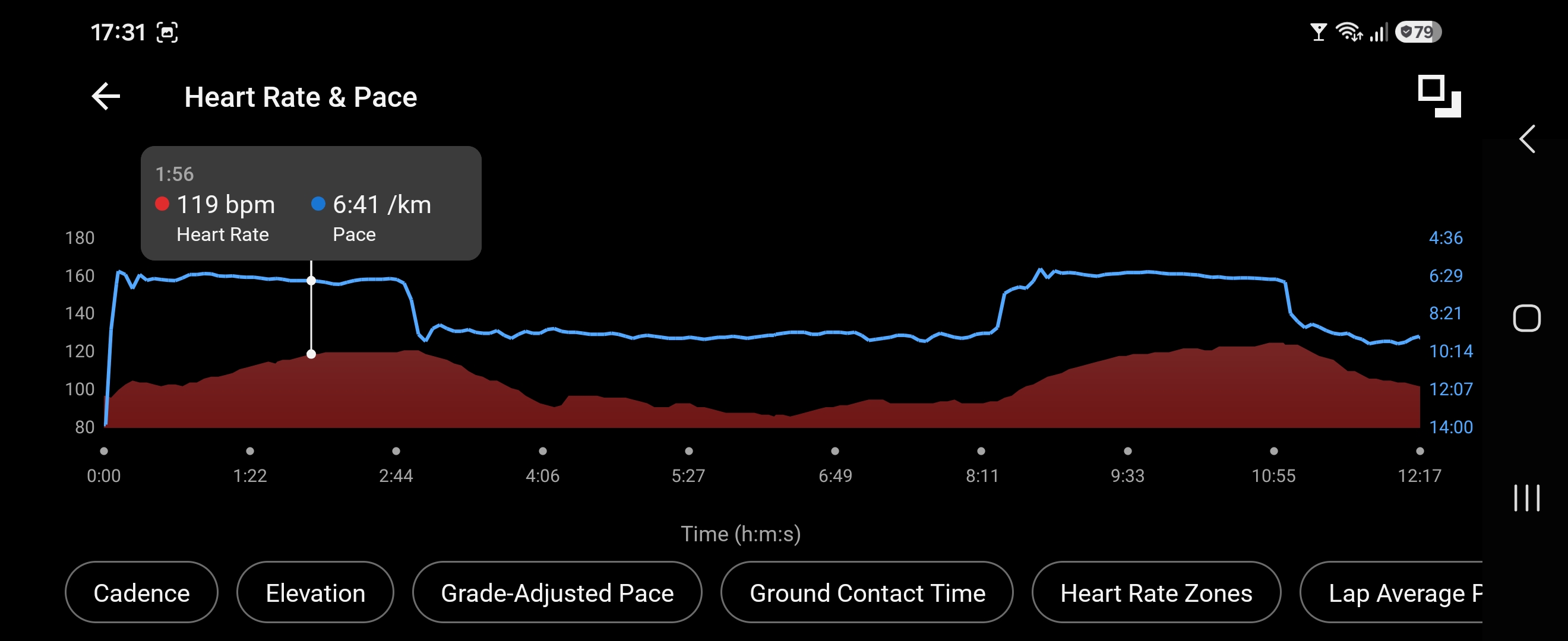
Whole exercise Suunto:
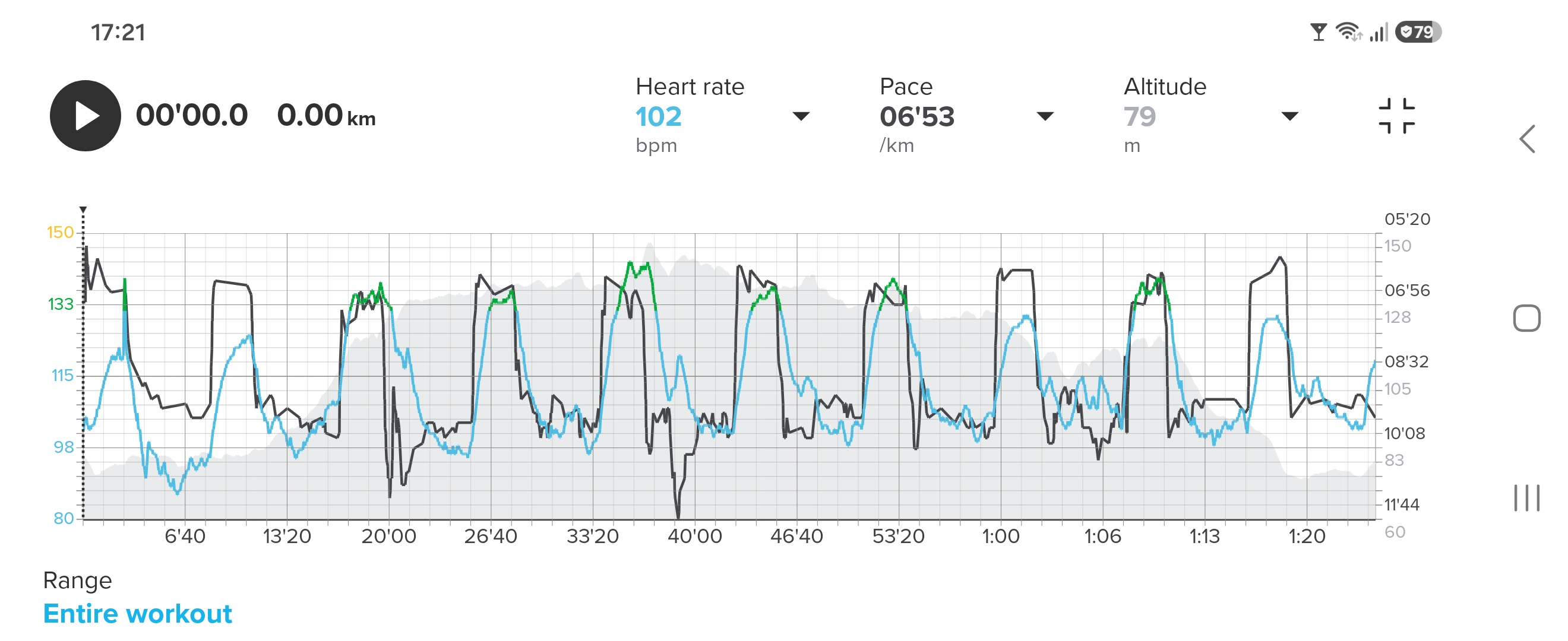
Whole exercise Garmin:
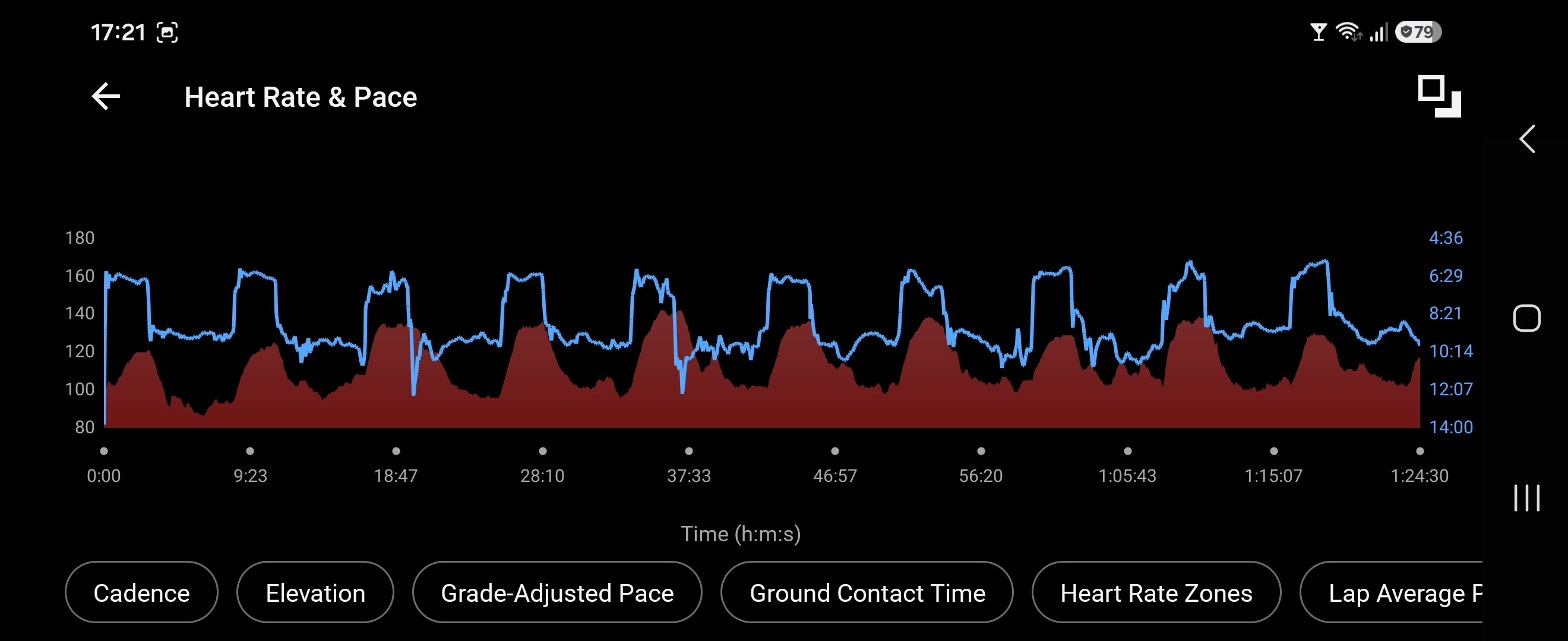
Runalyze R-R data (total of 0.3% Anomalies):
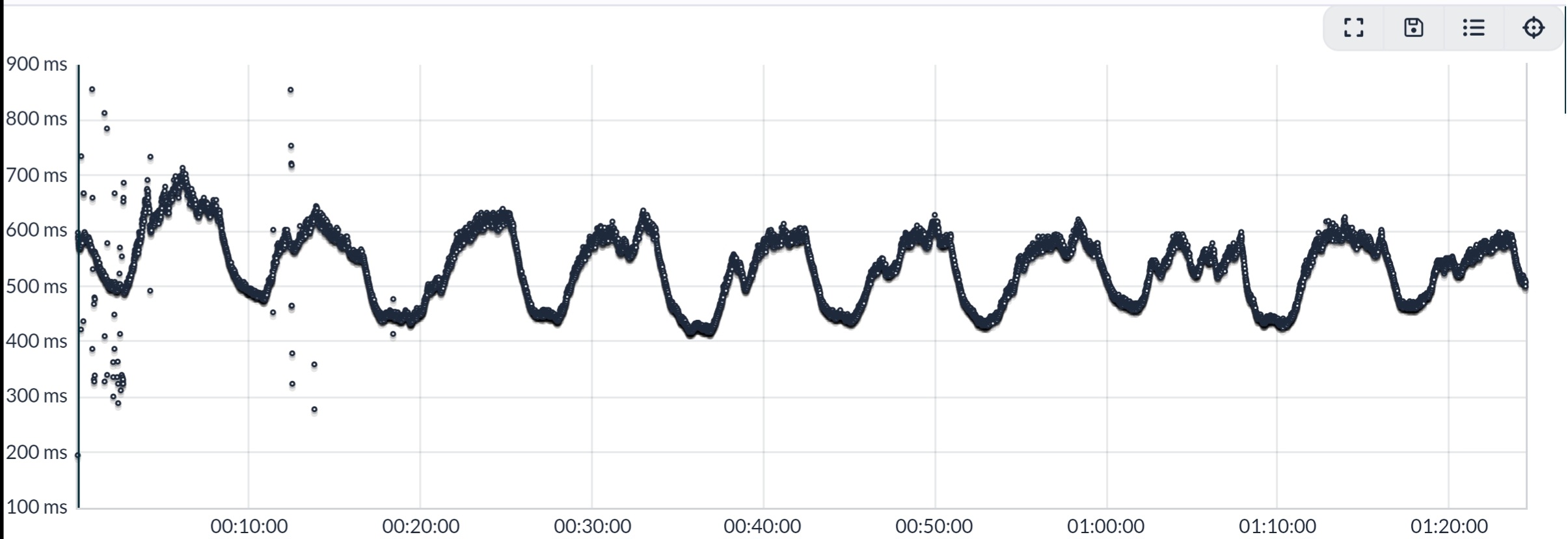
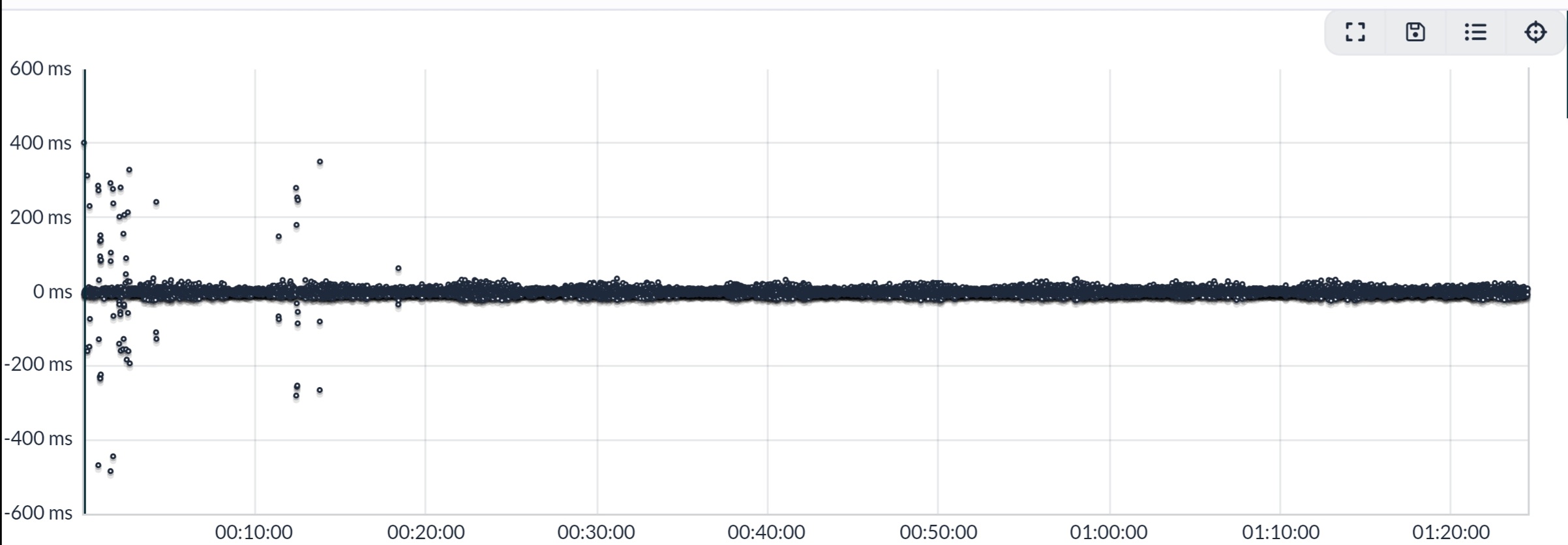
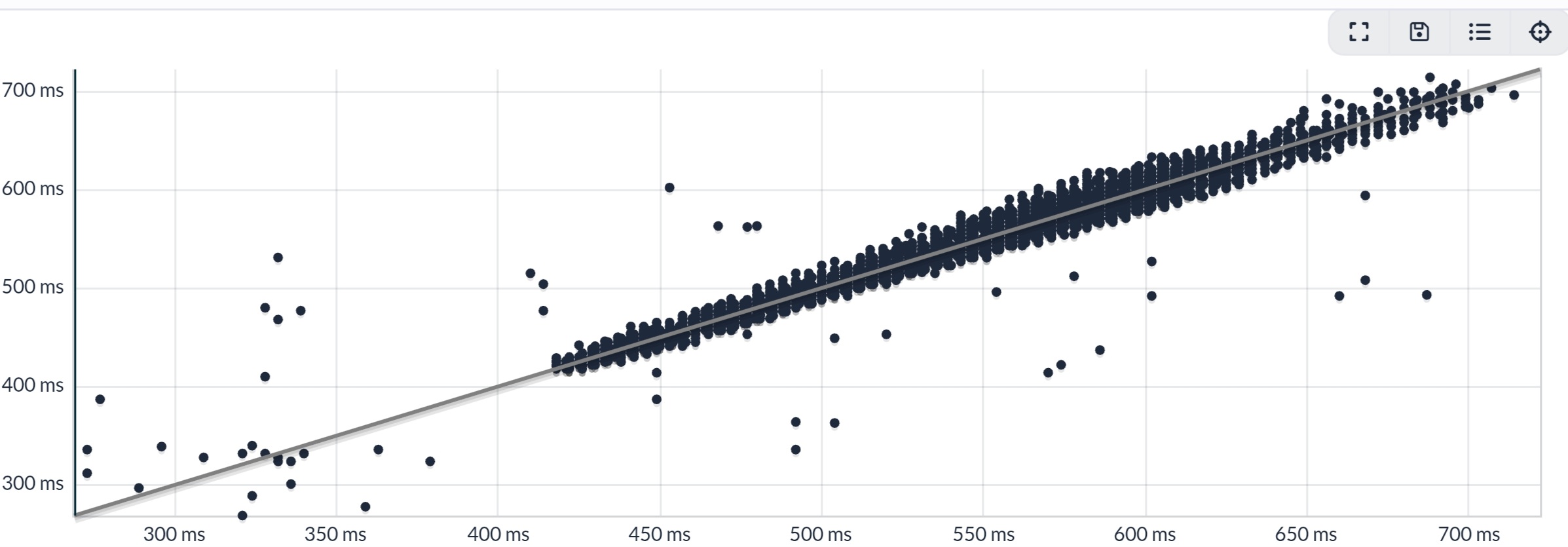
Whole session: FR955 (OHR) Avg HR 113 bpm, Max 143. SHRM2 Avg HR 113 bpm, Max 143.
-
@Inge-Nallsson Hi, would you mind sending me the fit file for this activity via PM? Thanks!
PS
If gps data is a privacy concern, you could export only the timestamp and heart_rate fields from the record messages for hr, and the time field from the hrv messages for the r-r intervals.Run 2
SHRM2
Spark -
I went for another run today, no problems with the belt and data.
-
Hi I have just used my new Suunto Smart Heart Rate Belt 2.
I have connected belt to Suunto App, it is showing power in device details. When I paired it for the first time, it showed 100%, but after my first and only ride (30km, 1:15hour of sensor usage) it shows 80% now. Does it mean that sensor goes down with energy 20% per 1 hour and 15 minutes???
I used sensor with my Vertical during a ride and I saw HR rate. I have paired HR2 belt with Garmin Edge as well, but I did not see any HR data, even the belt it is shown in Edge’s sensor list. Does anybody know, why it could it be so please?
I have clicked na User guide link in SuuntoApp in HR2belt details, but this returns Page not found

T3c, Quest, Ambit3 Peak, 9PP, Vertical
-
@thailon not sure what you wanted to say about battery level. It seems some informatino is missing.
Manual is here:
https://www.suunto.com/Support/Product-support/suunto_smart_heart_rate_belt_2/suunto_smart_heart_rate_belt_2/ -
@thailon not sure what you wanted to say about battery level. It seems some informatino is missing.
Manual is here:
https://www.suunto.com/Support/Product-support/suunto_smart_heart_rate_belt_2/suunto_smart_heart_rate_belt_2/My wrong, post updated.
Thank you for link to manual. -
@thailon I had this with all kinda sensors. Sometimes its 100% sometimes 80%. These batteries / readings are not really reliable.
Community Manager / Admin @Suunto
Creator of quantified-self.io — a next gen training dashboard with MCP access, cross-service activity and route sync
-
@Dimitrios-Kanellopoulos said:
@thailon I had this with all kinda sensors. Sometimes its 100% sometimes 80%. These batteries / readings are not really reliable.
ok, thank you for update. I was curious about battery consumption, 20% per 1 hour and 15 min sounded horrible

-
@thailon The LiPo cells in the watch has a charge meter, that monitors pretty well how much energy goes in and out of the battery.
Sometimes a calibration is needed to tell the charge meter, where the 0 and where the 100% ar lying.The HR strap is powered by a simple button cell. There is no charge meter in place (it it would not make sense, unless there were batteries with a certified charge built in.).
Thus the capacity is simply derived from the cell voltage. Temperature and other factors play a role here as well so that the battery information is a rather coarse one. -
Hi, would you mind sending me the fit file for this activity via PM?
I’m really hazy about the workings of this forum regarding chats, sending files etc. So I’ll just try to put it here instead (all my exercises are public through the app anyways). I’m guessing you’d want to see if the HR values are changed in the App visavis the watch file:
-
@thailon The LiPo cells in the watch has a charge meter, that monitors pretty well how much energy goes in and out of the battery.
Sometimes a calibration is needed to tell the charge meter, where the 0 and where the 100% ar lying.The HR strap is powered by a simple button cell. There is no charge meter in place (it it would not make sense, unless there were batteries with a certified charge built in.).
Thus the capacity is simply derived from the cell voltage. Temperature and other factors play a role here as well so that the battery information is a rather coarse one.Let me provide some technical background on the issue. Measuring the charge level of a coin-cell battery in low-power devices is very difficult. The main factors affecting accurate measurement are: 1. The discharge curve is very flat. Consequently, measurement requires precise voltage readings that are independent of temperature and humidity—something difficult to achieve cost-effectively. 2. Batteries from various manufacturers can be used, and they may have slightly different specifications. 3. Once the battery is somewhat depleted, there is a significant difference between the voltage during data transmission and the voltage at idle. The battery might show an acceptable voltage at idle, but during transmission, the voltage can drop enough to corrupt the data or prevent it from arriving altogether (which, technically, amounts to the same thing in BLE transmission).
I recently dealt with a battery issue in a Garmin HRM-Dual. It had been in use for three years and covered about 300 km of running. The strap was transmitting data that looked “normal,” but the readings didn’t actually correspond to the level of exertion. The Race 2 watch reported 85% battery life, so one would assume everything was fine. I replaced the battery with a new one; the Race 2 still reports 85%, but the strap is now providing accurate data.
So, my advice is to start by replacing the battery, adjusting the strap’s tightness, and moistening the electrodes. If that doesn’t work, the problem lies with either the strap or the watch. -
Hi, would you mind sending me the fit file for this activity via PM?
I’m really hazy about the workings of this forum regarding chats, sending files etc. So I’ll just try to put it here instead (all my exercises are public through the app anyways). I’m guessing you’d want to see if the HR values are changed in the App visavis the watch file:
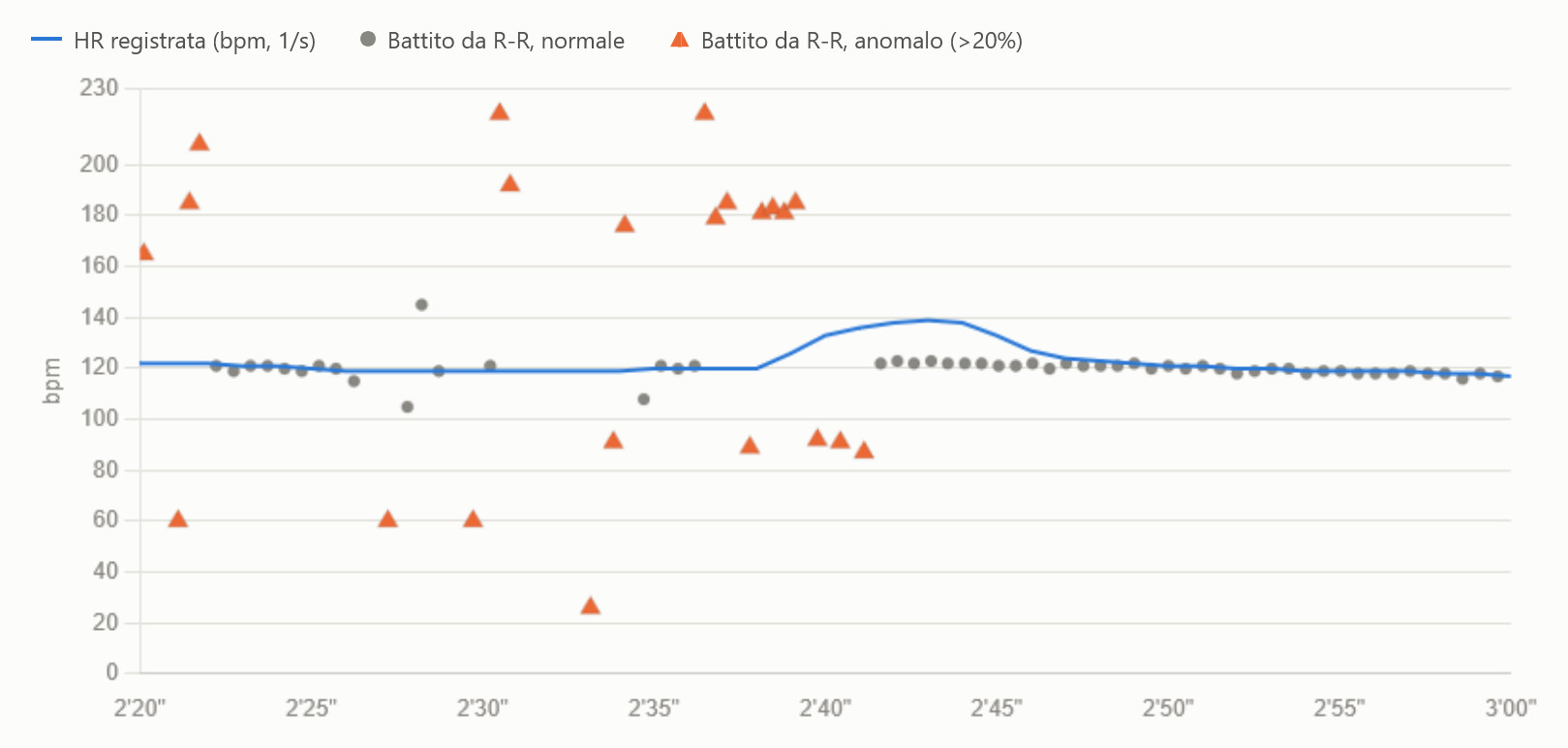
Each dot is one RR interval converted to bpm. Grey dots are consistent with the previous beats; orange triangles deviate from them by more than 20% (a threshold I applied). The blue line is the HR recorded by the watch. I’ve narrowed the data down to the spike zone only.
2’20"–2’34": isolated abnormal intervals, no effect. Several scattered triangles, ranging from 26 to 220 bpm, but the blue line stays flat at about 119–122, so the watch ignored them.
2’36"–2’41": the burst. Here 11 abnormal intervals come in a row: first 8 at about 180 bpm, then 3 at about 90. There’s no normal beat in these 5 seconds.
2’39"–2’50": the spike. The blue line rises right during the burst, peaks at 139 at 2’43", and is back to 121 by 2’50". Meanwhile, from 2’41" on, the grey beats are already steady again at about 122.
That said, the spike matches the only long run of consecutive abnormal intervals, and the beats before and after show no real increase in HR. This suggests a calculation effect: that sequence of intervals was, at least in part, included in the displayed heart rate, as you had surmised. Whether those intervals are strap artifacts or real irregular beats can’t be told from the file, that would need an ECG.
I keep using both SHRM2 and H10 but yet to see something as happened to you.
I forgot to mention that I assumed the RR data was raw, unfiltered data.





Hello! It looks like you're interested in this conversation, but you don't have an account yet.
Getting fed up of having to scroll through the same posts each visit? When you register for an account, you'll always come back to exactly where you were before, and choose to be notified of new replies (either via email, or push notification). You'll also be able to save bookmarks and upvote posts to show your appreciation to other community members.
With your input, this post could be even better 💗
Register Login