Suunto Vertical | Map Load Failure | FW 2.50.28
-
firmware:
2.50.28Good Morning All,
I’ve just started having issues with maps not loading with my Suunto Vertical which I’ve had for a few weeks and had no issues with until yesterday.
It seems that no matter how long you leave the map it stays on the default black background with a white grid:
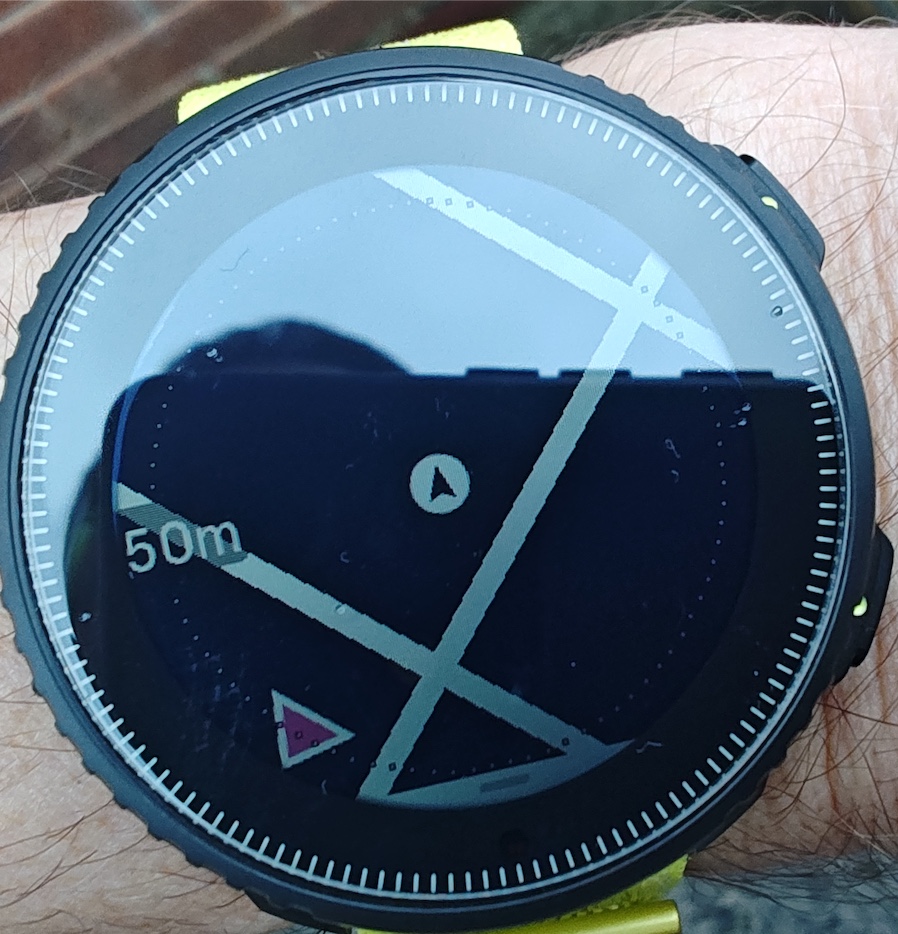
I went for a walk with the dogs this morning and tried zooming out to cover a wide area and it prompted it to start filling in the map segments.
It started failing yesterday partially and could well be related to another issue where the data logging got frozen and the live power value got stuck:
https://forum.suunto.com/topic/15978/suunto-vertical-power-with-zeros-stuckDiagnostics snipping from the failed map load:
#170034 13.10.2026 07:49:00 : EVT <Unknown> : EveryTenMinutes Step:211
#170035 13.10.2026 07:57:40 : TRC MAPS : Maps opened
#170036 13.10.2026 07:57:40 : TRC MAPS : Tile[0]: LOAD_FAILED (x16190, y10618, z15)
#170037 13.10.2026 07:57:40 : TRC MAPS : Tile[1]: LOAD_FAILED (x16190, y10617, z15)
#170038 13.10.2026 07:57:40 : TRC MAPS : Tile[2]: LOAD_FAILED (x16191, y10618, z15)
#170039 13.10.2026 07:57:40 : TRC MAPS : Tile[3]: LOAD_FAILED (x16191, y10617, z15)
#170040 13.10.2026 07:57:40 : TRC MAPS : Tile[4]: LEFTOVER (x16198, y10622, z15)
#170041 13.10.2026 07:57:40 : TRC MAPS : Tile[5]: LEFTOVER (x16198, y10621, z15)
#170042 13.10.2026 07:57:40 : TRC MAPS : Tile[6]: LEFTOVER (x16197, y10622, z15)
#170043 13.10.2026 07:57:40 : TRC MAPS : Tile[7]: LEFTOVER (x16197, y10621, z15)
#170044 13.10.2026 07:57:40 : TRC MAPS : Tile[8]: FREE (x16196, y10621, z15)
#170045 13.10.2026 07:57:40 : TRC MAPS : Tile[9]: FREE (x16194, y10619, z15)
#170046 13.10.2026 07:57:40 : EVT MAPS : Load style: default-off
Not sure what else to check in the log but you’d think there would be enough storage on a Vertical to not require any kind of reboot to clear things down.
link to an old post about maps not loading :
https://forum.suunto.com/topic/8851/no-map-problem/127Suunto Vertical | Garmin Forerunner 955
Polar OH1+ | Wahoo Trackr
BLE/ANT+ Microcontroller Development -
@Woodster first thing to try if map is not showing:
12s upper button soft reset.You won’t loose any data. Please report back if this helps. Cheers!
-
@Egika will try if it fails again - for now it’s working every time I load the map now after fully zooming out. It lots regardless of having a GPS signal too which is how it’s been working so far with the last known location.
-
-
@Egika watch finally crashed right at the end of a short walk across London - the maps were rending quite slow, like 1 FPS just before. Thankfully the data was saved before it rebooted, however Resources was defaulted back to 70%
I don’t have the crash log as I was working away and missed the event by an hour - not sure as yet if the log gets deleted on reboot or retained on the watch’s storage.
I’ll try and capture diagnostics next time.
( update - the log does get kept during a 12s long UP button press “soft reset” )

Hello! It looks like you're interested in this conversation, but you don't have an account yet.
Getting fed up of having to scroll through the same posts each visit? When you register for an account, you'll always come back to exactly where you were before, and choose to be notified of new replies (either via email, or push notification). You'll also be able to save bookmarks and upvote posts to show your appreciation to other community members.
With your input, this post could be even better 💗
Register Login