Suunto Core 2 questions/advice before possible return
-
@mikekoski490
If we’re talking about the time difference between specific geographic coordinates, then, for example, here (Czech Republic—Central Time Zone), the time difference per 100 km is about 5–6 minutes. I don’t know how it works where you are. So if the watch were set to Prague (central), and I were in Brno (about 190 km away), the app would shift the sunrise and sunset times east-west by about 11–12 minutes. I’m not sure how it works where you are. The farther north you go, the more minutes the actual sunrise and sunset times shift.
But of course, I don’t know if that’s the case or if the problem is with the watch.
What’s bothering me is that barometric pressure graph that stays flat!!! 🫤 And I’ve noticed it in practically every Core 2 review on YT. -
@Alpha Thanks. Yes, I think that’s accurate and again thanks for the info. I am actually north about 100km from the closest city listed in the Core 2 settings, so agree now that I dont think it’s a software glitch.
I guess the Bluetooth app connection is trying to fill in the gaps so Im ok with it.
I agree too the new baro graph is a bit underwhelming, but i sort of knew that before purchase so im ok with it. ‘Generally’ the baro graph is similar to other watches I have (…although flatter and less dramatic), but have to remember to lock in baro mode overnight.
If I could change anything, it would be:
-
Go back to the Core auto alti/baro switch. On the Core 2, I realize now I have to put it in the baro mode to lock it to get an accurate graph if Im not moving. Reminds me of my old Suunto Observer. I have to remember to switch out of baro mode before I go anywhere.
-
If Suunto can do a firmware update to improve the auto alti/baro lock, then the baro trend arrow would be able to be visible in the main time screen again, like on the original Core.
-
-
@mikekoski490
Well, if you’re north of the meridian, it shouldn’t make a difference—you’d have to be traveling east or west from the reference point (the city) for the time difference to take effect. If you were exactly north (along the meridian), there would be no time difference. So, on the map, you need to follow the meridian northward from the city set on your watch and, at your current location (on the parallel), measure the distance from that meridian to your position and use that to calculate the time difference.
In this regard, I swear by my favorite Suunto Traverse Alpha watch… with that one, I rarely have to correct the altimeter. Hopefully, we’ll see a more substantial software update for the Core 2 soon! Or I’ll just go back to wearing my good old Core Alpha. -
Yeap, my Core 2 also receives the pre-calculated (at least that’s my understanding) Sunrise-Sunset values when synced with the phone/app. The next day the values are off.
-
I’m experiencing the same issue with my Suunto Core 2 and its sunrise/sunset times. Everything looks correct immediately after syncing with the app, but by the very next day, the times can be off by up to 10 minutes.
What makes this even stranger is that I’m physically located in the same city selected as my reference city in the watch settings.
I’ve contacted Suunto support, but so far, I haven’t made much progress. We’re still going back and forth over basic troubleshooting steps, such as recalibrating the compass and verifying the selected city, even though I’ve already done everything before I contacted them.
Hopefully, Suunto will investigate the actual cause of the problem rather than continue repeating basic troubleshooting steps.
I also gave them direct link to this post so we will see.
-
I have reported the sunrise/sunset times issue.
-
Has anyone here received a response from Suunto Support explaining why they added the “Dive” feature to the Core 2 but lowered the recommended maximum dive depth from 10 m (Core 1) to 2 m (Core 2)?!
They didn’t give me an explanation!
-
A Alpha referenced this topic
-
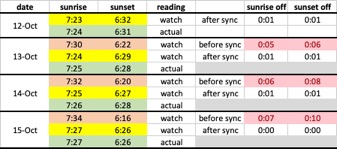
This is what I’ve observed over the last three days.
The watch’s sunrise and sunset times become inaccurate right at midnight, with an error of about 5-10 minutes. After syncing, the times are almost spot on again, usually within 0-1 minute, but only until the next midnight.
This doesn’t make sense to me. I specifically bought an ABC watch so I wouldn’t have to rely on a phone connection. At this point, I have to sync the watch with the app every day just to keep the sunrise and sunset times accurate.
My Suunto Traverse, which is probably over 10 years old, gets these times spot on without this issue.I’m seriously considering returning the watch because this defeats one of the main reasons I bought it in the first place.
-
Update to my previous observations:
The interesting thing is that the watch is significantly off only after the first midnight. If I don’t connect it to the app the next day, the time drifts by only about a minute the following day, which is normal day-to-day variation. However, the watch remains inaccurate because of the significant shift that occurred the previous day.
It almost seems like the watch either has incorrect coordinates programmed for the selected location or uses an incorrect formula to calculate sunrise and sunset times. It may then be trying to correct the time based on the data received from the app during the last sync and overwrite it the following day at midnight.
-
@klipowicz
Maybe someone from Suunto will answer our questions about this! Surely someone from the company must be registered here! Or are the employees not Suunto fans?! -
@klipowicz If I would have to guess, the connection with the app delivers correct position for your location and therefore the times are ok, while this is reset to a default position for your timezone which you have set on your watch on each new day, until sync again…
-
@mikekoski490 Sorry, I missed this post and have a test version at home. I will test the sunrise/sunset issue as I am traveling this weekend.
I have iOS and the watch connects on every try. This could be phone related. My step counts were good when testing but I will check again.
-
@klipowicz If I would have to guess, the connection with the app delivers correct position for your location and therefore the times are ok, while this is reset to a default position for your timezone which you have set on your watch on each new day, until sync again…
Your guess would be correct, except I live in Portland, Oregon, and that’s also the city selected in my watch settings. So, a 7-10 minute difference can’t be explained by the difference between my physical location and my phone’s location - unless Suunto has incorrect coordinates programmed into the firmware or incorrect formula to calculate sunrise/sunset.




Hello! It looks like you're interested in this conversation, but you don't have an account yet.
Getting fed up of having to scroll through the same posts each visit? When you register for an account, you'll always come back to exactly where you were before, and choose to be notified of new replies (either via email, or push notification). You'll also be able to save bookmarks and upvote posts to show your appreciation to other community members.
With your input, this post could be even better 💗
Register Login