SuuntoPlus blood glucose sports app
-
Hello all, I’ve been working on a sports app that receives blood glucose data (values, trends, IOB etc.) from Nightscout or similar environments. I’ve seen several people across the forum build their own version of this, but I thought it might be useful to concentrate the knowledge in one place. If it’s something a select few people would really like to see maybe it would be worth it to try and publish via the partner program, since rebuilding the app everytime after I sync with the app is cumbersome.
-
To give people an idea of the Suunto+ app:
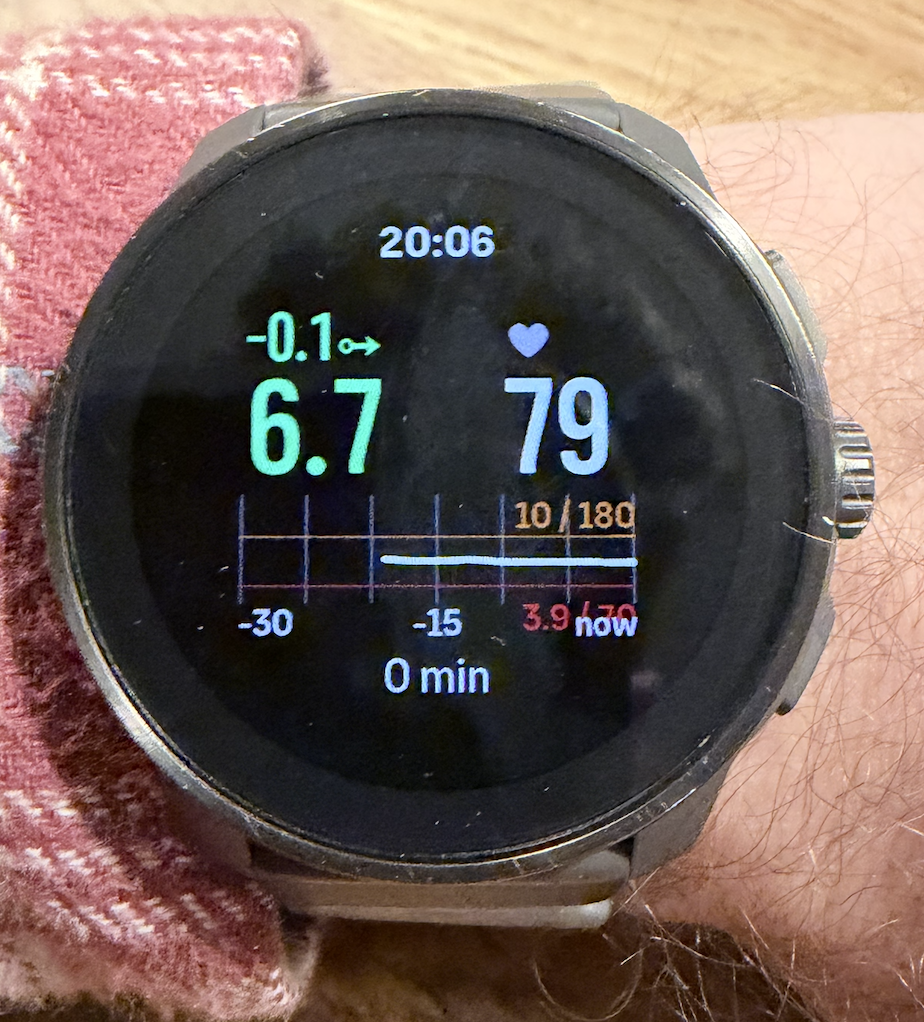
Obviously work in progress, and am looking to add relevant data but this is sufficient for me for the meantime, but any and all input is appreciated.
-
@aenzed wow, yes, this would be incredible and such a help. I use a Libre so hoping it would be possible to get data from LibreLinkUp? I use the GotCGM on my phone and also have an extension for my Karoo that somebody built, but getting my data on my watch would be a game changer. I’m not a developer and don’t know anything about how this would all work, but just wanted to add my enthusiastic support for this project!
-
It shouldn’t be too difficult. You just need to have a screen and know the output data from the meter and implement it. It can be taken as another accessory. It would help a lot of people with diabetes and monitoring.
-
Indeed the sports app itself is not very special, the annoying part is getting the data to the watch. For wider implementation the actual problem is having an app or environment to send your BG data to the phone, across different platforms, since there’s no option to link to a Nightscout or similar in the Suunto phone app.
So I’m currently testing two routes: 1) Using a small app that only functions as a bluetooth bridge, which receives and sends data from my own Nightscout; 2) My own Trio fork which handles data locally instead of over Nightscout.
I’m sure there are other options, which is why I made the thread since I’m just messing around.
In the best case scenario there’d be an html connection option in the suunto app, which would already solve a lot, and ideally a watch face instead of the sports app, but making do with what we have.
-
The app has become rather big, but everything works solidly. Keep in mind that all of this is read-only, so you can’t adjust things from your watch to a communicating app. Currently only tested for my Race S (q display), it’ll probably work for the Vertical 1, and the 9PP, but I obviously haven’t tested that.
I was able to fit in two different layouts in in the app, switchable by holding the upper right button for about 2-3 seconds. Tried below with Trio in CGM simulator & pump simulator, and went bouldering for 2 hours and on a 40 min run while connected to my own Nightscout, all without issue. BG units are data stream aware, meaning it’ll show as either mmol/L or mg/dL. IOB, COB, Loop, BG, trend arrow, trend value are read from Nightscout/Trio data stream. Data age (lowest value) is data age from CGM, but an internal counter on the watch keeps track and greys out values older than 6 minutes, and gives an audible alert and buzz if older than 10 minutes.
The left is a “Sports” layout, the right is a “Daily” layout.
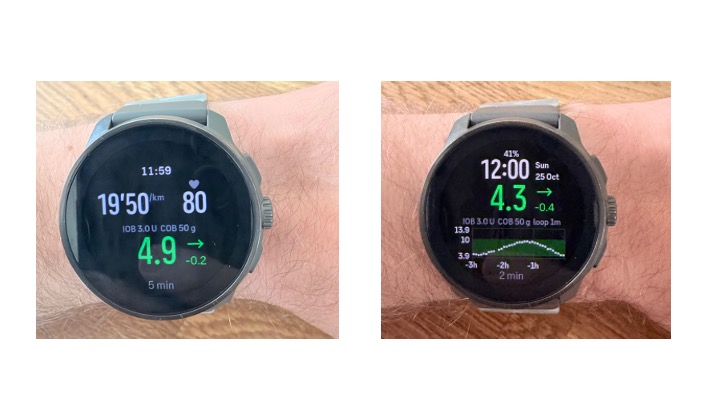
In the Sports layout, pace (upper left) is unit aware so automatically adjusts per sports profile chosen (tested with running, cycling, rowing). I’ve chosen HR and pace here as these are generally the major two I keep an eye on. All other info you can simply see by switching to you screen of choice.The graph on Daily is the past 3 hours, data points are streamed as soon as watch connects to phone, with one point per 5 minutes (takes roughly 2 minutes for everything to load in). Dots in range (user adjustable, but a little quirky still) are white, otherwise red below range, orange above range. Values below 3.0 mmol/L are red triangles, value above 13.9 are orange triangles (upper range is adjustable but compresses the graph). Green band is Low to High, also adjustable. Switching to and back from the Daily screen may cause the graph to empty visually, but should be filled back in over a minute or so.
Alerts (vibration, plus a tone if your watch tones are on): going below or above your alert levels, a repeat alert if you stay low, falling or rising fast, and signal lost. In quiet sports (yoga, walking, meditation, etc.) I’ve set different levels because I tested this in a yoga class and the thing went off every 15 minutes because I was consistently just a little too high. The reason I’ve opted for two layouts, and two different alert “types”, is because without a true watch face implementation a “walking” exercise with the Daily layout is the best workaround I could think of for people to keep track of everything without having to check your phone.
Regarding settings and connection:
- BLE bridge key: a 32-character key shown in a phone app. Secure connection and super lightweight. I’ve currently set this to be user generated in my bridge / Trio fork, and I entered this into the Suunto app with the VSCode extension.
- Low below / High above: your target range: colours, graph band and time-in-range.
- Stale (grey) after: minutes before an old reading turns grey
- Alerts: alerts on or off
- Alert below / Alert above: when the watch alerts (can differ from your range, e.g. alert at 5.0 during exercise)
- Repeat low alert: repeat while you stay low, every x minutes (0 = off)
- Quiet sports: alert below / above / falling fast below: the separate levels for quiet sports
- Save glucose to workout: adds a glucose graph and avg/min/max/time-in-range to your workout in the Suunto app
Currently working out if I can send a warning if anything in a closed loop failed, but the app is extremely heavy for Suunto standards so I’ll likely only be able to send an “AID alert” warning.
Hello! It looks like you're interested in this conversation, but you don't have an account yet.
Getting fed up of having to scroll through the same posts each visit? When you register for an account, you'll always come back to exactly where you were before, and choose to be notified of new replies (either via email, or push notification). You'll also be able to save bookmarks and upvote posts to show your appreciation to other community members.
With your input, this post could be even better 💗
Register Login