Suunto app Forum Suunto Community Forum
    • Recent
    • Tags
    • Popular
    • Users
    • Groups
    • Register
    • Login

    Software Update 2.48.16 (2025 November Rain release)

    Scheduled Pinned Locked Moved Watches
    428 Posts 117 Posters 24.2k Views 108 Watching
    Loading More Posts
    • Oldest to Newest
    • Newest to Oldest
    • Most Votes
    Reply
    • Reply as topic
    Log in to reply
    This topic has been deleted. Only users with topic management privileges can see it.
    • EgikaE Offline
      Egika Platinum Member @v.sacre
      last edited by

      @v.sacre said in Software Update 2.48.16 (2025 November Rain release):

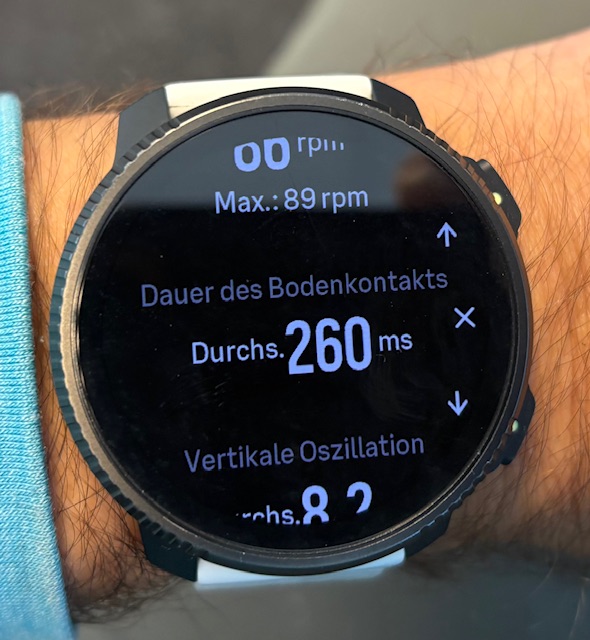
      I still don’ t understand how to see new running metrics (ground contact etc).
      I use Vertical 2 with latest firmware, with or without Stryd, with or without custom mode and in all cases I don’t see those metrics…

      I have this data with all others available after the run:
      IMG_2395.jpeg

      t6, S6, Elementum Terra, Ambit 3 Sapphire, Spartan Ultra Copper, Traverse Alpha, S7 Graphite LE, S9B Ambassador, S9P Granite Blue Titanium, S9PP Titanium Sand, Vertical All Black, Race Titanium Charcoal, Race S All Black / Titanium Courtney, Run Lime

      1 Reply Last reply Reply Quote 0
      • G Online
        gkaempfer Bronze Member @thanasis
        last edited by

        @thanasis I’ve seen multiple reports linking battery drain with HR belts (I noticed that you use a belt too). Apparently the BT connection doesn’t get shut off after a workout. Maybe that’s your case too.

        My recent experience with Vertical 2 wrt battery life is quite good since I switched off the AOD in both day to day and activities (I don’t normally navigate with my watch so only check the screen occasionally).

        After a full charge (with some extra time to make sure I am at a real 100%) I can report that I’m at 50% after 9 full days (216 hours) including 6:30 hours of GPS activities (running, biking). In fact, it seems that GPS usage with AOD off is better than the 65 hours in the specs. I consume less than 1% per GPS hour! Without activities I get 5% per day and sometimes even less, possibly depending on the number of notifications I receive.

        These are my current settings:

        AOD OFF
        Raise to wake DISPLAY ONLY
        247 HR ON
        Sleep tracking ON with HRV without spo2
        Wireless OFF
        BT discovery OFF
        Notifications ON

        For reference, with AOD ON and the rest of the settings as above, I got about 7% per day without activities and about 2% per GPS hour. For me, that’s a huge difference.

        1 Reply Last reply Reply Quote 3
        • P Offline
          pgrob
          last edited by

          I am new to Suunto (Race 2) and have a question about BT Discovery. Does it always have to be active for the watch to connect to the smartphone/app? Or is it only needed for connecting, i.e. so that the watch is visible to Bluetooth devices, and can be deactivated after a successful connection?

          G 1 Reply Last reply Reply Quote 0
          • G Online
            gkaempfer Bronze Member @pgrob
            last edited by

            @pgrob you need it on only for pairing. After that you can turn it off. App syncs fine when off.

            P 1 Reply Last reply Reply Quote 2
            • P Offline
              pgrob @gkaempfer
              last edited by

              @Gideon-Kaempfer
              Great, thank you for your quick reply. I’ll disable that then.

              1 Reply Last reply Reply Quote 0
              • pilleusP Offline
                pilleus
                last edited by

                Today in the morning all watch faces were gone, only the default one was shown on the Vertical. No choice in individual settings, there was only the default one.

                After 2 hours and several syncs with the app the watch faces were back, but I have to configure it. The watch faces were in the standard configuration (colour and complications). I never had this on my Vertical.

                Running the actual firmware. 😲

                https://www.instagram.com/moves.are.life/
                Suunto Vertical Black Lime
                Suunto 9 Peak Pro Black
                Suunto Spartan Ultra Stealth Titanium

                1 Reply Last reply Reply Quote 1
                • 2 Offline
                  2b2bff
                  last edited by

                  I turned off my watch yesterday and turned it on today again. Watch was set to 01:01 on January 1st and told me to sync with the app before starting new adventures. It took a few attempts until the watch connected correctly to the App and has been back to normal after syncing again…
                  Never had this before…

                  Suunto Race S

                  1 Reply Last reply Reply Quote 0
                  • EgikaE Offline
                    Egika Platinum Member
                    last edited by

                    I think it makes sense to open separate topics for the various issues one may encounter.
                    Posting them under the update information will maybe lead to others not finding them…

                    t6, S6, Elementum Terra, Ambit 3 Sapphire, Spartan Ultra Copper, Traverse Alpha, S7 Graphite LE, S9B Ambassador, S9P Granite Blue Titanium, S9PP Titanium Sand, Vertical All Black, Race Titanium Charcoal, Race S All Black / Titanium Courtney, Run Lime

                    2 1 Reply Last reply Reply Quote 1
                    • 2 Offline
                      2b2bff @Egika
                      last edited by

                      @Egika however it can be dealt with the best. It used to be tha way to report bugs in the firmware version thread, me thinks…

                      Suunto Race S

                      1 Reply Last reply Reply Quote 0
                      • EgikaE Offline
                        Egika Platinum Member
                        last edited by

                        If it is FW related, it makes sense.
                        If it is general watch behavior, maybe better open a separate thread
                        Now there are questions that ask how to set the BT visibility…

                        t6, S6, Elementum Terra, Ambit 3 Sapphire, Spartan Ultra Copper, Traverse Alpha, S7 Graphite LE, S9B Ambassador, S9P Granite Blue Titanium, S9PP Titanium Sand, Vertical All Black, Race Titanium Charcoal, Race S All Black / Titanium Courtney, Run Lime

                        P 1 Reply Last reply Reply Quote 1
                        • P Offline
                          pgrob @Egika
                          last edited by

                          @Egika
                          Actually, I asked whether the BT Discovery setting must always be active, not where the setting needs to be made. The question arose because many people are posting their settings in this thread. That’s why I asked here. If the question was wrong, I wasn’t aware of it.

                          1 Reply Last reply Reply Quote 0
                          • Francesco PaganoF Offline
                            Francesco Pagano Silver Members Bronze Member @thanasis
                            last edited by

                            @thanasis said in Software Update 2.48.16 (2025 November Rain release):

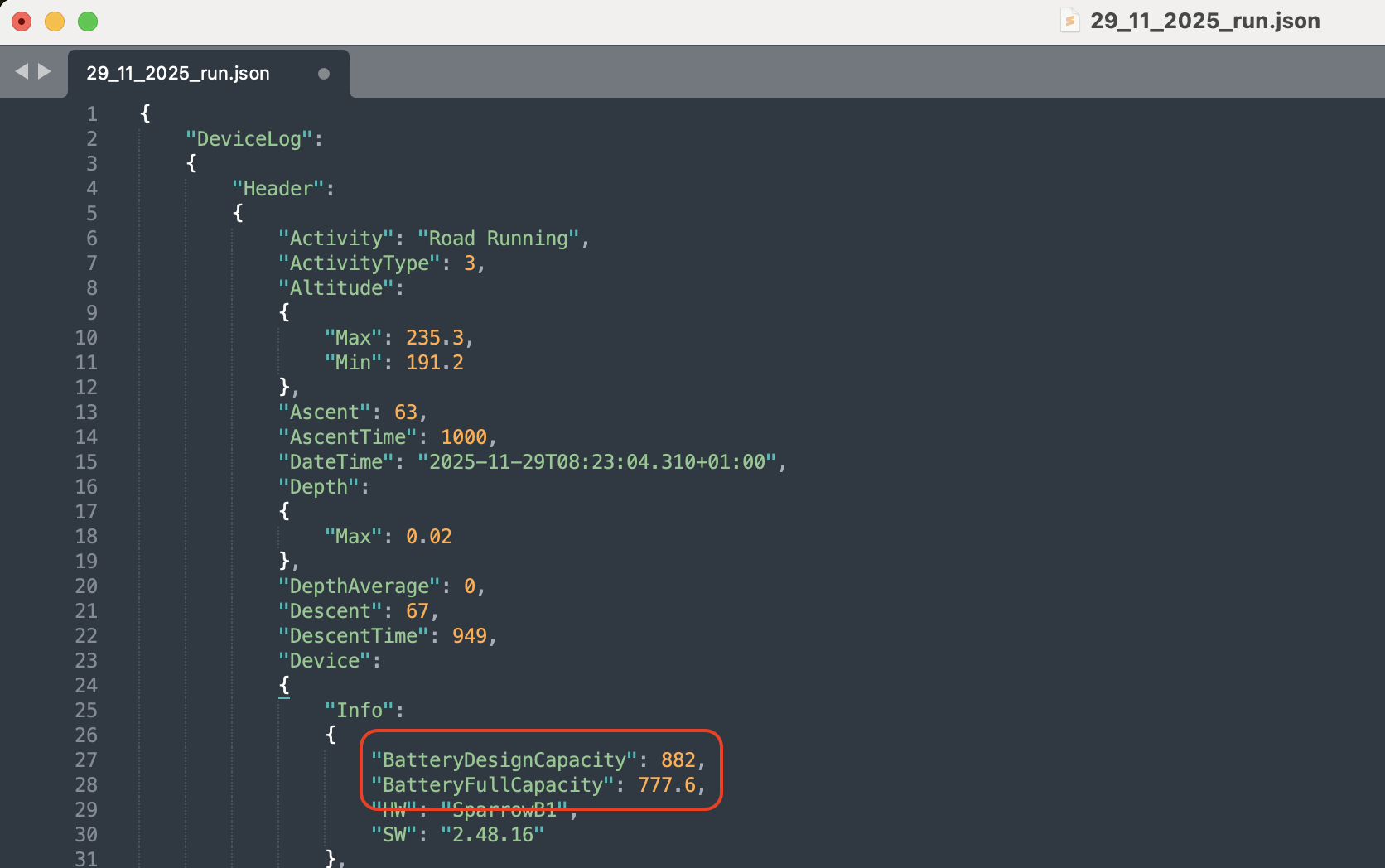
                            The only other possible explanation would be that battery has degraded significantly over the last 2 years

                            I recently found something interesting looking at a JSON file downloaded from Suunto App for Mac: there are two fields named “BatteryDesignCapacity” and “BatteryFullCapacity” that suggest the current health state of the watch battery. In my case, the full capacity is over 88% of the design capacity, which seems fair after more than 2 years of use.
                            Screenshot 2025-12-01 at 19.26.37.png

                            S9PP
                            S5

                            1 Reply Last reply Reply Quote 2
                            • First post
                              Last post

                            Suunto Terms | Privacy Policy