Watch mode during activity recording
-
Hi, I’m a new Suunto Vertical 2 owner, I come from a Garmin Fenix.
While recording an activity (cycling, running…), is it possible to switch to watch mode to see the time, for example? On Garmin you can see it among the different screens, while recording the activity
Thanks
Paul -
@PBord no you can’t switch to watch mode but the time is visible on every activity screen except map and climb guide if I remember correctly.
-
@PBord
I am also new to Suunto I love the Home Screen and have been struggling when recording an activity to see the time, silly you can’t scroll to the watch face but there is a page to control your music which I will never use, would be good if the page was customisable.
I see the time is on the info page that gives you your heart rate distance and time taken but I need my glasses to see it as it is so small. Even worse when the screen is wet.Its a bit rubbish really. I would like to keep an eye on the time when heading to find a camp. -
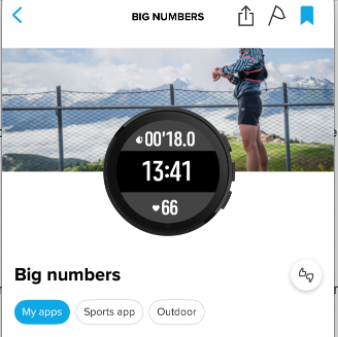
@leehikes It uses up a SuuntoPlus slot but “Big numbers” does what it says for time of day.
-
@leehikes
You can deactivate music control and can create a customized sportmode with all your needs, including the current time (in bigger font). -
@Fenr1r I see the Suunto plus menu but there is no big numbers option? So a little unsure what you mean? Sorry for being a bit thick
-
@leehikes Have you installed the “Big numbers” SuuntoPlus app via the Suunto App watch configuration page?
-
@leehikes said in Watch mode during activity recording:
I see the time is on the info page that gives you your heart rate distance and time taken but I need my glasses to see it as it is so small.
You can disable Music controls if you don’t use it. For bigger time, customize your sport mode and add/use Time of day as one of the data fields on any of the data pages. In case you don’t want to waste S+ slot for Big numbers S+ app, or don’t want to have one more additional S+ page.
-
-
@Stavrogin Yes?
-
?? Not sure what I am saying yes to, but thought a visual of that app would be easier to identify than creating new sport profiles, I like it better than Garmin, They do not have the activity time and HR in the time.
-
@Stavrogin Re “Not sure what I am saying yes to”.
You weren’t saying “Yes” there in my reply. I was, in acknowledgment that you were showing the app I had suggested initially but not understanding (“?”) why you were directing the post at me. I didn’t suggest the sport profile. Perhaps @leehikes was your intended recipient?