Widgets meanings
-
Hello,
I would like to ask about data inconsistency and data representation in some of the widgets. I use watch in Czech language, so I will try to trainslate it to English…I tried to study CRL/ATL/TSB principle from Suunto videos and some articles and I think I got the idea how it works.
This is my data now:

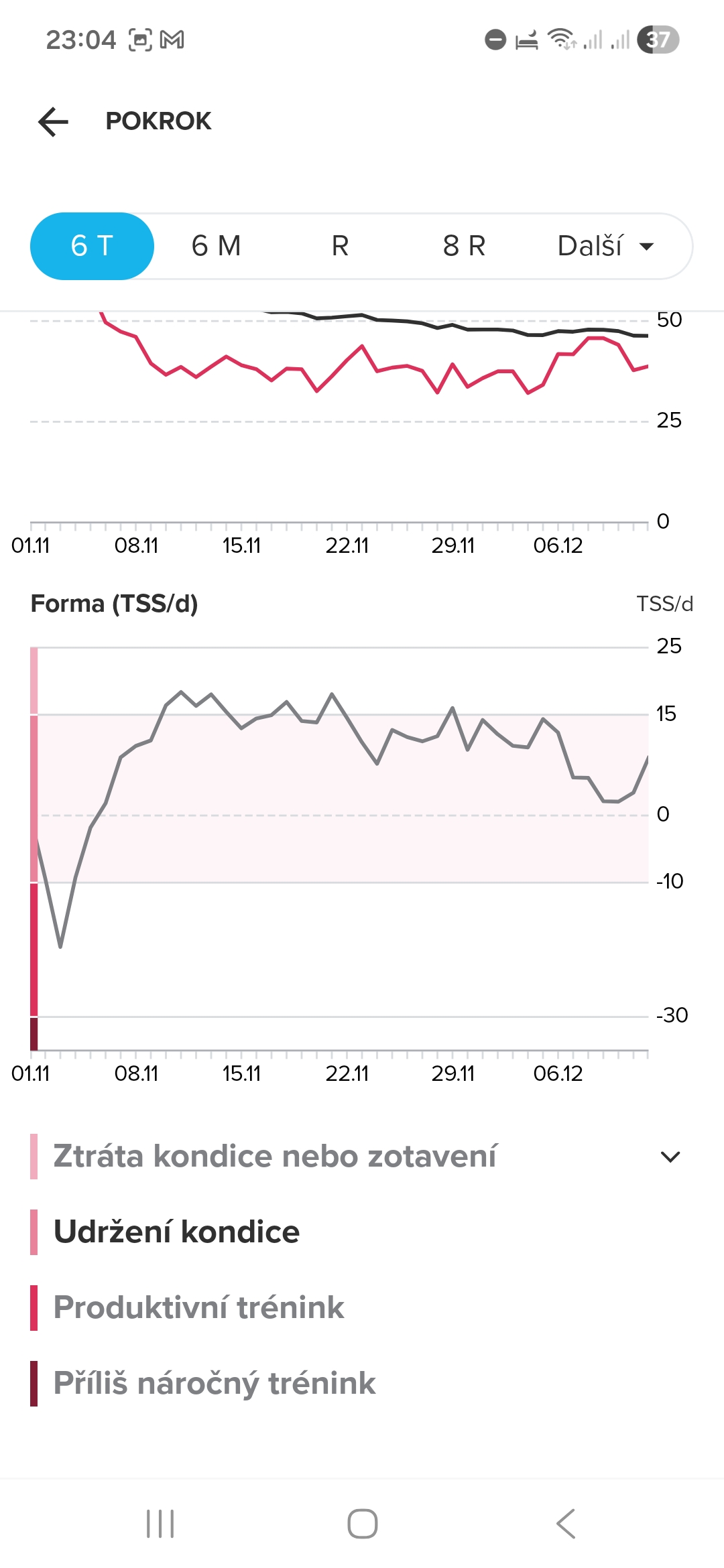
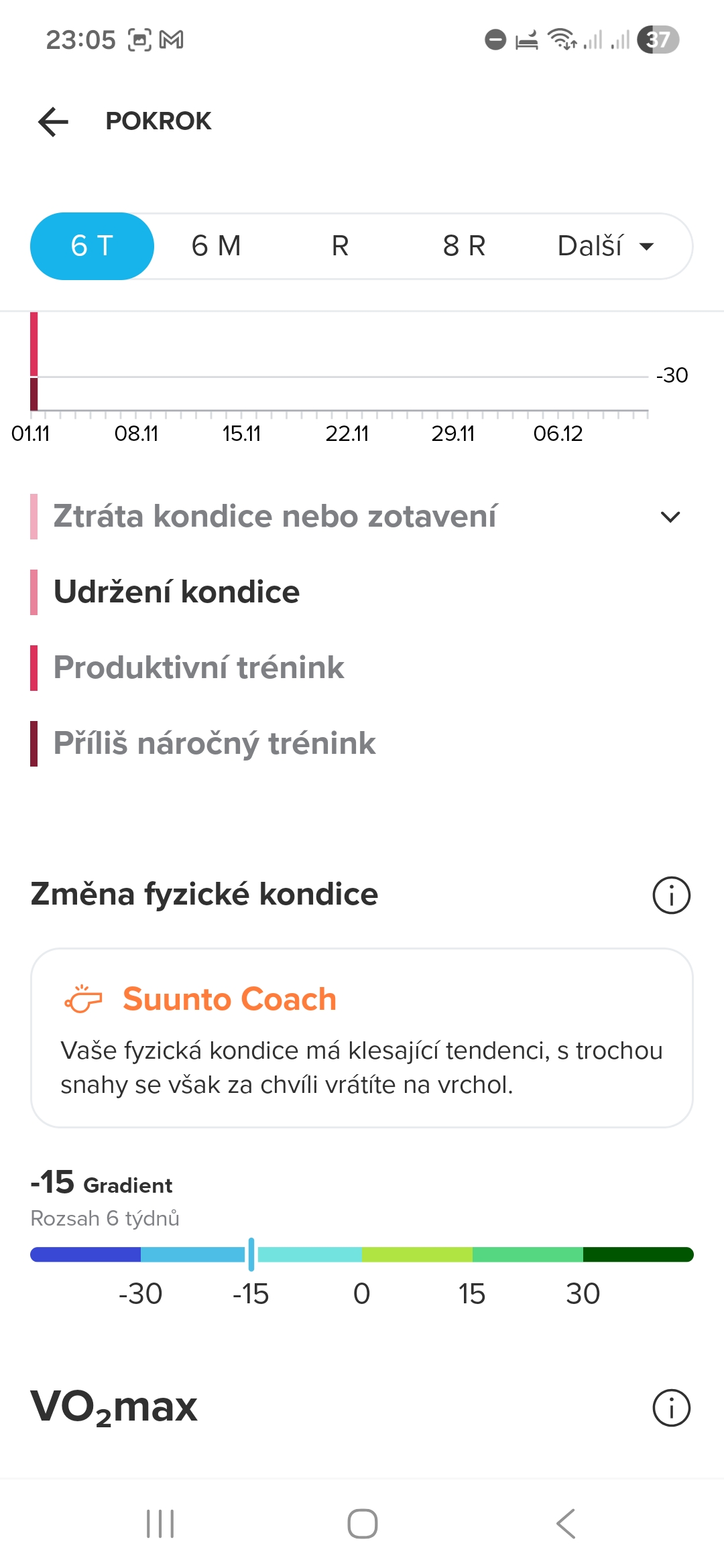
My current CTL is 46, ATL 39 and Form (TSB) is 9.
Suunto has 4 categories for Form (TSB) as far as I understand:- above 15 - Loosing fitness or recovery
- -10 to 15 - Maintaining fitness
- -30 to -10 - Productive training
- below -30 - Push too hard
In the app I can see Udržení kondice = Maitaining fitness which correspond to value 9. Ok so far, it is understandable in the app according the Training peaks methodology.
Then let’s go to the watch. Widgets seems to be very confusing for me.
Progress widget (POKROK) shows me 46 CTL. Same as app.
Ramp rate (Gradient) is -13 in the watch, while gradient in the app shows me -15… A bit strange…
The gauge has 6 colors, I guess it correspons to the Ramp rate (gradient) graph in the app. Is that correct?
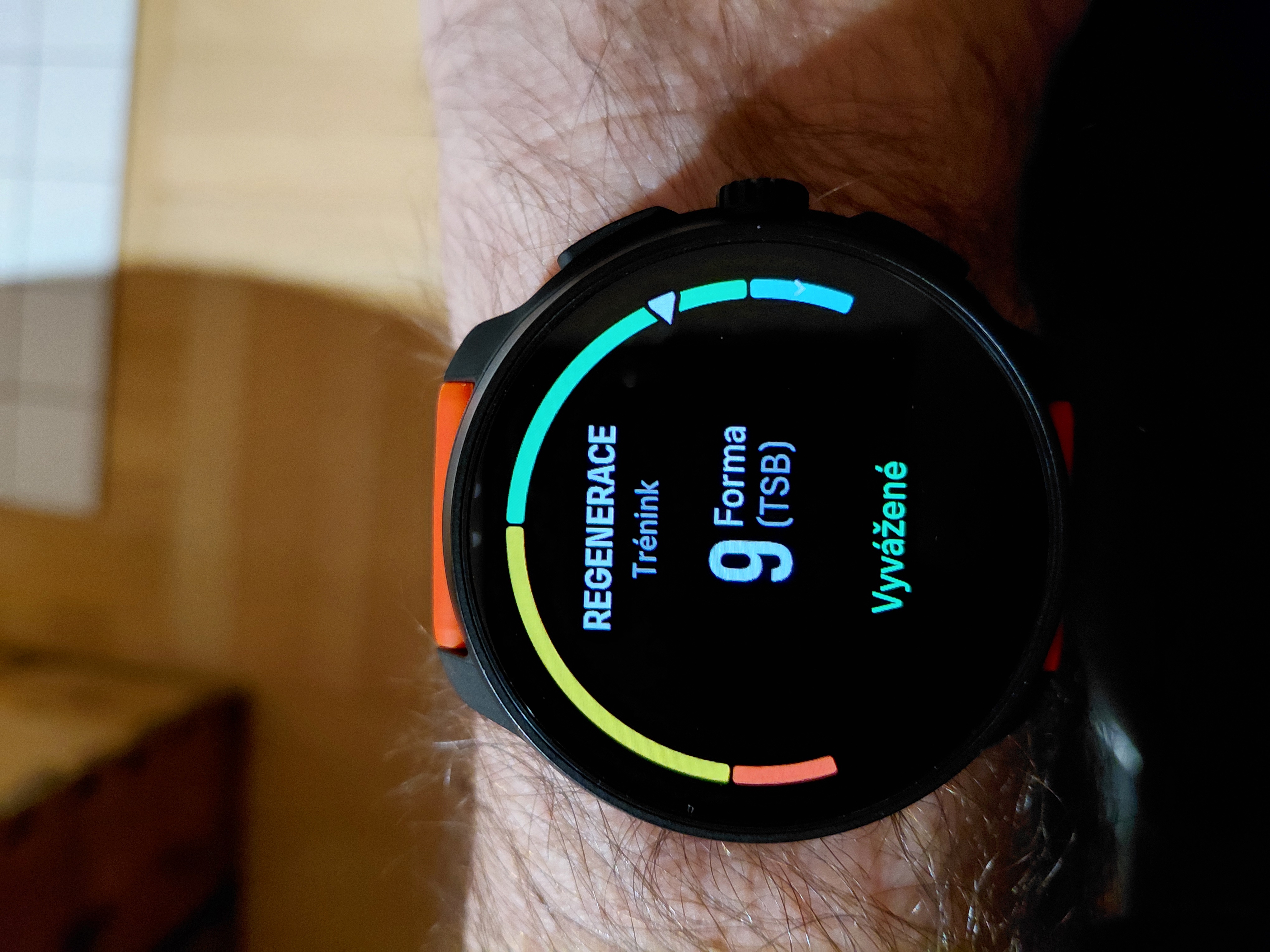
And finally why the widget says Produktivní trénink - Productive training? Based on what it decides that? Obviously it is not based on TSB (Form) 9, which corresponds to Maintaining fitness level…Recovery, training (REGENERACE) widget shows me 9 TSB. Same as app.
Then there is gauge with 4 colors, is it those four levels of form I desribed above?
Why there is mentioned Balanced (Vyvážené) text? I would expect here the description corresponding to TSB levels mentioned above, so Maintaining fitness…These watch widgets are really confusing to me and I don’t understand what they represent according training peaks method neither the data representation in the Suntoo app.

-
@DropQb said in Widgets meanings:
Progress widget (POKROK) shows me 46 CTL. Same as app.
Ramp rate (Gradient) is -13 in the watch, while gradient in the app shows me -15… A bit strange…
The gauge has 6 colors, I guess it correspons to the Ramp rate (gradient) graph in the app. Is that correct?Sure, ramp rate should be the same right after watch&app sync. It can diverge a little bit over time or before new activity is synced to the app.
CTL widget colors have nothing to do with ramp rate, but are tied to CTL value itself.
Don’t know the exact ranges but I think the values are about:
1st: 0-19
2nd: 20-44
3rd: 45-70 or 75? (green)
4th: 7?-100? (yellow)
5th: 100?-150? (orange)
6th: >150?@DropQb said in Widgets meanings:
And finally why the widget says Produktivní trénink - Productive training? Based on what it decides that? Obviously it is not based on TSB (Form) 9, which corresponds to Maintaining fitness level…
That is fixed to CTL green range, the term seems to be coincidence, and really stupid at that.
“Productive training” should be in TSB widget, for Yellow range, so the nomenclature would match the app.@DropQb said in Widgets meanings:
Recovery, training (REGENERACE) widget shows me 9 TSB. Same as app.
Then there is gauge with 4 colors, is it those four levels of form I desribed above?
Why there is mentioned Balanced (Vyvážené) text? I would expect here the description corresponding to TSB levels mentioned above, so Maintaining fitness…Yes, 4 levels as you described and what’s in the app. Also note the correct TSB formula:
Form (TSB) = Yesterday’s Fitness (CTL) - Yesterday’s Fatigue (ATL)
Suunto doesn’t mention this detail in the app, so people are confused when TSB ≠ CTL - ATL
TSB widget texts should match the 4 ranges from the app as you mentioned, but whoever came up with current implementation wasn’t paying much attention do detail and nobody challenged this nonsense.
In the end, it is what it is. Training Peaks metrics are great and you will get used to them. Just watch the numerical values and don’t pay attention to widget texts in the watch, as you discovered, they make no sense. -
@Squirrel Thanks a lot! Now it makes sense.
I am new to TrainingPeaks and I tried to study how the CLT, ATL and TSB are calculated and I though that I understand it but then different text description of values in the app and watch totally confused me. Also in the watch manual there is no deep description of widgets, there are just few general sentenses without needed details.
I think that this would be an easy fix which helps people to start with training peaks. Also lots of people complains than Suunto watches are often inconsistent with the app and this would help at least a bit with this issue…

