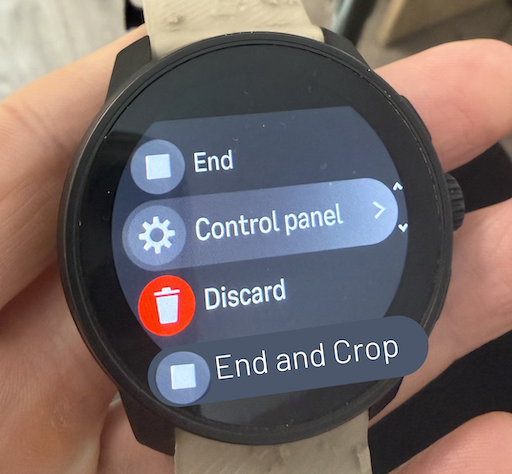
Feature Request: Crop Activity Before Saving

-
@stefano-m64 (@egika @Steven-Hambleton)
Maybe you’re right about the ease of development on the mobile app.
But in order for external apps like Strava to work properly we would need manual sync with them. Maybe something like:
- Add a Manual partner sync toggle button in Profile → Partner services
- Add a Sync to partner services button in the Home page for when it’s disabled.
Otherwise you’ll still have the bad statistics.

-
@Dimitar-Dulev Or on the watch you could choose an option like “Save but don’t sync with 3rd parties” and then trim and share it later, after post-editing in the app.
Suunto 9 Peak Pro
-
@Brad_Olwin tried it out yesterday but nothing happend so far.
Will check later again, would really be helpful. -
@cheetah694 Yep, that sounds like better UX for 90% of the activities.
- An “End without partner sync” button in the watch that marks the activity to not be automatically synced.
- A new crop screen in the app.
- A manual “Sync to partner services” button in these activities.
This sounds like the simplest/cleanest solution technically, I’m interested what Suunto devs think.
Btw I also saw that Garmin Connect’s mobile trim feature only has a time select which would be more than enough for resolving the issue.

-
I contacted Suunto regarding crop feature. According to customer support this was already available in iOS but not in Android. Can someone with iPhone confirm this?
Reply from customer support:
“the native Trim Activity feature is currently only available on the iOS (iPhone) version of the Suunto App. It is missing entirely on the Android app” -
@Goran-Khalaf So far, the only option I have found is Edit → enter the correct distance, but that does not actually trim the activity, so it is of very limited use.
I currently sync my workouts to Strava and crop them there. Another workaround would be to use gpx.studio, trim the activity, delete the original from Suunto, and then import the corrected file again.
But honestly, that is ridiculous for such a basic feature. Suunto should provide proper activity trimming directly in the app. From a development perspective, this should not be a major task.
They should also add a manual sync option, so an activity can be corrected before it is automatically uploaded to connected services.
https://www.strava.com/athletes/37982563
https://www.instagram.com/macdev -
@Goran-Khalaf not on my iOS.
-
@Ecki-D. Wouldn’t this lose the fitness metrics though?
Watch: Suunto Race S
-
@Ecki-D. Wouldn’t this lose the fitness metrics though?
Cropping the occasional activity this was has very limited impact on the metrics your watch shows and zero impact on your real life fitness (the one that counts)
-
@Steven-Hambleton Well, I guess a sync back to the watch after a trim could be implemented to keep the values in sync.
But at the moment everything is better than having a run in your stats with a 30min car drive afterwards or whatever.
-
@Ecki-D. I sync to Strava, crop there, export GPX, load it to Sport Tracker (after deleting the original). It works, but it is like trying to scratch your left ear with your right foot
 .
Btw. This feature was asked for for at least 10 years
-
I also want this feature as I am always forgetting to stop my runs especially at my running club sessions.
I like the idea of an option to crop when ending the activity -
Me too I often find myself with stupid end of activity due to forgetting to stop. The car detection was my moste appreciated feature upgrade.
I remmeber sayin to my partenr " ouray they finally added this " I amways find absurd to speak “AI coach analysiss etc…” and not help with these common difficulties of many user especially ADHD like me.After all it seems so simple to implement and valualble to any downstream analysis. I have many trail run ending by 45km/h on my bike !
Cropping is NECESSARYbut chnaging the activity of a portion from trail to bik would be even better.
-
@Goran-Khalaf on iOS, it is very limited to edit/correct the distance and time; not much. I think it is better to have it on phone apps rather than edit on the watch, as we also have to understand that, at the end of the day, it is a watch, not a powerful computer.
More load on the watch for such a function means more bugs and performance issues, such as sluggishness of the watch screen and lots of complications on a small screen.
-
Me too I often find myself with stupid end of activity due to forgetting to stop. The car detection was my moste appreciated feature upgrade.
When was car detection added? Is it a new feature?
-
@Goran-Khalaf since more than 2 years I think.
Edit: Came in 2024 with the “moving while paused” reminder





Hello! It looks like you're interested in this conversation, but you don't have an account yet.
Getting fed up of having to scroll through the same posts each visit? When you register for an account, you'll always come back to exactly where you were before, and choose to be notified of new replies (either via email, or push notification). You'll also be able to save bookmarks and upvote posts to show your appreciation to other community members.
With your input, this post could be even better 💗
Register Login