Suunto Routeplanner
-
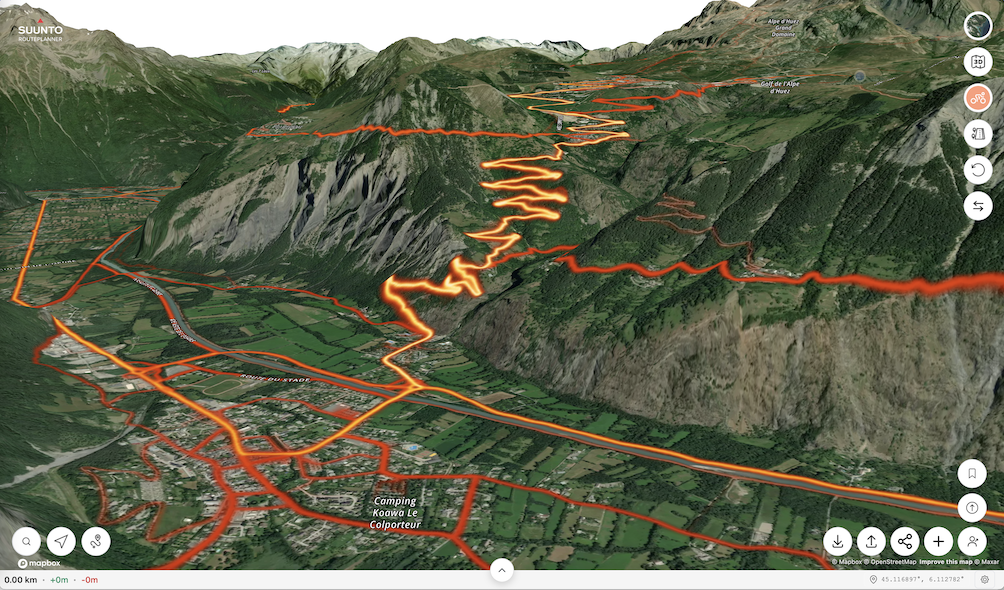
@JebClydeNC said in Suunto Routeplanner:
Overall, excellent work—I do GIS for my “day job,” and the map styling has to be some of the best I’ve ever seen, on ALL baselayers!
Only bugs I’ve found are units settings and login not being stored when returning later (might be a cookie issue on my end though), and when changing the units to imperial, the route library (when logged in) still shows overall route distances in km.
For a future tweak, It would be awesome to have elevation and sunrise/sunset time pop up as a label when clicking (or tapping) a position like in the Suunto App. And perhaps, for manual point-to-point routes, labels on the lines with bearing and distance? Just thoughts from my overly map-heavy brain though. Seriously, excellent work on this project!
Thanks. The login is stored but clearing cache will remove it. Some browsers may by default clear cache between sessions. Regarding the imperial problem, I am not able to reproduce it. Make sure you reload the page in case you have had it open for long and try to find a way to reproduce it.
Nice feature ideas, need to think about them. Difficult to support these on both touch and desktop use though.
-
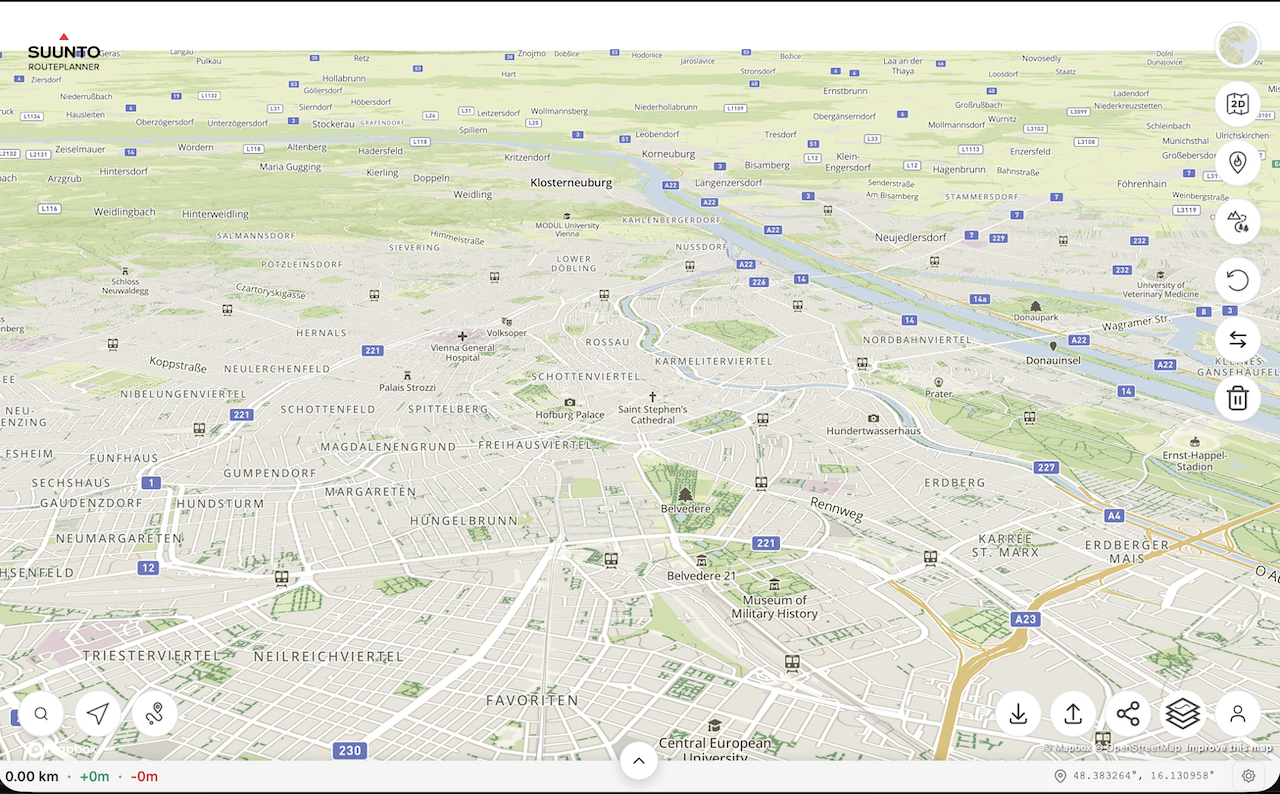
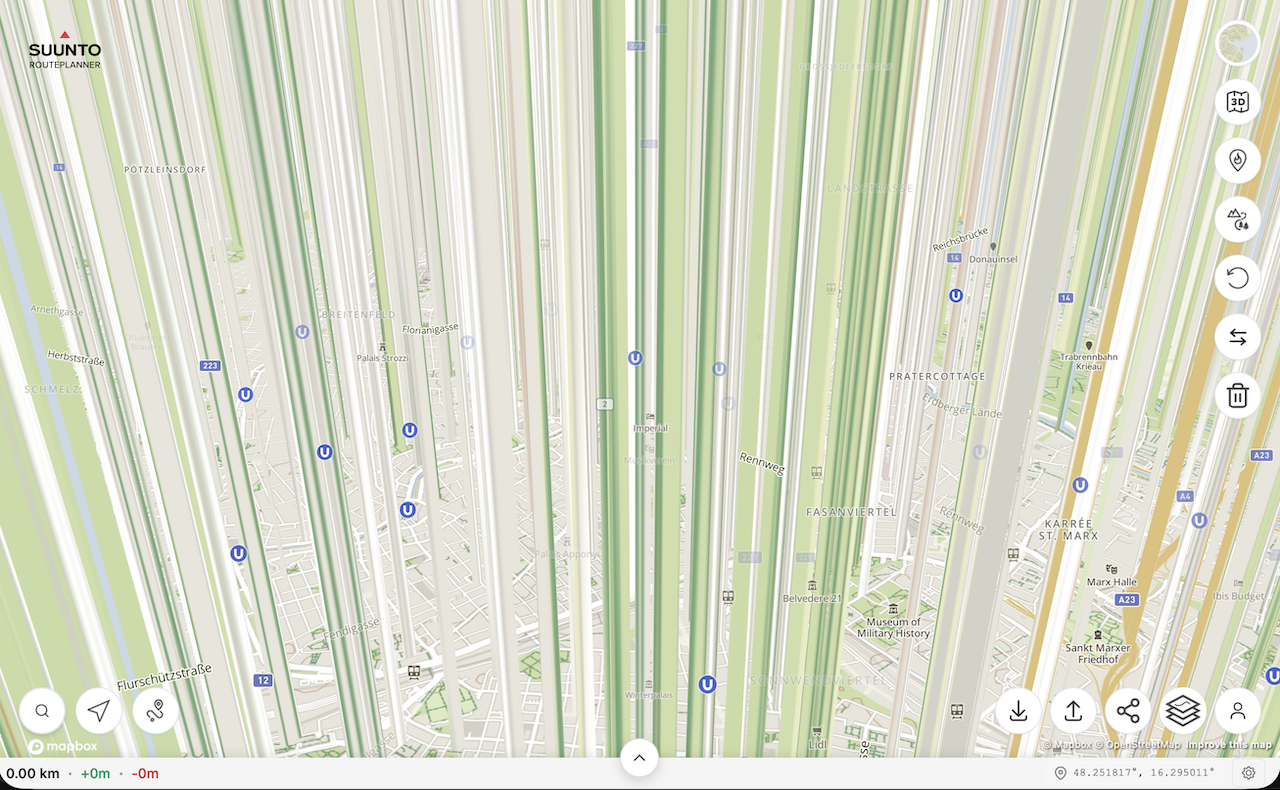
@kemetter on my Mac I have the same problem as @johann.fuehrer with the rendering of 3D model if I press the 3D button but not if I tilt the map with the mouse. On iOS devices it works normally.
First screenshot is the map tilted with the mouse, second screenshot is after pressing the 3D button without moving the map.
(MacOS 26.2 (25C56), Safari 26.2 (21623.1.14.11.9))
-
@Freezer what Mac did you try this on? Works on my M4 Mac mini…
-
@2b2bff, hi! I’m on MacBook Air M2 (Mac14,2).
-
said in Suunto Routeplanner:
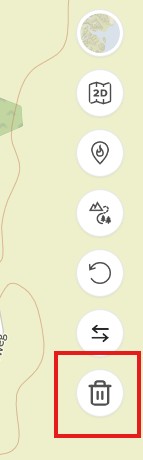
Reset Button: An option to clear the currently planned route and start fresh on an empty map.
@kemetter Thanks for the new button to clear the current route

-
@tuxbuster Oh, this is good, thanks Suunto. But I wait for slope/gradient % indication. Maybe some day…
-
@Freezer said in Suunto Routeplanner:
@kemetter on my Mac I have the same problem as @johann.fuehrer with the rendering of 3D model if I press the 3D button but not if I tilt the map with the mouse. On iOS devices it works normally.
First screenshot is the map tilted with the mouse, second screenshot is after pressing the 3D button without moving the map.
(MacOS 26.2 (25C56), Safari 26.2 (21623.1.14.11.9))
I think that’s the ‘Interstellar View’
-
Used a couple of times, would like to add that if I can log in with Suunto account, I also want to be able to me my heatmap on the site too when planning please at some point.
-
I am really glad to see this browser option from Suunto! Quick question about the Route Collection functionality. Is it possible to see all routes in a collection on the basemap at once? I am planning a multi-day trip and would like to see the option to have multiple routes visible at a time. In my case, I am trying to separate my routes by day.
-
I wanted to try the route planner and found a bug that makes planning impossible.
In the “Outdoor” map view, forest and dirt roads are displayed as regular roads. Only after zooming out to a certain level do they appear correctly as dashed green lines. However, at that zoom level not all paths are displayed anymore.
The dark map mode works exactly the opposite way. Even at the highest zoom level, forest and dirt roads are displayed correctly as dashed lines, but from the same zoom-out level they start to be drawn as regular roads.
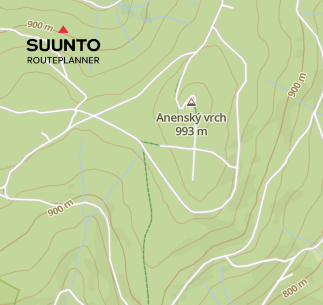
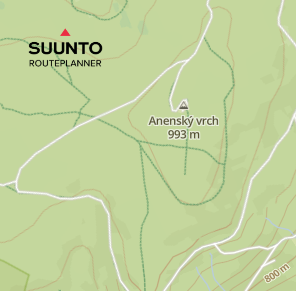
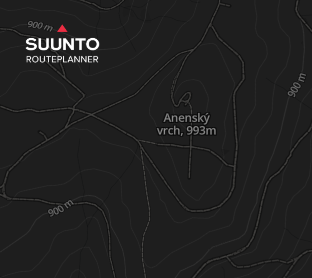
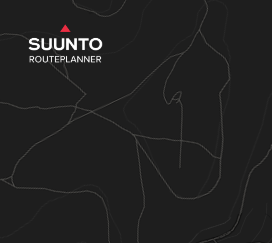
In Suunto Android app, the same forest and dirt roads are displayed correctly as full or dashed green lines.
-
Is this still being actively developed, is there official support?? I’ve not really noticed any changes since day 1 ??
I find that if I “Upload Route to Suunto”, and then bring that route back to work on it later, any saved Waypoints disappear (but are visible in the phone app).
This along with the routeplanner seemingly forgetting it created the original route and thinks its just a regular GPX, so if you “come back later”, then make changes and re-upload, then TBT is lost to the watch, unless you ‘re-mark’ routing points along the route and effectively redraw it.
Final issue with Waypoints is where I have routes which go over the same place twice, it becomes impossible to place them where I want…so if I have an out and back section, and halfway out I want a Waypoint to remind me to have a gel or something, I can’t reliably place it on the “out”, it might be on the back…
…one simple solution on this would be if the Waypoints also displayed, and were placeable, by clicking on the Altitude vs Distance chart that goes along the bottom.It would be nice to be able to grab a placed Waypoint on the Altitude graph and nudge/shift it left or right to the desired position.
-
@Nigel-Taylor-0 said in Suunto Routeplanner:
Final issue with Waypoints is where I have routes which go over the same place twice, it becomes impossible to place them where I want…so if I have an out and back section, and halfway out I want a Waypoint to remind me to have a gel or something, I can’t reliably place it on the “out”, it might be on the back…
This has always been a problem with Suunto, even with the app based route editor. But what is even worse, even if you manage to place waypoints correctly, for example one on the out part of the route and one on the back part, there is no guarantee that these waypoints won’t jump to another part of the route when synced to the watch, as long as the route is transferred via GPX. For example, you may end up with two waypoints on the out part and none on the back part. In GPX there is no concept of the distance on the route, so the waypoint has only the coordinates, and in my experience Suunto interprets that randomly.
Garmin avoids this issue by using a FIT format for routes where every waypoint has a distance along the route in addition to the coordinates. I propose that the web route planner also adopts the FIT format. Along other things, the FIT format can also include turn directions or timing information for pace guidance. Then it would be possible, for example, to import enhanced routes from sites like PlotARoute and UltraPacer that currently only Garmin watches can take advantage of.
-
@sky-runner you don’t need FIT to do that, despite all the posts above saying it…GPX will suffice, it’s exactly what I’ve been doing before returning to Suunto this year.
For previous few years I’ve been using plotaroute, adding my own waypoints (technically they’re routepoints) to mark turns/aid stations/whatever, exporting as GPX and successfully using those files on Apple using the Workoutdoors app, or on Garmin (with the oddity that I had to dump the files into the watch file system via a browser, sharing them via Garmin Connecf would strip my waypoints/routepoints).
It became my much preferred method of watch nav, Garmins automated TBD is just stupid, with tons of spurious alerts, and Apple Workoutdoors app simply didn’t have it, until recently.
Creating manual turn points / cue points, embedding them in a GPX, is the way that I want to work most of the time…I want to study the route and ensure I understand it, adding alerts when I expect to need them. The automated TBD is just a nice to have really.
I think the limitation you’re referring to is for POIs, which technically sit on the map, rather than on the route, so have no concept of being “at X distance along the route”, they’re just “oh, you’re near this”.
-
@Nigel-Taylor-0 Yes, importing waypoints via GPX does work as long as it is a simple route. But now imagine a situation when a route goes through that waypoint twice. Should that waypoint get triggered when you go through it the first time or the second time, or both? In the Suunto case it would be randomly either the first time or the second time. In the Garmin case, it used to be the bug at least in Fenix 7 - the waypoint wouldn’t trigger at all if it didn’t have a distance assigned to it. I have personally reported it on the Garmin forum and if I remember correctly they have fixed it a few years later.
And if you think that the case I described above is not typical, in every single trail running race that I’ve done in the last few years (at least a dozen), some of the aid stations were visited twice. So I had to really jump through the hoop to make this work correctly with Suunto. With Garmin, as long as I created waypoints in Garmin Connect or Strava, or in PlotARoute with FIT export, this worked correctly.
-
As per my own search and understanding, the issue is not purely related to the file format (fit or gpx) but more related to the fact that Suunto routes seems not to manage coordinates along with distance or timestamps (any of them would suffice) (as @sky-runner is explaining) (gpx could do this as well as @nigel-taylor-0 is saying also).
Fit or gpx, it is more how routes and Waypoints are handled in Suunto routing current mecanisms. Currently, if I did understand well, WP are some kind POI on the route (track) but without “when will they appear on the route” data.
But I can be corrected, it is not recent since I have looked into this.SSU (retired), SV1, SV2
Wife : S9PP
SA: Always the latest beta :)
Android + Galaxy S205G -
@kemetter There seems to be a bug in the distance scale along the x-axis when looking at the altitude profile.
Here is a long road run I’m planning. The jumps per grid line are erratic:
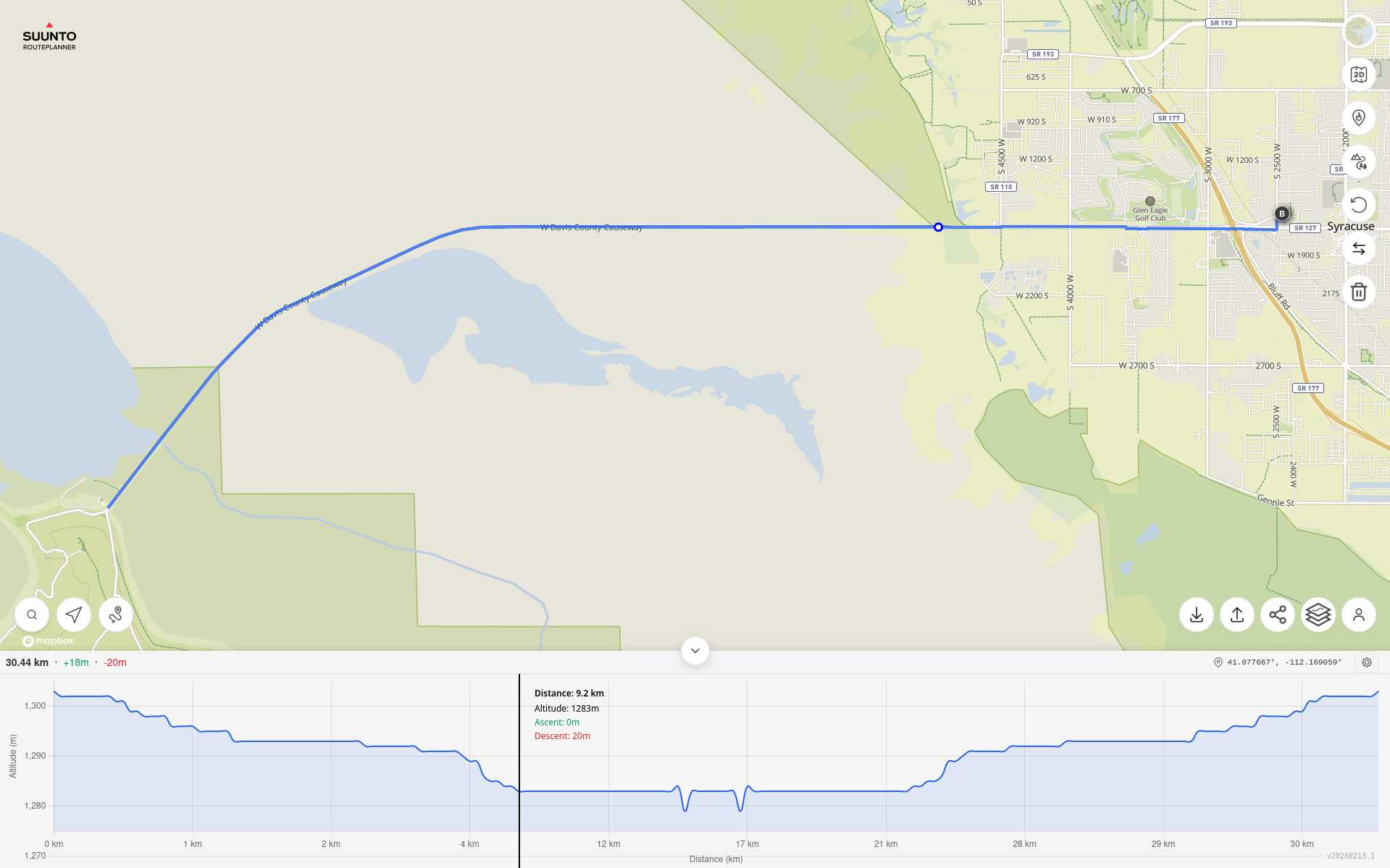
- 0 km
- 1 km (+1 km)
- 2 km (+1 km)
- 4 km (+2 km)
- 12 km (+8 km)
- 17 km (+5 km)
- 21 km (+4 km)
- 28 km (+7 km)
- 29 km (+1 km)
- 30 km (+1 km)
This is also consistent with a future planned mountain trail run also:
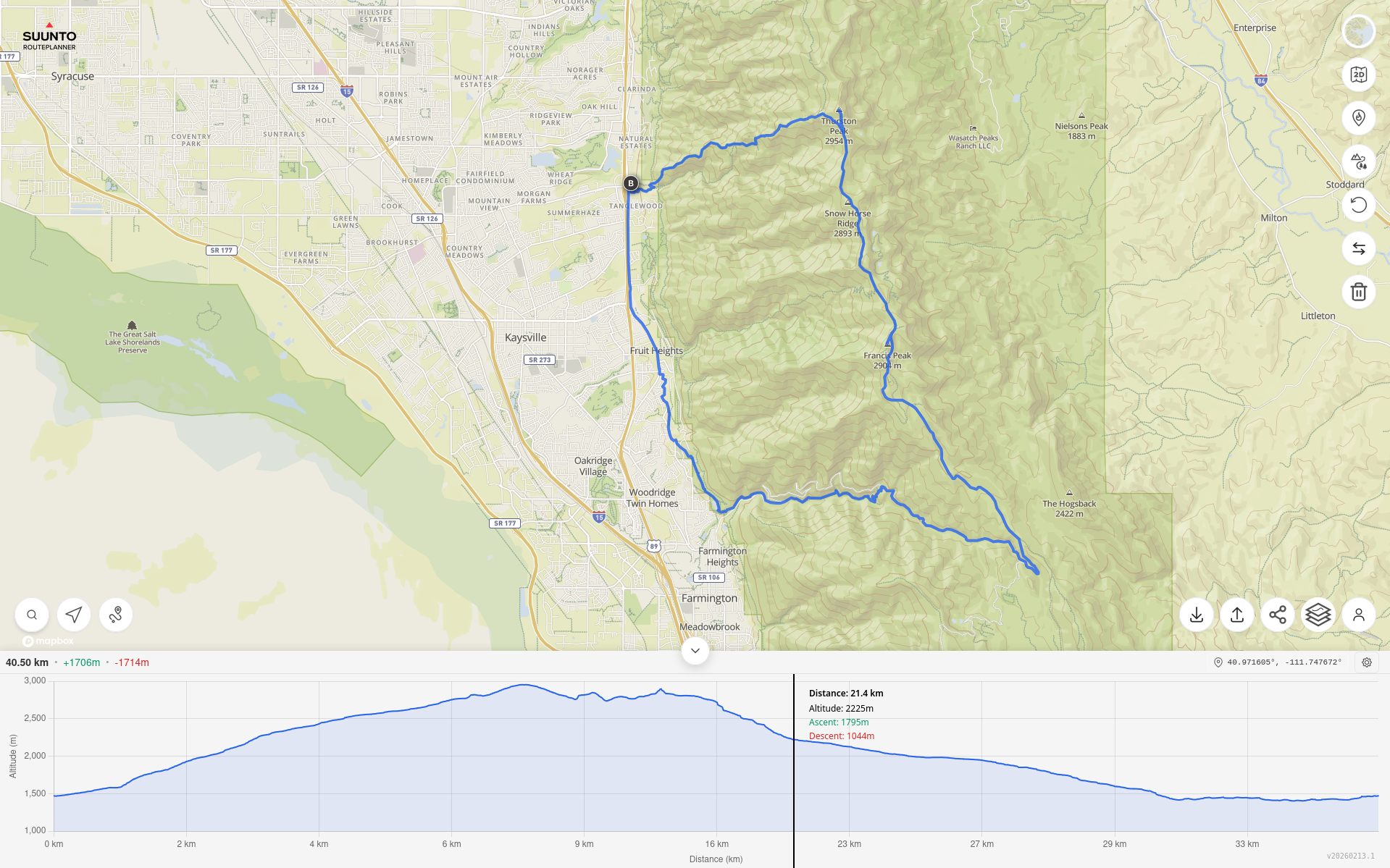
- 0 km
- 2 km (+2 km)
- 4 km (+2 km)
- 6 km (+2 km)
- 9 km (+3 km)
- 16 km (+7 km)
- 23 km (+7 km)
- 27 km (+4 km)
- 29 km (+2 km)
- 33 km (+4 km)
Has this bug been reported already? Or is there something to fix it?
Thanks.
Suunto Race S / 9 Baro / Ambit 3 Peak / Observer
Suunto SHRB2 / Polar H10 / Verity Sense / OH1
Stryd Duo / Wind
r/suunto mod -
@sky-runner
First this.
I don’t use Strava, Suunto, Garmin, nor .fit files.
I’m just reading along and respond to the next comment:https://forum.suunto.com/post/185132
The GPX (trk) track mode with navigation wpt (waypoints) in Plotaroute is a Locus map track navigation method.
Unfortunately, Plotaroute does not offer the even simpler GPX (trk) track mode with navigation (trkpt) track points.The TBTs are supersimply discreetly placed in the (trkpt) sym element, yielding so excellent results.
Any route planner—Strava, Suunto, etc if desired can eventually apply this as well. (someday ?).In attachment: Issy Alps 50k_navtrk_12kmh.gpx
The demo GPX file is “discreetly” enriched with TBT trkpt’s , announced via trkpt’s inclusive the “separate” GPX wpt.
The via point info attached in the trkpt’s ensures their announcements is also automatically correctly timed.
The BRouter used for the demo file does not generate street names. The GPX format itself supports this as well if generated by the router engine of course.The Android Cruiser GPS app uses this simple GPX navtrk format. (Locus Map imports and navigates this gpx file as well)
The Cruiser navigation audio alerts, triggered xxx meters before the turns or via trackpoints distance is customizable.
The audio alerts are set as TTS or a (loud) tone indication. (Different for L/R/S)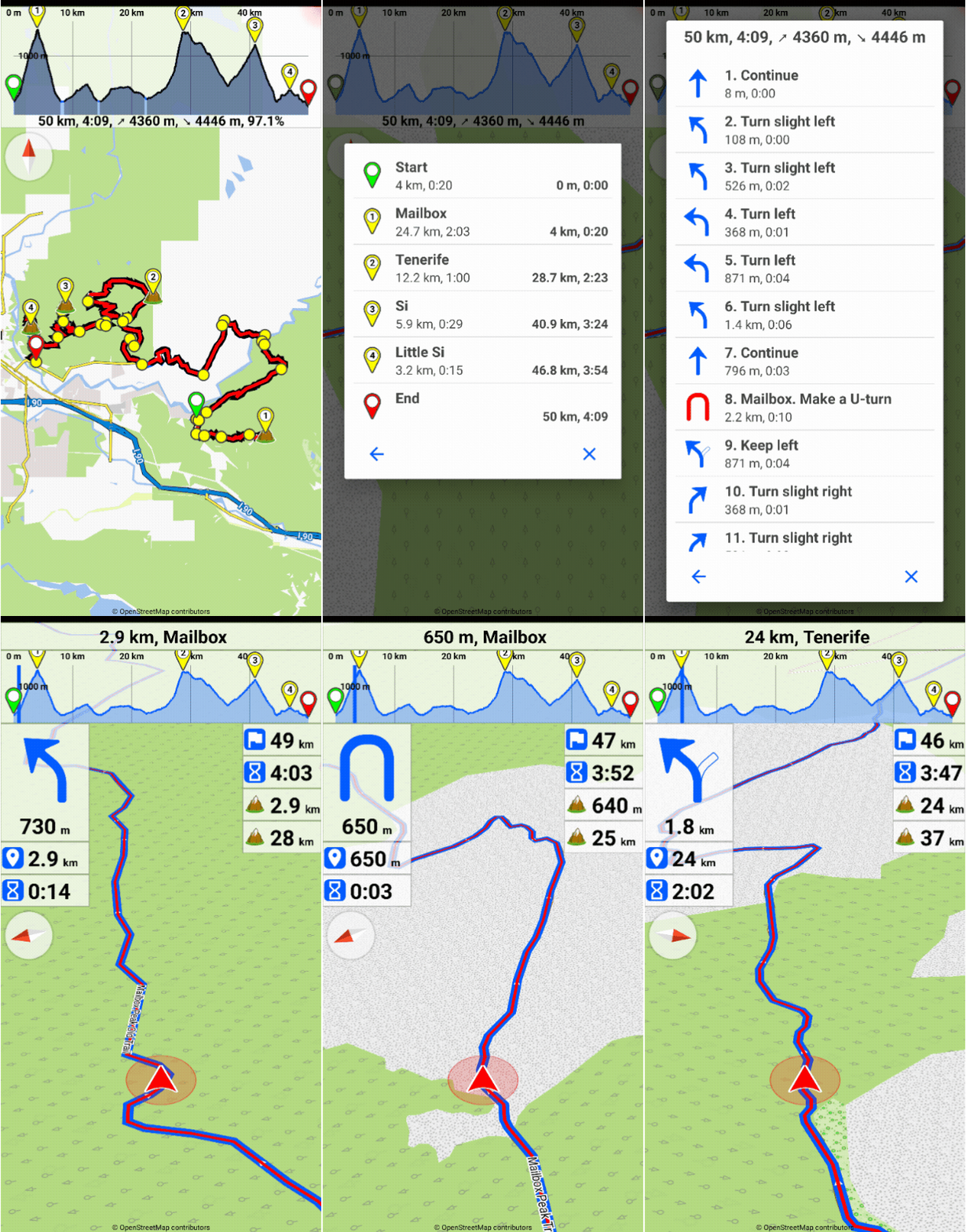
Translated with DeepL.com (free version)
-
Hey everyone!
After a lot of trial and error, I finally cracked a super simple way to turn any city walk into a personal audio-guided tour using just my Suunto watch + phone. No need for expensive apps or guided tours – works offline once set up, and it’s perfect for historic/architectural walks like in Oviedo, Spain.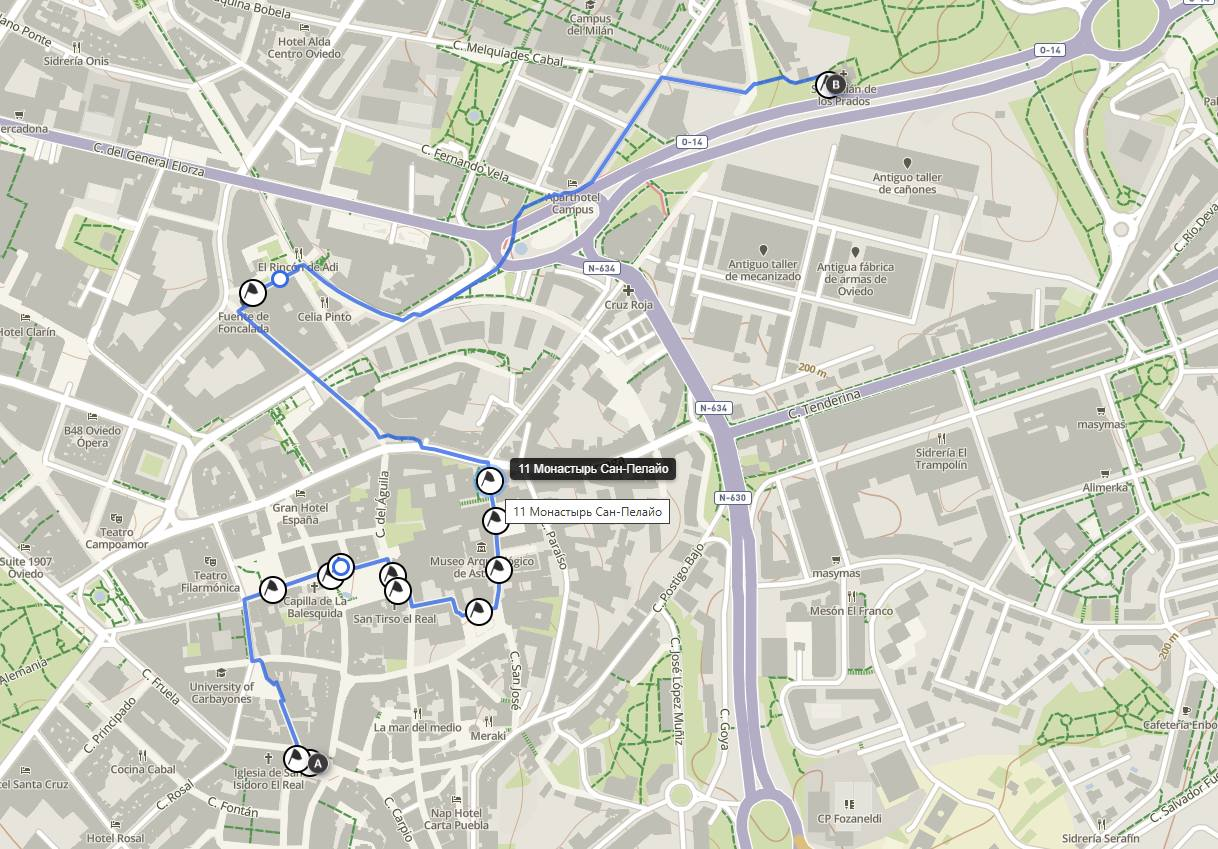
The key combo:-
Suunto Route Planner (web version: https://routeplanner.suunto.com/) for creating/planning the route and waypoints on a big screen.
-
list itemGPSmyCity tours (free self-guided walks with detailed descriptions): https://www.gpsmycity.com/tours/oviedo-historic-architecture-6280.html
-
list item@Voice Aloud Reader (Android TTS app) to read the tour descriptions aloud as you walk.
Step-by-step how I do it:
-
Pick a tour on GPSmyCity (e.g., “Oviedo Historic Architecture” – 2.7 km, ~2 hours, covers gems like Oviedo Town Hall, San Isidoro Church, Palace of the Counts of Toreno, Balesquida Chapel, Valdecarzana-Heredia Palace, and more – full list with descriptions on the page).
-
Open the page on your computer/phone → copy the full text (introduction + all stop descriptions). Paste into a note or Google Doc.
-
@Voice Aloud Reader:
- Import/share the text → it will read everything aloud (choose a nice voice, adjust speed).
- You can split into chapters by stop number for easy pause/resume, or just play sequentially.
- Bonus: offline TTS – download voice packs if needed.
- Create the route in Suunto Route Planner (browser):
- Go to https://routeplanner.suunto.com/
- Search for Oviedo → zoom in.
- Manually add points/waypoints by clicking on the map at each stop’s approximate location (use the tour descriptions for exact spots).
- Name each waypoint clearly (e.g., “1. Casa Consistorial de Oviedo (Town Hall)”, “2. Iglesia de San Isidoro”, etc.).
- The tool auto-connects with paths/roads – tweak as needed.
- Save the route → sync to your Suunto app → sync to watch (turn-by-turn navigation works great).
- Important tip about waypoints/GPX (learned the hard way!):
Waypoints added/edited in the Suunto app often don’t sync back to the web Route Planner properly (or get lost).
Always export the route as GPX from the web planner BEFORE syncing to watch (or right after creating). Keep a copy on your phone/computer.
If you need to edit later – import the GPX back into the planner (waypoints usually load if they were created there originally). Waypoints from watch → app → web don’t transfer reliably.
Result: On the walk, your watch guides you point-to-point (arrow + distance to next waypoint). At each stop – pause navigation if needed, tell @Voice to continue reading the description/history of that exact building/sculpture/site. Feels like a real audio guide!
This works for ANY city/place – just find a similar tour on GPSmyCity (tons of free ones), or even Wikipedia/Wikiloc/AllTrails descriptions. Super flexible for travel!
Has anyone else tried something similar? What TTS app do you use? Any tricks for better waypoint handling in Suunto?
Happy trails! ️
️

-
-
For testing, I attached my route.gpx file.
route.gpx
Even Better Prep: Virtual Tour with AI + Satellite Maps Before You Go!
Want to make your walk 10x more exciting and personalized? Do a virtual preview right from home!Open Google Maps / Google Earth (satellite view) or Apple Maps — zoom into your destination city (e.g., Oviedo historic center).
Switch to 3D/street view if available, or just satellite + street names.
Ask an AI (like Grok, ChatGPT, Claude, Gemini — any good one):
“Describe the top historic architecture highlights in Oviedo’s old town for someone who loves Pre-Romanesque and Baroque styles. Suggest a personalized walking order based on my interests: [your preferences, e.g., ancient fountains, cathedrals, hidden gems, avoid crowds]. Include why each spot is special and photo tips.”The AI will happily give you a tailored list with explanations — often better than generic guides! For example, it might prioritize La Foncalada (9th-century fountain), San Tirso Church (Pre-Romanesque), the Gothic Cathedral, Foncalada Fountain, San Julián de los Prados (UNESCO Pre-Romanesque with frescoes), etc., and suggest starting at the Town Hall for the best flow.
Then:Use the AI’s suggestions to fine-tune your waypoints in Suunto Route Planner (add custom notes like “Must-see: Victory Cross on Foncalada”).
Take screenshots of satellite views or AI descriptions — paste into your phone notes for offline reference.
Bonus: Ask AI for café recommendations at the end (e.g., “Best sidrería near Foncalada Fountain in Oviedo for a reward after the walk”).This way, you arrive already “knowing” the places, spot hidden details faster, and feel like a local explorer. Your walk becomes truly customized — no more surprises (only good ones)!
Anyone tried AI for pre-trip route personalization? Share your prompts or results! ️
️
-
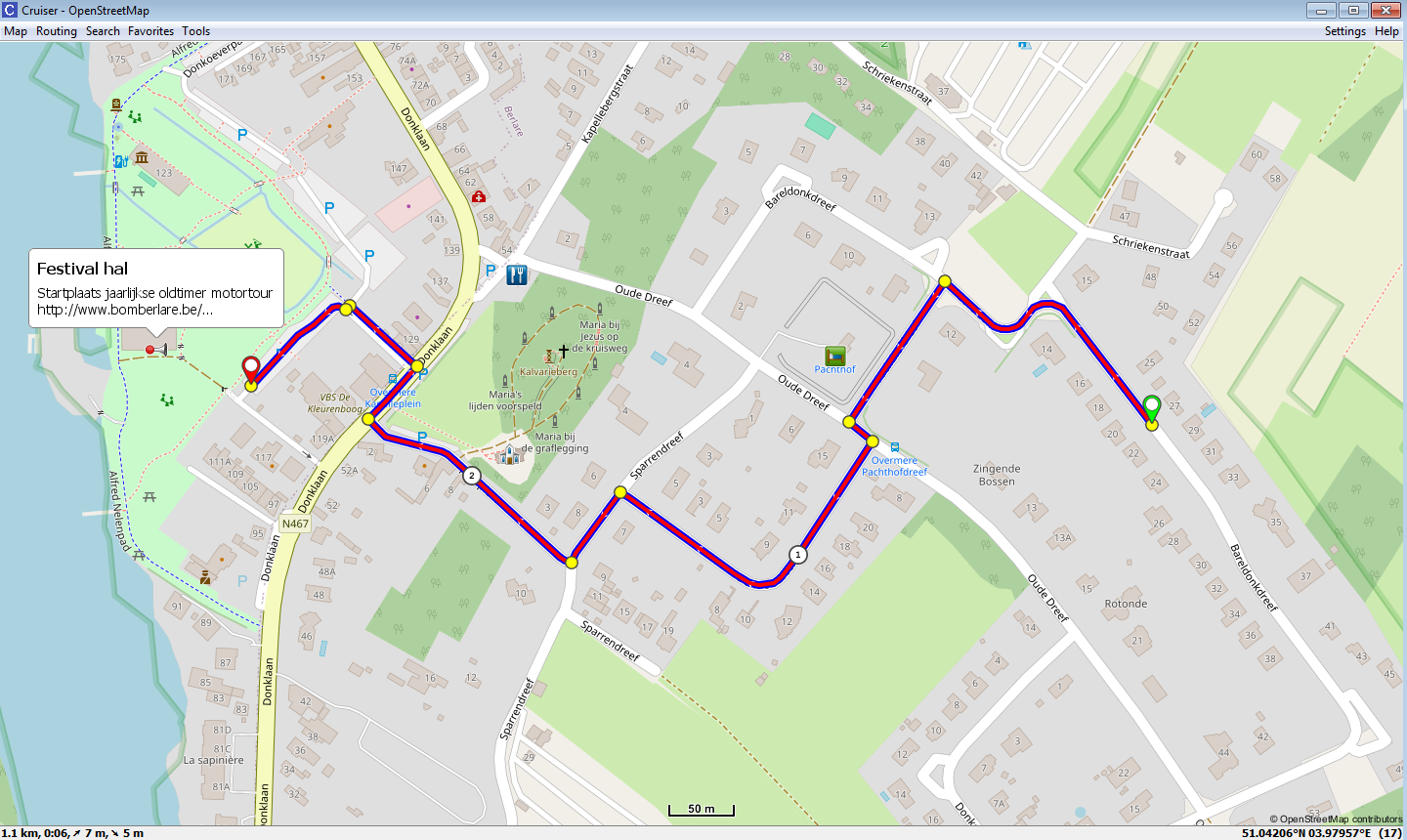
Please consider the following purely for informational purposes.
As I was particularly curious about the Suunto web GPX export.
The web presentation is actually very well done.
The GPX export differs from what I expected
See attachments:
Suunto_route.gpx
Suunto_navtrk.gpxThe Suunto GPX export and a comparable copy as a GPX navtrk file.
The original GPX file was manually edited for this purpose using Notepad++.
The GPX navrrk copy therefore so do not contain any trackpoint timestamps.
A few GPX WPTs have been added with a Garmin-compatible sym.
One of these GPX WPTs also contains an operational web link.
The GPX WPT list is not unnecessarily cluttered with turn instructions.
See also the presentation in the Cruiser desktop version.
Translated with DeepL.com (free version)








Hello! It looks like you're interested in this conversation, but you don't have an account yet.
Getting fed up of having to scroll through the same posts each visit? When you register for an account, you'll always come back to exactly where you were before, and choose to be notified of new replies (either via email, or push notification). You'll also be able to save bookmarks and upvote posts to show your appreciation to other community members.
With your input, this post could be even better 💗
Register Login