Data screens
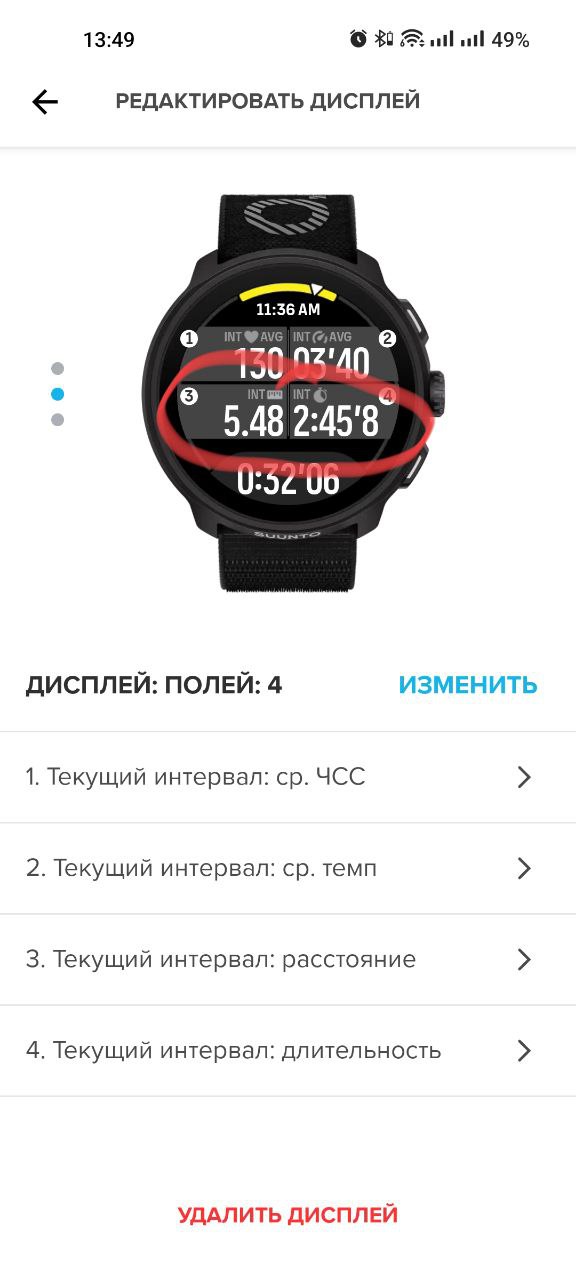
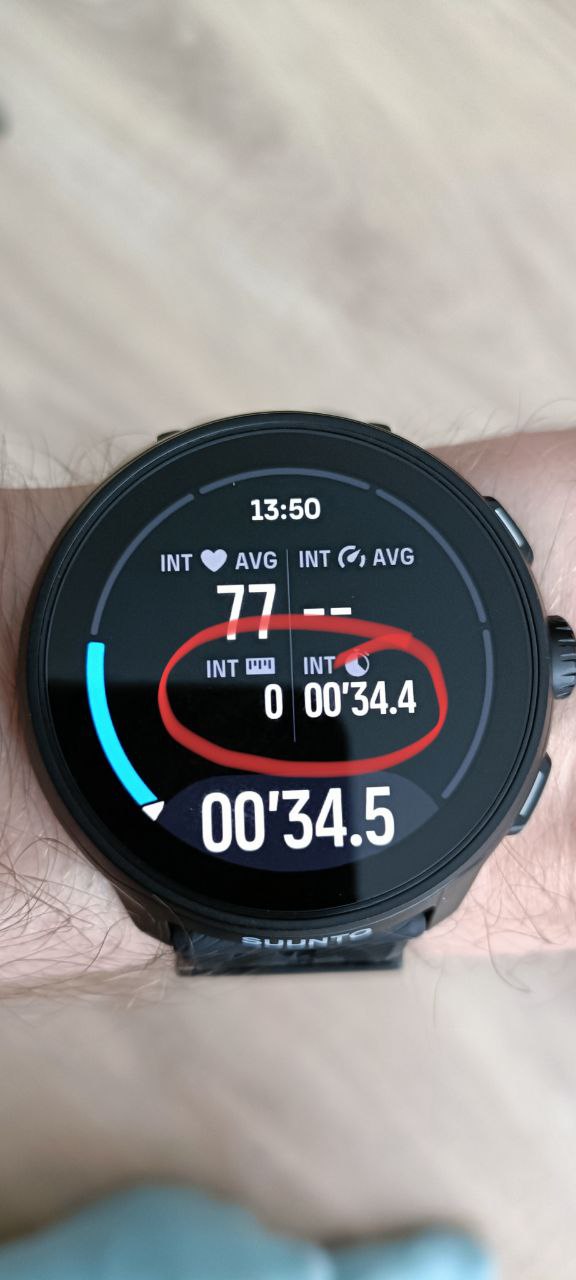
-
Scaling the entire line is odd…
Using the watch over clothing (in this case, wrist-lift activation doesn’t work) – it’s not warm everywhere year-round. The ZoneSense screen has a small font for the percentage of time spent in zones; there should be an option to configure the screen to show either percentages or time. Configuring screens for interval training. The minimum screen timeout is 10 seconds, while 4-5 seconds is sufficient… -
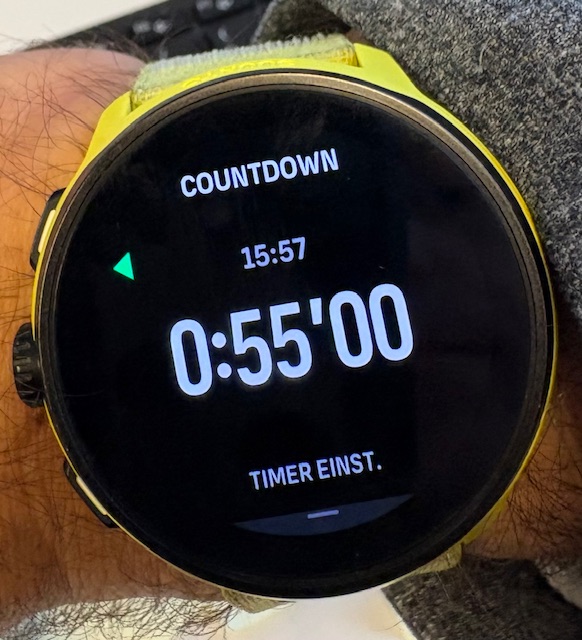
After each workout, could there be an option to suggest updating heart rate zone data (at least the maximum), and implement a test. The watch has the resting heart rate metric, but where is it in the app… It could be used for heart rate zones, for example, as an average over N days like in Garmin. Watch faces are a separate “art form”—please provide proper tools for watch faces. Countdown timer: I want to set 55 minutes… I have to scroll from 00 -> 01 -> 02 -> … -> 55 instead of an easy scroll from 00 -> 59 -> 58 -> … -> 55. How did this happen, who came up with this…
-
@perfekt_tall I mentioned this same issue in another thread and suggested a possible solution:
https://forum.suunto.com/topic/14488/fields-of-duration-too-small
No one took my comment into consideration, or at least, there were no replies.
-
There are workouts for duration, distance, calories, with a virtual partner, and free training. But where is the workout based on TSS (Training Stress Score)?
It’s an unclear situation – why is there no coach? Essentially, the watch lacks many features that competitors have…
I like the design, that the watch is lightweight (I wanted to buy another brand, but as always… I never thought it would be this disappointing…)
-
-
Using the watch over clothing - known issue
-
The ZoneSense screen has a small font for the percentage of time spent in zones; - agreed
-
Configuring screens for interval training. - known and has been requested.
4)After each workout, could there be an option to suggest updating heart rate zone data - this isn’t Suunto Run specific, Suunto has historically never provided such feature on any watch so.
- Watch faces are a separate “art form”—please provide proper tools for watch faces. - when Suunto Run came out we didn’t even have watchface store so it’s definitely progress

6)Countdown timer: I want to set 55 minutes - valid, hopefully it can be improved
7)Suunto Coach debuted on the other line of Suunto watches, Suunto Run is a completely different track and platform, but we haven’t seen a strong NO won’t be there since day so.
-
-
@herlas said in Data screens:
6)Countdown timer: I want to set 55 minutes - valid, hopefully it can be improved
Don’t get it. I can perfectly set 55’ as a countdown time.
Suunto Run is on a separate development path but will get great new features!t6, S6, Elementum Terra, Ambit 3 Sapphire, Spartan Ultra Copper, Traverse Alpha, S7 Graphite LE, S9B Ambassador, S9P Granite Blue Titanium, S9PP Titanium Sand, Vertical All Black, Race Titanium Charcoal, Race S All Black / Titanium Courtney, Run Lime
-
I noticed that even when worn over clothing, the screen still activates when I lift my arm, but perhaps there’s no proximity sensor.
The wrist-lift activation, just like the button press, retains the previous brightness level, and that’s annoying.
You can’t add a separate notification widget (it simply doesn’t exist).
-
Read carefully!!! It’s been almost a year since the watch went on sale… What functions do you know about?
-
For example, regarding watch faces:
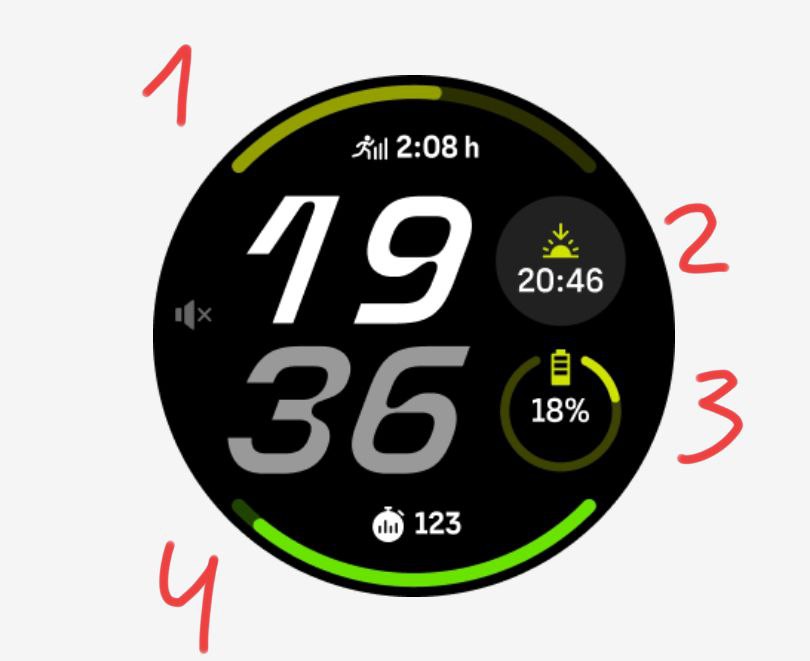
I want:
1 - CTL metric.
2 - Heart rate.
3 - Day of the week.
4 - TSB metric.
But I can’t, and why is that… -
@perfekt_tall relax man, we’re trying to help
On the timer, scrolling up on the minute to start from 60 is not available even on the other Suunto watches, so not a Suunto Run thing only but I get it, it’s a valid ask.
And yes watchfaces might not allow customization today but it can change in near futureSuunto Run is almost on a monthly firmware update cadence, lots of features had been added or fixed.
-
I think developers should listen to product users. Treating current and future users with an attitude of “eat up, eat up… don’t look, just eat” is a mistake, in my opinion. Competitors aren’t standing still—I expect I’ll stay with Suunto only until the end of the year if nothing changes. Developers need to communicate with users.
First, existing shortcomings in the user interface and similar issues should be fixed. Only then should new features be added. Amateur sports aren’t just about using a stopwatch—they’re about something more.
Right now, in my opinion, these watches don’t fit into either the category of sports watches for amateurs or everyday watches. They simply lack what’s needed. You can’t create a proper training plan and transfer it to the watch, and so on — you’re cut off from everything. For everyday use, there are no basic apps — for example, there’s no reminder app!
-
@perfekt_tall look, Suunto is regularly asking customers what they want. Usually these polls are shared in this forum.
Now, if you ask 100 people what they want, you get 100 different answers, some excluding each other (like more battery vs. higher screen bightness etc).
Developers are usually not trained to work with these results. This is what product managers do. They take all the information, rate it and put it into a roadmap.
The rest maybe answered by Q8 here: https://forum.suunto.com/topic/9960/more-faqt6, S6, Elementum Terra, Ambit 3 Sapphire, Spartan Ultra Copper, Traverse Alpha, S7 Graphite LE, S9B Ambassador, S9P Granite Blue Titanium, S9PP Titanium Sand, Vertical All Black, Race Titanium Charcoal, Race S All Black / Titanium Courtney, Run Lime
-
Is it possible to reorder the data screens (without having to delete and recreate them)?
Speaking of user communication… I can’t find a dark mode in the app. I imagine quite a few users have asked for it.
Version 3.24.14 of the watch software has been released, but there’s no announcement saying, “We’re letting you know that update X is out, we’ve fixed Y, and added Z.” Not even the official website mentions the update.
-
@perfekt_tall that’s not how it works, UX people listen, study and research the end user needs/experience, then they work with PM and Dev folks to deliver what’s needed according to the research and user interviews insights.
-
@Egika
Is there a table/list that lists the various user requests? Because it must be difficult and redundant for the development teams to read all these discussion threads.