2 problems with Suunto Vertical at once : Buttons and screen
-
Dear All,
I have for the first time a serious quality problem with my Suunto Vertical watch… not just 1 but 2 problems at the same time. Obviously, this appears 2.5 months after the end of the 2-year warranty.
It seems my watch didn’t survive my last 8-minute swim because the next day, I wanted to use it and I noticed two problems :
-
Pressing the “up” button performs the actions “up” and then “confirm” (SV_up.mp4 ). Pressing the “confirm” button performs the actions “up” and then “confirm” (SV_confirm.mp4 ). I tried a software reset as well as a hard reset but it did not solve the problem.
-
Three air bubbles have appeared under the glass. It looks like it’s starting to come unglued.
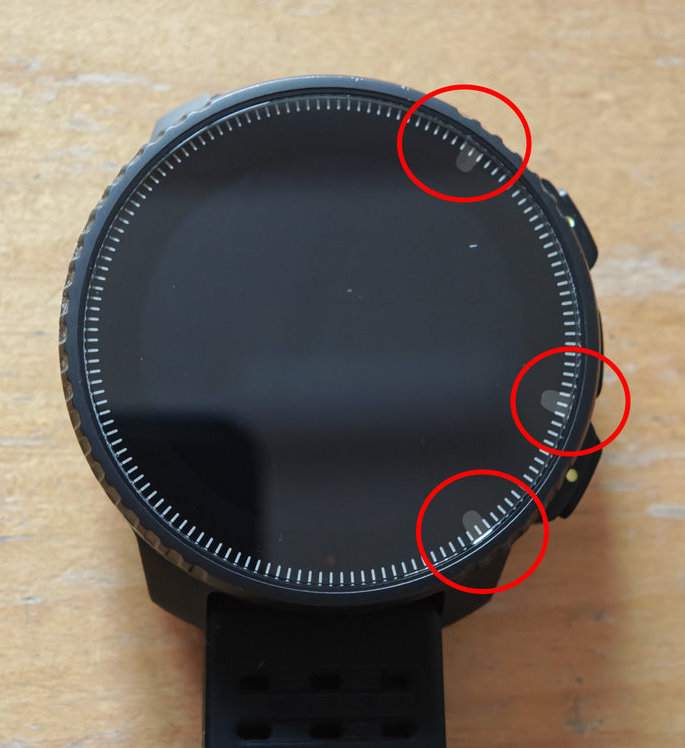
The bubbles aren’t a problem for use, but they’re visually unappealing. On the other hand, the button issue is very annoying to navigate the menus.
Has anyone else encountered either of these problems? I seem to recall seeing a post on the forum where someone shared a photo of the bubbles, but I haven’t been able to find it.
Thank you for reading.
Suunto 9 Peak Pro, Ambit2 Black HR, Core All Black, Spartan Ultra All Black Titanium HR, t3d, Vertical All Black, X6, X6 HR
-
-
For the problem #1, have you tried a soft reset? 12/15 s upper button?
For #2 aren’t you using a screen protector? -
@cosme.costa
For #1 : Yes, I did a soft reset and also a hard reset.
For #2 : No, I don’t have a screen protector. The bubbles are under the glass, on the crown where the minute markers are. -
@fondueaufromage
For the buttons, you might try to clean them (like put watch in gentle warm water, with few soap and brush gently). Maybe not the pb, but worth trying.
After, if soft or hard reset didn’t change anything, it is looking like an internal issue. Is it doing the same for all menus?SSU (retired), SV1, SV2
Wife : S9PP
SA: Always the latest beta :)
Android + Galaxy S205G -
Also thought there probably was a protective film in place.
But if you have button + screen issues, I would definitely send it in to Suunto.
Their technical service is top notch!t6, S6, Elementum Terra, Ambit 3 Sapphire, Spartan Ultra Copper, Traverse Alpha, S7 Graphite LE, S9B Ambassador, S9P Titanium, S9PP Titanium, Vertical All Black, Race Titanium Charcoal, Race S Titanium Courtney, Run Lime, Race 2, Vertical 2 Titanium
-
@Mff73 You’re right, it’s worth trying another cleaning with a water bath… at this point I’m at it.
Yes, the problem is there for all menus. As described in my first message:
Pressing the “up” button performs the actions “up” and then “confirm”. Pressing the “confirm” button performs the actions “up” and then “confirm”.This is problematic for certain functions where it is not possible to do without the buttons (for example, refusing to save an activity that is the last choice in the menu).
-
@Egika In addition to my forum post, I contacted Suunto support with the same information. Their response was either to return the watch for assessment or offer a discount on the purchase of a new watch. Since it’s impossible to know the repair cost before analysis, I find the discount offer appealing.