Suunto app Forum Suunto Community Forum
    • Recent
    • Tags
    • Popular
    • Users
    • Groups
    • Register
    • Login

    [Question] No stupid questions - ask anything here

    Scheduled Pinned Locked Moved Suunto Plus Development
    116 Posts 32 Posters 7.5k Views 30 Watching
    Loading More Posts
    • Oldest to Newest
    • Newest to Oldest
    • Most Votes
    Reply
    • Reply as topic
    Log in to reply
    This topic has been deleted. Only users with topic management privileges can see it.
    • Dimitrios KanellopoulosD Offline
      Dimitrios Kanellopoulos Community Manager @assaf1007
      last edited by

      @assaf1007 hrv is available only via belt afaik

      Community Manager / Admin @Suunto
      Creator of quantified-self.io a portal that allows you to analyze your data from various providers, upload fit activity files to Suunto app, gpx routes and more…

      1 Reply Last reply Reply Quote 0
      • dave russoD Offline
        dave russo
        last edited by

        The “Watch displays” docs say

        Note: SuuntoPlus is no longer maintained for UI1(s、m、l).

        Does this mean that the Vertical 1, which has UI1 l, is not supported? Or, just that no updates to this first public release of s+ will be coming for these watch models?

        1 Reply Last reply Reply Quote 0
        • Tomas5T Offline
          Tomas5 Gold Members @SuuntoPartnerTeam
          last edited by

          @SuuntoPartnerTeam thanks for explaining, i was mistaken that logIndex -1 is reading log forcurrently recorded excercise.

          Suunto Ambit 2 > Suunto 5 > Suunto Race 2

          1 Reply Last reply Reply Quote 1
          • H Online
            harry08 Bronze Member @SuuntoPartnerTeam
            last edited by

            @SuuntoPartnerTeam
            Hi, one question regarding date calculations. I saw in the Suunto Reference that Date is not supported in the standard built in objects.
            So I need to do all date calculations based on seconds? Is this true?

            Thanks

            S 1 Reply Last reply Reply Quote 0
            • surfboomerangS Offline
              surfboomerang
              last edited by

              @suuntopartnerteam I’m still a little bit confused about the setText() behavior.

              For example
              I create two template files, both with a <div id="testid" ....> section.
              In the main.js evaluate() function I set the text setText('#testid', 'testvalue');

              This put’s the text in th div-section. If the text is changed, the div-section updates accordingly.

              However, when I change the template to the second tempate (and call unload('_cm');) the div-section on the new template, which has the same id, isn’t updated at all.

              Do you have any advise on how to handle this?

              Suunto Vertical Titanium Solar
              OnePlus Nord 4

              S 1 Reply Last reply Reply Quote 0
              • S Offline
                SuuntoPartnerTeam @surfboomerang
                last edited by

                @surfboomerang

                1. As with web development, ids are meant to uniquely determine an element. You shouldn’t use the same id for different elements. This is true even when those elements are inside different HTML templates, if both templates may be active at some point during the runtime of the app

                2. You cannot change a template that is not active. The uiViewSet might be something worth looking at, depending on what you’re trying to achieve

                surfboomerangS 1 Reply Last reply Reply Quote 1
                • S Offline
                  SuuntoPartnerTeam @hitriy
                  last edited by

                  Hey @hitriy .

                  You can fetch data from any device which supports being in peripheral mode – even a laptop. In your case, you would need to write an application for your phone which communicates with the watch using Bluetooth Low Energy.

                  H 1 Reply Last reply Reply Quote 0
                  • S Offline
                    SuuntoPartnerTeam @harry08
                    last edited by

                    Hi @harry08 .

                    That is right, you can only get precise current time or the day of the week. The rest needs to be calculated manually

                    1 Reply Last reply Reply Quote 0
                    • I Offline
                      Isotop7
                      last edited by

                      Is it possible to get the Suunto Plus Guide a user has selected for the current workout? The goal would to the show a graphic representation (for example bar chart) to show all intervals of the workout and vertical ruler showing the current point in the workout.

                      1 Reply Last reply Reply Quote 2
                      • surfboomerangS Offline
                        surfboomerang @SuuntoPartnerTeam
                        last edited by

                        @SuuntoPartnerTeam said in [Question] No stupid questions - ask anything here:

                        The uiViewSet might be something worth looking at

                        Thanks for the hint! This worked for my case.

                        Suunto Vertical Titanium Solar
                        OnePlus Nord 4

                        1 Reply Last reply Reply Quote 1
                        • H Offline
                          hitriy @SuuntoPartnerTeam
                          last edited by

                          Awesome, works fine for me. Worth buying new watches then!

                          1 Reply Last reply Reply Quote 0
                          • Ecki D.E Offline
                            Ecki D. Bronze Member
                            last edited by

                            Connect watch to macbook - VSCode

                            Should this work?

                            I have a older (rather old 😉 macbook running monterey. I couldn’t connect the watch to deploy my app on it.
                            Maybe it failed cause the watch hasn’t been properly disconnected from the phone see my other thread over here:

                            https://forum.suunto.com/post/187290

                            https://www.strava.com/athletes/37982563
                            https://www.instagram.com/macdev

                            1 Reply Last reply Reply Quote 0
                            • U Offline
                              Unpaired8373
                              last edited by

                              Does the watches JS-runtime support WASM by any chance?

                              S 1 Reply Last reply Reply Quote 0
                              • Tomas5T Offline
                                Tomas5 Gold Members
                                last edited by Tomas5

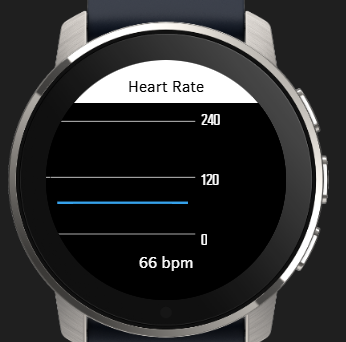
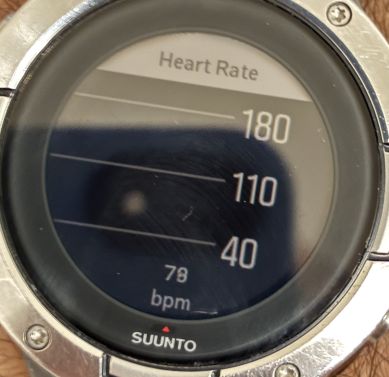
                                Hello, can anyone help, I am trying to display Graph for HearthRate.

                                I am using this code for displaying graph, it is taken from one of examples just modified input path for current hearth rate:

                                <graph style="position:absolute;
                                              left:0px; top:0px; width:100%; height:100%;
                                              box-sizing: border-box;
                                              padding-right:90px; padding-top:60px; padding-bottom:60px;
                                              font-size:21px;"
                                       valueFormat="HeartRate_Fourdigits"
                                       type="line"
                                       grid="three lines"
                                       inputType="subscribe"
                                       input="/Activity/Move/-1/HeartRate/Current"
                                       min="0.6666666667"
                                       max="3"
                                       slack="0.1"
                                />
                                

                                and it works fine in simulator and I see this:
                                Snímka obrazovky 2026-03-20 210235.png

                                but when I upload app to watch (Suunto 5 or Race 2), than there is no graph line for Heart Rate:
                                1774037407881-img_2476.jpg

                                Suunto Ambit 2 > Suunto 5 > Suunto Race 2

                                Tomas5T 1 Reply Last reply Reply Quote 0
                                • ookO Offline
                                  ook
                                  last edited by

                                  guys I need help, anyone know how to use the crown/middle button to scroll to the next ui?

                                  Tomas5T 1 Reply Last reply Reply Quote 0
                                  • Tomas5T Offline
                                    Tomas5 Gold Members @ook
                                    last edited by

                                    @ook i would try “onEvent(input, output, eventId)” and display value of eventId on screen and than see if crown produce some events.

                                    Suunto Ambit 2 > Suunto 5 > Suunto Race 2

                                    ookO 1 Reply Last reply Reply Quote 0
                                    • ookO Offline
                                      ook @Tomas5
                                      last edited by

                                      @Tomas5 thanks Tomas I tried your method, it just return 0 to me, but i find out if ur ui is big enough it will able to scroll down,dont have to do anything.

                                      S 1 Reply Last reply Reply Quote 1
                                      • Thibault B.T Offline
                                        Thibault B. Bronze Member
                                        last edited by

                                        Hello,

                                        What I want to do is quite simple but I do lack experience with JS, and it has been a long time since I developed in HTML.

                                        I would appreciate your help :). I want to override down button press to make a lap type 24, but only if activity is ongoing. If it is paused I want the default behavior (stop activity).

                                        In my html:

                                        <userInput>
                                              <pushButton name="down" onClick="$.put('/Zapp/{zapp_index}/Event', 123, null, 'int32');" />
                                        </userInput>
                                        

                                        In my js:

                                        function onEvent(input, output, eventId) {
                                          if (eventId == 123) {
                                            // Down button was pressed
                                            $.put('Activity/Trigger', 24);
                                          }
                                        }
                                        

                                        I was thinking of conditioning the HTML onClick but do not really know how to access necessary variables, etc. I have tried a few things but I am lost.

                                        U 1 Reply Last reply Reply Quote 0
                                        • U Offline
                                          Unpaired8373 @Thibault B.
                                          last edited by

                                          @Thibault-B. There is an example in the examples collection. Essentially have a global variable that is set in the start-handler and unset in the stop-handler and then handle the condition in you event

                                          Thibault B.T 1 Reply Last reply Reply Quote 0
                                          • Thibault B.T Offline
                                            Thibault B. Bronze Member @Unpaired8373
                                            last edited by

                                            @Unpaired8373 Not sure to get what you mean.

                                            function onEvent(input, output, eventId) {
                                              if (eventId == 123 && output.isPaused == 0) {
                                                // Down button was pressed
                                                $.put('Activity/Trigger', 24);
                                              }
                                            }
                                            

                                            It is not triggering the lap but it is not doing anything else and I wanted to default to initial behavior (so I didn’t want an explicit call to stop, which seems anyway not available?).

                                            Thibault B.T 1 Reply Last reply Reply Quote 0
                                            • First post
                                              Last post

                                            Suunto Terms | Privacy Policy