Several navigation issues (feedback)
-
Hello,
After testing the Race 2 and buying the Vertical 2 Titanium (a watch that I’m finding very improved when comparing to the previous generation), I wanted to share some feedback.
Please, keep also in mind that english is not my first language.Map downloads are slow
While downloading a map is something that someone is not going to do everyday, the very first thing you notice is how slow is the map download in Suunto. You need to download a whole region in your country and if you live in a border area of that region, you are downloading 2 or 3 regions (like in my case). Coros and Amazfit implementation is perfect for this, where you just select a part of the map you select to download. I don’t consider this an important issue but this is also something to note.
Turn-by-turn notifications current design and issues
One of my (very big) suprises is that we still have the implementation of the previous generation through Komoot for the turn-by-turn notifications, while others (Coros and Amazfit) introduced their own implementations like, I think, 2 years ago (which are now very improved with several updates) . While Suunto’s approach works, and considering now the other’s have their own implementations, this is totally a bad design:
-
It means that users are forced to register in a 3rd party social network if they want the turn-by-turn notifications. The contrary means a feature lost. This should not happen and it also limits the functionality. Some users will not ever know their watches have this feature because or the 2 plattforms design.
-
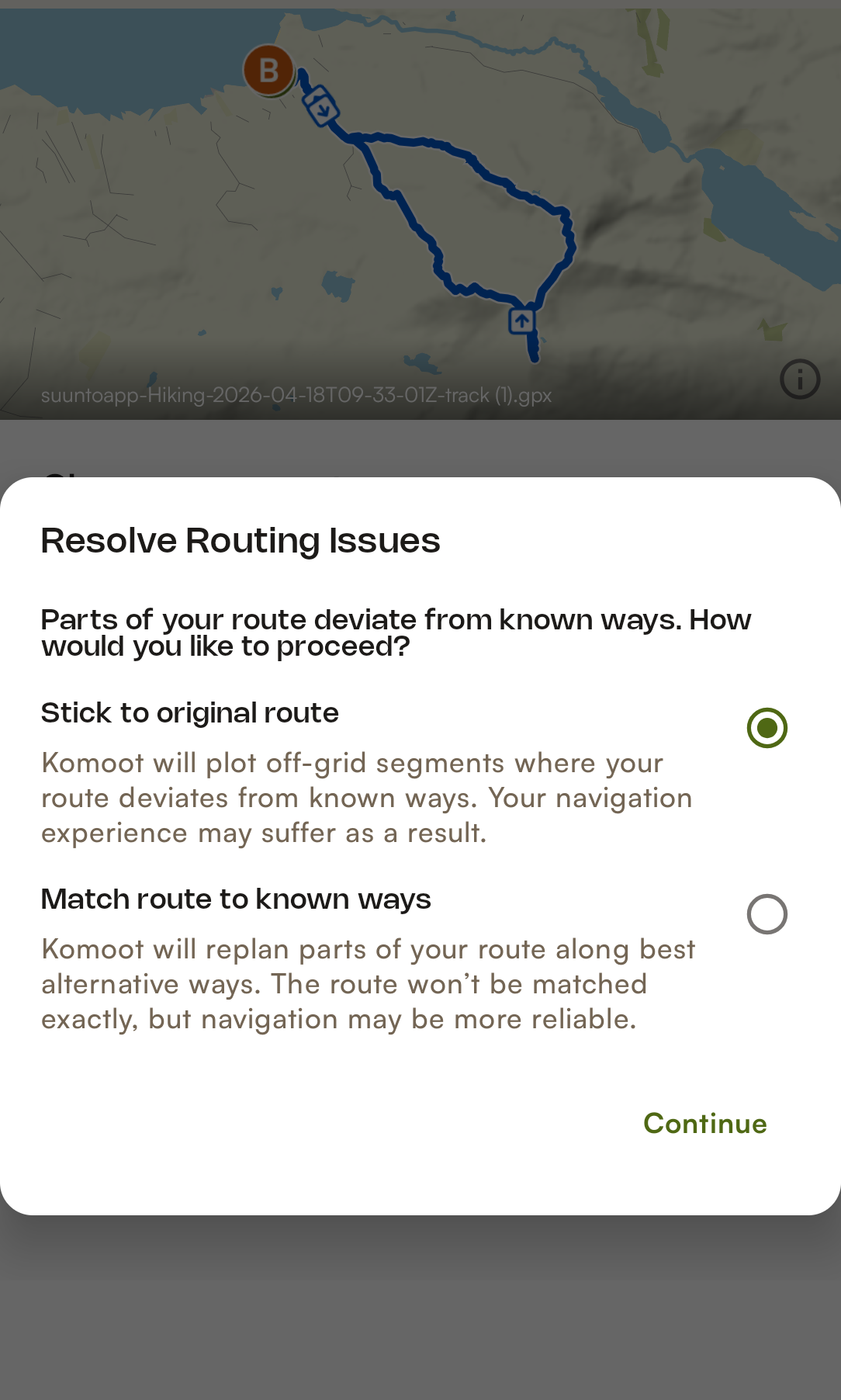
The process of uploading a GPX track to Komoot to have then the track synced into Suunto’s app, is slow and convoluted. The user needs to do a manual intervention in 2 plattaforms to just upload a track to the watch to have the indications.
-
Garmin, Coros and Amazfit can import directly GPX tracks and have turn-by-turn notifications. No modifications needed, nothing.
-
We are delegating something into an external company. That means that if their service is not good, or if their systems are down, Suunto has afectation.
Said these things, I have tested several tracks. What I’m finding is that while it’s (very) true notifications are better than in Coros or Amazfit (Suunto has also roundabouts, U-turns and forks), my experience is the notifications are not as reactive as in Coros or Amazfit.
I mean, once you are approaching a turn (or a roundabout, an U-turn or a fork), it’s like the notifications are sometimes late remaining even not only inside the turn but also several meters after the turn. I’m finding things like after a roundabout the watch is saying there are still 15 meters left, which is totally wrong. And I’m also finding the contrary with notifications lost several meters before the arrival of the turn.
And the thing is that I have tried the same GPX tracks in Coros, Amazfit, Garmin and Suunto and it seems that only Suunto has these issues with the precision. Since Suunto delegates the turn-by-turn logic in Komoot, we also don’t know if this is an issue generated by bad Komoot algorythms or how Suunto interprets the tracks downloaded by Komoot.
In any case, it is not only a performance consideration but the explained points. And the thing is that considering Garmin, Coros and Amazfit can do these notifications without something like Komoot, it seems very clear Suunto should reconsider a redisign of all this logic. Users will appreciate it, and Suunto will not have the issues genetated by others (if that is the case).
At the end this is a suboptimal and a convoluted design. In my opinion software works better when the things are simple. Simplicity, when possible, should be a design goal and any accidental complexity should be avoided. https://en.wikipedia.org/wiki/KISS_principle
Missing turn-by-turn on/off toggle in the watch
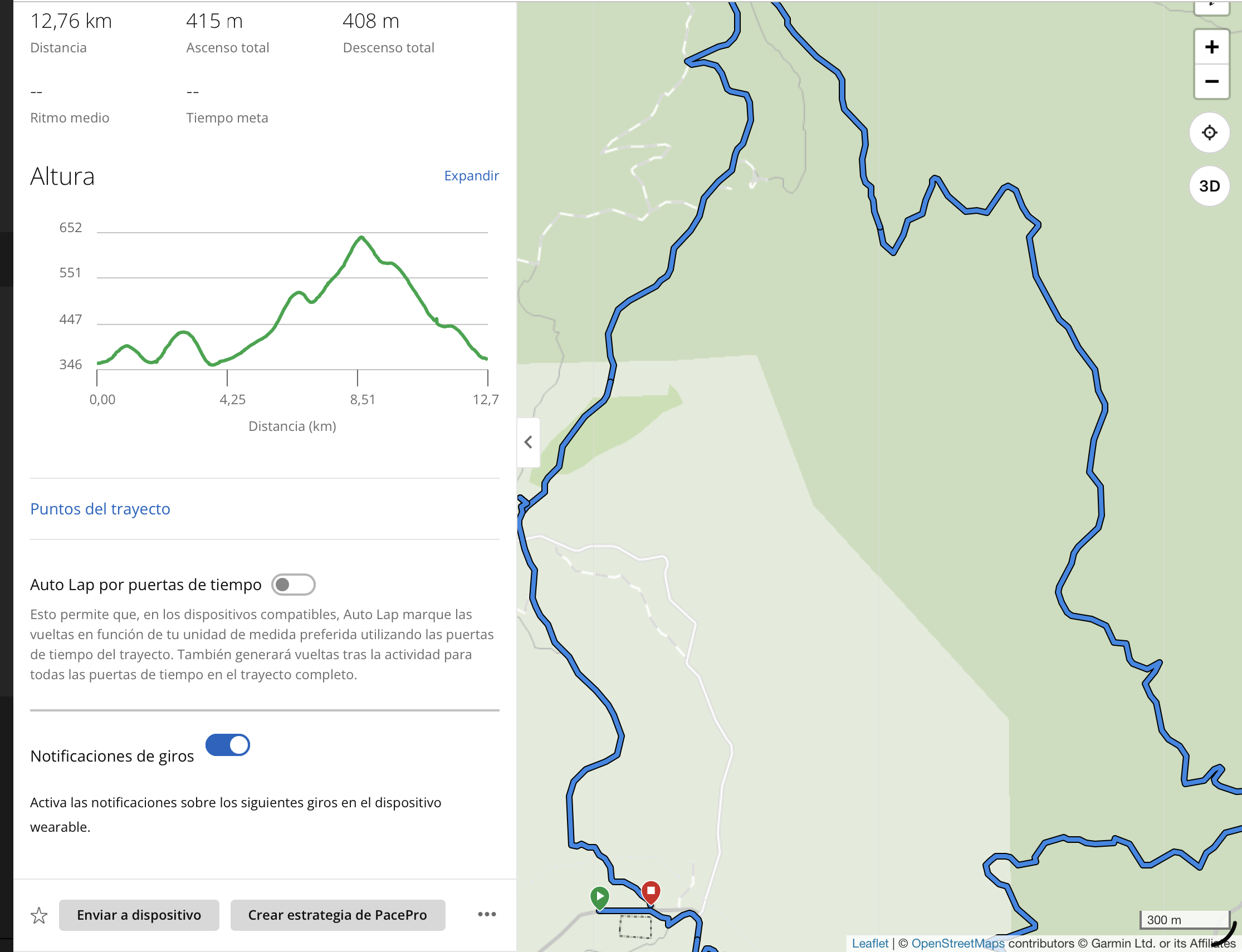
In the route section in the application, we can see this:
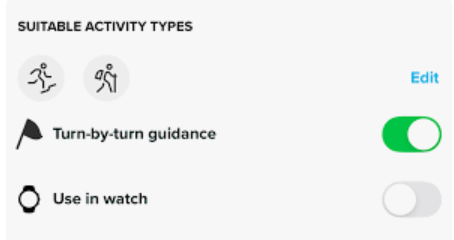
Which means that the track is sent to the watch with turn-by-turn on or off. This is again a bad design issue. The track should be sent always with the turn-by-turn indications, leaving that on/off option in the watch (without the need of reuploading tracks using the phone). Garmin, Coros and Amazfit do have that option in the watch.
Missing voice navigation notifications
Turn-by-turn voice notifications are missing. These are useful in a trail run when you are running in technical paths and you don’t want /can’t look at the screen.
Climb notifications
There’s already a very good thread here by @sky-runner. I made very small appreciations that were answered by @joaquin with very nice feedback. While Climb Guidance is a fantastic thing Suunto has, some improvements are still left.
I’m referencing the dedicated thread, which in my opinion, is very good:
https://forum.suunto.com/topic/15016/vertical-2-2.53.42-map-and-navigation-features-are-greatly-improved-but-there-are-still-a-lot-of-old-issues-and-also-new-bugs-introduced-in-the-latest-update/Auto-reverse:
When you change the direction you are running while using a track, I’m finding the watch is not as fast as it should reversing all the indications. I’m not sure if this is because of the Komoot implementation but I tested this, and the watch skipped 3 turns after changing my direction. Fastest is Garmin which, after changing your direction, notifies first an “Out of the route” and a bit later reverses all notifications according to the new direction.
This should be improved.Auto-Routing / routeable maps:
I understand auto-routing should be improved. I don’t consider this so important at this moment when there are other things to consider before, but there’s work here to be done.
While it’s true the watch’s screen is too small for planning routes, there are several interesting use cases that the watch should be more clever. Actually, Garmin and Amazfit can accomplish these scenarios:
-
Auto-routing. This is very new in Amazfit (introduced last month). It does work but paths are not ofter as optimal as Garmin’s yet. I.E, you found a road cut and you are taking another path. The watch automatically calculates a new real path to the point you want to go. I tested this in the Ultra 2 and the thing is it works.
-
Just a a click on a POI icon in the screen and calculate a route using real paths. Same for the waypoints of your track when loaded (I.E when you are out of the route and want to go to that waypoint or just a part of the track or whatever part of the screen (I.E, a mountain, lake…)
-
Calculate automatically a route. You can tell the watch to calculate let’s say a 20km round route from point A to point B and using real paths. Sometimes watch’s screen is enough (see examples before) if the watch is capable to create the route without your intervention. The thing is this actually works.
I left this to the end, since (at this moment) I think it’s more like a “nice to have” . I think navigation will evolve with these kind of things but, for now, I think there are other things to have a look at.
Suunto Vertical 2 Titanium Sage, Suunto Run
-
-
@dreamer_ some points
GPX - TURN BY TURN
No brand, except Garmin, is truly providing reliable turn-by-turn navigation directly from a GPX file. Garmin can do this because it vectorizes the map data on-device and matches the track against a real path network.
Let me explain the other common approaches.
Case 1
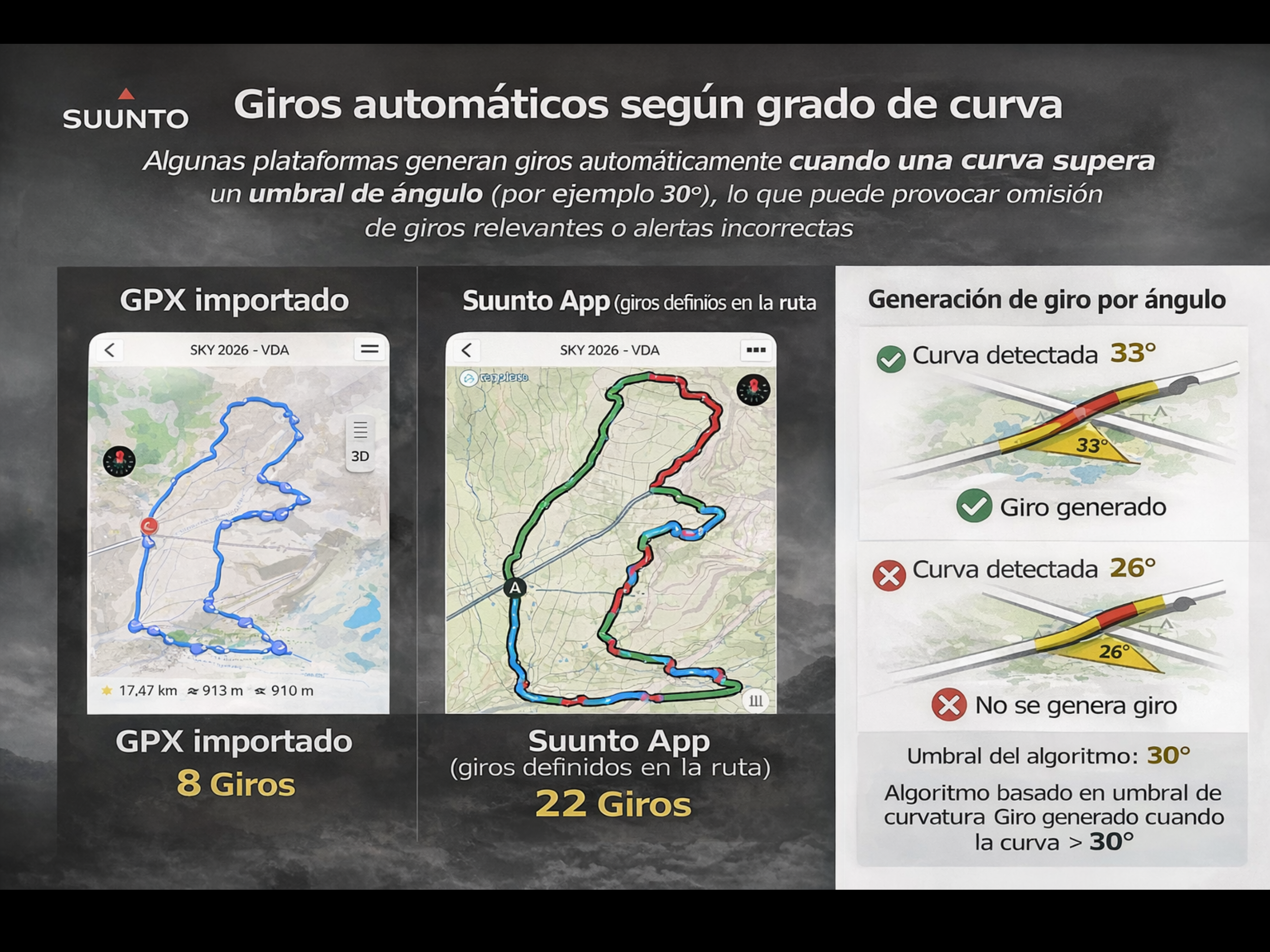
When you import a GPX into devices from Amazfit or Polar, the watch simply interprets direction changes in the track. For example, if there is a curve above a certain angle threshold (around 30°), it generates a “turn”. This leads to multiple false turn alerts on curves, and at the same time, real intersections may have no turn at all.You can see in these images what it describes; the lower field is the distance to the next turn.
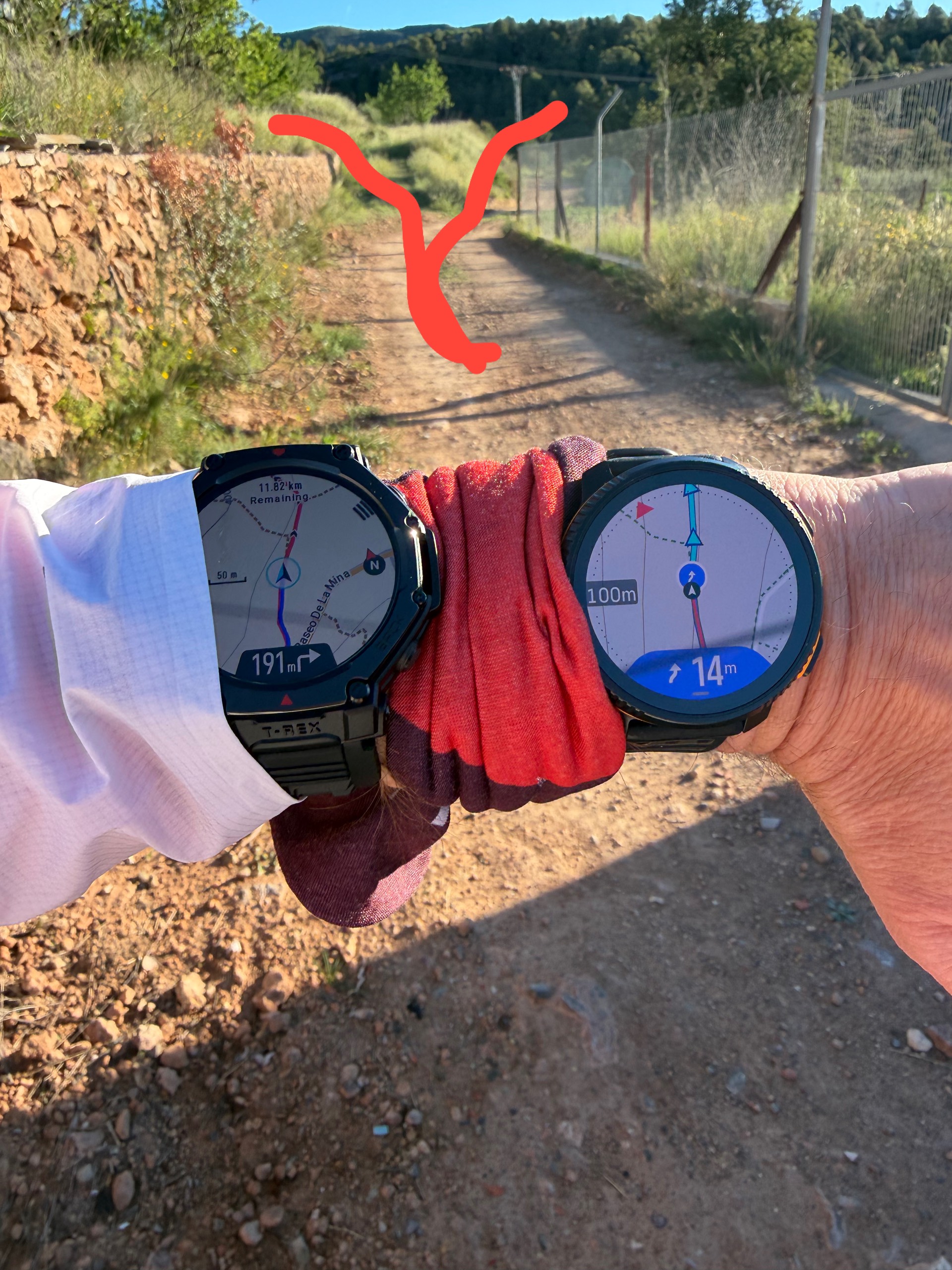
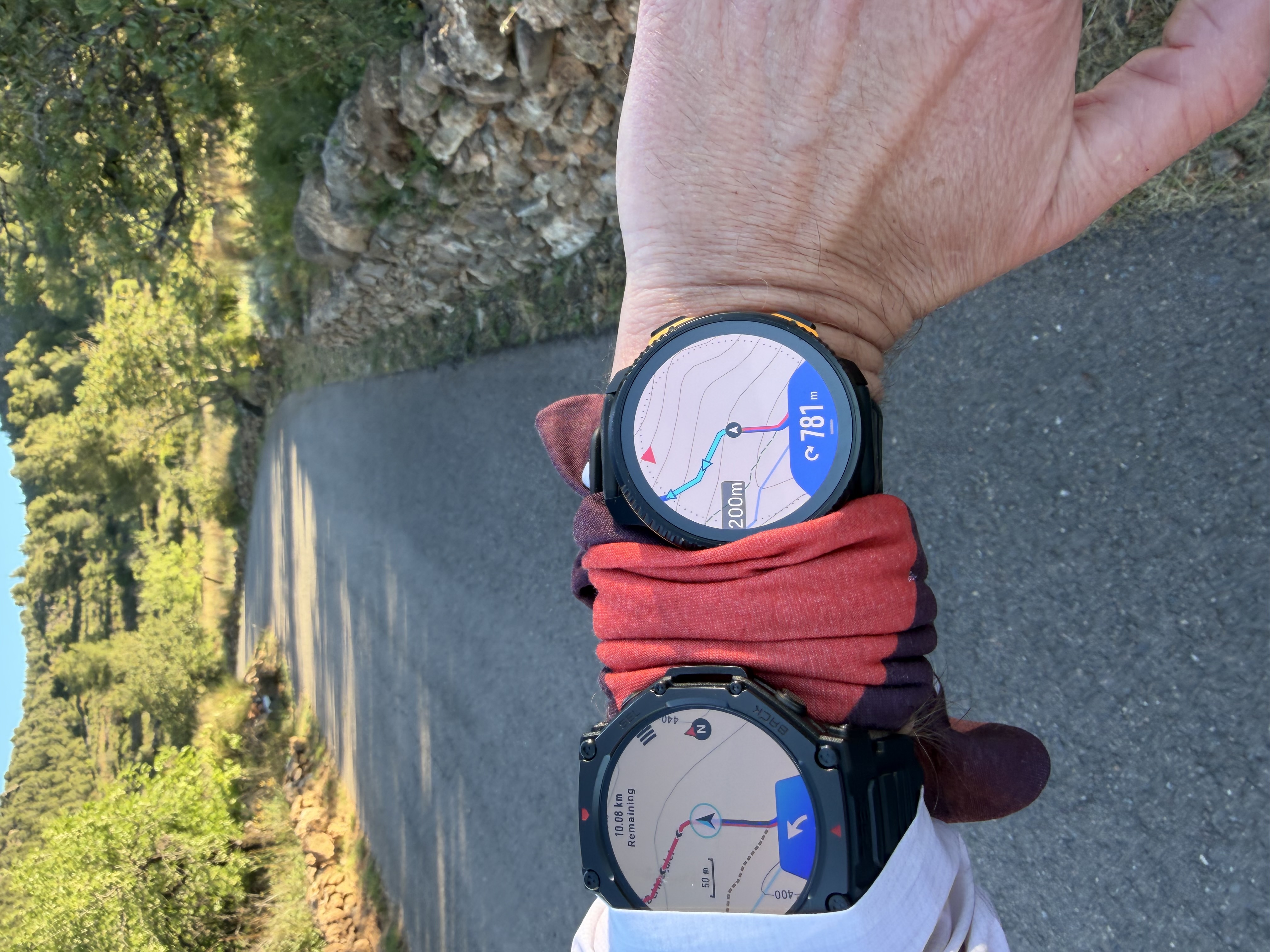
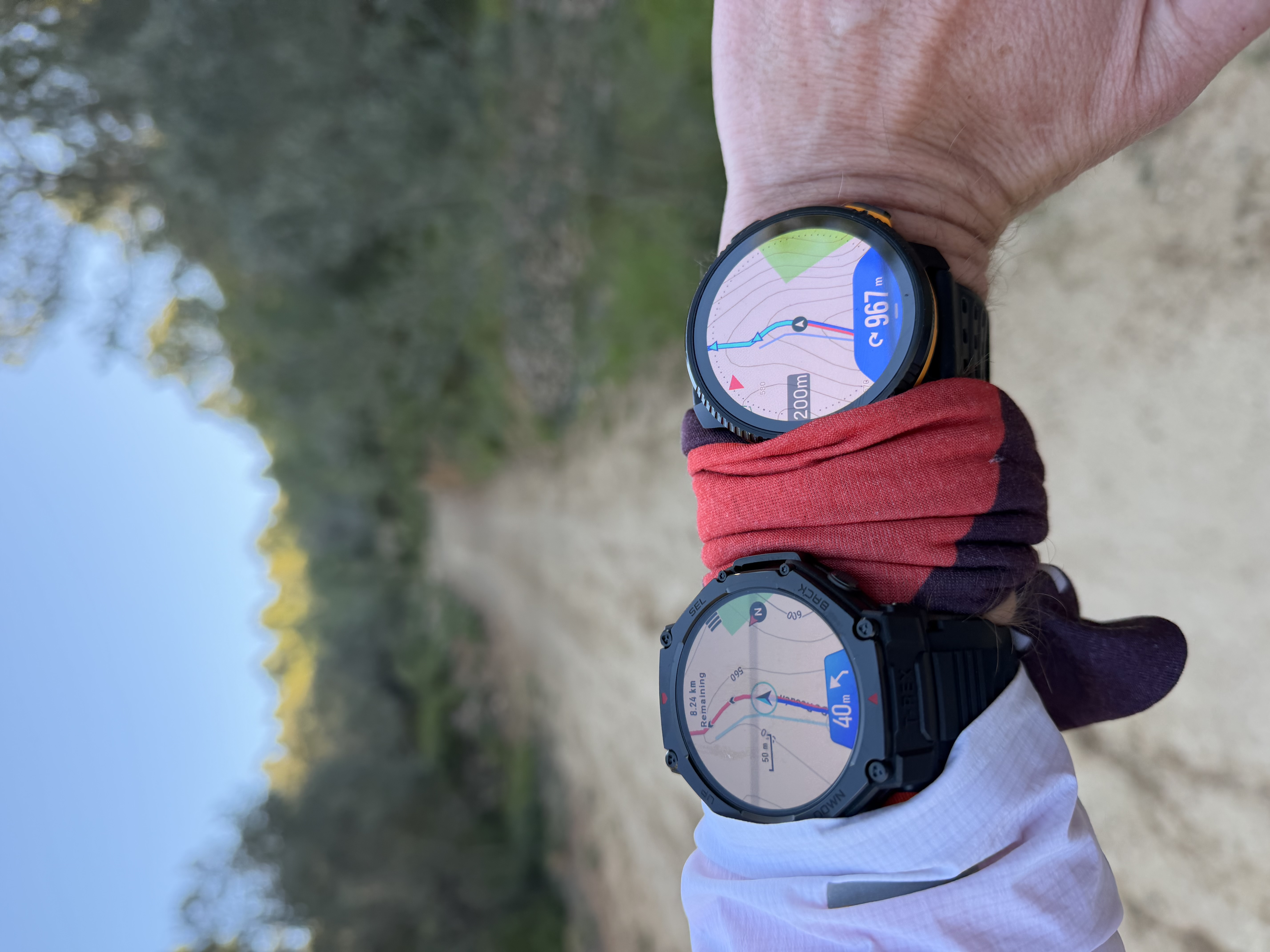
Case 2
When importing a GPX into COROS, the logic is very similar. Sharp curves trigger turn notifications, while some real intersections are missed. So the underlying issue is the same: geometry-based detection instead of real navigation logic.This is not what we want. On a 12 km route you can easily end up with 20+ false alerts. In ultra distance scenarios, this becomes not only frustrating but potentially dangerous.
That is why we do not implement turn-by-turn from raw GPX files. Until there is a way to do it properly, we prefer to prioritize accuracy over approximation.
From a technical standpoint, this approach is much more reliable, even if it may seem less convenient at first.
You can see in these images the route created in the Suunto app and the same route imported into Coros via GPX.
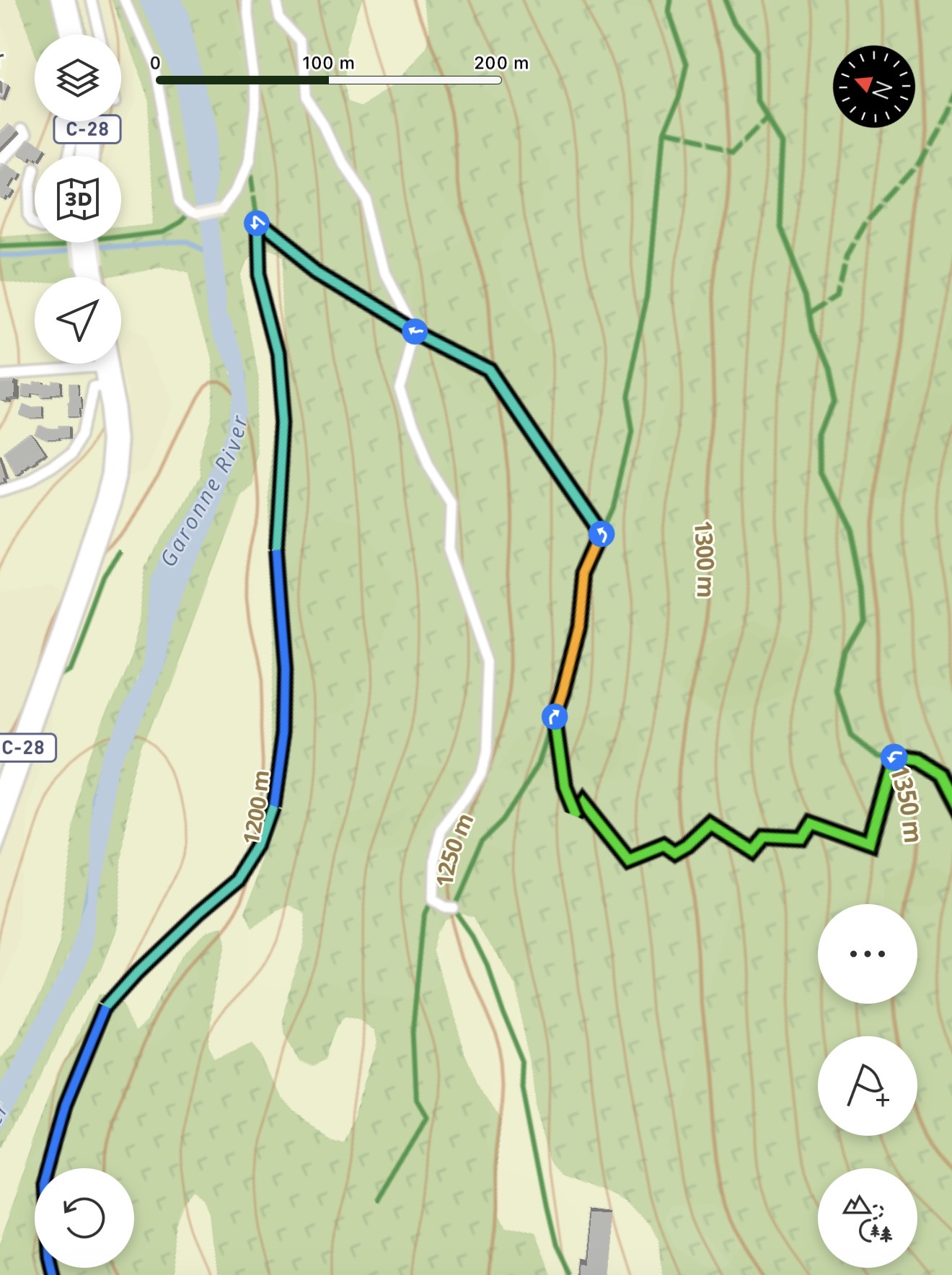
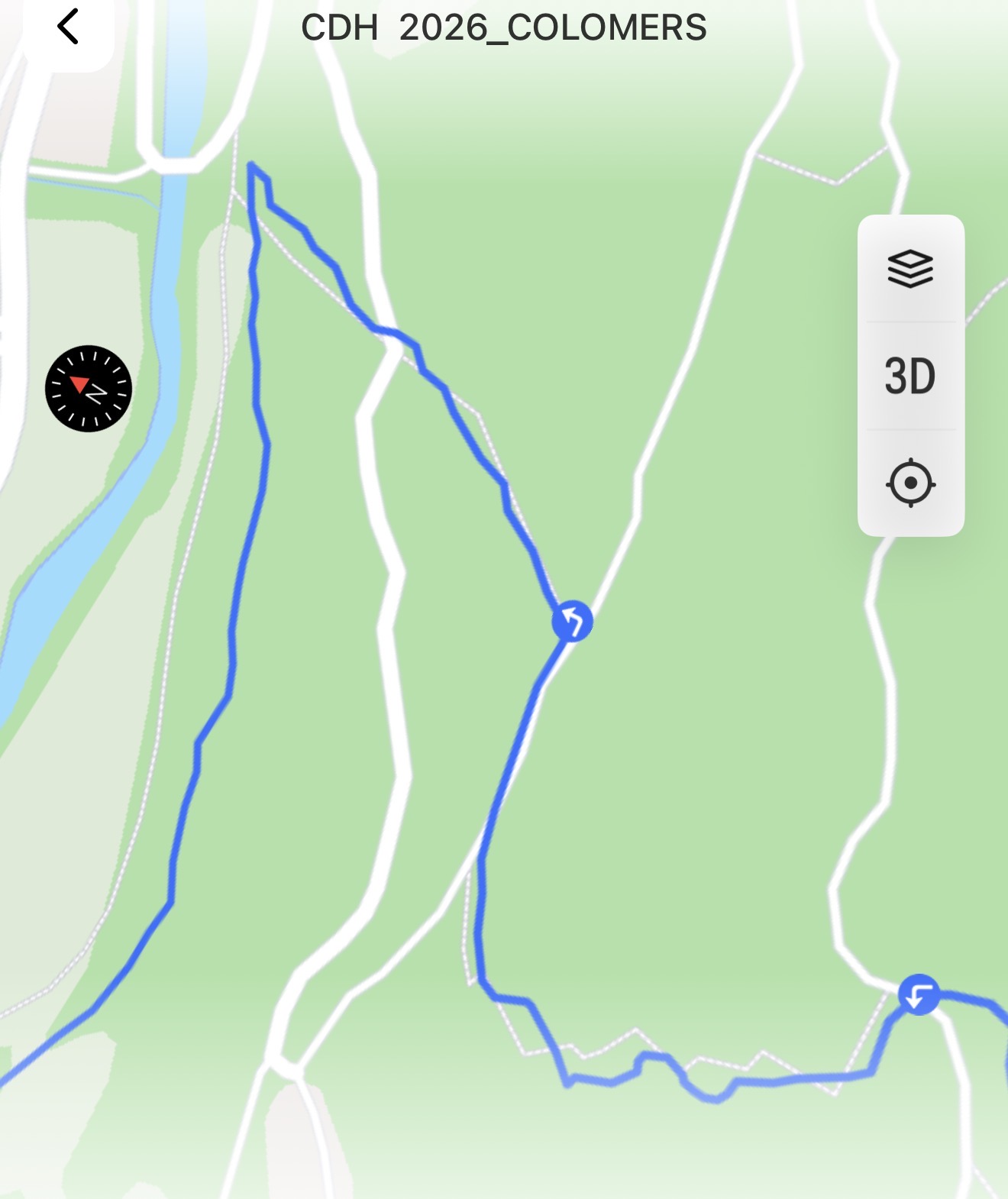
Technical & Product Specialist – Suunto Iberia
-
@dreamer_ AUTOREVERSE
Regarding auto-reverse, let me explain how it actually works on Suunto devices.We have an automatic direction detection system. This means the watch can detect when you are following a route in the opposite direction and automatically invert all navigation indications, including turns and distances. There is no need for manual interaction.
To make this reliable and avoid false “off-route” alerts or incorrect direction changes, the system uses a safety threshold of around 200 meters. Once you consistently follow the route in the opposite direction for that distance, the watch recalculates and reverses all turn-by-turn instructions accordingly.
This behavior is intentional. It prioritizes stability and avoids constant false positives, which are very common in navigation systems that react too quickly to direction changes.
In other brands like Garmin, the system reacts faster, but typically first triggers an “off-route” alert before recalculating. In contrast, our approach avoids misleading alerts during short or temporary direction changes.
In practice, this also works as an enhanced Track Back. Simply by turning around on your route, you will automatically get full turn-by-turn guidance back to your starting point, without needing to activate a separate function.
It’s a different design choice: slightly less immediate, but more stable and reliable in real-world scenarios.
Technical & Product Specialist – Suunto Iberia
-
@dreamer_ Regarding auto-routing and routable maps, you are absolutely right that this is an interesting area and that it will continue to evolve.
As you mentioned, doing this directly on the watch has significant limitations. Even in the case of Garmin, where they can vectorize paths on-device, the results are only moderately consistent.
With Amazfit, the current implementation is not something we consider a good benchmark. In our testing, routing is often not truly intelligent. It can select suboptimal or even inappropriate paths, which in mountain environments can become a real safety concern.
For example:
- It may not choose the shortest or most logical path in a critical situation
- It can route a MTB activity through hiking-only trails
- Or suggest paths that are technically not usable for the selected sport
This is something we also see happening, to some extent, even with Garmin.
For this reason, our approach in Suunto is different.
We prioritize safe and reliable routing through the Suunto App using offline maps. In less than a minute, you can create a route that is:
- adapted to the sport type (road, trail, MTB, etc.)
- based on appropriate paths
- and fully controlled by the user
That route can then be sent to the watch and used during the activity, even without connectivity.
Our main investment has been in:
- high-quality offline maps in the app
- and seamless route transfer to the watch during activity
On-device auto-routing may look attractive as a feature, but today it is often inconsistent and, in some scenarios, potentially unsafe.
As always, we prioritize reliability and correctness over “nice-looking” features that are not yet mature enough for real-world use.
Return route created on the watch vs. Suunto app: a detour along a path that increases the final distance by 400m on this 3.5km return route. Imagine on a 20km route; it can be relatively dangerous.
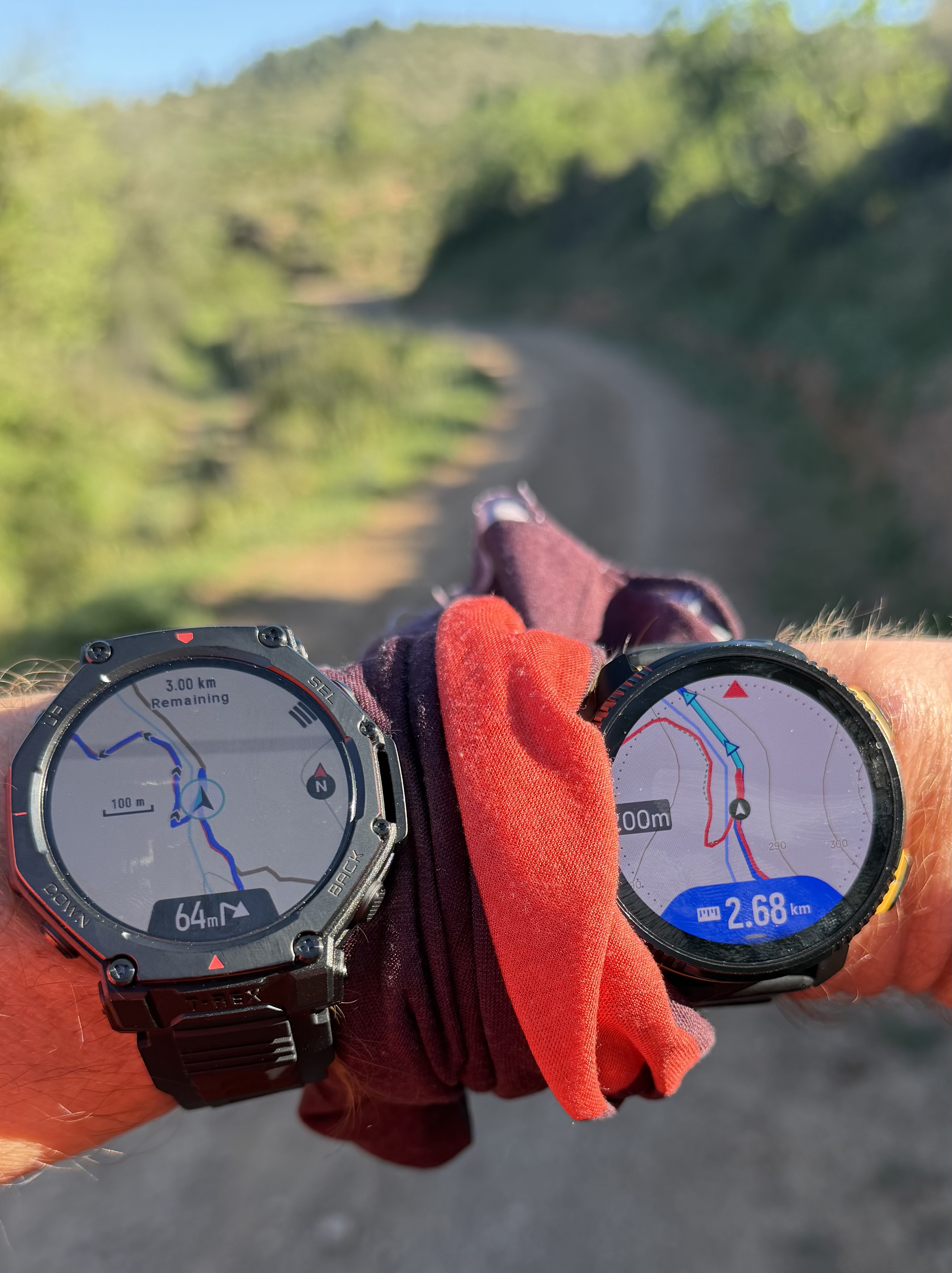
When creating an 8km route, the watch creates a route of almost 14km.
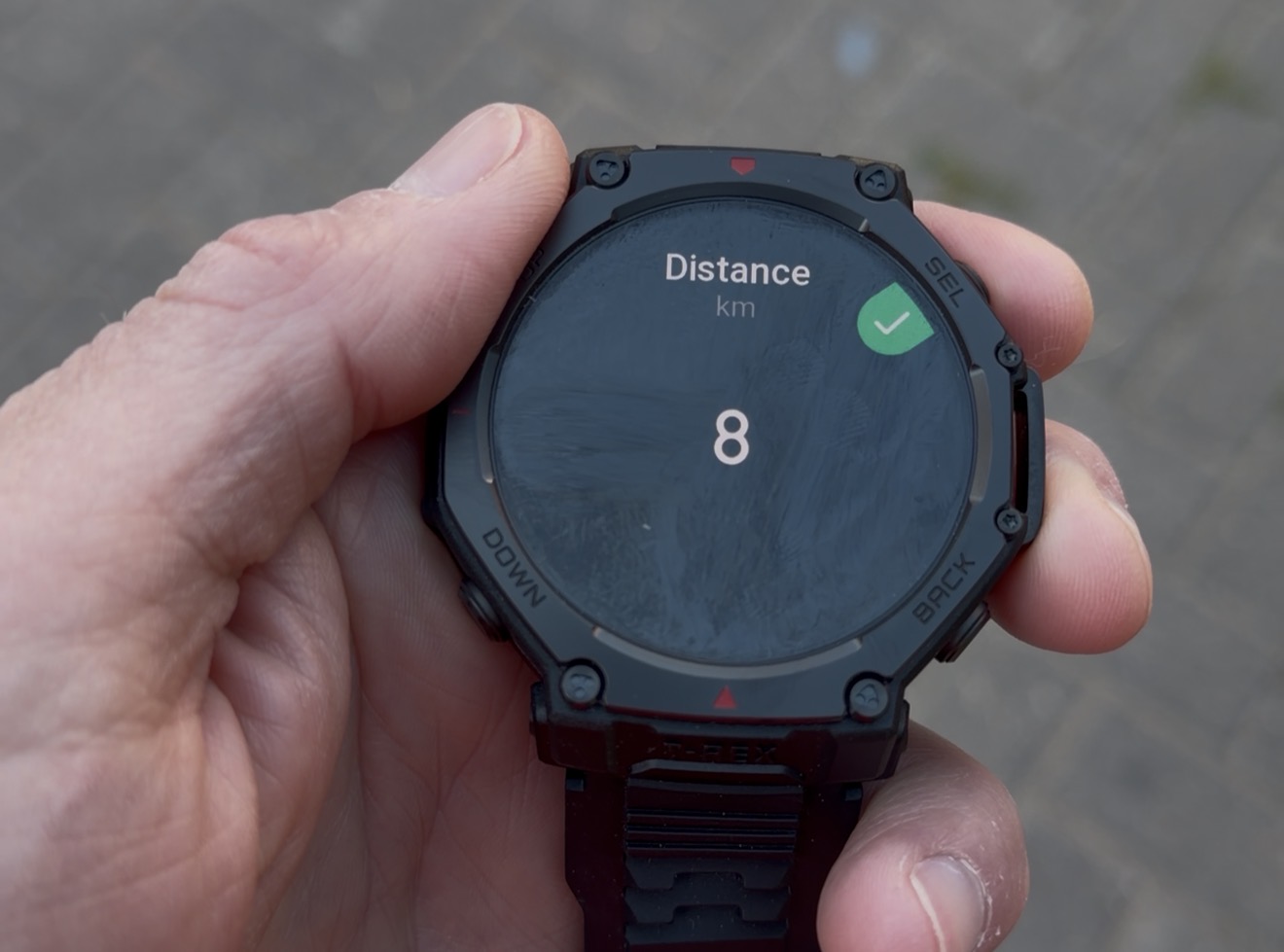
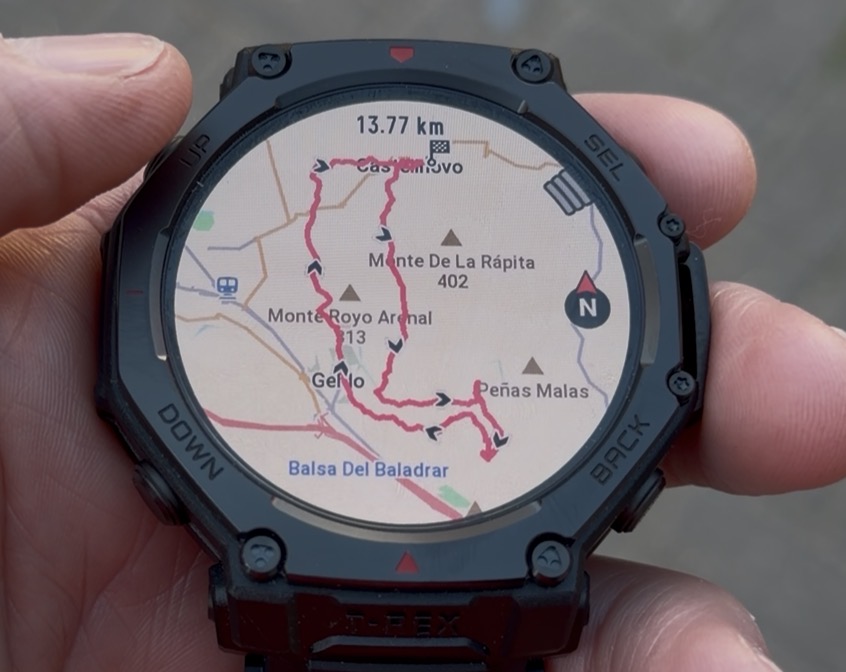
I understand that sometimes it’s easy to get carried away by features from other brands that look very appealing at first glance.
But believe me, we test all competitors extensively and we know very well what they are doing. We are also fully aware of our weak points.
Our goal is not just to implement features for the sake of it, but to ensure that what we deliver is reliable, safe, and truly useful for the user, especially in real situations where it actually matters.
In some cases, that means not implementing certain features until we are confident they meet the level of quality we expect.
We prefer to focus on solutions that genuinely help the user, rather than adding features that look good on paper but don’t perform consistently in real-world conditions.
Technical & Product Specialist – Suunto Iberia
-
@dreamer_ Missing turn-by-turn on/off toggle in the watch
This is on our watches, you can find it in: map screen-press top button-notifications.
You can enable or disable turn by turn and climb Guidance notifications
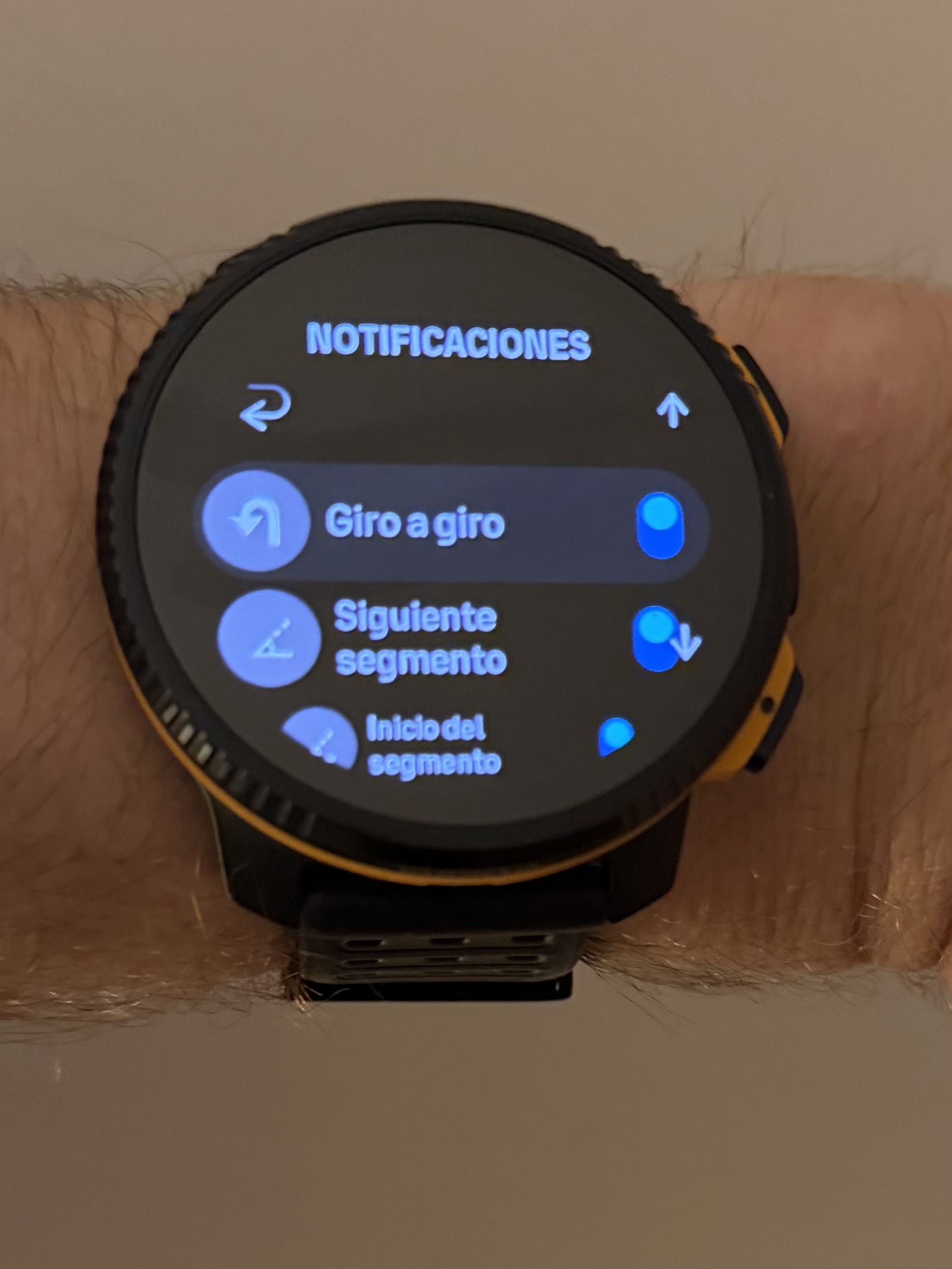
-
“ And the thing is that I have tried the same GPX tracks in Coros, Amazfit, Garmin and Suunto and it seems that only Suunto has these issues with the precision”
That is not my experience. On my previous watch, a garmin forerunner 965, tbt notifications 5k into my route where on time. 10k into the route just before then turn, 15k into the route in the middle of the turn and after 20k the notifications came after the turn. Of course I complained, but garmin support demanded a video of this behavior. That is their current goto reply if they don’t want to be bothered by bugs.
And audio notifications for tbt? No! No! Please no!!!
Garmin introduced this and they where forced on you. You couldn’t turn them off. People complained about this on the garmin forum. Garmin didn’t like the complaints so they closed the topic. This change by garmin pushed me over the edge and I sold my 1 year old forerunner 965 and bought a race s.What auto reverse concerns… compared to my previous 2 garminwatches, it actually works on my suunto. My garmin watches could only complain that I was heading in the wrong way (for 25k if I did a long run). You could manually select you wanted to do the route the other way around when you selected a route but then you would lose all tbt alerts. My suunto automatically detects which way I go. Maybe the newest garmins have improvement but I’m quite happy how it works on my suunto.
-
@dreamer_ said in Several navigation issues (feedback):
We are delegating something into an external company. That means that if their service is not good, or if their systems are down, Suunto has afectation.
Correct me if I am wrong - but the web-bases Suunto Routepalnner also offers turn-by-turn navigation.
So if you use the same account as on your watch, you have the routs immediately on your watch - so there’s no immediate need for Komoot (advantages and/or disadvantages of using Komoot are a different topic)Vertical 2 Limited Edition
-
@Joaquin
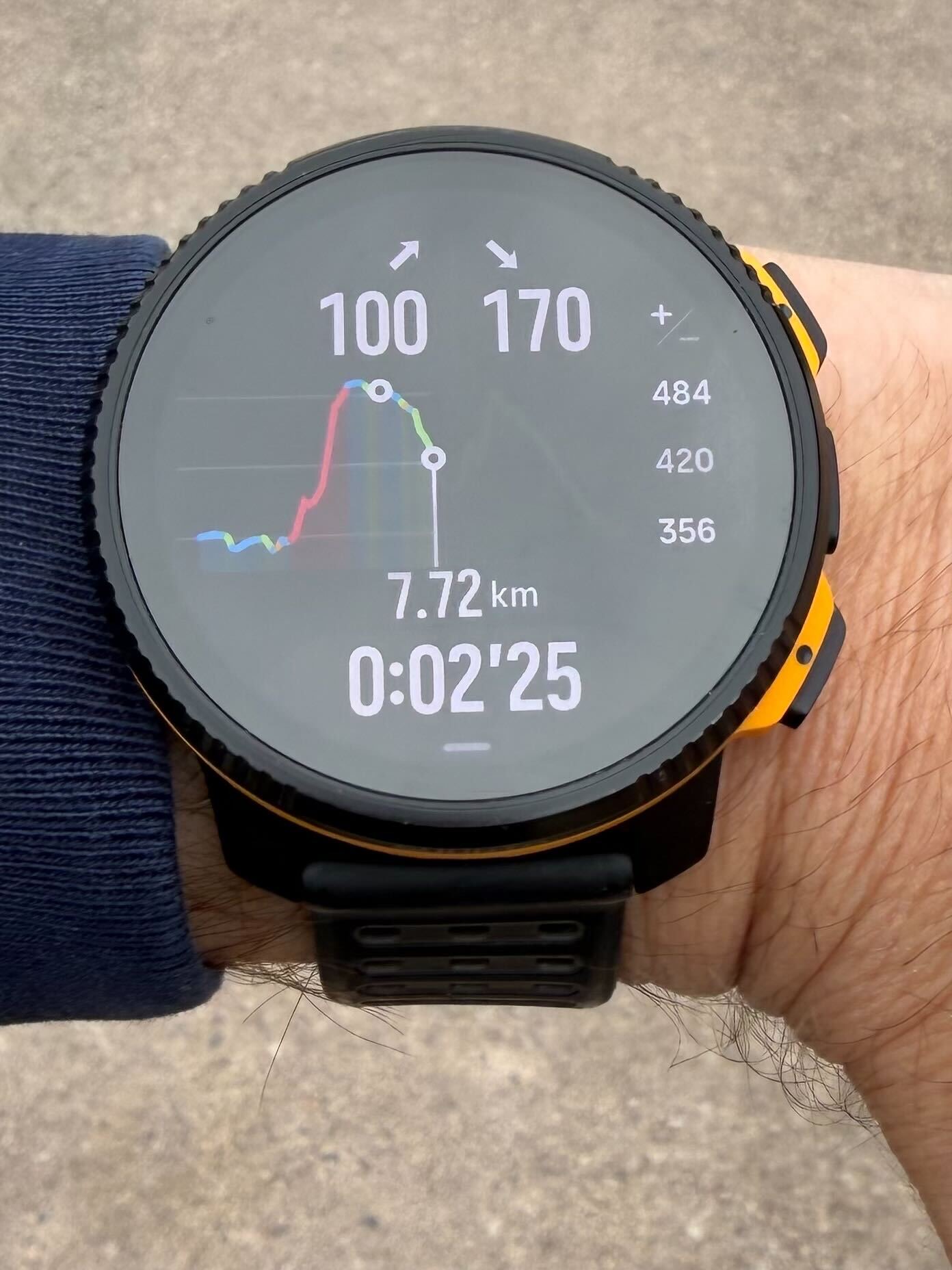
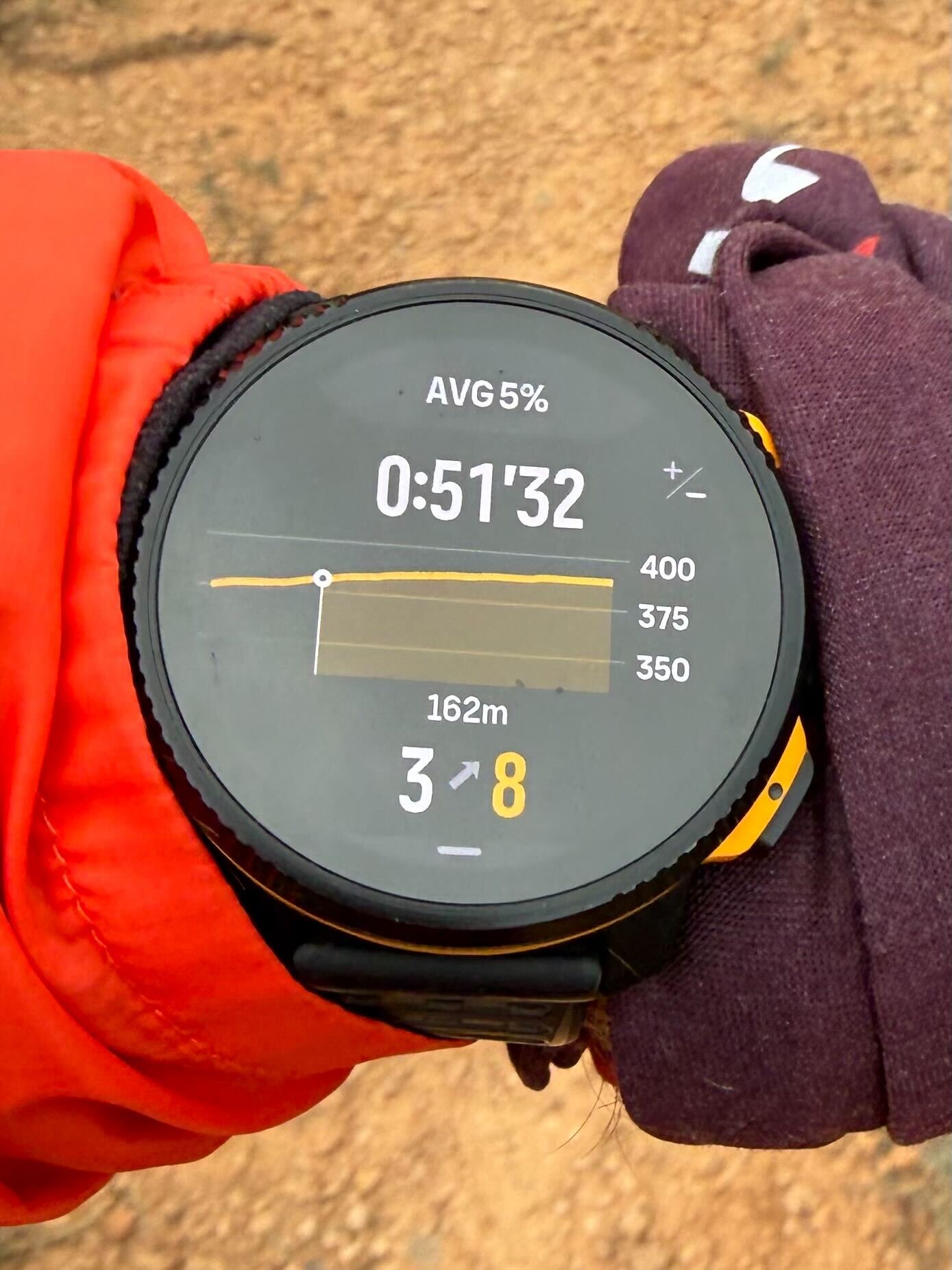
Hello, good day. Joaquín, I have a question about… “Simply by turning around on your route, you will automatically receive step-by-step directions to return to your starting point.”… In this case, will we have the Climb guide again? This weekend I did a 25 km route and after asking the watch for the return route option to the starting point, I couldn’t access the Climb guide…
Perhaps I should have generated a new route from the app using offline maps and then sent it to the watch to have the Climb guide available???. Thanks for your suggestions and clarifications. Best regards.Sunnto VERTICAL 2
SALUD y SENSACIONES -
@dreamer_ Regarding the responsiveness of turn notifications, I forgot to mention an important point.
Turn by turn timing does not depend on the GPS accuracy of the device, but on the original map data that defines and vectorizes each turn.
In practice, all brands including Suunto, Garmin, COROS and Amazfit work with similar trigger margins, typically around a 20 meter radius from the turn point.
The perceived reactivity depends on how accurately that turn point is positioned in the underlying map data. Small differences in map vectorization can shift the trigger slightly forward or backward.
However, we are talking about very small margins. With modern mapping platforms like Mapbox, Apple Maps, Google Maps or OpenStreetMap, these differences are usually within just a few meters.
In real world testing this becomes very clear. I often run with multiple devices at the same time and you can see they do not trigger turns at exactly the same moment. Sometimes Suunto is earlier, sometimes Garmin, sometimes COROS or Amazfit.
This is simply due to how each platform defines the exact location of the turn in its map data.
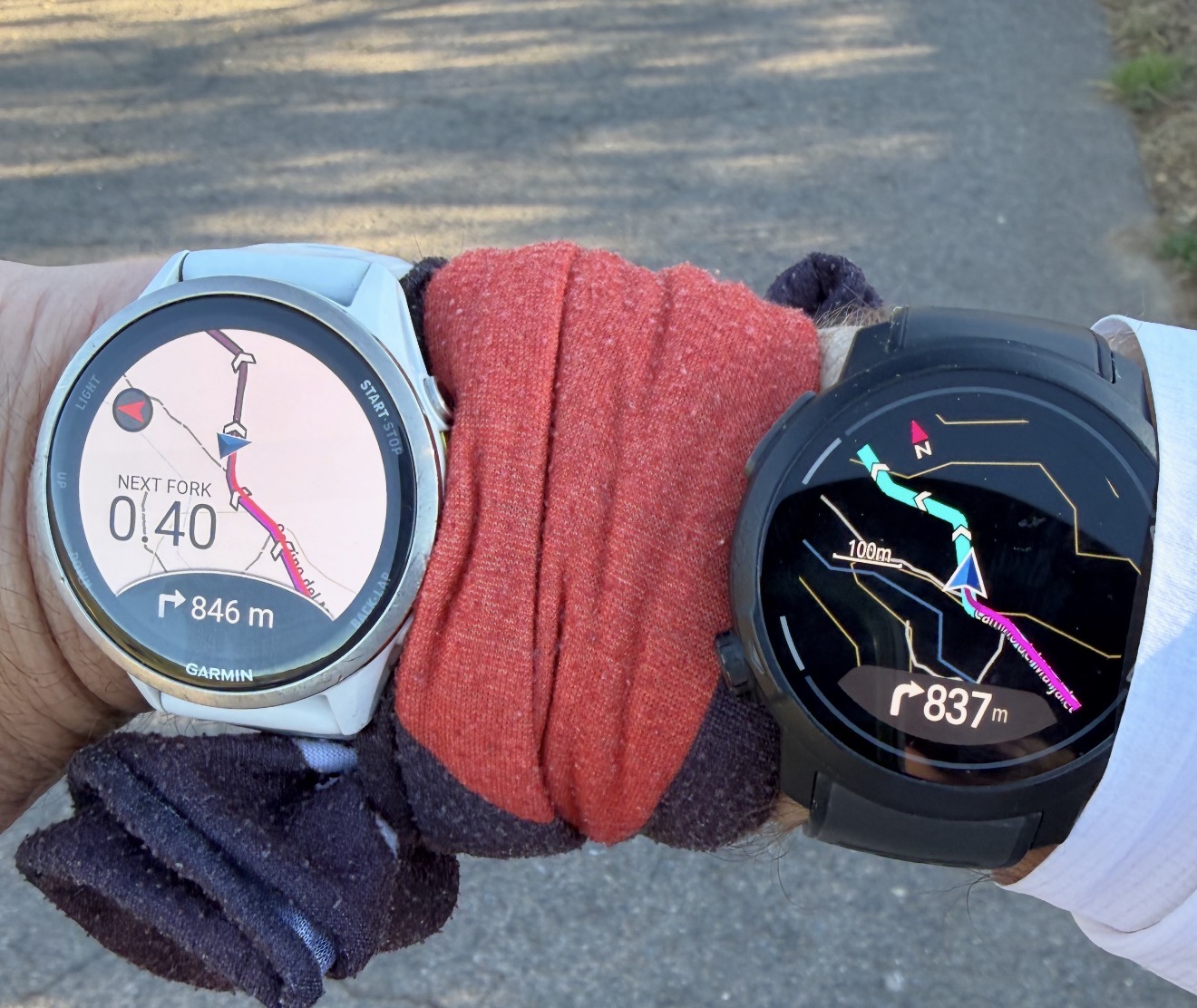
Here is an example of distance to turn where you can clearly see how each device reports a slightly different value for the same turn.
Suunto: 843m
Coros: 837m
Garmin: 846m
Amazfit: 66m (wrong turn)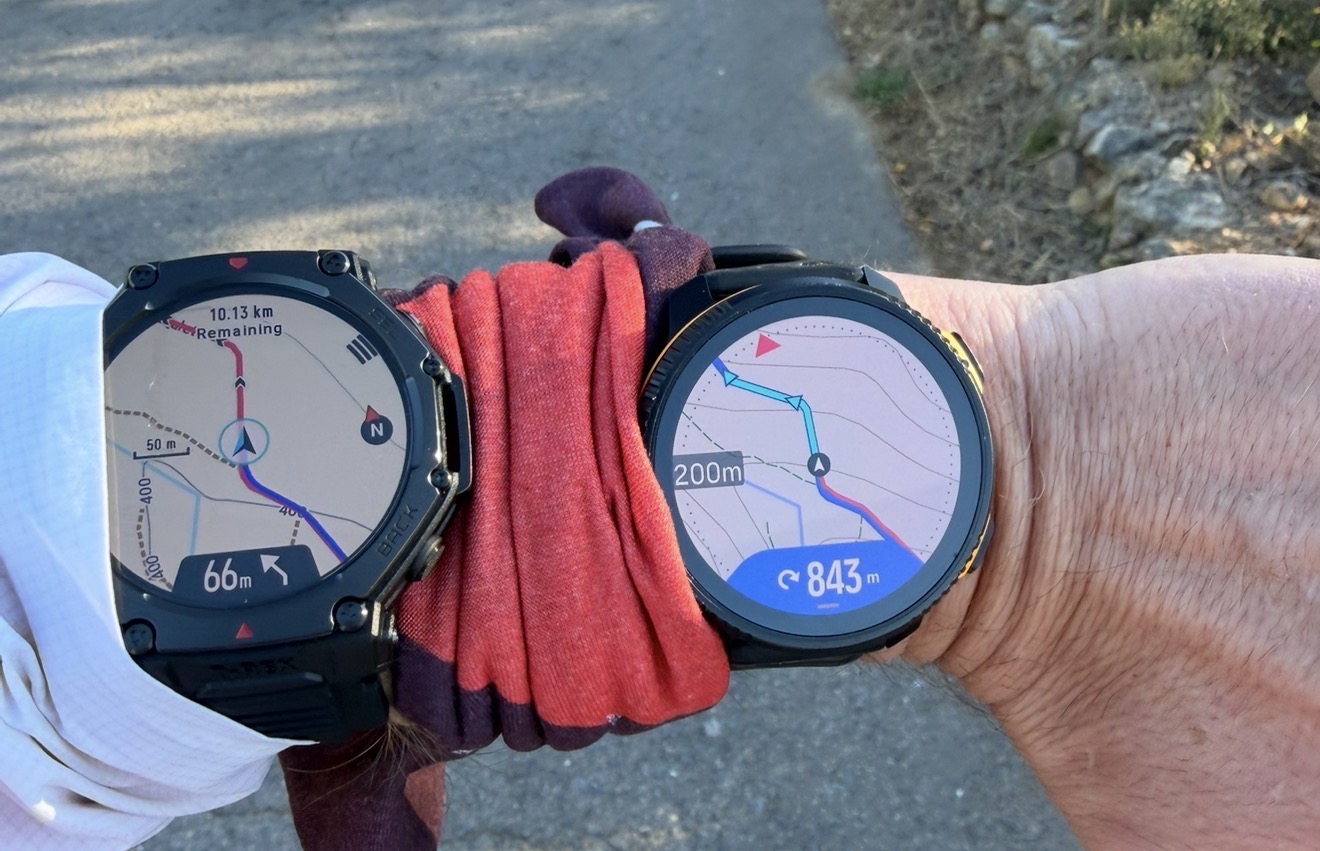
-
@Elmiuel yes but Yes, you will have it, but in reverse; that is, instead of going from left to right, you will see how the ascent guide will go from right to left, and you will always have the current segment, updating to your route direction.
Technical & Product Specialist – Suunto Iberia
-
@Stefan-T. Correct, you have turn by turn. Routeplanner and is a super good tool and intuitive

In fact, it’s a tool that any user of any brand can use, allowing them to plot routes, save GPX files, or even upload an activity to the Suunto app from Routeplanner using a FIT file—for example, from Zwift to the Suunto app. Turn-by-turn functionality is only available for routes created in Routeplanner and sent to the Suunto app.
-
@Stefan-T. said in Several navigation issues (feedback):
Correct me if I am wrong - but the web-bases Suunto Routepalnner also offers turn-by-turn navigation
As far as I know (and tested it quite recently), if you import an existing gpx into the suunto routeplanner (app of website) you do not get TBT notifications.
-
@elbee yes, as explained above, it is not possible to obtain accurate turns with GPX, therefore the operation is exactly the same as SA.
-
@Joaquin said in Several navigation issues (feedback):
@elbee yes, as explained above, it is not possible to obtain accurate turns with GPX, therefore the operation is exactly the same as SA.
I understand. But importing a gps into komoot (or Garmin connect) can produce a fit file for the watch that contain TBT notifications, in opposite to Suunto app/website where importing a GPX cannot produce a fit file with TBT notifications.
It’s not a ‘not possible’, it’s a ‘not implemented’ (and I understand resources are limited, feature requests are plenty and choices have to be made)
-
@elbee These are different topics.
Komoot generates turn-by-turn instructions because it has its own routing engine and is a platform fully dedicated to route planning. In fact, its core value proposition from the beginning has been precisely to create reliable turn indications, so all its development is optimized around that.
In the case of sports watches, the approach is different. It’s not just about navigation, but a much broader ecosystem including performance metrics, battery optimization, sensors, etc. Replicating that level of accurate turn generation without a full routing engine behind is not trivial.
Garmin, for example, does not rely on pre-generated turns embedded in the route file. The watch itself generates turn instructions in real time based on its onboard maps. That’s why you don’t see turns included in the route itself, as they are calculated directly on the device during navigation.
Additionally, what you’re showing in the screenshot is exactly that behavior.
The “turn notifications” toggle does not mean the turns are embedded in the file itself. It simply enables the device to generate turn alerts during navigation based on its internal maps and routing logic.
In other words, the turns are not coming from the GPX/FIT file as predefined instructions. They are being calculated on the watch side, in real time, using the available cartography.
This is fundamentally different from platforms like Komoot, where the turns are precomputed by a routing engine and exported as part of the route.
With Suunto, when working with GPX files, you are limited to the track geometry, which does not contain reliable turn information. That’s why, to have accurate turn-by-turn guidance, the route needs to be created or edited directly in the Suunto App, where that navigation layer can be properly generated
BTW, IG that GPX route has turn-by-turn directions—Wikiloc, for example, has some routes with turns, Suunto app will show those turns or information waypoints.
-
@Joaquin said in Several navigation issues (feedback):
No brand, except Garmin, is truly providing reliable turn-by-turn navigation directly from a GPX file. Garmin can do this because it vectorizes the map data on-device and matches the track against a real path network.
In my experience of using Fenix 6 and Fenix 7 it is not how it works. What you describe might work if on device routing mode is used, but in reality nobody that I know ever uses it because it is super slow, glitchy, and half of the time can’t start a route, especially if the route is long.
The vast majority of people use the “Follow the course” mode which isn’t that different from how Suunto follows a GPX route - the map isn’t used for the most part for the navigation and exists there only for the context. The way Garmin does turn directions in this mode is y detecting sharp changes in the route direction. As of a couple years ago Garmin also cross references that against trail or road junctions on the map to avoid turn notifications at every zigzag of a trail, but they used to do that in the past. Still Garmin implementation often misses turn notifications if the turn isn’t sharp enough, for example of there is a Y shaped trail fork. Also, by the way, these turn directions are included in the map as special waypoints (Garmin calls them course points), but it seems that skipping of erroneous turn directions that are not at trail junctions is done on the watch.
-
@Joaquin I did not pretend a comparison but to expone some points (starting with the user experience, and that is very important) and explained why the Komoot workaround needs a very serious rework. The notifications while better than in Coros or Amazfit, are not accurate enough. This is like in the previous generation and it is very clear that work and investigation needs to be done.
Keep also in mind that I throughly tested all brands but Polar in very long trail runs.
Said this, the fork shot you post is a very nice example, since:
- It’s true Amazfit does not notify some forks
- It’s true Coros notifies forks as right-left turn. While Coros’ approach is not perfect, is somehow valid since keeps you in the path.
- It’s also true that the Komoot approach is not accurate enough, and this applies to all notifications of the whole track (not just and only the forks)
-And it’s also true that the Komoot workaround means the complicated user experience and that users are even forced to use a third party social network.
Even if some forks are left (in Amazfit but not Coros), what it happens in a very long trail run is that most notifications are just turns. Since with the Komoot algorythms It seems there’s an offset being the notifications not good enough, the feeling (for the whole trail run) while better with all the notifications, is less accurate. And this is important to note and should not happen.
But there’s something that has changed in Amazfit in the very last month (I don’t think they have still fixed those forks thought). The thing is I tested very recently the T-Rex Ultra 2 (not the T-Rex 3 Pro) and the navigation is incredible improved this very last month (as said, there don’t notify forks or roundabouts yet and there were some few forks left, like the one you show but with the T-Rex 3 Pro).
In my opinion they have rewritten everything. And the explanation is that they finally managed to add the routeable thing I was explaining. Have a look at this : https://youtube.com/shorts/jGDmJTFyGwk (there’s an english audio track) . This is the very last month, and there’s even a new update improving that.
I’m posting this, not to explain the routeable thing but to say they finally found a way to make everything A LOT more clever. So yes, in my opinion, this means they changed completely their turn-by-turn implementation (or my impression is that is greately improved). Now they are here, they are very likely fixing the remaining things very soon.
Again, this is not a comparison at all (personally, I don’t have now that Ultra 2 watch and I don’t recomend their watches at all because the so many bugs and issues), but what I mean is that their navigation at this moment, is a lot better that we could think just looking at those shots in a very concrete scenario.
I also had tested the Coros Nomad 2 months ago, and while I don’t like Coros navigation, their turn-by-turn are working perfectly fine, even if you change your direction (they only notify left and right turns)
As said, I’m here because Suunto is superior in many things. Triathlon now excels and navigation, while not perfect, I feel like maps are super fast and very good. But Komoot’s algorythms are not good enough (and the user experience is not either the best) and this should be noted because the Komoot approach is convoluted and is not good enough.
Suunto Vertical 2 Titanium Sage, Suunto Run
-
@dreamer_ I’m simply trying to explain why Suunto does it this way, I think it’s good to understand why things are done this way.
And super thanks for the feedback

-
@Joaquin said in Several navigation issues (feedback):
Garmin, for example, does not rely on pre-generated turns embedded in the route file. The watch itself generates turn instructions in real time based on its onboard maps.
That is not my experience. My forerunner 935 didn’t have maps only breadcrumb, but I do get TBT notifications if I imported a route via Garmin connect. Some goes for the forerunner 965 I had before my current watch. If I selected a route I did get TBT, but if I selected “follow the route in opposite direction” I didn’t get TBT notifications.
Also, I once didn’t load a map for an area on my forerunner 965 but still got TBT notifications (althought the screen only showed a black background and a breadcrumb to follow)Maybe that changed in the last year.
-
In my opinion, on‑watch routing is highly overrated. And sometimes it can be really dangerous – in higher mountains, for example. It’s slow, unreliable, and on a tiny watch screen, you can easily miss potential errors in an automatically generated route.
SuuntoApp is missing one pretty obvious feature. When you import a GPX file, it should ask – the way Komoot does – whether you want it to redraw and analyse the route (adding missing elevation, turn‑by‑turn directions, etc.), or just import the original GPX file without any changes, like it does now.






Hello! It looks like you're interested in this conversation, but you don't have an account yet.
Getting fed up of having to scroll through the same posts each visit? When you register for an account, you'll always come back to exactly where you were before, and choose to be notified of new replies (either via email, or push notification). You'll also be able to save bookmarks and upvote posts to show your appreciation to other community members.
With your input, this post could be even better 💗
Register Login