Suunto app Forum Suunto Community Forum
    • Recent
    • Tags
    • Popular
    • Users
    • Groups
    • Register
    • Login

    Posting images...

    Scheduled Pinned Locked Moved Questions & Feedback
    forum
    23 Posts 10 Posters 6.0k Views 9 Watching
    Loading More Posts
    • Oldest to Newest
    • Newest to Oldest
    • Most Votes
    Reply
    • Reply as topic
    Log in to reply
    This topic has been deleted. Only users with topic management privileges can see it.
    • geoffspakesG Offline
      geoffspakes Bronze Member
      last edited by

      Damn, didn’t try that one!!!

      jthomiJ 1 Reply Last reply Reply Quote 1
      • jthomiJ Online
        jthomi Moderator Gold Members Silver Members @geoffspakes
        last edited by

        its a slightly misleading image for uploading a picture. One small flaw in this otherwise amazing forum. 😉

        @geoffspakes said in Posting images...:

        Damn, didn’t try that one!!!

        Dimitrios KanellopoulosD 1 Reply Last reply Reply Quote 0
        • Dimitrios KanellopoulosD Offline
          Dimitrios Kanellopoulos Community Manager @jthomi
          last edited by

          @jthomi I’ll check if I can replace this icon.

          Community Manager / Admin @Suunto
          Creator of quantified-self.io a portal that allows you to analyze your data from various providers, upload fit activity files to Suunto app, gpx routes and more…

          jthomiJ 1 Reply Last reply Reply Quote 1
          • jthomiJ Online
            jthomi Moderator Gold Members Silver Members @Dimitrios Kanellopoulos
            last edited by

            First I tried the picture button, for inserting the url of a pic, next to the link button, maybe a new button that mix with the picture/cloud/arrow?

            @dimitrios-kanellopoulos said in Posting images...:

            @jthomi I’ll check if I can replace this icon.

            Dimitrios KanellopoulosD 1 Reply Last reply Reply Quote 0
            • Dimitrios KanellopoulosD Offline
              Dimitrios Kanellopoulos Community Manager @jthomi
              last edited by

              @jthomi or a different composer altogether. will see

              Community Manager / Admin @Suunto
              Creator of quantified-self.io a portal that allows you to analyze your data from various providers, upload fit activity files to Suunto app, gpx routes and more…

              1 Reply Last reply Reply Quote 1
              • jarlinJ Offline
                jarlin
                last edited by

                Seems you can also upload videos (at least short). Nice! 😎

                1 Reply Last reply Reply Quote 1
                • Dimitrios KanellopoulosD Offline
                  Dimitrios Kanellopoulos Community Manager
                  last edited by

                  I removed the bugs image link icon so we can rest in peace of users pressing the wrong one.

                  For images use: 0_1516563929230_Screen Shot 2018-01-21 at 20.45.19.png (haha I just pressed it)

                  and for files:0_1516563956917_Screen Shot 2018-01-21 at 20.45.49.png
                  (I pressed it again🤓 )

                  @jarlin If you need more upload types etc or bigger vids drop a comment or ask it’s ok.

                  Community Manager / Admin @Suunto
                  Creator of quantified-self.io a portal that allows you to analyze your data from various providers, upload fit activity files to Suunto app, gpx routes and more…

                  1 Reply Last reply Reply Quote 2
                  • Mff73M Offline
                    Mff73
                    last edited by

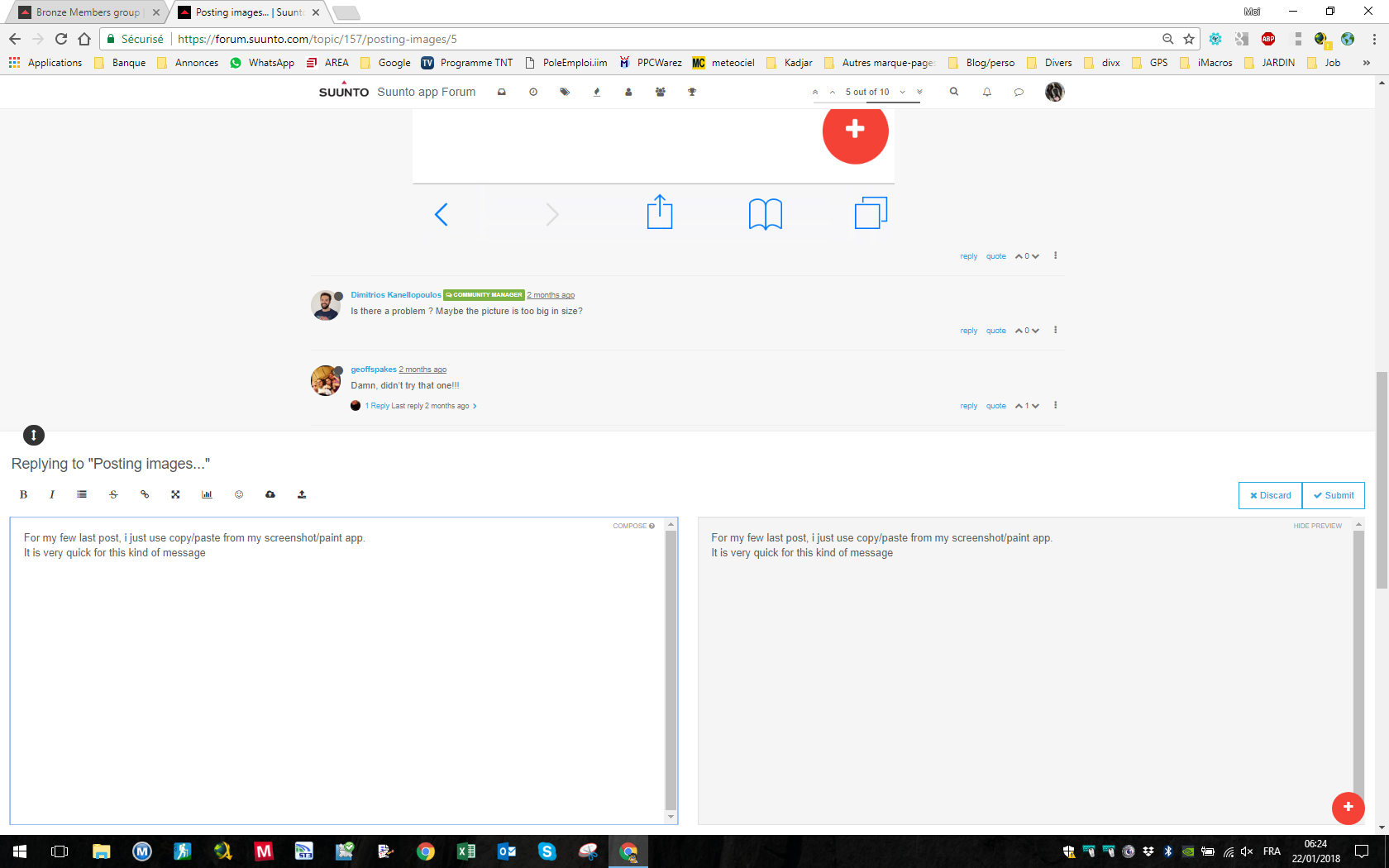
                    For my few last post, i just use copy/paste from my screenshot/paint app.
                    It is very quick for this kind of message if your picture is in clipboard 😉
                    My screenshot in two clics 🙂
                    0_1516598678473_be161437-f7ba-412c-94fb-768dc50b418b-image.png

                    SSU (retired), SV1, SV2
                    Wife : S9PP
                    SA: Always the latest beta :)
                    Android + Galaxy S205G

                    geoffspakesG 1 Reply Last reply Reply Quote 2
                    • geoffspakesG Offline
                      geoffspakes Bronze Member @Mff73
                      last edited by

                      @mff73 Yup, works great from desktop but alas screenshots from the Suunto app are on my phone…works great for Movescount or others.

                      1 Reply Last reply Reply Quote 1
                      • G Offline
                        Gunnar Bronze Member
                        last edited by

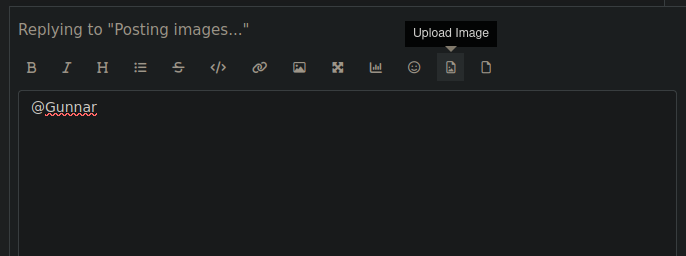
                        Hi, I try to add a screenshot to my post but I can’t manage it. I press the button that looks like an Image and I get this: ![alt text](image url)
                        What to do now or what am I doing wrong?
                        Thanks for any help.

                        Gunnar

                        SquirrelS 1 Reply Last reply Reply Quote 0
                        • SquirrelS Offline
                          Squirrel Silver Members @Gunnar
                          last edited by

                          @Gunnar That’s an image link button. Try second button from right.
                          Screenshot from 2025-11-10 08-15-23.png

                          Race S

                          G 1 Reply Last reply Reply Quote 1
                          • G Offline
                            Gunnar Bronze Member @Squirrel
                            last edited by

                            @Squirrel I didn’t know that I can scroll this icons . Thanks 🙂

                            v.sacreV 1 Reply Last reply Reply Quote 0
                            • v.sacreV Offline
                              v.sacre Silver Members @Gunnar
                              last edited by

                              @Gunnar same here. Not really instinctive to scroll right on those buttons.

                              A3S | S9B | S9P | S9PP | SV1 Ti | SV2 Ti
                              Suunto Wing
                              Suunto App: Android Beta

                              1 Reply Last reply Reply Quote 0
                              • 2 Offline
                                2b2bff Silver Members
                                last edited by

                                You can also just copy a screenshot and paste it in…

                                Race S

                                OutdoorManO 1 Reply Last reply Reply Quote 1
                                • OutdoorManO Offline
                                  OutdoorMan Silver Members @2b2bff
                                  last edited by

                                  @2b2bff this is the way. I copy all photos and just paste it. Super easy.

                                  G 1 Reply Last reply Reply Quote 0
                                  • G Offline
                                    Gunnar Bronze Member @OutdoorMan
                                    last edited by

                                    @OutdoorMan I am on Android and can’t find the option to copy a screenshot with onboard screenshot app. Any help for Android?

                                    OutdoorManO 2 2 Replies Last reply Reply Quote 0
                                    • OutdoorManO Offline
                                      OutdoorMan Silver Members @Gunnar
                                      last edited by

                                      @Gunnar Sorry, I am using iOS. But quick google search says:

                                      Screenshot 2025-11-13 at 08.46.35.png

                                      G 1 Reply Last reply Reply Quote 0
                                      • G Offline
                                        Gunnar Bronze Member @OutdoorMan
                                        last edited by

                                        @OutdoorMan thank you for trying to help! 🙂 But your results do not allow copy & paste. But since I now learned that I can scroll the menu, the problem is solved. Although copy & paste would be a bit more convenient.

                                        1 Reply Last reply Reply Quote 0
                                        • 2 Offline
                                          2b2bff Silver Members @Gunnar
                                          last edited by

                                          @Gunnar said in Posting images...:

                                          @OutdoorMan I am on Android and can’t find the option to copy a screenshot with onboard screenshot app. Any help for Android?

                                          Which Android?

                                          On Samsung you do a screenshot, it will show a thumbnail of it bottom left. You tap on this - or go into gallery and open it there - then on the upper right in the three dots menu you can copy it in the clipboard…

                                          Race S

                                          G 1 Reply Last reply Reply Quote 0
                                          • G Offline
                                            Gunnar Bronze Member @2b2bff
                                            last edited by

                                            @2b2bff Pixel 7, latest Android. I playedaaround a little bit, I found an option in SwiftKey to enable that.

                                            1 Reply Last reply Reply Quote 0

                                            Hello! It looks like you're interested in this conversation, but you don't have an account yet.

                                            Getting fed up of having to scroll through the same posts each visit? When you register for an account, you'll always come back to exactly where you were before, and choose to be notified of new replies (either via email, or push notification). You'll also be able to save bookmarks and upvote posts to show your appreciation to other community members.

                                            With your input, this post could be even better 💗

                                            Register Login
                                            • First post
                                              Last post

                                            Suunto Terms | Privacy Policy