Suunto Race S – Climb Guidance screen is black
-
Hello,
I have also contacted Suunto Customer Support regarding this issue, but I wanted to ask the community as well to find out whether anyone else is experiencing the same problem or has found a workaround.
I have been experiencing an issue with my Suunto Race S for the last few weeks when trail running with a route loaded on the watch.
The issue
When I start an activity with a route and switch to the Climb Guidance screen, the screen is completely black.
However, the screen is not actually turned off: the BPM/heart-rate data field at the bottom of the screen remains visible.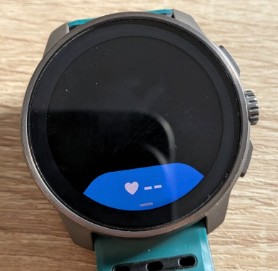
The strange part is that when I switch from the Climb Guidance screen to the next screen, the elevation profile sometimes appears very briefly, then disappears again.
The issue started a few weeks ago. Before that, Climb Guidance worked perfectly for me.Routes
My routes come from Strava and are automatically synchronized with Suunto App.
The elevation profile is correctly available in Suunto App. For example, the route shown in the attached screenshot is 35.22 km with approximately 2,207 m of ascent, and the elevation profile is displayed correctly in the app.
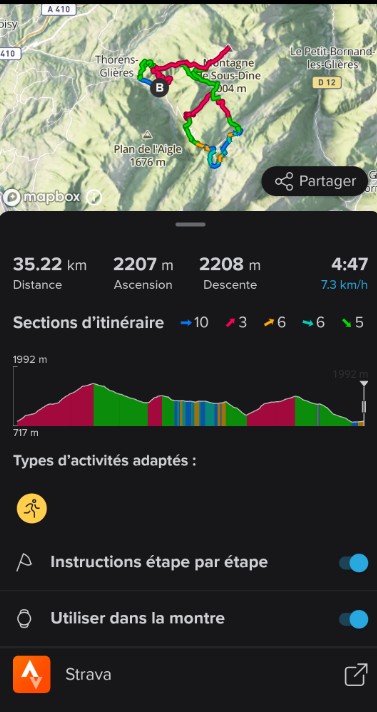
Therefore, I don’t think this is caused by missing elevation data in the route.
What I have already tried
Watch updated to the latest available firmware
Soft reset/restart of the watch (holding the upper button for 12 seconds)
Checked that the elevation profile is correctly displayed in Suunto App
Fully synchronized the watch and the appThe issue remains.
My question
Is anyone else experiencing the same problem on the Suunto Race S, specifically with Climb Guidance?
The fact that the BPM field at the bottom remains visible while the main elevation graph is completely black makes me think this could be a rendering/refresh issue rather than a problem with the route data.
If anyone has experienced the same issue, I would be very interested to hear if there is a known workaround or a way to fix the issue without performing a full factory reset.
Thanks in advance for your feedback!
-
@Thomas-Gilquin never experienced something like that, but since a couple of weeks there is a “similar” issue with climb guidance in the zoomed segment where no profile is visible (see https://forum.suunto.com/post/195432).
Your doesn’t seem to be the exact same problem, but who knows, it can be somehow related if this is a backed issue from Suunto servers. -
@Thomas-Gilquin I experience the exact same issue on my Race (1). It does not happen with every route but most of the times. For me it usually starts to work after some minutes (5-10) into the training.
-
@Thomas-Gilquin never had this.
Does it happen to all of your routes all the time?
Does it happen after you soft-reset the watch and remove / re-add the route?Thx!
-
@Thomas-Gilquin I’m with you. For me it happens occasionally, but still. Very annoying. And I create routes 99% in Suunto app.

Hello! It looks like you're interested in this conversation, but you don't have an account yet.
Getting fed up of having to scroll through the same posts each visit? When you register for an account, you'll always come back to exactly where you were before, and choose to be notified of new replies (either via email, or push notification). You'll also be able to save bookmarks and upvote posts to show your appreciation to other community members.
With your input, this post could be even better 💗
Register Login