Watch not connecting to wifi for map download
-
@isaac.net sorry for double post but since the other post was talking about a different software version I thought i should open another one. Apologies.
-
Could be an App or map servers problem?
WiFi configuration is done in the App.Suunto Vertical Titanium Solar, Suunto Race 2 Ti & Suunto Wing.
-
@Wenzudeg that was maybe not the worst idea. I reverted my FW right now and still have the same issue. I now have tried:
2.56.18
2.56.28Maybe it’s really not the firmware but some connection via WLAN to the Suunto Map download server… then the error message is misleading …
-
@jjpaz this!
In the Spanish forum it was told that it is a server problem and Suunto is working on it. -
@johann.fuehrer Thank you.
What is strange is I’ve been using the same 2.5ghz router for the past 18 months and everything has been okay. II only experienced the issue with the watch not being able to connect to wifi when trying to download a map two days ago. Software 2.50.28 and 2.50.26 may have created this bug ??
-
@9ppuser Have you tried to downgrade the watch software to see if the problem exists with an older software version?
-
@Rokelly yes, but the problem is the same …
-
@Rokelly it seems that it is a Suunto server issue. no need to downgrade FW (I did - no difference)
-
@johann.fuehrer How do we open a Suunto Support ticket?
-
@Rokelly I have the same.
Have reported it to Suunto -
@Rokelly email to support@suunto.com from the email address you are registered at suunto app (not necessarily the same like the forum!)
-
I was in holidays last week and i was able to download my map without any trouble on my Vertical 1.
-
same issue here on my suunto Race S, using FW2.53.42, but wonder if the issue is not coming from the App update 3.13.1 …
-
W Wilson75 referenced this topic on
-
It is a known issue and already under investigation, it should not require firmware update as far as I can guess.
-
@Rokelly Exactly the same for me. Tried many option with no success. I got a replacement watch yesterday and after installing the newest firmware coudn’t download maps to the watch.
-
Just a quick update: I’ve tried everything—from downgrading to resetting all settings, deleting the app, and reinstalling it—but nothing worked. Unfortunately, all the maps I’d downloaded previously are now gone, too… I hope the Suunto team can find a solution or at least narrow down the problem.
An additional question for the community—is there a way to completely reset the watch? At least in my app, the watch’s memory is shown as not empty, even though the maps are no longer available after the reset. Or is the watch completely back to factory settings and the app is displaying incorrect information?
Thanks and happy training
-
@9ppuser as said earlier, the error is known and under investigation, is almost certainly not firmware related, and what you should have done instead of downgrading/resetting/andsoon was to wait that the server side issues are solved…
Watch: Suunto Vertical 2 Titanium Black
Blog: isazi's home
-
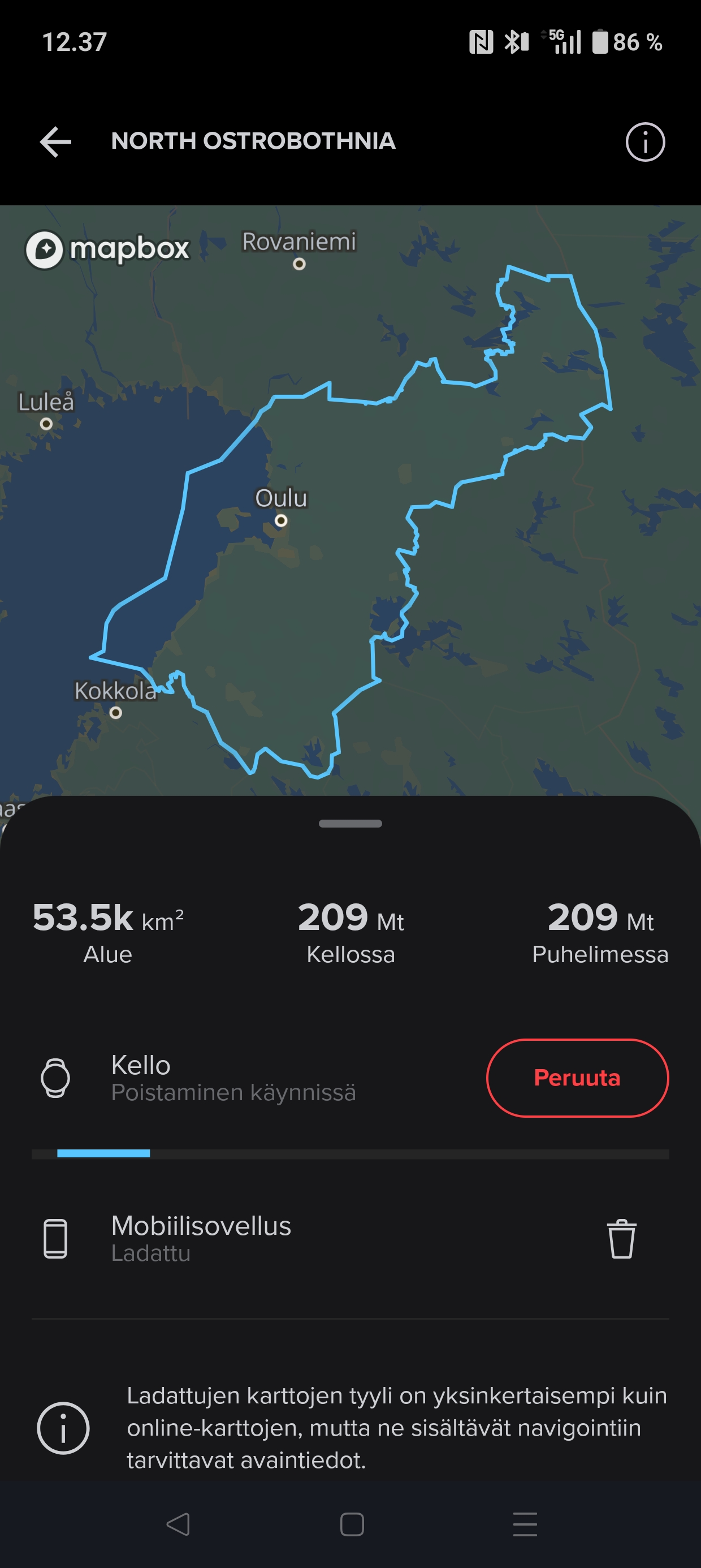
@isazi Also deleting maps from the watch is stuck. Perhaps these are related problems? It’s been like this for five minutes now.
Compasses: M-311, A-10, SK-7
Diving: Finnlight Navy 90, Vyper
Sports: Metron, S7, S9B and Vertical -
@isazi Thanks, and yes, you are right, I tried that yesterday, when it wasn’t yet clear that it might be a server issue… I’ll stay patient

-
@BrunoH yes, map operations are all dependent on the server




Hello! It looks like you're interested in this conversation, but you don't have an account yet.
Getting fed up of having to scroll through the same posts each visit? When you register for an account, you'll always come back to exactly where you were before, and choose to be notified of new replies (either via email, or push notification). You'll also be able to save bookmarks and upvote posts to show your appreciation to other community members.
With your input, this post could be even better 💗
Register Login