Suunto Run Music format support - fixed bitrate MP3, no FLAC, inconsistent variable bitrate MP3
-
Looking to collaborate with any other Suunto Run users who are interested in understanding the reality of what music is supported.
As documented here https://us.suunto.com/pages/suunto-run-user-guide:
“The watch supports the following file formats: MP3, FLAC, WAV, AAC.”
FLAC has not worked for me in many attempts. Despite the files existing on the watch when viewed as mounted storage on the connected computer.
MP3 works more reliably, but seems to fail randomly with variable bitrate songs. If you re-encode the songs at fixed bitrate (320K for maximum quality), they seem reliable.
I have not tried WAV or AAC yet.
The order of the songs does not follow any predictable rules that I have been able to discover. I’ve tried file name, track order and album details in each song’s metadata, and manipulating the create and modify date and time on the files themselves. Others have also tried and failed (see https://forum.suunto.com/topic/15067/music-organisation-suunto-run).
I am still eager to make the best of this feature of an otherwise great watch. So if anyone is interested, join me in the comments on this thread!
-
I can share my experiences with uploading songs to Run.
I’m a Mac user, and often it takes 4-6 tries to get the watch mounted to the computer. It’s not a huge problem, just a bit annoying sometimes when I’m in a hurry.
It sometimes takes a while (some minutes) for the songs to show up on the watch. Sometimes it seems like they don’t show up because the filenames for the songs are too long, but I haven’t actually verified if there is some kind of limit to the filename length.
Most of the time the MP3 files work fine, but I had problems with one album that was labeled as “24-bit audio” (could also be because of the variable vs fixed bitrate?). When I did not get that album to work, I used WAV instead, which worked fine.
The song ordering is indeed a mess that should be really easy to fix, so I hope that they do that in the future.
-
@sloppysloper thanks for sharing. I have not yet succeeded at mounting from a Mac, and have been using a Linux machine for transferring songs. It seems we are stuck in limbo with this feature. Glad that it exists but compromised in its current existence.
-
Small update for those following along.
I experimented with ID3V1 and ID3V2.4 tags. ID3V1 tags, are functional for the display during song playback (artist and title show as they should.) Track number and album seem ignored or not used for ordering purposes.
ID3V2.4 are also supported similarly. Artist and Title display as expected, but Album and Track Number are not useful.
On suspicion that the file timestamp of when the file is copied on to the watch might be the default, I scripted uploading files one by one with over 60 seconds of wait in between, in my preferred order to the watch. This also does not seem to control the order in which the watch media library indexes and sorts things.
The search continues…
-
Interesting progress today. I was able to connect via an android device and capture a debugging trace of Bluetooth communication between the watch and the phone. Slowly working my way up to building a utility which will create a playlist in a slightly less frustrating manner.
-
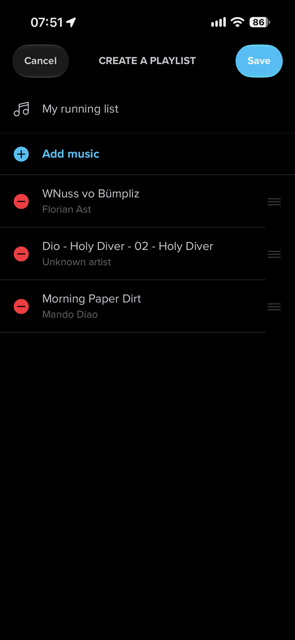
aybe I don’t get it, but you can easily create playlists in the Suunto app after copying files to the watch.
-
@Egika thanks for joining the conversation.
I am trying to bridge the gap between how most people manage their music externally, and reducing the friction to using that music on the watch.
For example, I have a whole collection of music (every CD I ever owned) on a local file system, organized by folders like “Artist/Album/TrackNumber - Title”, and each Album has a fairly open standard playlist file alongside the song files. When I want to use an entire album on the watch, right now I have to:
- connect the watch via USB to my computer (filesharing from phones / tablets is its own problem to solve)
- navigate in my OS to copy the files to the watch
- hope that my files are supported by the watch (avoid the variable bitrate problems, the FLAC problems, etc.)
- disconnect the watch from the computer
- open my Suunto app on the phone / tablet
- navigate to the Offline Music widget
- create a playlist
- name the playlist
- select the songs for the playlist using only their titles from the selection of All Songs (which can be a long, randomly populated list)
- re-order the songs in the playlist to match the album order
- save the playlist
- repeat for every playlist you want
- go run
For those of us who use US services like Amazon Music or the iTunes relics, the pattern is similar, but adds a “download my playlist or album” step.
So, I’m on a slow journey to do something relatively trivial. I already have playlists, I already have song files, I want a very simple single tool with minimal steps to replicate those on the watch.
- connect watch via USB
- execute tool with selection of playlists
- disconnect watch
- go run
If the native watch media player supported something simple like default sorting by file name, then this would be trivial by just renaming files as they are copied. But it doesn’t, so it isn’t.
Happy to provide more detail if helpful.
-
I ran into the same FLAC issue and honestly just gave up and re-encoded everything to fixed bitrate MP3. Not ideal but it works every time. Really hoping they fix this in a firmware update since the manual clearly lists FLAC as supported.
-
@Davijen57 thanks for joining the conversation.
Part of my motivation of starting this thread was to document the reality for future users. All of the workarounds are simple enough, but it is even more frustrating to have to discover them on your own. So thanks for contributing.

Hello! It looks like you're interested in this conversation, but you don't have an account yet.
Getting fed up of having to scroll through the same posts each visit? When you register for an account, you'll always come back to exactly where you were before, and choose to be notified of new replies (either via email, or push notification). You'll also be able to save bookmarks and upvote posts to show your appreciation to other community members.
With your input, this post could be even better 💗
Register Login