• Activities end by itself when the 'destination reached' message appears

    3
    0 Votes
    3 Posts
    163 Views
    M
    @sky-runner That’s correct – it’s a crash. Every time if it happens, the ascent reads 0, and the unlock screen just means the watch rebooted after crashing. The conditions were always the same: Hiking activity, map screen, active GPX navigation, and SuuntoPlus: Last km/mile, Weather Insights, and Burner. And always after the ‘destination reached’ message appeared.
  • Several navigation issues (feedback)

    50
    1
    1 Votes
    50 Posts
    3k Views
    dreamer_D
    said in Several navigation issues (feedback): I can’t try until Sunday but I wanted to share if anybody wants to try, since I have an interesting answer from Komoot’s Thanks for sending the GPX file. I took a look and found a workaround that should help you save the full route: Click New > Import a GPS Route Drag and drop the GPX file Instead of selecting Import to Plan a Route, select Import as Activity Tap Import Activity This saves the file as a completed Activity on your account. On the map, the route should connect all the way to the end. After that: Click the three-dot icon on the right Select Make a Copy Click Save The copied route will be on the Saved Routes. It should then show the full route from the completed Activity, rather than being cut short like it was when imported directly as a planned route. You may, of course, delete the Completed Activity after. Let us know how it works for you. All the best, komoot Support Team So this solves the pre/post processing issues (perhaps) for the GAPs, and perhaps the offset thing. I’d like to test it now, but I’m out this weekend, lol. I tried this. I noticied an slightly improvement and the track is 20 meters more using this workaround. But the offset and the false “out of the route” issues persist. In fact, I’m getting wrong Climb notifications in this round-trip scenario (things like downhill notifications when you are going up and uphill notifications when you are going down). Autoreverse does also need a serious work.
  • My Vertical 2 Wishlist for Next Update in 2026

    vertical2 wishlist vertical
    76
    9 Votes
    76 Posts
    10k Views
    TieutieuT
    @Ze-Stuart ok sorry I thought you were saying it’s was already available. It’s been discussed a lot ; for now I have never been disappointed by fusedalti, and I use sometimes altitude calibration already available (out of exercice), mostly after long car travels that lead to « altitude errors »
  • 14 Votes
    31 Posts
    3k Views
    sky-runnerS
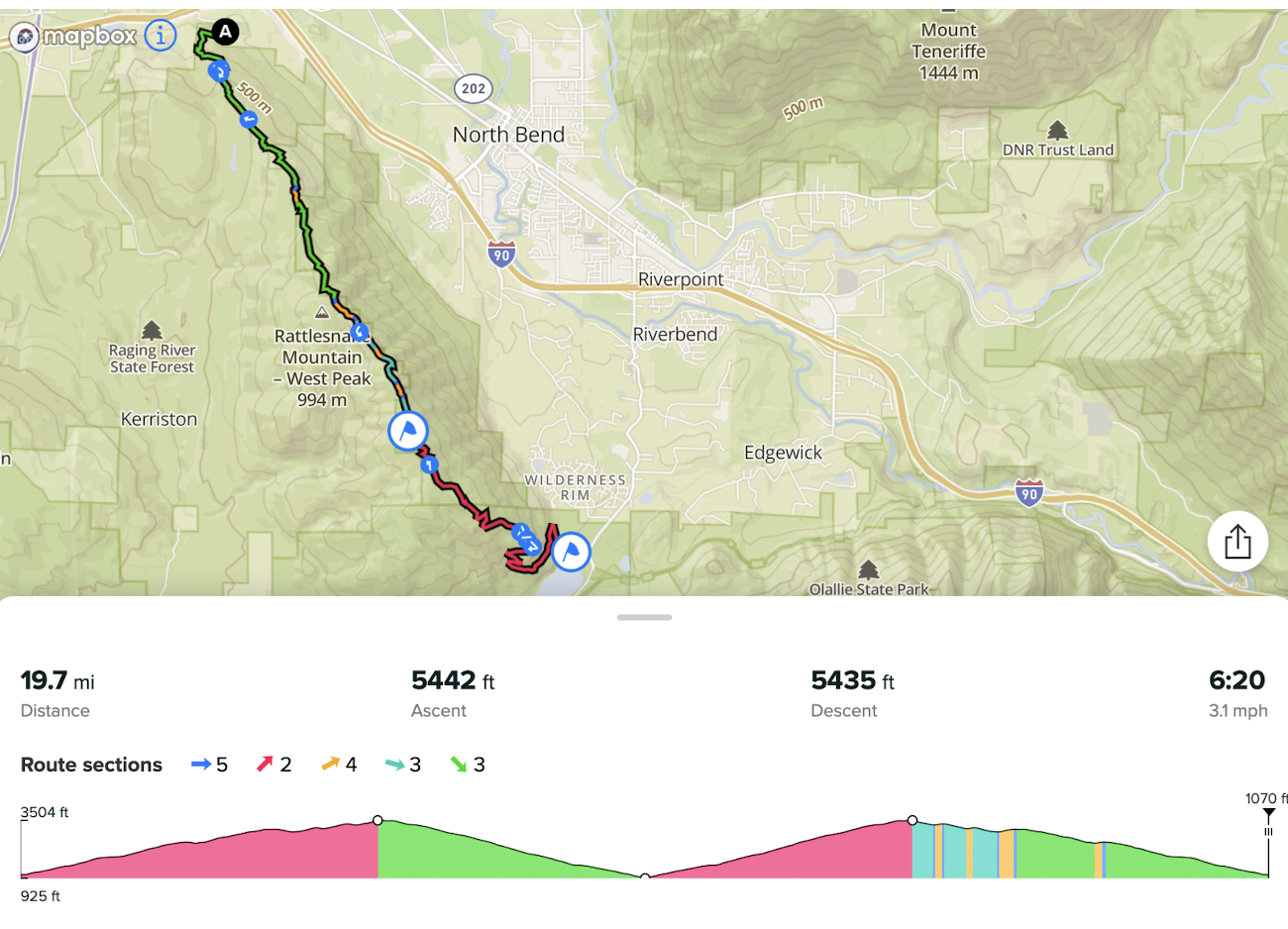
    A bit of follow-up: Today I did a local 50k race which includes 3 different loops to the top of the mountain with a shared descent, a shared aid station at the top, and a shared aid station at the bottom. Here is how it looks like. [image: 1778377115267-screenshot-2026-05-09-at-6.37.23-pm.png] Obviously, I wanted a single GPX route for the entire race to track the climbing and not have to mess with the watch during the race. Also I wanted to track the distances to the aid stations. Overall, Climbing guidance v3 worked satisfactory and was helpful but it wasn’t without issues: Issue #1. When I imported the the GPX file from the race website, I was unable to place waypoints on the route so that a single waypoint covered multiple distances The waypoint (aid station) at the bottom is visited 4 times at various distances and the waypoint at the top is visited 3 times at various distances. I just couldn’t make that work. Whenever I tried to place a waypoint it was inserted for just one randomly picked distance on the route. Finally I decided to just re-draw the entire route from scratch in Suunto App, and only after that placing a single waypoint would make it match multiple distances as shown on the elevation profile above. That’s what I wanted from the beginning. I don’t know what is the difference, but I suspect when a route gets imported it probably gets simplified and loses resolution (the number of points along the route). It seems that there is no interpolation of segments between route points, which would explain this issue. I saw some evidence of the low resolution because some parts of the imported route looked like straight squiggly lines, but when I create the same route in Suunto App it looks far more precise. By the way, that isn’t a problem in Strava. When I import the same GPX route in Strava, it doesn’t lose resolution. Issue #2 - The same as already covered above. When Suunto App finally managed to insert waypoints, when that applied to turnarounds, it ended up creating multiple waypoints at a short distance (a few meters) from each other. As I explained above, that was a problem for zooming the elevation profile, which now didn’t work as expected. It is nearly impossible to insert a single waypoint at a turnaround because the app simple doesn’t have enough precision. Issue #3 - For the most part the watch was able to stick to the planned route even thought the route is very complex with multiple shared parts. However in the beginning of the 3rd loop it decided to switch me to another loop - the one that I had already finished. I am pretty sure I followed the route perfectly, so there was absolutely no reason for it to switch. I could see that because it notified me about a wrong climb (the wrong climb elevation gain). Then, after I continued on the correct loop - the one that was planned in the route - after a few minutes the watch corrected itself. Issue #4 - The most zoomed-in climbing guidance view - the one that shows individual climbs - was messed up again. I didn’t normally look at it during the race, but at least on one occasion it showed me on a descent when I was in fact climbing. This issue has already been discussed above.
  • Watch reboots mid-activity at ca 9km when using GPX navigation

    5
    0 Votes
    5 Posts
    349 Views
    K
    I received an update on the matter after contacting Suuntos support team. After shipping off all my logs and specifications, I received this: *As per the reply from our technical team, we recommend restarting the watch before exercising and trying to use fewer Suunto Plus apps during activities. Please note that this issue has already been identified and is expected to be addressed in the next software update.*
  • Загрузка офлайн карт на часы

    14
    0 Votes
    14 Posts
    2k Views
    I
    @Александр-Галюк Здравствуйте, Александр. Скажите пожалуйста, у вас получилось решить проблему с загрузкой карт? Я не могу скачать на race s, в основном пытался раздать vpn трафик через точку доступа, ни с телефона ни с виндовс не загружает карты, при том что с виндовс я смог раздать vpn через хот спот своему телефону и у меня получилось, т.е. не включая впн на самом телефоне, смог зайти на ютуб например и все видосы подгружались. Но часы тем не менее не хотят качать карты. Читал информацию что часы подключаются по какому-то примитивному принципу, и так как телефон умно не умеют, обходить блокировки. Приложения разные которые советуют на телефон скачать для раздачи, пробовал и ни о чем. В общем, интересно что вы скажете
  • 1 Votes
    29 Posts
    2k Views
    ElmiuelE
    Hi, to add some information to the matter, I noticed that if I had “WRIST HEART RATE” disabled, it wasn’t detecting my external chest strap (a new Polar H10). I selected it to avoid interfering with the watch’s optical readings. Therefore, after enabling wrist heart rate in the exercise options, it automatically detects the strap and monitors my heart rate during exercise. I would have to test if, after a medium-length stop during an activity, refueling, a forced pause, and restarting the activity, the heart rate recording with an external band continues… I understand that it will always be available with the optical sensor of the watch.
  • Vertical 2 Brightness

    11
    1 Votes
    11 Posts
    1k Views
    C DC
    @Egika I mean DND during the sleep schedule. Currently way too bright during the night.
  • Disable Morning Report?

    17
    0 Votes
    17 Posts
    629 Views
    C DC
    @elbee I agree, there should be a simple toggle for morning report without doing anything about sleep tracking.
  • 2 Votes
    3 Posts
    184 Views
    A
    @sky-runner I do not use TP or any other structured workouts, but I can confirm 1. with built-in intervals also, I did setup 20s hill sprints - the notification stayed through out all interval, I almost thought it crashed.
  • Bluetooth FTMS support?

    8
    0 Votes
    8 Posts
    575 Views
    ravenR
    @dreamer_ My experiences with treadmills have been poor in the past and generally I’d prefer a footpod. Back before the pandemic in 2020, I’d often do indoor running at university gym and at that time I only had an Apple Watch, which can estimate pace/distance decently when you do sufficient outdoor running to calibrate it. For example, if I ran an indoor 400m track five times, I’d expect 2000m and I’d get something like 2012m, and that often would be explained by lane switches during the session. Meanwhile, a similar run on a university treadmill would always give me something like 2000m on the watch and 2600-2800m on the treadmill, just vastly giving me too optimistic results. I’m also very familiar with certain paces, so if I wanted to do a steady state effort at 5:00/km for example, setting the tread for 12kmh (which is another problem, most use “speed” rather than “pace,” and for outdoors running, one typically uses pace) would give a result on my watch that I’d be doing closer to 4:00-4:15/km pace, and internally, I knew I was faster than the 5:00/km pace I wanted. These kind of results are often the case when I bother to use a treadmill in a hotel gym when I travel. Most just give faster results that I don’t trust. I also have a sort of philosophical problem with how treadmills give data. Imagine a treadmill is moving at a decent speed, and I put my hands on the arm rails, and use my arms to muscle up and my feet dangle in the air, no longer running and not connected to the treadmill belt. The tread is still in motion and still marking pace and distance. I could even position myself to just get off the treadmill and let it run, gathering “free” distance if I wished. Now, it’s not that I think people are “cheating” the results of treads, but the example is to illustrate that what is being measured isn’t the runner as much as it is the treadmill. Meanwhile, with my indoor bike, if I stop pedaling the bike comes to a stop. On my rowing machine, if I stop my effort, again the flywheel comes to a stop. So it seems to me the equivalent for indoor running is “if my feet stop, metrics stop” which is where I see a footpod as being a better way to track. However, that doesn’t help with the issue of elevation grade changes. One solution is to use a manual treadmill like a Woodway: https://www.woodway.com/manual-treadmills/ and now there’s no motor moving the belt, and these type of treads typically don’t have an adjustable incline. It would also solve an issue of needing a good electrical outlet in older homes that may not be wired for that; simply avoid the need for electricity. Still, most people don’t have manual treadmills, and likely have more faith in their treadmill metrics than I do. Perhaps people who own treads in their home are better at keeping them calibrated, whereas the gyms I’ve been to do not do so. Also, if someone mostly runs on a tread and not outdoors, then it doesn’t matter if the metrics are correct as long as they are consistent, I suppose. So sure, I’d like to see sports watches get the data off of them by bluetooth FTMS. Let the user decide if the metrics are valid.
  • [Vertical 2, 2.53.42] Exited (crashed?) activity!

    14
    1 Votes
    14 Posts
    1k Views
    M
    It happened to me two days ago (I didn’t have a chance to send the logs). Hiking activity, map screen + GPX navigation. SuuntoPlus: Last km/mile, Weather Insights, and Burner. It froze at the end of the activity, when the ‘destination reached’ message appeared. Black screen. V2.
  • Suunto Vertical 2 General Discussion

    433
    1
    3 Votes
    433 Posts
    88k Views
    K
    Got suunto support update regarding this issue: “The discussion you found dates back to 2025, when a limited number of early units showed this behavior and were reported by some users online. Since then, this has been fully addressed, and current production models have gone through updated quality control processes”
  • SUUNTO VERTICAL 2. Rotating display inside the watch case

    7
    6
    0 Votes
    7 Posts
    2k Views
    K
    Hi! Just wanna check what is the verdict for this “issue”? Anyone got official suunto statement for this? Before i buy v2 wanna be sure if this is handled as defect or something what is normal to expect? Thanks
  • 0 Votes
    1 Posts
    136 Views
    No one has replied
  • 2 Votes
    17 Posts
    1k Views
    dreamer_D
    @Webby-Skymaster BTW, I have a similar sensation since I bought the Vertical 2 after all the navigation marketing because of the Q1. They did a nice job but there are several issues and bugs, and while there are nice things, navigation is not that good as advertised (in my opinion). I opened a thread with several things. There’s also a very nice one about the issues of the Climb Guidance 3.0
  • HR broadcast to Wahoo not working?

    21
    1 Votes
    21 Posts
    1k Views
    Webby SkymasterW
    +1 Suunto Vertical 2 + Wahoo Roam 2 = no HR broadcast recieved
  • Persistant Settings for GPS usage

    1
    0 Votes
    1 Posts
    111 Views
    No one has replied
  • Vertical 2 - On my Vertical, I suddenly get a strange message:

    3
    0 Votes
    3 Posts
    329 Views
    Steven VandersteeneS
    @Egika thanks.
  • Some text not rendering? Soft reset to fix

    1
    1
    0 Votes
    1 Posts
    100 Views
    No one has replied

Suunto Terms | Privacy Policy