Suunto Software update Q1 (2.53.42)
-
@kriskus said in Suunto Software update Q1 (2.53.42):
. Unless it’s the display type that is the limitation here
My guess it is the display resolution. All more recent watches starting from Race have the same higher resolution.
-
@sky-runner It could be. But I was reading about instability due to insufficient memory and that made me curious.
-
@Dimitrios-Kanellopoulos What’s the status on the battery drain reports? I’ve read some comments that it might be Bluetooth pairing with some specific devices, like the Polar H10, and others that different watch faces can affect battery drain differently. Before this update, I was seeing ~20% drain per day.
-
@HonzaS said in Suunto Software update Q1 (2.53.42):
For @miroslava :
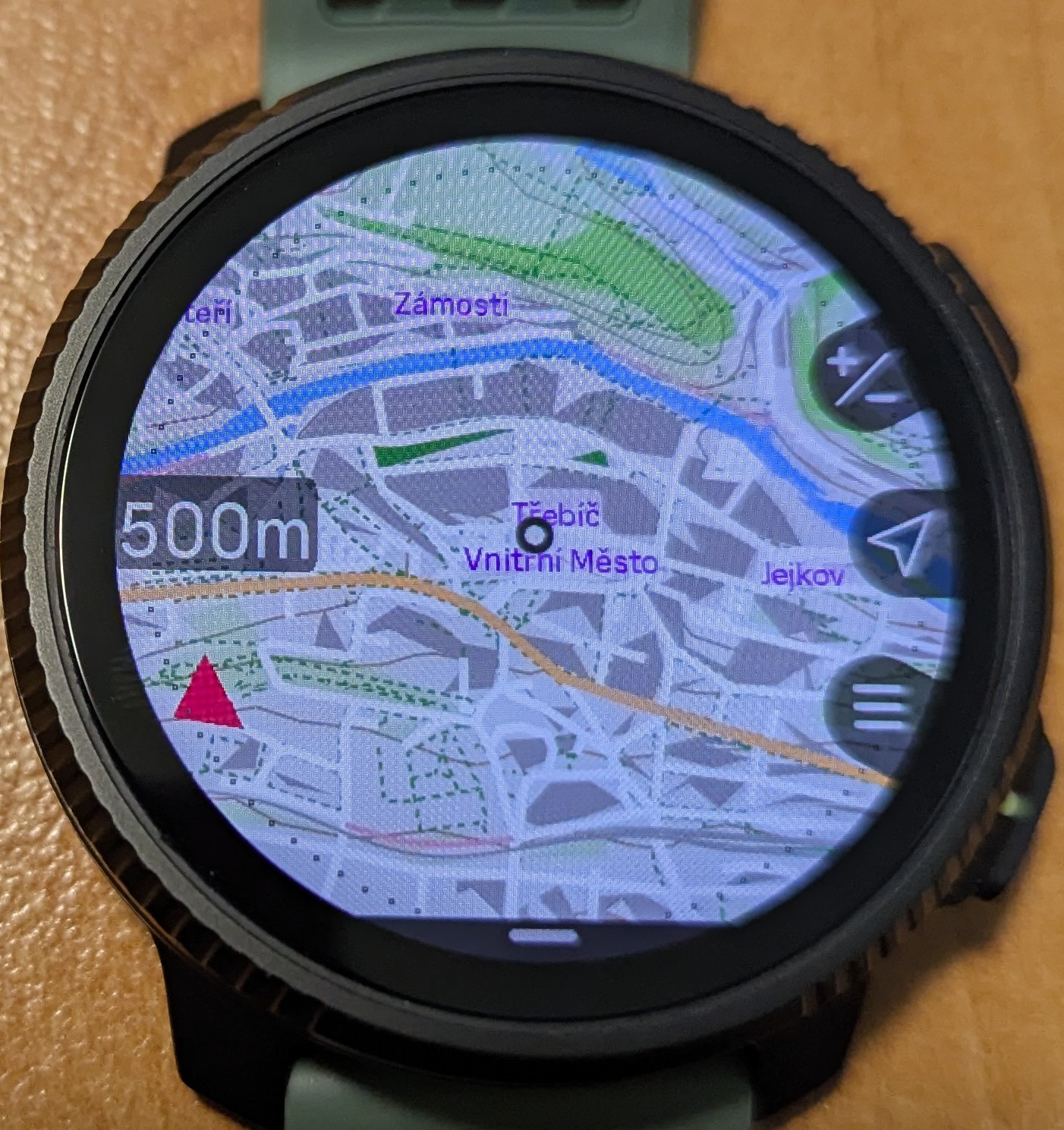
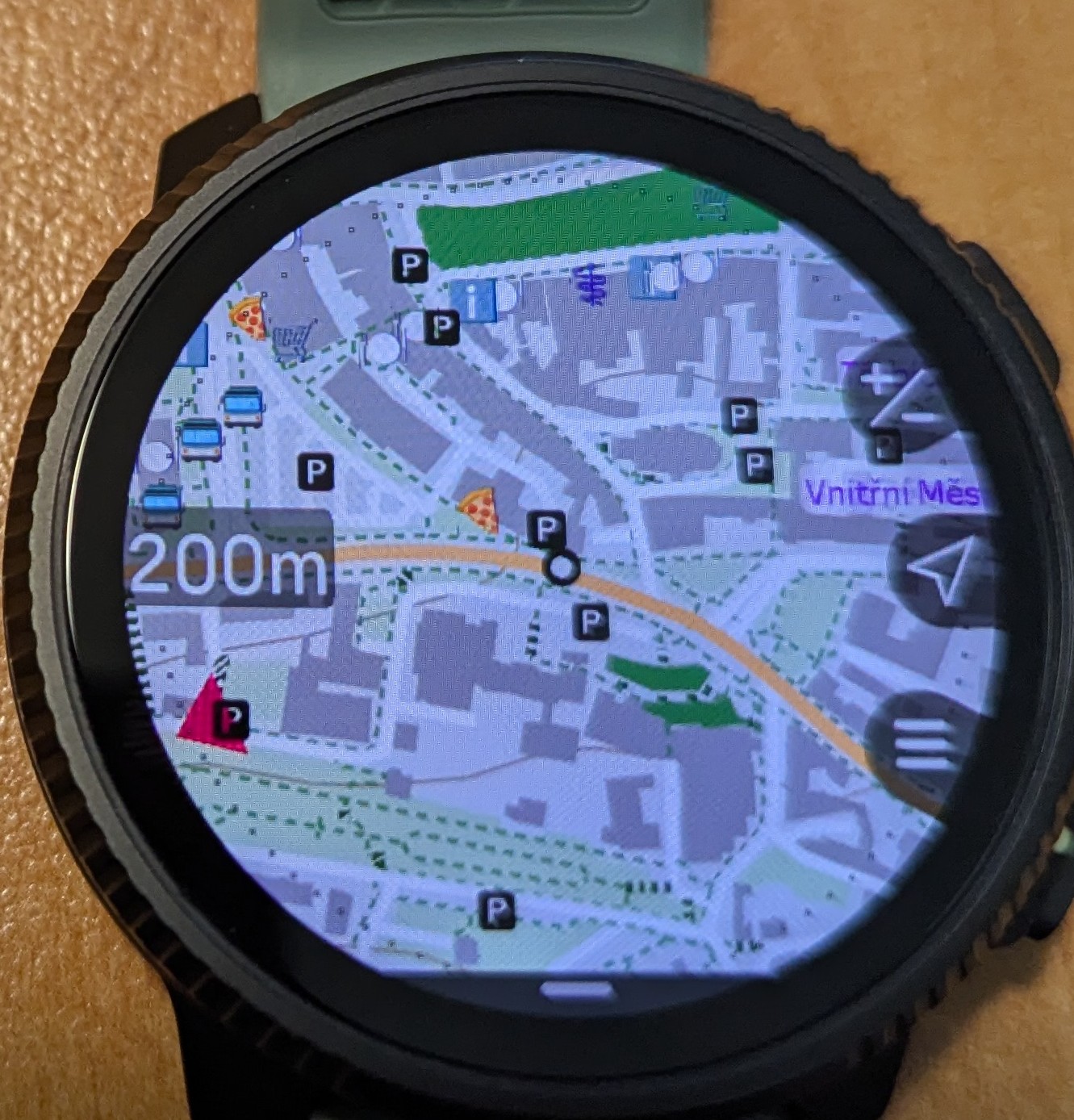
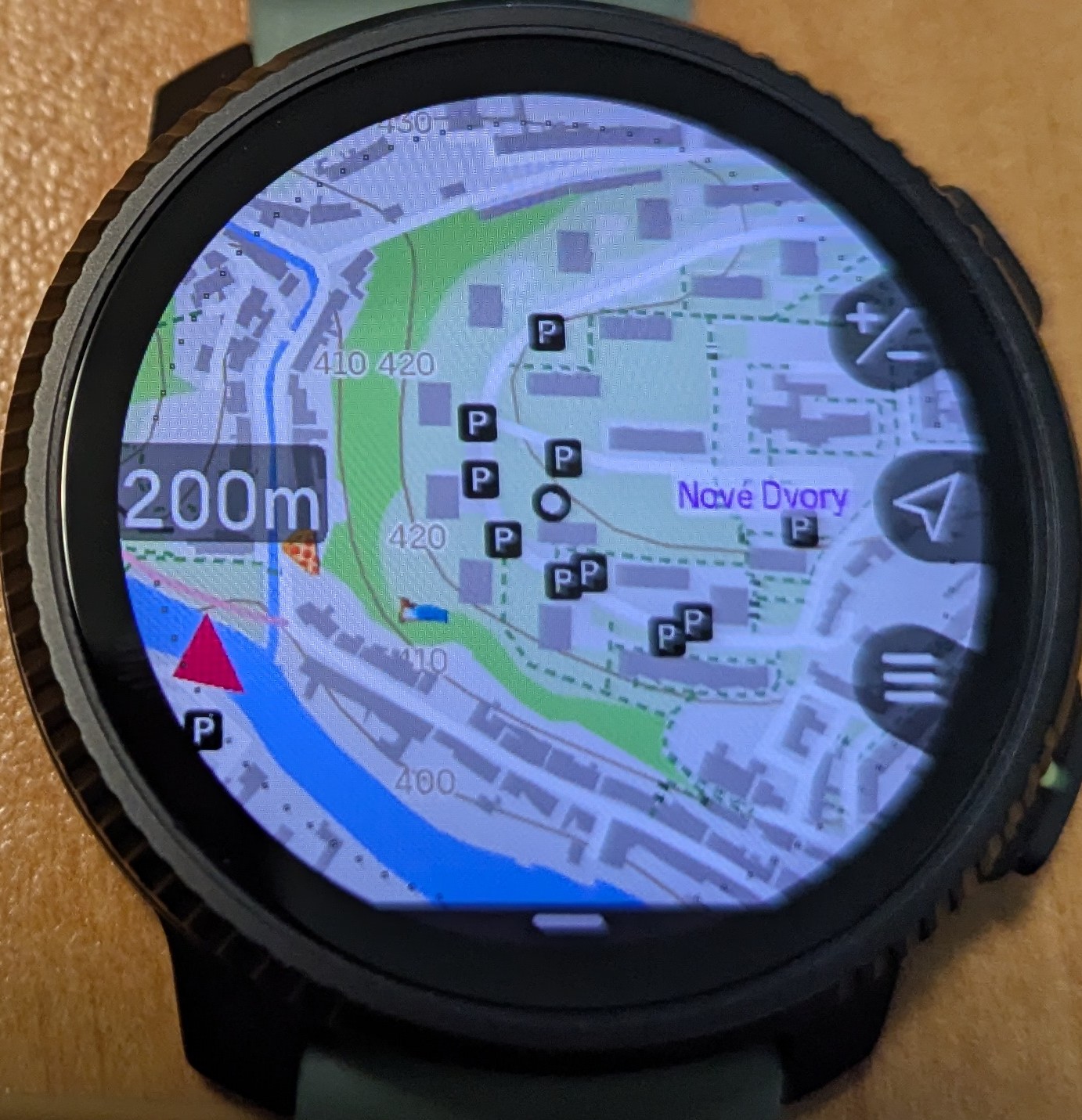
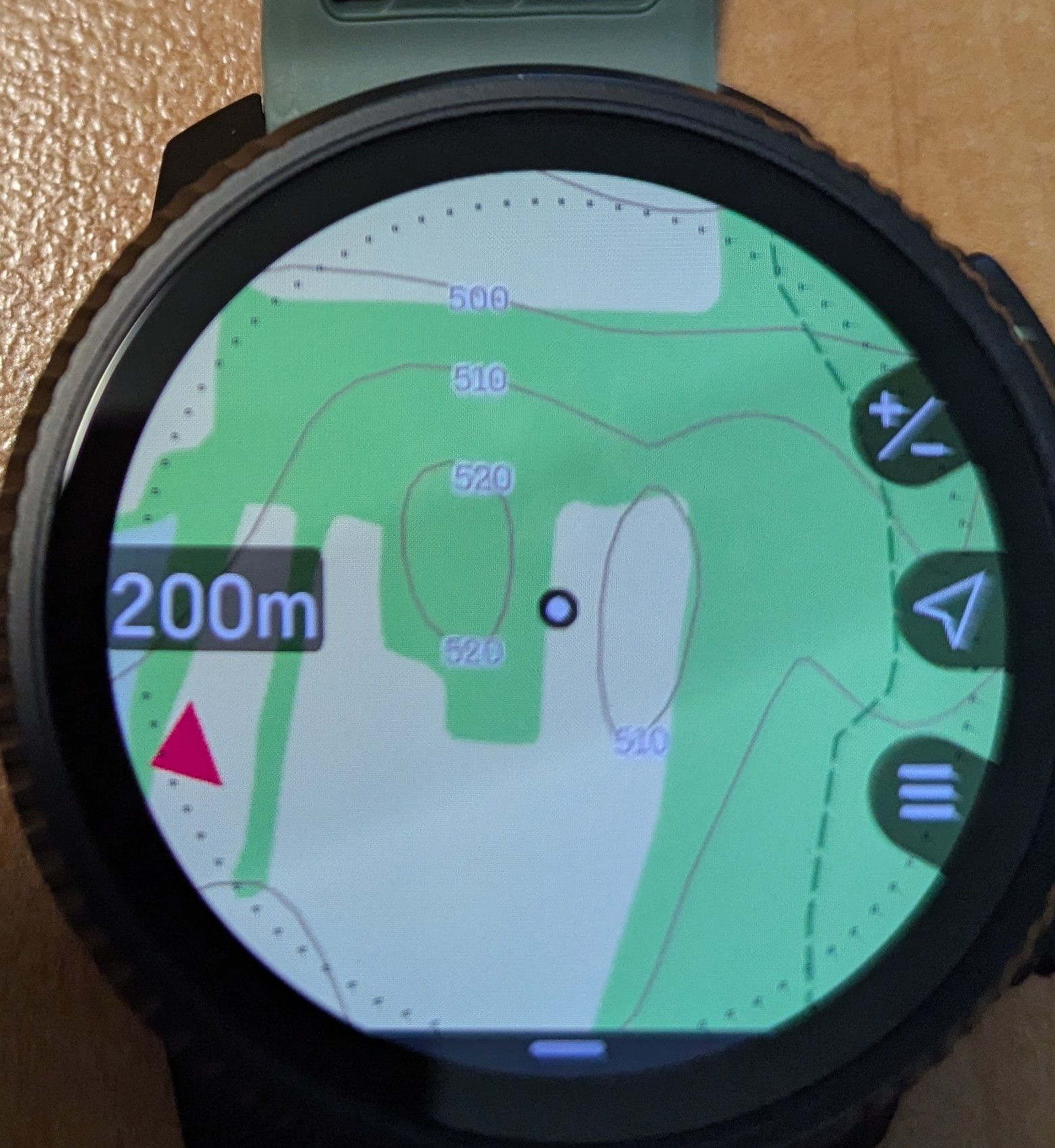
I have only city names (Race 2) no pizza icon, pharmacy, bus, parking etc icons. You enabled it somehow? I checked map options and I dont see anything.
-
@Squirrel That was my expectation!
Instead, it was fixed at 500m on my watch (Race). I may have done something wrong as I did only a quick check enabling turn by turn notification on one of my usual runs, will double check with my wife’s Race S as well. -
So when will they fix the battery drain issue for vertical 1 users? Still getting 20% a day like flogging a dead horse I guess suunto have just forgotten about it and moved on? I’m sure others still experience this and are probably tired from talking about it.
-
@HonzaS I just have to comment that even though the pictures look extremely nice in this blown up state, in reality we have to fight with physics and optical laws. Edit: at your post https://forum.suunto.com/post/188741
For example: I am myopic (nearsighted), which means that removing my glasses - for general sight - I can see fine details at a close range. But, on my Suunto Race S these new Elevation Labels on the Contour Lines are practically invisible. I see the lighter area surrounding the label, but the numbers themselves are undiscernable without a jewelers loupe/magnifying lens.
This is at a distance between eye and watch of ca 18 cm (ca 7 inches) which is my current focus point at the age of 66. Perhaps a younger person would have a better chance with these tiny details though…
Edit 2: The “Map style” “Winter” does have a colour for the elevation numbers which makes them discernible, with some focusing effort, even to me. But I would not like to be in a winded or exhausted state (with sweat trickling down into the eyes) while trying out such eye gymnastics!
Suunto Race S
-
@isazi Is the memory (16 GB for Race steel) the limitation you mentioned? If so, I wonder if Race Titanium will get new maps?
If I understood correctly, there are no other meaningful hardware differences between Race and Race S. -
@Tami999 you must update maps to latest version. It is stagged release so maybe you still have old data. Keep suunto app up to date. Newest app will offer update of maps in watch.
-
Just wanted to mention, no problems with the Race 2 after software updaten. HR-zones are kept.
I do have one other thing, I would like to be able to have touch screen music control for some workouts, like for weightlifting for example but no music control while running or cycling. Enabling music control, enables music control for all workouts. Thanks for allowing, touch screen control, in work-out mode.
-
@Squirrel I agree. In mountaineering the routes are only approximates, the actual path depends on the current conditions (crevasses).
-
I was not aware there was a difference between the Race and Race s in internal hardware. I thought it was just the case and display. So I was a bit surprised with no new map icons for Race. But I don’t mind it too much. I prepare my POI-s myself before mountain activities anyways. Would be nice to have the altitude displayed on the contour lines tho.
Anyway great update! So many new useful features
-
@Inge-Nallsson You’re right. Even on Vertical 2, the elevation values could have better visibility, but that’s something you won’t use while running. I’d also appreciate a list of all POI types with switches to enable what I want to display on the map. Also, the main city names (not districts) could be visible even at the lowest 20 km zoom level for better orientation on the map.
Suunto Vertical 2 titanium
-
@kriskus said in Suunto Software update Q1 (2.53.42):
@sky-runner It could be. But I was reading about instability due to insufficient memory and that made me curious.
It couldn’t be about internal storage, but rather RAM.
-
@Inge-Nallsson said in Suunto Software update Q1 (2.53.42):
But, on my Suunto Race S these new Elevation Labels on the Contour Lines are practically invisible. I see the lighter area surrounding the label, but the numbers themselves are undiscernable without a jewelers loupe/magnifying lens.
I wouldn’t be able to see these numbers too. A good experiment is to use a zoom tool in the browser window until the size of the picture that shows the watch screen becomes about the same size as the watch screen when you look at it during an activity. Yes, I have to agree that the numbers are completely indiscernible.
Suunto: Ambit, Ambit 3 Peak, 9 Baro, Race S, Race Ti, Vertical 2 Ti
Garmin: Forerunner 210, Forerunner 610, Fenix 6X, Fenix 7X Ti -
@sky-runner said in Suunto Software update Q1 (2.53.42):
@Tieutieu said in Suunto Software update Q1 (2.53.42):
Touchscreen to navigate from screen to screen !
WOW !!!This one I am not going to use for sure - not compatible with rain or long sleeves getting wet from sweat. But I see how a lot of people will like this feature. Hopefully it is configurable!
yes, it is. You can select “touch on”, “map only” or “touch off”
t6, S6, Elementum Terra, Ambit 3 Sapphire, Spartan Ultra, Traverse Alpha, S7 Graphite LE, S9B Ambassador, S9P Titanium, S9PP Titanium, Vertical All Black, Race Titanium, Race S Titanium Courtney, Run Lime, Race 2, Vertical 2 Titanium, Race 3s
-
@sky-runner said in Suunto Software update Q1 (2.53.42):
@Dimitrios-Kanellopoulos said in Suunto Software update Q1 (2.53.42):
Maximum map detail at 500 m zoom level
This makes me happy! I wonder if this translates to 0.2 mi or 0.5 mi zoom level for watches configured in imperial units. It used to be 0.5 mi (800m) in the beginning of 2025. I guess I’ll know soon. Also, Vertical 2 anniversary edition arrives today. I promised that I’ll upgrade my watch when this issue is resolved and I have done that!
I am also very happy about a number of other map and navigation improvements, and mixed units, and a few other things! Very well done Suunto and everyone involved!
when set to miles, the full details are shown up to 0.2mi, which translates to some 330m or so.
t6, S6, Elementum Terra, Ambit 3 Sapphire, Spartan Ultra, Traverse Alpha, S7 Graphite LE, S9B Ambassador, S9P Titanium, S9PP Titanium, Vertical All Black, Race Titanium, Race S Titanium Courtney, Run Lime, Race 2, Vertical 2 Titanium, Race 3s
-
@Egika
Hatt jemand etwas bemerkt dass die wachpasen erkennung besser geworden ist? Oder wird sie immer noch mit leichtschlaf fast gänzlich mit leichtschlaf ausgepügelt?
Hatte 0min wachphasen die letzte Nacht… bitte um Erfahrungsberichte der ersten Nacht? -
@Egika said in Suunto Software update Q1 (2.53.42):
when set to miles, the full details are shown up to 0.2mi, which translates to some 330m or so.
0.2 mi = 322 m, which is unfortunate because that means 36% worse radius of visibility at the zoom level with maximum details. That is still quite a penalty for US users.
Here is an old picture of Garmin Fenix 7X which shows a scale of 800 ft for the quarter of screen, which in Suunto case would translate to 1600 ft scale (for half of the screen):
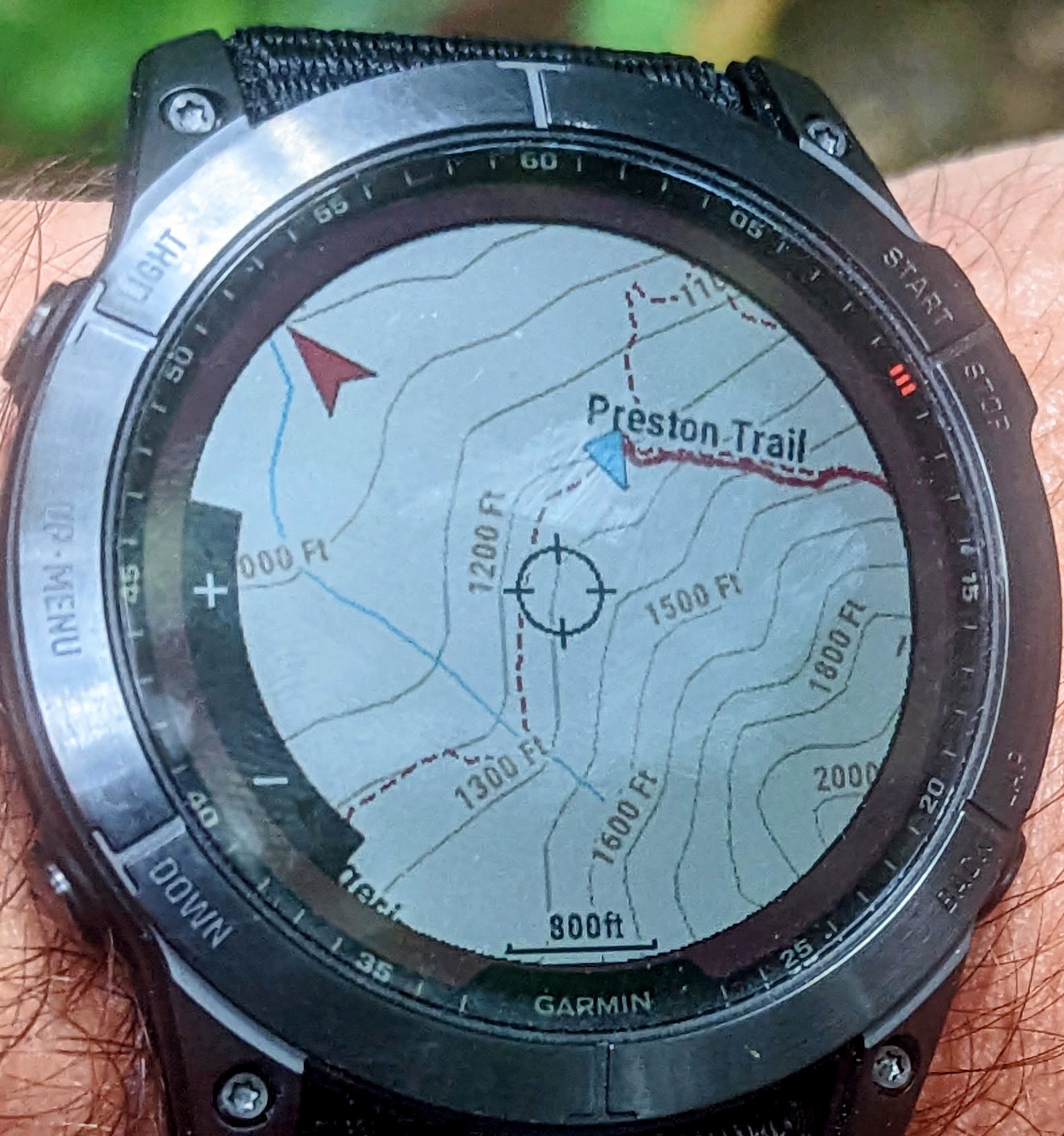
1600 ft translates to about 500 m, which would fairly closely match the existing zoom level in the metric system.
In metric system zoom levels are 25m, 50m, 100m, 200m, 500m, 1km
But in imperial - 100 ft (30m), 200 ft (61m), 500ft (152m), 0.2mi (322m), 0.5mi (804m)As you can see, Garmin doesn’t stick to round numbers and that has never been an issue. I don’t think anyone ever complained about that.
Suunto: Ambit, Ambit 3 Peak, 9 Baro, Race S, Race Ti, Vertical 2 Ti
Garmin: Forerunner 210, Forerunner 610, Fenix 6X, Fenix 7X Ti -
a recap of the Q1













Hello! It looks like you're interested in this conversation, but you don't have an account yet.
Getting fed up of having to scroll through the same posts each visit? When you register for an account, you'll always come back to exactly where you were before, and choose to be notified of new replies (either via email, or push notification). You'll also be able to save bookmarks and upvote posts to show your appreciation to other community members.
With your input, this post could be even better 💗
Register Login