Suunto Ocean update 2.51.28
-
his update brings new features, improvements, and bug fixes.
New Dive Features
- Tide widget
- Customization of switch window and arches for dive modes
- Dynamic depth graph in dive summary
- Option to configure a stopwatch for dive views
- Possibility to link two tank pods to the same gas
- If two tank pods are linked to the same gas, the tank pressure field will show two tank pressures during the dive
- Option to set a pressure difference alarm when diving sidemount
- Support for new dive watch face, available in Suunto app
- Water type setting for scuba diving
New Outdoor & Sport Features
Includes features and improvements from:
- 2.50.26
- 2.48.16
- 2.44.52
- 2.44.46
- 2.43.1
Features
- Support for pairing multiple sensors of the same type
- Sensors will need to be paired again
- Showing sensor information, such as battery level and name
- Downloading maps now enabled also without charger
- ZoneSense intensity target setting in sport mode
- Improved Climb guidance user interface and zoom enabled between waypoints
- Passcode feature for securing the watch when off wrist
- Support for new watch face types
- New improved morning report
- New notification for treadmill calibration
- Connected sensors can be enabled or disabled per sport mode
- Sensor services can be selected separately in sport mode
- New default sport modes for duathlon, swimrun, and aquathlon
- New data fields:
- Instant, average, and lap NGP
- Peak power
- Peak pace and speed
- Ascent/descent to next waypoint
- ZoneSense adjustable as a target to follow in sport mode
- ZoneSense zone distribution shown in log summary
- Automatic transitions in triathlon sport mode
- Automatic transitions in swimrun sport mode
- Circular transition between sports in predefined multisport modes
- New map orientation selection for north/heading
- In-store demo mode for events and demo purposes
Improvements and Bug Fixes
- Localization fixes
- Snorkelling max depth was missing from summary
- Algorithm deviation icon not showing on screen after software crash
- Issues with surface time arch
- Reduced the time of the no-fly icon
- Tank pod icon showing in pre-start view even if offline
- Issues with Wi-Fi and maps download
- Memory optimization
- Bearing didn’t clear after exiting Scuba dive
- Added e-labels for certification
- Improvement to tank pressure arch
- Surface time sometimes showing wrong values
- Transition optimization in menu items
- Wrong total dive count
- No message after downloading maps
- GNSS optimization happens over wireless network automatically every night
- New winter map styles
- A wide range of new data fields possible to add in sport mode customization
- Improved swim style detection in pool swimming
- Notifications show longer content than before when used with iOS
- Zoom range indicator on map
- Improved accuracy with updated GNSS firmware
- Bike sensor wheel size adjustment added
- Sleep tracking accuracy improved
- ZoneSense zone indicator fixed
- Some crash root causes fixed
- Button lock problem fixed
- Battery drain problem fixed
- Sport mode options remembered better
- New paired sensors automatically enabled in compatible sport modes
- Map data field made bigger and more visible
- Weather data also downloaded over Wi-Fi
- Improved pool swimming accuracy
- Smoother transition between menus
- Improved altimeter stability
- Improved ascent and descent calculation accuracy
- Several bug fixes and performance improvements
Community Manager / Admin @Suunto
Creator of quantified-self.io — a next gen training dashboard with MCP access, cross-service activity and route sync
-
D Dimitrios Kanellopoulos pinned this topic on
-
I’m going to test the pool swimming accuracy improvement right now
-
P pavel.samokha referenced this topic on
-
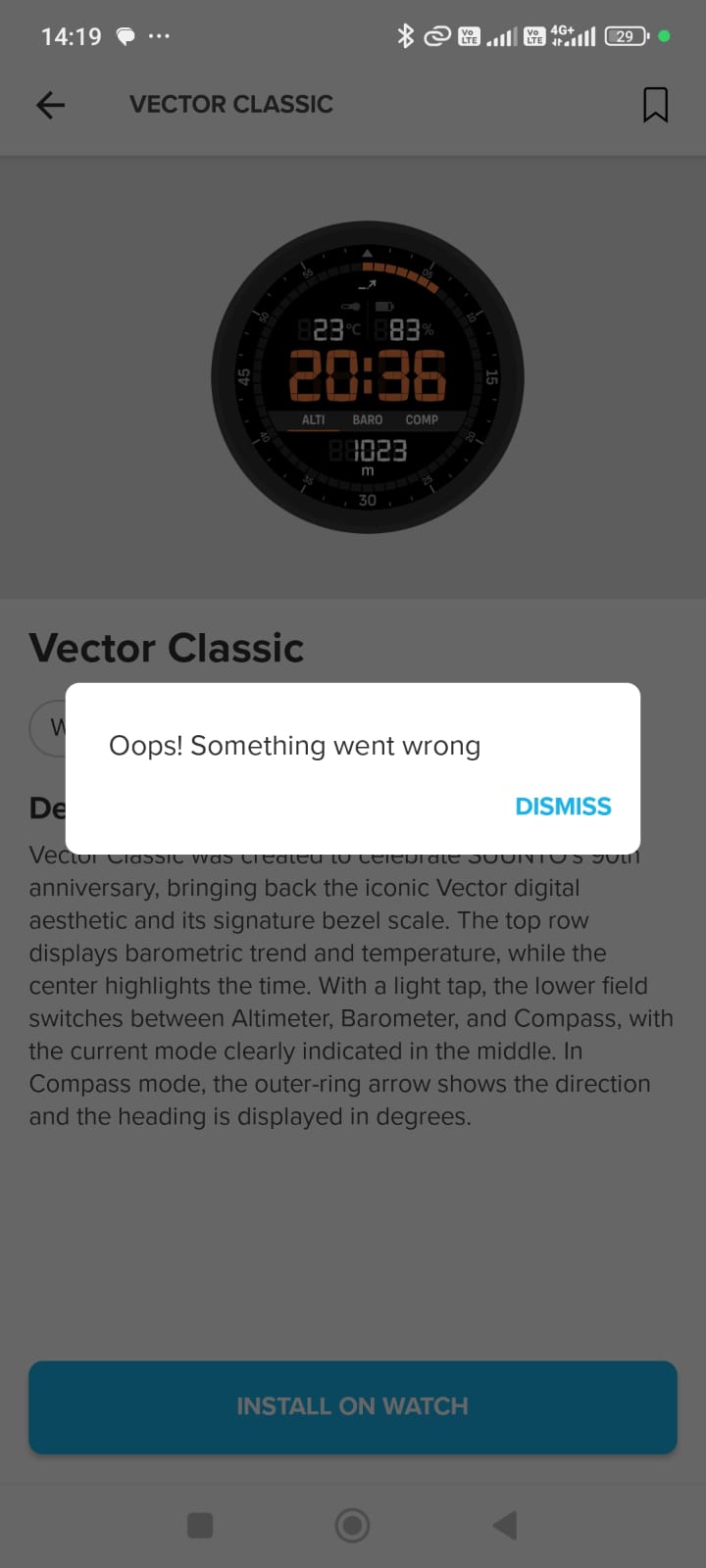
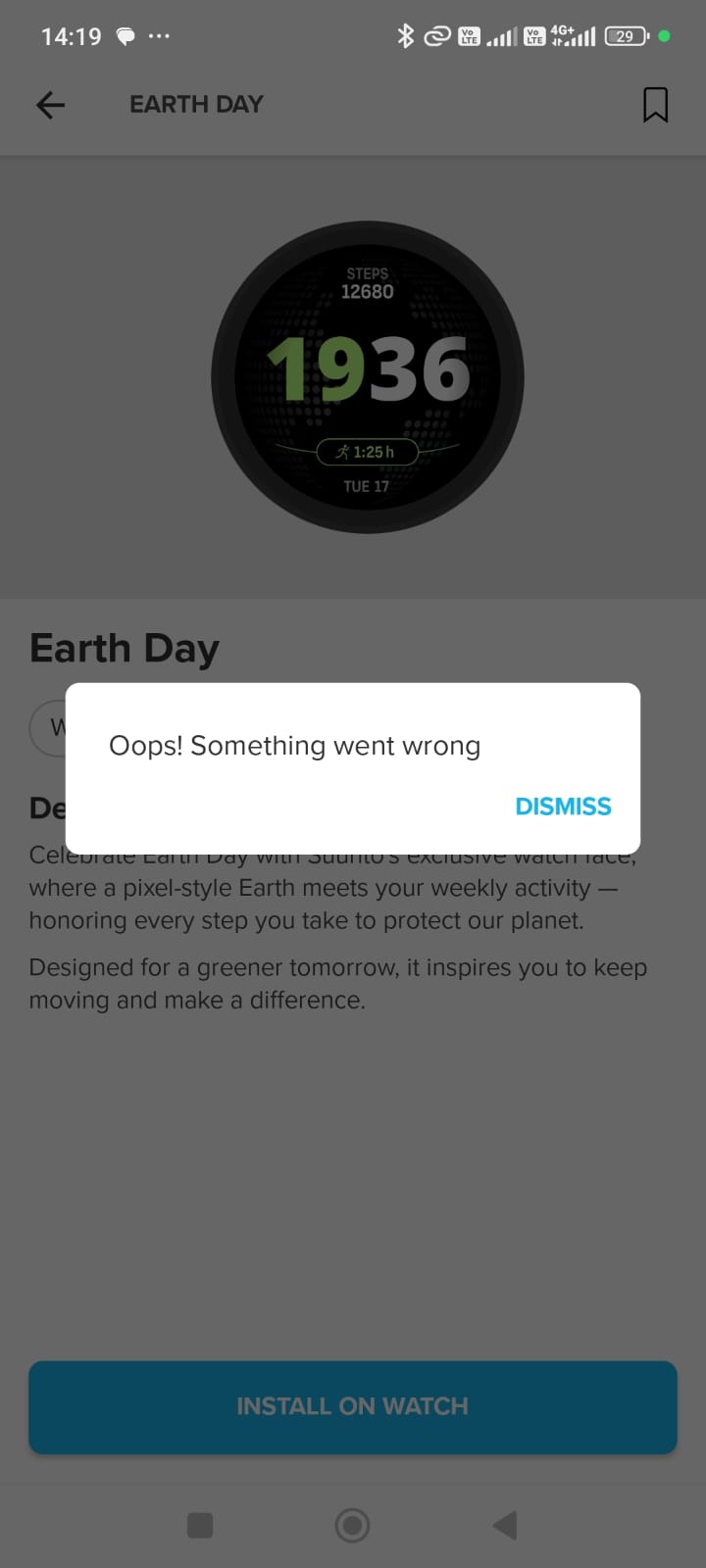
@Dimitrios-Kanellopoulos I have done the update and reset my Ocean after. I have picked up an issue with Watch Faces, if anyone can confirm, but I have tried installing the Earth Day as well as Vector Classic and keep getting the issue “Oops! Something went wrong”. I have restarted my watch and phone with no luck. I will be testing more of the update in the coming days.!!
-
@dotcom Please let me know what you find, also a swimmer and testing it out later today.
-
@Reino-von-Wielligh
Absolutely no change: legs, one arm, nothing is better. -
@Reino-von-Wielligh
same issue on IOS with Watch Faces -
@dotcom I see now in the log that we also did not get the drill mode OR any of the recovery metrics. Must say I am very disappointed atm.
-
Does someone know how that Tide Widget looks like? I’d love to see and wish it for all the other models

-
Maybe it looks like this!
https://www.suunto.com/en-nl/Support/Product-support/suunto_nautic_s/suunto_nautic_s/widgets/tide/
-
@Reino-von-Wielligh I got the same error
-
@Dimitrios-Kanellopoulos that is great, I have been waiting for the dive switch window customizations impatiently, also 2 tank pods on one gas is amazing. I can’t download the new watch faces , I guess the ocean lite is the one for scuba features , but it doesn’t download for me!
Everything else is amazing! -
@Horizontal_2
I would really like to see this feature on the R2 as well because I enjoy fishing, and this function would be extremely useful for me. -
@Reino-von-Wielligh Same here…
-
@Reino-von-Wielligh Same here
-
reporting the watchface issue
Community Manager / Admin @Suunto
Creator of quantified-self.io — a next gen training dashboard with MCP access, cross-service activity and route sync
-
I have just updated my Ocean to 2.51.28.
Synced the watch with suunto spp - and the new watches are all downloadable and can be used on my watch.Many months ago, i reported that the race2 and outback adventure watch faces has portions of them not displaying properly or not working - they have been fixed in this update and it works for me; race2 now displays the graph or chart (before this it was blank), and the outback adventure has 2 arches on the watch face (before this it only had 1 arch at the bottom and missing the top arch).
I was also able to download on my watch the following watch faces:
Chengdu trail
Light flow
Ocean lite,
Race 2
Outback adventure
Snow slash
Vector classic
Earth dayThe tide wodget also displays information related to my location.
-
Looks great update:
- Performance is smooth, way faster menus.
- New options to customize dive watch looks promising, now we can leave only data we need to quickly switch between them. Not super customizable, but a great start.
- Water type is nice to have feature, guess POD additional info is also nice addon. No-fly icon was unnecesary for too long, if it is shortened - that’s a nice feature.
- Sleep report looks better, will see if alarm / night report bug is fixed.
! logbook missing. After update I only see activities for ~1 month, did not find a way to seperate other activities and diving and my older dives are missing on watch.
- not sure if daylight saving time is fixed (we are still switching winter/summer time and sync with GPS did not change it correctly, had to choose time zone manually)
- can’t find new dive watch face (not really need it, but could not find it anyway)
- sad that latest maps updates are not integrated in this update, guess we will get them in a year or so
Suunto Ocean
-
@Reino-von-Wielligh Same issue with Ocean.
-
@prakalejas said in Suunto Ocean update 2.51.28:
not sure if daylight saving time is fixed
not sure if daylight saving time is fixed -> this is cached via the app FYI
-
@prakalejas Yeah also disappointed that the new maps update and swim features were not included in this update of Ocean. I remember on the slides of the updates from & April, it said coming to Ocean, but when we will get this, we can only hope Suunto starts treating the Ocean with the same urgency as the rest of the lineup.





Hello! It looks like you're interested in this conversation, but you don't have an account yet.
Getting fed up of having to scroll through the same posts each visit? When you register for an account, you'll always come back to exactly where you were before, and choose to be notified of new replies (either via email, or push notification). You'll also be able to save bookmarks and upvote posts to show your appreciation to other community members.
With your input, this post could be even better 💗
Register Login