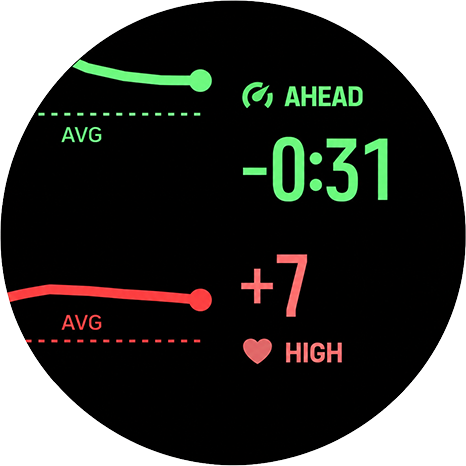
Constantin: monitor effort drift against your session average
-
@Speed-Man thanks for your review! Noted. I’ve reduced the app to one screen because of stability issues but since I’ve found a new, stable method - perhaps it’ll be possible to get back to different screens too and the visible delta.
-
@Speed-Man you can go to watch settings in the Suunto App, then view the apps that are synced to the watch, select Constantin and scroll to the bottom of the page to see when it was updated.
-
@Łukasz-Szmigiel Now it’s on the latest version. Thank you very much for the support and continuous improvements

-
Constantin 2.12
Steadier drift view, new detail screens, and a website
Hi everyone,
I’ve just published Constantin 2.12, a new version of my SuuntoPlus app for monitoring movement-speed and heart-rate drift during workouts.
What’s new in 2.12
This release focuses on making the app clearer, smoother, and more stable during real workouts.
Three switchable views
Three views are back, but this time without the need of reloading the template:
- Drift — combined movement-speed and heart-rate trend
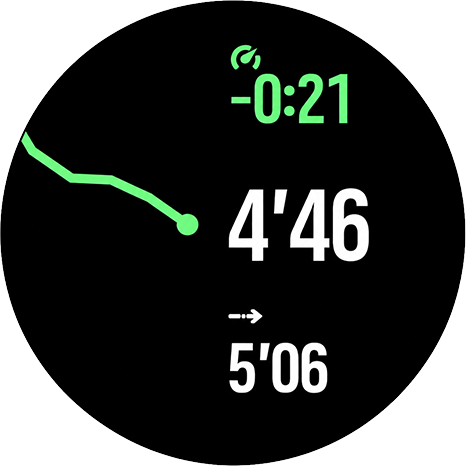
- Pace / Speed / NGP — movement-speed detail view
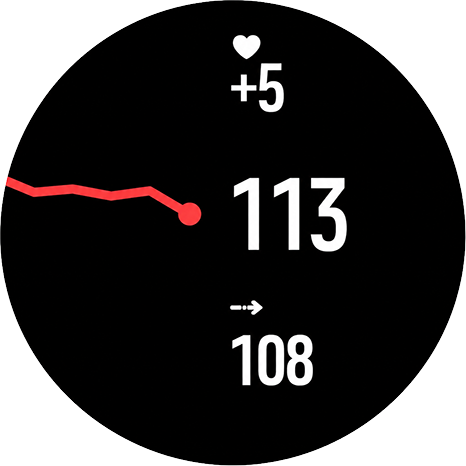
- Heart Rate — HR detail view
The upper button switches between them:
- short press: next view
- long press: previous view
All views share the same collected trend data, so switching views does not reset the chart.
Smoother and more representative trend chart
Trend values are now averaged over each recording interval during up to 10 minutes (four bucket, each 2:30 min average + “now” refreshed every 3 seconds). The chart now reaches further back and gives a broader view of how effort is changing over time.
Better behavior when data briefly drops
If GPS/speed data drops briefly, the chart should hold its history instead of clearing. When you stop moving without pausing the activity, the movement-speed trend holds the last valid sample while heart rate can continue updating.
Shared scale for pace and heart rate drift
In the combined drift view, both lines now share one visual scale and meet at the same point on the right. This should make it easier to see whether movement speed and heart rate are drifting together or diverging.
HR zone bar appears immediately
The heart-rate zone bar now appears as soon as an HR zone is active, without waiting for the trend chart to fill.
More stable alongside navigation and other SuuntoPlus apps
A lot of work in this release went into making the app behave more calmly under load, especially when used together with route navigation or other SuuntoPlus apps.
Website with details
I also published a small website with more details, screenshots, and explanation of how the app works:
https://constantin.szmigiel.design/
Feedback is very welcome, especially from people testing it during longer workouts, route navigation, or together with other SuuntoPlus apps.
-
Thank you so much. You did an amazing job designing everything—it all looks great.
-
2.13 (2026-06-27) is live with a small bugfix:
- Each trend line now scales to its own movement, so a chart looks the same whether you view it in the combined drift view or in its own dedicated view.
- Fixed the effort direction for speed-based sports (such as hiking): moving faster than your average now correctly reads AHEAD instead of FADE (and correct green/red colors).
-
Hi guys!
I’ve received a report from Suunto App from someone using Suunto Race S saying that Constantin is still crashing and rebooting the watch when used with manual laps without any other apps or GPS routes loaded.
I’m unable to reproduce such behaviour on my S9PP. Can somebody with Race S see if the app triggers the crash with manual laps triggered?
-
2.14 (2026-07-07)
- The heart-rate zone bar and trend chart now react right away in workouts without speed data — indoor sessions, or while waiting for a GPS fix — where they could previously lag behind by a couple of minutes.
- The view you selected stays selected after lap and other watch overlays, and the trend keeps averaging smoothly through them.
- Shows – instead of STABLE until there is enough data to judge your effort.
Also, I’ve spammed 30+ manual laps and cycled through screens like mad and all is stable as a rock. Just didn’t manage to breake the app or the watch.
-
I don’t know if others are experiencing the same issue on R2, but I can’t use this application. It seems like it’s not working at all.
-
@Speed-Man can you explain a little bit more? What are you experiencing?
-
@Łukasz-Szmigiel This morning I went for a run, but the Constantin app didn’t display my heart rate or speed on the screen. I checked it again just now, and it seems to be working normally now.
-
@Speed-Man this is because the initial aggregation of data necessary for the graphs to display starts when the Constantin screen is displayed for the first time.
After it has been displayed at last once - it continues to collect the data so the graphs are fresh even when outside of the app. It is a good practice to cycle screens after the workout starts so that it can initialise.
Also keep in mind that the graphs are flushed after navigation panel settings change (route / poi load / unload) or when the S+ are loaded / unloaded.
This is not ideal but allowed for making the app way smaller and lighter so that three displays can be merged into one and well… It doesn’t crash.
-
@Łukasz-Szmigiel Thank you. I’ll try using it now.
-
Constantin 2.31
FYI: The update may not yet be public in the apizone.
Charts now use minute averages, expanding from a 5-minute to a 10-minute and then a 15-minute window. Nine vertical levels make the trends steadier, while a wider green line helps distinguish overlapping pace and heart-rate trends.
Charts refresh roughly every four seconds, with numeric values updating every two seconds. I also simplified the calculations and screen layout to reduce overhead.
Initial testing suggests the chart survives longer when used alongside route navigation. This is encouraging, though longer testing is still needed to confirm reliability.
Full details, the changelog and an interactive demo are available at constantin.szmigiel.design.
-
Constantin 2.32 fixes an unintended regression in 2.31: the chart’s endpoint was showing an averaged value rather than what was happening now.
The endpoint now represents the latest pace, NGP or speed delta and heart-rate delta, updating roughly every four seconds. The four earlier points remain averaged and cover consecutive intervals, giving 4, 8 or 12 minutes of history plus “now”.
Full details, the changelog and an updated interactive demo are available at constantin.szmigiel.design.
-

Good news everyone! It seems that I’ve finally found a way to have a history in main.js that survives the UI unload and no-crash experience. I’m currently testing this version.
-
Constantin 3.00 — the Carduelis release
Constantin 3.00 is out. The main change: you now decide what “steady” means, and that choice directly shapes the trend chart.
Where to set it. Open Constantin’s settings in the Suunto app. There are two sliders: Steady heart rate range (2–9 bpm, default 4) and Steady pace and speed range (1–10% of your average, default 3%). Changes apply the next time the Constantin screen loads, e.g. at the start of your next workout.
What it does to the chart: a minimum scale for steady running. The chart has nine levels, four above and four below your current drift. Your range sets the smallest step between levels, so the chart can never zoom in further than four ranges either way. With the default 4 bpm that’s ±16 bpm: a heart-rate point stays on the line within 0–3 bpm, moves one level at 4–7 bpm, two at 8–11 bpm, and so on. For pace at an average of 6:00/km, 3% is 11 s/km, so a point moves one level only once it’s 11 s/km away. This is what matters when you’re running steady: small fluctuations inside your range keep the line flat, and every step means a real change of at least that size.
Beyond that, the scale is still dynamic. Once any point drifts further than four ranges from now (more than 16 bpm with the default), the chart widens to fit the largest difference, and each step becomes bigger than your range. Example: with a 4 bpm range, a point 24 bpm away puts the scale at ±24 bpm, so one level is 6 bpm. So during intervals, hills or a big fade, you still see the whole shape on screen; the range only stops the chart from blowing up tiny changes when things are calm.
Same range for the status. The STABLE label uses the same numbers: a delta smaller than your range is STABLE; from the range upward it reads HIGH/LOW for heart rate or AHEAD/FADE for pace.
How to choose. Go tighter (e.g. 2–3 bpm, 2%) to see every small change on steady tempo runs or long easy efforts. Go wider (e.g. 6–9 bpm, 5%) if you only care about bigger shifts. Pace and speed use a percentage, so the setting means the same at any pace and in slower sports like hiking.
Also new in 3.0: the chart now survives screen changes. When route navigation starts or stops, or another SuuntoPlus app is switched, the full chart comes back in about 15 seconds, and history keeps collecting while Constantin is hidden.
-
Hi everyone,
Could someone with a Suunto Vertical 2 or Race 2 share the full filename of the latest firmware package stored on their watch? Ideally version 2.56.28.
I’m looking for the complete
.soffilename, including the build number and the identifier at the end, rather than just the software version shown in About. I need it to find a direct download link and download the firmware to my computer.To check the package name:
- Open Settings → General → About.
- Scroll down to Data privacy.
- Press and hold the lower button until the service/debug menu appears. This may take around 12–20 seconds.
- Open Select OTA pkg.
- Take a photo of the package names or copy the full filename, and mention whether your watch is a Vertical 2 or Race 2.
Please only view the list. Don’t select a package to install, and don’t use “Delete OTA pkgs”, as it removes the cached firmware packages. Once you have the filename, leave the menu.
A photo is fine if the filename is too long to copy.
Thanks!
S9PP 2.50.28
-
@Łukasz-Szmigiel
I just have 2.56.18,sorry
https://firmware.geo.movescount.com/production/Xiamen-fw_2.56.18.31896-V-a8f49e99.sof -
@Mff73 thanks, It’ll be helpful!



Hello! It looks like you're interested in this conversation, but you don't have an account yet.
Getting fed up of having to scroll through the same posts each visit? When you register for an account, you'll always come back to exactly where you were before, and choose to be notified of new replies (either via email, or push notification). You'll also be able to save bookmarks and upvote posts to show your appreciation to other community members.
With your input, this post could be even better 💗
Register Login