Suunto Run: custom data screens/fields for interval training
-
@Mennekk Absolutely agreed, right now we are looking at by default data that we don’t know the meaning. Please let us customize.
-
I have the same issue. I wanted to see average pace for my current interval and couldn’t set it up
-
I think that everyone who uses interval training would like to be able to customise their watch displays.
Like you, I hope that this will be possible in the not too distant future.
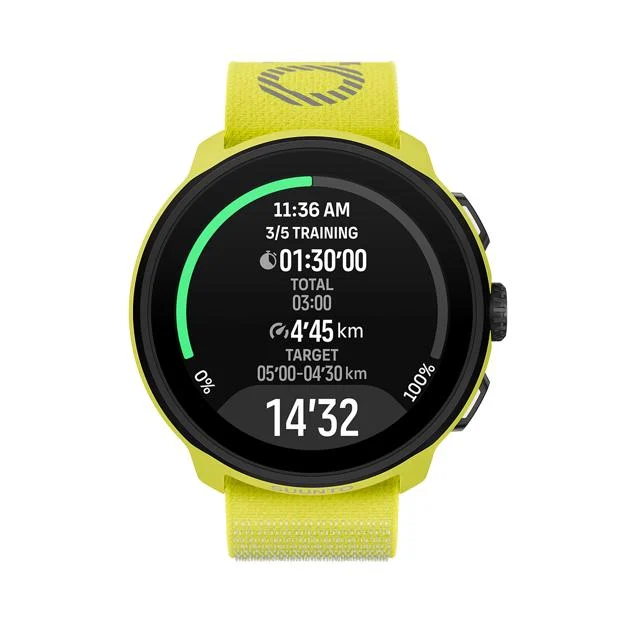
I also find the additional display unclear: the font is too small and the targets are not highlighted enough.At 54, I find it difficult to read such small text, especially when it is grey.
-
@Mennekk
Assolutamente d’accordo. I dati sono ingestibili. Cercate di provvedere -
Another improvement is to actually see where in the interval runs you are.
E.G. I have now a training interval setup:
3 min warmup
x12
250m sprint
2 min jog2 min cool down
When I am in the middle of the sprint/jog sessions, I do not know my progress, do I have 10 more sprints to do or 2 more? I need to keep that in my head. I would love for the watch to show me where I am in my intervall training.
I have a similar setup for climbing training, same issue here, I repeat it for x20 times but I have no idea where I am in the session.
-
Another improvement needed is that if you have manual lap set, to change to next step you have to be on the first screen. Doesn’t make sense.
Countdown on repeats only available if the set is defined with time. When doing by distance no countdown exists.
-
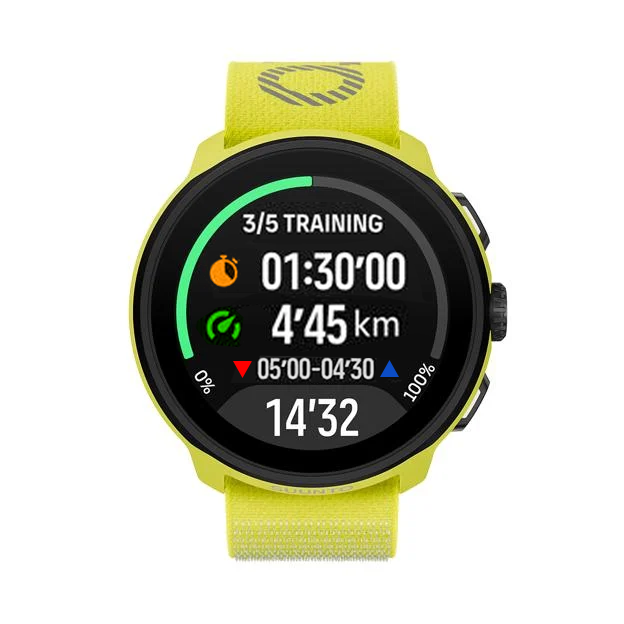
Any ideas on how it might develop?
-
This proposal looks amazing! The Suunto Race desperately needs a feature like this. Being locked into the default screens during intervals is a real shame, so hopefully the dev team takes note and implements this soon
-
On the Suunto Run, if you select an interval workout previously created in the Suunto App, you get an extra screen showing the interval progress, your target pace/HR/etc. (which is great!). However, the rest of the data screens are the default ones and cannot be customized. None of them display the “average interval pace”.
Since this functionality was recently added for the Marathon mode, it would be really useful if the data screens/fields for intervals could also be customized.
(This seems to be a feature already available on the “standard” Suunto software platform, but not for the Suunto Run)
Is it something that happens also in Race 2 or Vertical 2?
-
Just coming in to add my support to this request - this is a much needed feature for the Suunto run!
Just for example - during an interval workout, there’s no way to see your HR and pace in on display. You must toggle between 2 different ones, each showing just one data point (either pace or HR).
Please add this in a future update so we could utilize our watch to the fullest during interval workouts!
Thanks

-
I am new suunto user and I second this feature. I really miss the average lap pace that Garmin provided. I love the cleanliness of suunto’s interface but it would be extremely nice if I could see my average lap pace on the interval. Or any data customisation on the interval workouts for that matter.
Thank you
-
I isazi moved this topic from Feature Suggestions
-
Just for example - during an interval workout, there’s no way to see your HR and pace in on display. You must toggle between 2 different ones, each showing just one data point (either pace or HR).
The same problem exists with the default interval screen on Vertical 2 and Race 2. That’s why I ended up paying subscription for Training Peaks and using Training Peaks S+ guide. There on a single screen I can see both pace and HR regardless of whether workout is pace based or HR based. But what Suunto has done for the default interval screen is problematic from usability point of view.
-
Two months without a single update for Run — that’s commitment, I’ll give them that. I guess Run 1 is now in the “we value your feedback so much we’ve stopped listening” mode. No fixes coming, apparently. I’m done playing the waiting game — time to find a watch that actually works.

-
@perfekt_tall do you have a comment that actually has anything to do with the topic of this thread?
Does not really seem so…
-







Hello! It looks like you're interested in this conversation, but you don't have an account yet.
Getting fed up of having to scroll through the same posts each visit? When you register for an account, you'll always come back to exactly where you were before, and choose to be notified of new replies (either via email, or push notification). You'll also be able to save bookmarks and upvote posts to show your appreciation to other community members.
With your input, this post could be even better 💗
Register Login