Constantin: monitor effort drift against your session average
-

Good news everyone! It seems that I’ve finally found a way to have a history in main.js that survives the UI unload and no-crash experience. I’m currently testing this version.
-
Constantin 3.00 — the Carduelis release
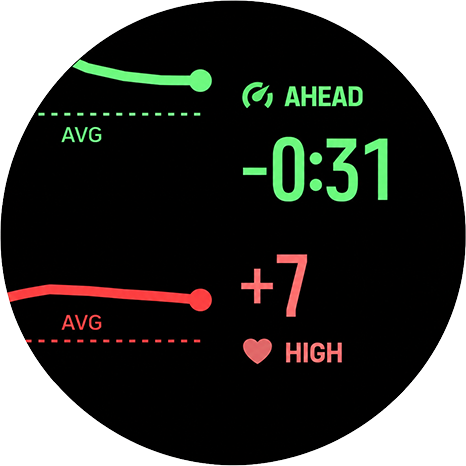
Constantin 3.00 is out. The main change: you now decide what “steady” means, and that choice directly shapes the trend chart.
Where to set it. Open Constantin’s settings in the Suunto app. There are two sliders: Steady heart rate range (2–9 bpm, default 4) and Steady pace and speed range (1–10% of your average, default 3%). Changes apply the next time the Constantin screen loads, e.g. at the start of your next workout.
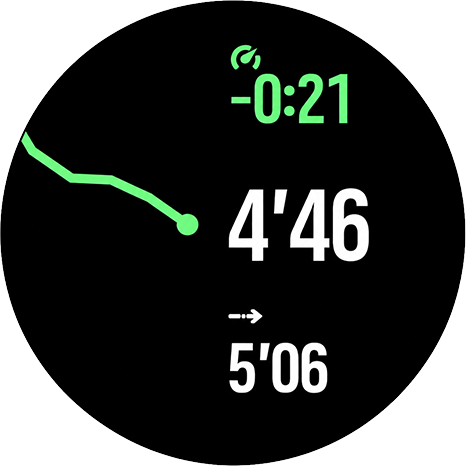
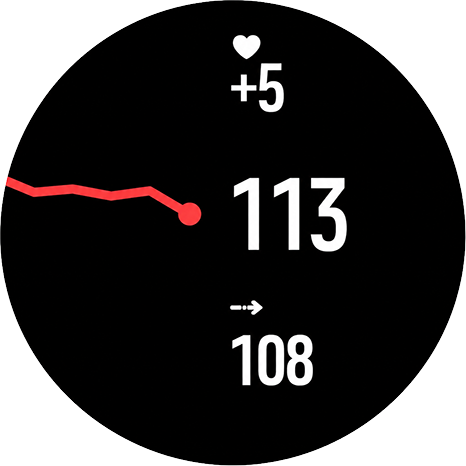
What it does to the chart: a minimum scale for steady running. The chart has nine levels, four above and four below your current drift. Your range sets the smallest step between levels, so the chart can never zoom in further than four ranges either way. With the default 4 bpm that’s ±16 bpm: a heart-rate point stays on the line within 0–3 bpm, moves one level at 4–7 bpm, two at 8–11 bpm, and so on. For pace at an average of 6:00/km, 3% is 11 s/km, so a point moves one level only once it’s 11 s/km away. This is what matters when you’re running steady: small fluctuations inside your range keep the line flat, and every step means a real change of at least that size.
Beyond that, the scale is still dynamic. Once any point drifts further than four ranges from now (more than 16 bpm with the default), the chart widens to fit the largest difference, and each step becomes bigger than your range. Example: with a 4 bpm range, a point 24 bpm away puts the scale at ±24 bpm, so one level is 6 bpm. So during intervals, hills or a big fade, you still see the whole shape on screen; the range only stops the chart from blowing up tiny changes when things are calm.
Same range for the status. The STABLE label uses the same numbers: a delta smaller than your range is STABLE; from the range upward it reads HIGH/LOW for heart rate or AHEAD/FADE for pace.
How to choose. Go tighter (e.g. 2–3 bpm, 2%) to see every small change on steady tempo runs or long easy efforts. Go wider (e.g. 6–9 bpm, 5%) if you only care about bigger shifts. Pace and speed use a percentage, so the setting means the same at any pace and in slower sports like hiking.
Also new in 3.0: the chart now survives screen changes. When route navigation starts or stops, or another SuuntoPlus app is switched, the full chart comes back in about 15 seconds, and history keeps collecting while Constantin is hidden.
-
Hi everyone,
Could someone with a Suunto Vertical 2 or Race 2 share the full filename of the latest firmware package stored on their watch? Ideally version 2.56.28.
I’m looking for the complete
.soffilename, including the build number and the identifier at the end, rather than just the software version shown in About. I need it to find a direct download link and download the firmware to my computer.To check the package name:
- Open Settings → General → About.
- Scroll down to Data privacy.
- Press and hold the lower button until the service/debug menu appears. This may take around 12–20 seconds.
- Open Select OTA pkg.
- Take a photo of the package names or copy the full filename, and mention whether your watch is a Vertical 2 or Race 2.
Please only view the list. Don’t select a package to install, and don’t use “Delete OTA pkgs”, as it removes the cached firmware packages. Once you have the filename, leave the menu.
A photo is fine if the filename is too long to copy.
Thanks!
S9PP 2.50.28
-
@Łukasz-Szmigiel
I just have 2.56.18,sorry
https://firmware.geo.movescount.com/production/Xiamen-fw_2.56.18.31896-V-a8f49e99.sof -
@Mff73 thanks, It’ll be helpful!
-
@Łukasz-Szmigiel
Here’s the one for Race 2 - 2.56.28https://firmware.geo.movescount.com/production/Wismar-fw_2.56.28.33260-U-5bfd6226.sof
-
3.10 is out. What changed since 3.00:
Chart
- History: 30 minutes instead of 12. Groups (oldest → newest): 1-1-1-1, then 4-2-1-1, 8-4-2-1 and 16-8-4-2 minutes (imagine as dots from the left side of the screen, where the rightmost is “now”).
- Each point is now that period’s mean vs. your current value. In 3.00, minutes were stored as deltas against the running average: steady drift showed at about half its size, and a lasting slowdown could look like a recovery.
- Fixed scale: one step = one steady range (4 bpm / 3% by default), max ±4 steps. In 3.00 the farthest point stretched the scale, so a warm-up could turn one step into 8–12 bpm and hide later drift.
Warm-up (new setting: 0–20 min, default 10)
- During the warm-up, the Pace and HR views show WARMUP instead of a status.
- After it, delta, status and the on-screen average compare with your average since the end of the warm-up, not the whole workout. In 3.00, HR read HIGH for most of a shorter run just because the first minutes were slow.
- Wider chart groups start only after the warm-up (default: at 18, 25 and 40 min), so the warm-up never comes back into the oldest point.
- 0 = 3.00 behaviour.
Summary
- Pace/HR AVG: unchanged (watch averages).
- VAR: measured against the post-warm-up average, so values are lower than in 3.00.
Full changelog: https://constantin.szmigiel.design
-
@Łukasz-Szmigiel Hi, here a little feedback. Of course many thanks for the app and the efforts you are putting in the dev and the updates. Keep it up!
It’s by far the s+ app I have used the most yet with my ~ 2 months old Race S.
Unfortunately the 3.00 and 3.10 updates make the watch systematic freezes and resets if a s+ guide is simultaneously active. When activated alone or with another sport app everything seems to work just fine.
For 2 weeks, with 3.00 of course, I experienced once another issue, the app couldn’t any display data. I was using the navigation and maybe another app as well, no guide.
I have to test this configuration again, especially since there is a new update. -
@Mich-Tom thanks a lot for the report.
To be fair - I’ve never tested the app alongside any guide being active as I’ve never used guides. The app is heavy and it’s already pushed to the limits of what the S+ platform can handle (untill I find a way to further optimise it), so in certain circumstances it may fail. However, normally the watch should unload any S+ apps in order to regain the memory. Freezes and reboots happen when it cannot do so.
I’ll do some digging into the compatibility with guides.
As for the issue you’re describing with no data - did you see a black screen or just no graph? were “–” present where the data should have been?
-
@Mich-Tom can we dig a little bit into your experience? It would be helpful if you could answer those questions:
- Which guide was it? A structured workout created in the Suunto app, or a guide from a partner service (TrainingPeaks, Humango, etc.)? If you can share the name or a screenshot of the guide, even better.
- When does the freeze happen: right after pressing start, at the first step change, or at a random step later on?
- Was route navigation active at the same time?
- Which other sport app worked fine together with Constantin, so I can compare its size?
- Which firmware version is on your Race S (Settings → General → About)?
- Did you ever use the same guide together with Constantin 2.x without problems, or did you start using guides only recently?
- Rough length of the workout before the freeze, and whether it was running, trail running or another sport.


Hello! It looks like you're interested in this conversation, but you don't have an account yet.
Getting fed up of having to scroll through the same posts each visit? When you register for an account, you'll always come back to exactly where you were before, and choose to be notified of new replies (either via email, or push notification). You'll also be able to save bookmarks and upvote posts to show your appreciation to other community members.
With your input, this post could be even better 💗
Register Login