I built "Steady", an app to hold one pace, cadence or HR target, looking for feedback
-
Hi all,
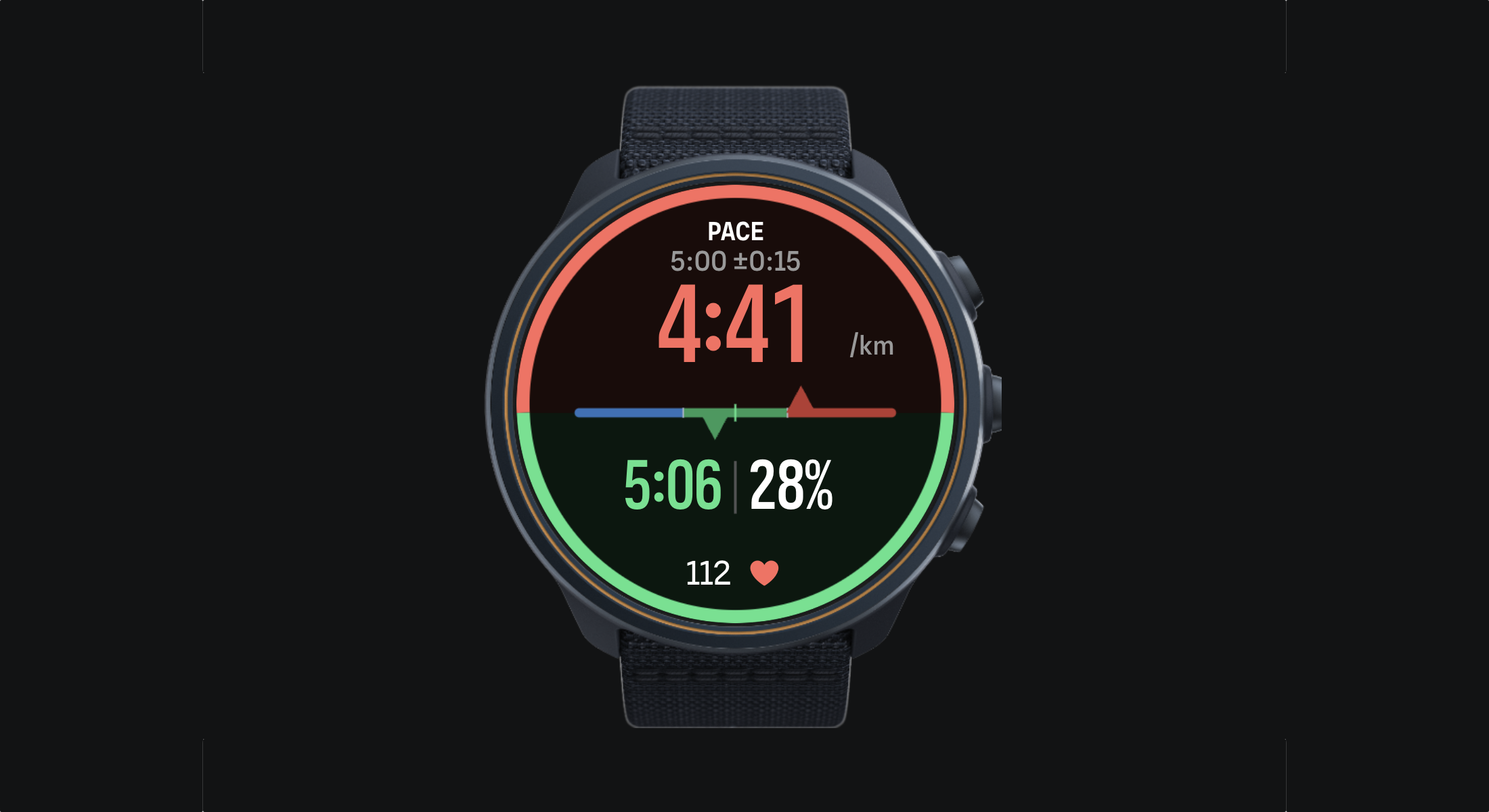
I run with a Race S, and I wanted something simple: pick one target, see from the corner of my eye whether I’m on it, and only get a buzz when I’ve really drifted. So I built Steady, now on the SuuntoPlus store.
How it works:
- Before the run, choose pace, cadence or heart rate, then a target and a tolerance (for example 5:00/km ± 15 s).
- The screen is split at the gauge. The top half is now: your current value in big digits, green when you’re in the zone, blue when you’re under, red when you’re over.
- The bottom half is the run so far: your average since the warm-up, plus the share of time spent in the zone. So you can tell a passing wobble from a run that’s going off.
- The watch only vibrates after a few seconds out of the zone, never at every wobble. Getting back in is silent.
- You can change the target mid-run with a long press on the upper or lower button.
Full disclosure: it’s sitting at 3/5 with 6 ratings, and that’s fair. One early version crashed on launch on some watches. It ran fine in Suunto’s simulator, but the real watch has a memory limit when it loads apps, and the simulator doesn’t apply it. That’s fixed, and the current version is lighter, easier to read in the dark theme, and the colours now always match the number on screen.
I’ve only been able to test it on my Race S. If you have a Race, Vertical, 9 Peak Pro or Ocean, I’d really like to know how it behaves on yours.
So: try it, break it, tell me what’s missing or annoying, here or on X (@tvial). And if it works for you, a rating on the store would really help pull it up from that early crash.
Thanks!
-
@tvial Can this hook into an interval session? The paces and tolerances are already set there so this would be a handy readout until the next interval.
-
@tvial
Tested with a 9PP while doing an easy run (no other app in parallel). It worked just fine.
I think you did an update since as I don’t remember that the warmup phase could exceed 300s. Now it is in minutes and that’s better.
I used to rely on Constantin app when I want to follow drift pace or HR but I will try again your app also during a tempo run by HR. Both apps are really handy for these kind of training.
5 stars ! -
@tvial not tried yet, but looks good
I tried this one on a half-marathon: https://forum.suunto.com/post/200609
It covers one gap with yours: capability to configure negative split (need a distance for this). The project looks not that active anymore (was thinking about starting a new app).
Some remarks:
- the heart rate information looks small compared to other fields (as said, not tried yet, will see how it fit on my SV1)
- in a race mode, I do not see a real benefit in the bottom half information (warmup, time in zone)
- great idea, the capability to modify the target with a long press
-
Can this hook into an interval session? The paces and tolerances are already set there so this would be a handy readout until the next interval.
Unfortunately not. SuuntoPlus apps can’t read the targets of a structured workout: the paces and tolerances you set in the interval session stay inside Suunto’s workout engine, and the developer API doesn’t expose them.
For now, the workaround is to set Steady’s target and zone to match your intervals. You can also adjust the target mid-run with a long press on the top or bottom button, without taking out your phone.
If Suunto ever opens this up, syncing with interval sessions would be the first thing I’d add. Great idea, thanks!
-
Tested with a 9PP while doing an easy run (no other app in parallel). It worked just fine.
I think you did an update since as I don’t remember that the warmup phase could exceed 300s. Now it is in minutes and that’s better.
I used to rely on Constantin app when I want to follow drift pace or HR but I will try again your app also during a tempo run by HR. Both apps are really handy for these kind of training.
5 stars !Thanks a lot, glad it worked well on the 9PP! You’re right, the warm-up moved to minutes in a recent update (up to 30 min), and it now shows a countdown on screen. HR is a good fit for tempo runs. Let me know how it goes, any feedback is welcome.
-
I tried this one on a half-marathon: https://forum.suunto.com/post/200609
It covers one gap with yours: capability to configure negative split (need a distance for this). The project looks not that active anymore (was thinking about starting a new app).
Some remarks:
the heart rate information looks small compared to other fields (as said, not tried yet, will see how it fit on my SV1)
in a race mode, I do not see a real benefit in the bottom half information (warmup, time in zone)
great idea, the capability to modify the target with a long pressThanks for the detailed feedback! A few pointers:
- Finish distance is already in the settings, and the bottom field can show a projected finish time. Negative split isn’t there yet, but since the distance is known it’s a natural next step. I’ll look into it.
- The bottom field is configurable (HR, pace, cadence, power, duration, distance, time of day or finish time), so you can put whatever matters most to you there. Let me know how HR reads on your SV1.
- Set the warm-up to 0 and there’s no countdown at all. The bottom half then shows your average and time in zone. Fair point that it matters less in a race, I’ll think about a race-focused layout.
Glad you like the long press!
-
@tvial
I wonder if it is normal not be able to choose the bottom data. I am on iOS18 and I can see Display - bottom field at the end of the appli screen, just before the finish distance field.
I can choose every other items except the display bottom one. Sorry if I am missing something. -
@tvial Looks pretty cool, looking forward to checking it out to help with staying in, for example zone 2.
I would like to see and specify the basis and units for the pace. For example, I want to have a 23 min 5k pace and have the app calculate the the per km of per mile pace in the display even if the units that I have selected are different than the units specified in the pace goal, so I don’t need to do the math to figure the per km or per mile pace for a larger goal or one in different units than I’m using in the watch
Also curious what happen it you go over or under the finish distance or is that critical to the app working?
-
Like @fixedgearscott I would use it for Zone2 training. Wozld it be possible to enter a zone instead of heartrate?
-
Not really good. The number is actually very small. It does not met the “corner of the eye” requirement.
Same for the pace target + pace window. I would say that most of the time, the information is not relevant. I mean, I know it (I configured it in the app), and the half-bottom line repeats part of it. Exceptions are: I just changed it with long press and/or negative split (the value changes over time).
The blue/green distinction is also not easy. Having a blue marker on the left of the main pace when too slow, and a red marker on the right when too fast would help (so both color and location of marker are meaningful). Could be a simple circle, or the delta (“-5s” or “+10s” for example, but I am not sure there is enough room there).
Note that my run was right before the night, with decreasing amount of light. Probably not ideal when looking for details.
In a race perspective, I am missing the number of seconds ahead/behind the objective as well. But that’s maybe too many requirements for a single app.


Hello! It looks like you're interested in this conversation, but you don't have an account yet.
Getting fed up of having to scroll through the same posts each visit? When you register for an account, you'll always come back to exactly where you were before, and choose to be notified of new replies (either via email, or push notification). You'll also be able to save bookmarks and upvote posts to show your appreciation to other community members.
With your input, this post could be even better 💗
Register Login