Suunto app Forum Suunto Community Forum
    • Recent
    • Tags
    • Popular
    • Register
    • Login

    Problem with intensity zone screen and GPX import

    Scheduled Pinned Locked Moved Suunto 9 Peak
    18 Posts 5 Posters 2.2k Views 5 Watching
    Loading More Posts
    • Oldest to Newest
    • Newest to Oldest
    • Most Votes
    Reply
    • Reply as topic
    Log in to reply
    This topic has been deleted. Only users with topic management privileges can see it.
    • TonyGT
      TonyG Silver Members @emanuele truccolo
      last edited by TonyG

      @emanuele-truccolo with regards to the intensity zone screen I have also noticed the top metric does not show; despite being given the option in SA sport setup. only the centre Hr field and the bottom field shows. I assumed it was due to the reduced screen size in S9P but I do miss having the top field available; on S9B I show PTE on the top field.

      1 Reply Last reply
      Reply Quote 0
      • emanuele truccoloE
        emanuele truccolo
        last edited by

        Thank you for reply, the gpx file has the altitude info (strava, training peaks and garmin have the right value), the gragh is OK but the ascend/descend field is 0

        Mff73M Dimitrios KanellopoulosD 2 Replies Last reply
        Reply Quote 0
        • Mff73M
          Mff73 @emanuele truccolo
          last edited by

          @emanuele-truccolo
          Do you import a gpx to create a route or to import as an activity? If it is for activity, then I guess you are using Syncmytracks, because gpx import to SA for activities is not possible (only fit files). And Syncmytracks import is known not to use the proper Suunto API and no ascent at the end.

          SSU (retired), SV1, SV2
          Wife : S9PP
          SA: Always the latest beta :)
          Android + Galaxy S205G

          1 Reply Last reply
          Reply Quote 0
          • Dimitrios KanellopoulosD
            Dimitrios Kanellopoulos Community Manager @emanuele truccolo
            last edited by Dimitrios Kanellopoulos

            @emanuele-truccolo I am sure the track doesn’t have altitude info and other services just use their own database.

            If possible can you share the file to take a look ?

            Community Manager / Admin @Suunto

            Creator of quantified-self.io

            1 Reply Last reply
            Reply Quote 0
            • Dimitrios KanellopoulosD
              Dimitrios Kanellopoulos Community Manager
              last edited by

              The top metric guys is the actual zone wheel

              Community Manager / Admin @Suunto

              Creator of quantified-self.io

              emanuele truccoloE 1 Reply Last reply
              Reply Quote 0
              • emanuele truccoloE
                emanuele truccolo
                last edited by

                I had a Garmin Fenix 6x pro and all my activities have the elevation info. I tried with sync my tracks but also importing gpx activity directly on sport tracker . Nothing works

                isaziI 2 Replies Last reply
                Reply Quote 0
                • isaziI
                  isazi Moderator @emanuele truccolo
                  last edited by

                  @emanuele-truccolo exactly, if you use sportstracker is not going to work as @Mff73 said.

                  Watch: Suunto Vertical 2 Titanium Black

                  Blog: isazi’s home

                  1 Reply Last reply
                  Reply Quote 0
                  • isaziI
                    isazi Moderator @emanuele truccolo
                    last edited by

                    @emanuele-truccolo if you have a Garmin you can definitely export fit files from Connect (fit is the default Garmin format, not GPX), and import them in Suunto App using many services including QuantifiedSelf.io and Runalyze.

                    Watch: Suunto Vertical 2 Titanium Black

                    Blog: isazi’s home

                    1 Reply Last reply
                    Reply Quote 0
                    • emanuele truccoloE
                      emanuele truccolo @Dimitrios Kanellopoulos
                      last edited by

                      @dimitrios-kanellopoulos said in Problem with intensity zone screen and GPX import:

                      The top metric guys is the actual zone wheel

                      On the user manual you can see that you can add other metric on the top

                      TonyGT 1 Reply Last reply
                      Reply Quote 1
                      • TonyGT
                        TonyG Silver Members @emanuele truccolo
                        last edited by TonyG

                        @emanuele-truccolo, @Dimitrios-Kanellopoulos, plus the option to add another metric is available on the app, it just doesn’t show on the watch

                        Dimitrios KanellopoulosD 1 Reply Last reply
                        Reply Quote 0
                        • Dimitrios KanellopoulosD
                          Dimitrios Kanellopoulos Community Manager @TonyG
                          last edited by

                          @tonyg I said this again. It’s the zone

                          Community Manager / Admin @Suunto

                          Creator of quantified-self.io

                          emanuele truccoloE TonyGT 2 Replies Last reply
                          Reply Quote 0
                          • emanuele truccoloE
                            emanuele truccolo @Dimitrios Kanellopoulos
                            last edited by

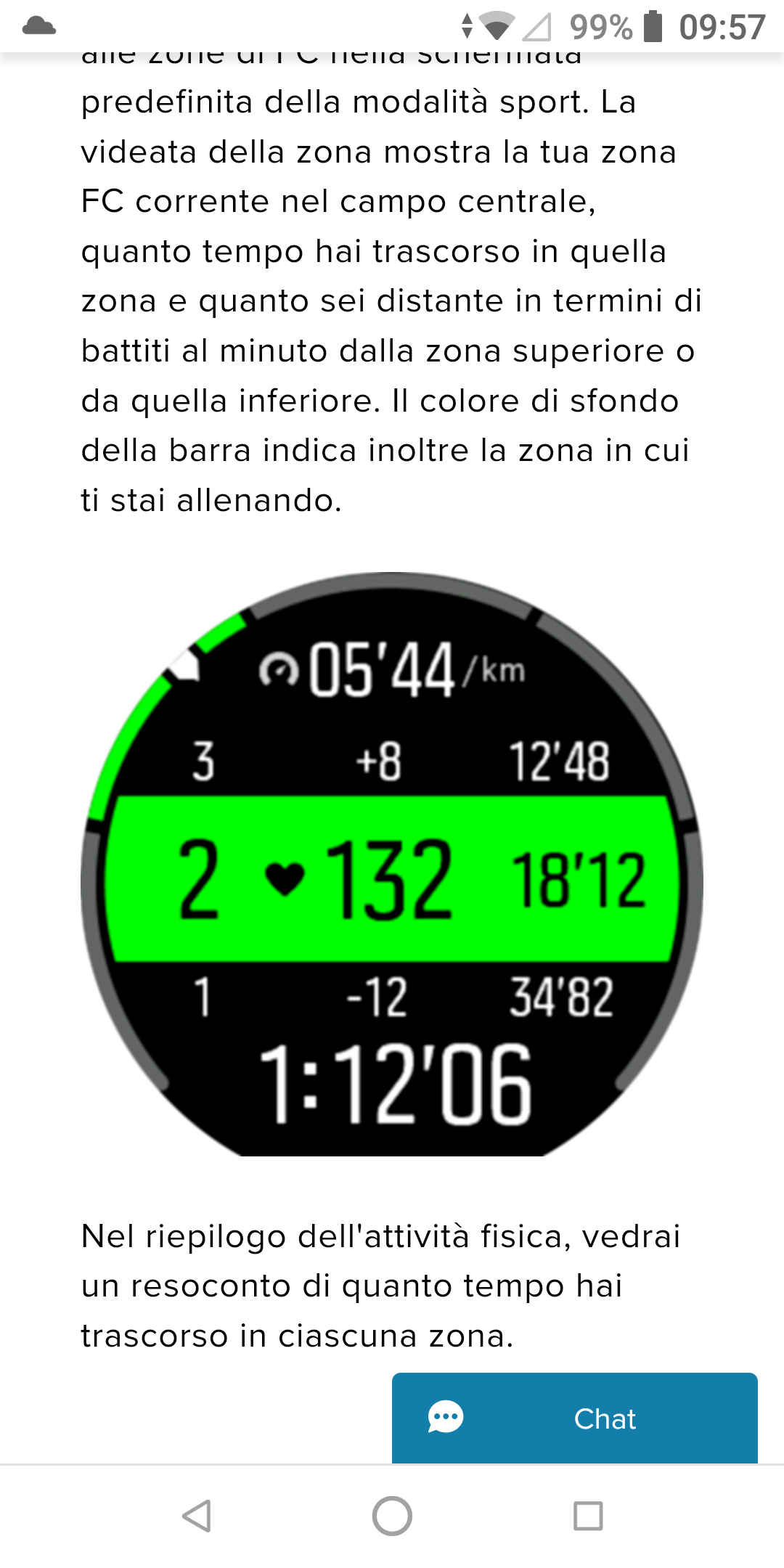
                            @dimitrios-kanellopoulos here below the page of user manual
                            Screenshot_20211003-095739.png

                            Dimitrios KanellopoulosD 1 Reply Last reply
                            Reply Quote 0
                            • Dimitrios KanellopoulosD
                              Dimitrios Kanellopoulos Community Manager @emanuele truccolo
                              last edited by

                              @emanuele-truccolo

                              In addition, there is a dedicated display for HR zones in the sport mode default display. The
                              zone display shows your current HR zone in the middle field, how long you have been in that
                              zone, and how far away you are in beats per minute to the next zones up or down. The
                              background color of the bar also indicates which HR zone you are training in.
                              In the exercise summary, you get a breakdown of how much time you have spent in each
                              zone

                              That’s what it says and the s9P has only the middle and bottom field customizable.

                              Community Manager / Admin @Suunto

                              Creator of quantified-self.io

                              1 Reply Last reply
                              Reply Quote 0
                              • TonyGT
                                TonyG Silver Members @Dimitrios Kanellopoulos
                                last edited by

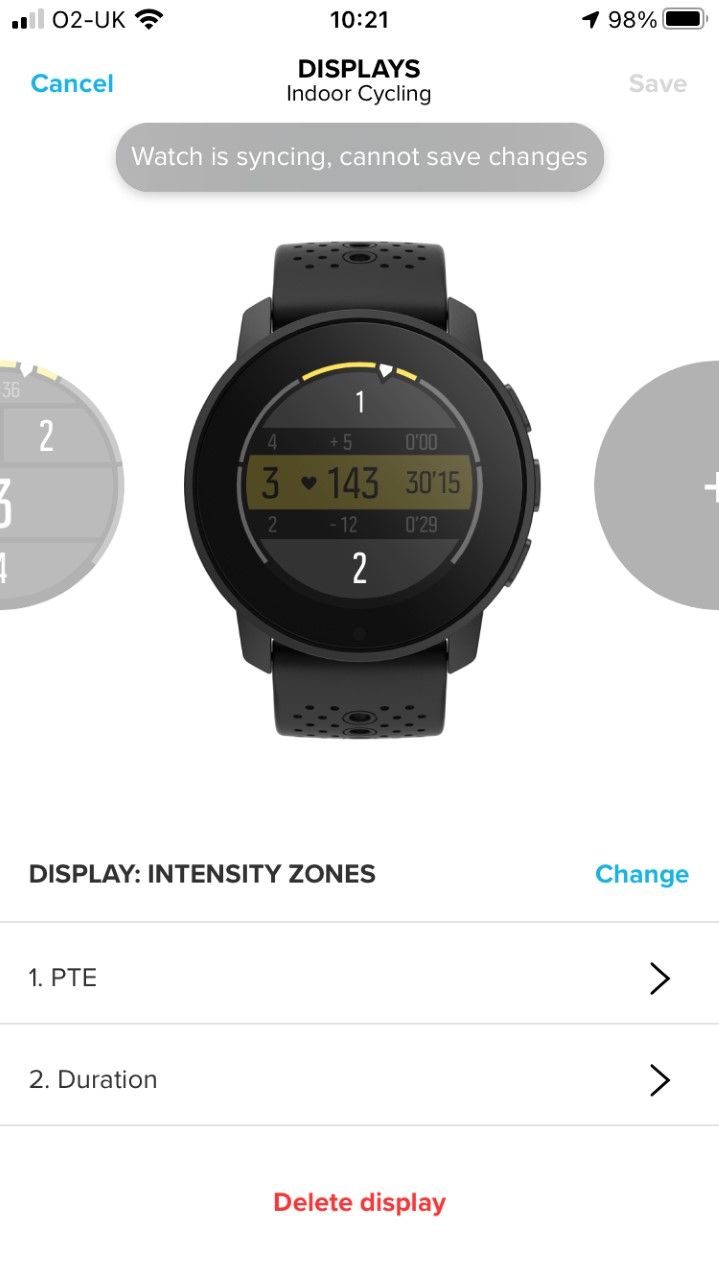
                                @dimitrios-kanellopoulos hmm,

                                Then why am i given the option to add a field in the app, as per this screen shot; IOS?
                                thumbnail_Image.jpg

                                Dimitrios KanellopoulosD 1 Reply Last reply
                                Reply Quote 0
                                • Dimitrios KanellopoulosD
                                  Dimitrios Kanellopoulos Community Manager @TonyG
                                  last edited by

                                  @tonyg 1 is zone

                                  2 is a second metric

                                  Community Manager / Admin @Suunto

                                  Creator of quantified-self.io

                                  TonyGT 1 Reply Last reply
                                  Reply Quote 0
                                  • TonyGT
                                    TonyG Silver Members @Dimitrios Kanellopoulos
                                    last edited by TonyG

                                    @dimitrios-kanellopoulos so its a bug! the fact I can change zone 1 on the app to as per screenshot 1.PTE or anything else

                                    1 Reply Last reply
                                    Reply Quote 0

                                    Hello! It looks like you're interested in this conversation, but you don't have an account yet.

                                    Getting fed up of having to scroll through the same posts each visit? When you register for an account, you'll always come back to exactly where you were before, and choose to be notified of new replies (either via email, or push notification). You'll also be able to save bookmarks and upvote posts to show your appreciation to other community members.

                                    With your input, this post could be even better 💗

                                    Register Login
                                    • First post
                                      Last post

                                    Suunto Terms | Privacy Policy