Suunto 9 Peak Pro no watch faces on watch and in app
-
Same here, I got a brand new S9PP two weeks ago. Running on Android 16. And that isn’t the only problem, the HR sensor stops almost every night
-
Same here. Got my watch one week ago…
-
Fix should come soon
-
Same issue. Everything is up-to-date on my 9PP: latest firmware, latest app. “0/4” watch faces installed. Blank watch faces page in store. How is it that an installed watch face can be disabled remotely? Not cool.
Oh, wait… Looks like it was fixed while I was typing this? Or maybe there’s some extreme latency on the server side. I just let the app sit there on the watch faces page for several minutes. It’s now re-syncing my watch faces with my watch. Fingers crossed…
-
@pavel.samokha said in Suunto 9 Peak Pro no watch faces on watch and in app:
Investigating, only S9PP are affected. Even more specifically newer, China-made S9PP
My S9PP is made in Finland was affected too. But within some time without an action of myself the watch faces came back, but the configuration was lost.
And my Vertical was affected too. 🧐
I wrote in Software Update 2.48.16 (2025 November Rain release):
Today in the morning all watch faces were gone, only the default one was shown on the Vertical. No choice in individual settings, there was only the default one.
After 2 hours and several syncs with the app the watch faces were back, but I have to configure it. The watch faces were in the standard configuration (colour and complications). I never had this on my Vertical.
Running the actual firmware.

-
@Greg-Searle I confirm, the watch faces are back! Let’s see if the HR readings are fixed before I decide to return the watch…
-
@Jaxxdu Yup, the faces are back. what a waste of time

-
The fix has been deployed and watch faces should be back. Sorry for inconvenience.
Opinions expressed are solely my own and do not express the views or opinions of my employer
-
@pavel.samokha thanks!
-
@Matteo-Donati said in Suunto 9 Peak Pro no watch faces on watch and in app:
@Santolo-Felaco same problem here, any official update?
Reply
Hello @Matteo-Donati , This morning the app is working. Thanks
-
All fixed this end, thank you
-
@pavel.samokha said in Suunto 9 Peak Pro no watch faces on watch and in app:
The fix has been deployed and watch faces should be back. Sorry for inconvenience.
My wife’s S9PP had the same problem with the watch faces. They came back, but now the HR is not working at all. No blinking light on the back of the watch when measuring OHR. The sleeping monitor stopped measuring HR in the middle of the night and has not worked since then. Did the fix break the OHR?
-Samuli
-
@Samuli-Sutinen watchfaces issue and its fix can’t have any effect on any other issue
-
@Samuli-Sutinen I reported the problem, sent the logs, contacted Service, and nobody really knows much. It was an old bug, which was fixed, but it is happening again to some users. The solution from service is to reboot the watch, which I think isn’t very professional, not for a 1 week old watch, they should suggest replacing or sending it back, not to reboot the watch every day…
You can check this chat: https://forum.suunto.com/topic/13274/sleep-tracking-not-working-after-most-recent-update/11?_=1764343827621
I hope they fix it soon, otherwise I will return it, because it seems that is out of stock (the titanium version) and it isn’t clear if they would keep the discounts I used.
-
I just had the watch faces reset issue occur this morning (maybe it took a while to get to North America?). My specific problem is that I’m using an old iPhone running iOS 15 with an old version of SA (2.39.1). I was able to get the watch faces back by pairing it with a newer device running current software. However, when I re-pair with my old phone, the faces are lost again.
@pavel.samokha Am I out of luck since I’m trying to run on old software? It’s interesting that it took this long for the issue to show up on my end. And a real bummer for me as I’ve really enjoyed using the 9PP with my tiny old original iPhone SE. I’d really hate to have to upgrade my phone just to get the Classic Analog watch face back.
Edit: Same problem with my SV1 as well. So I guess the issue isn’t model specific, but either related to my old SA software or a backend issue with SuuntoPlus and watch faces. Looks like others are also having watch face issues.
-
Yesterday morning on my SV 1 and 9PP the second time within two weeks am reset to the standard watch face and all other watch faces deleted. It needs two syncs with the SA to have the watch faces back on the watch, but the configuration was gone as the first time too.
-
@pilleus Interesting that it has happened twice to you. Unfortunately re-syncing with SA hasn’t helped me. I think that’s due to my older software version, though.
-
Same on Suunto Race S, no watch faces on watch and in app, iOS
-
I need screenshots of the issue in mobile app, your used operating system and app versions, email or name of the account you use in Suunto App to DM
Opinions expressed are solely my own and do not express the views or opinions of my employer
-
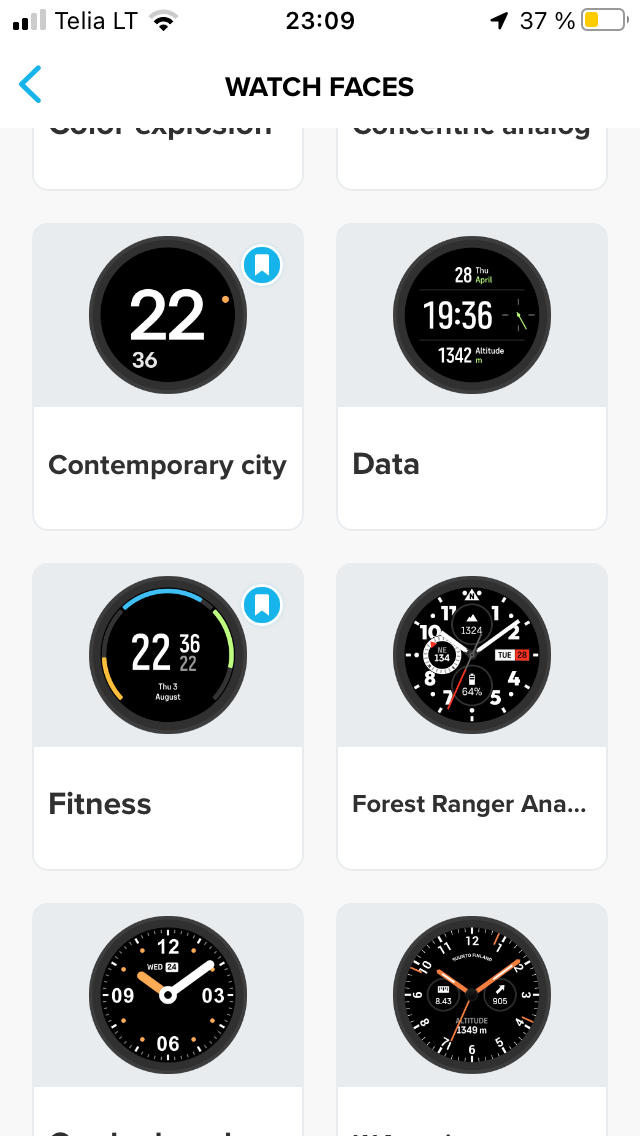
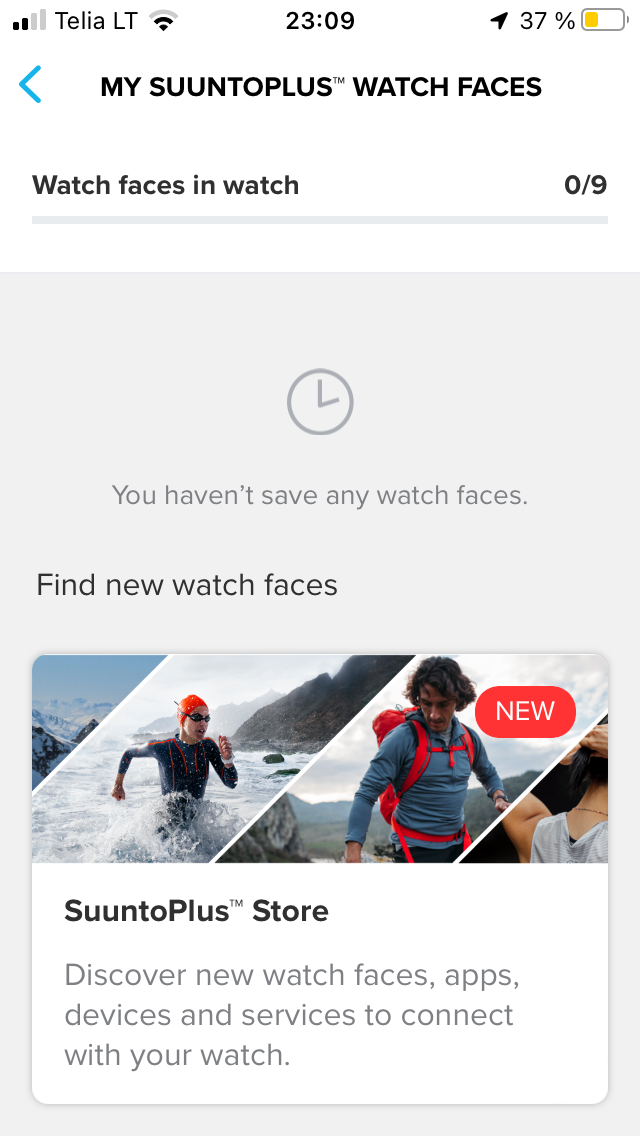
@pavel.samokha My iOS 15.8.5, Suunto App Version 2.39.1 (16998), email: <redacted>, Username: kosmarikas. Watch: Suunto Race S, Software version 2.48.16. Here some screenshots:






Hello! It looks like you're interested in this conversation, but you don't have an account yet.
Getting fed up of having to scroll through the same posts each visit? When you register for an account, you'll always come back to exactly where you were before, and choose to be notified of new replies (either via email, or push notification). You'll also be able to save bookmarks and upvote posts to show your appreciation to other community members.
With your input, this post could be even better 💗
Register Login