Music organisation - Suunto Run
-
The offline music player is a great feature of the Run, but getting tracks to play in a specific order is currently awkward.
The library view shows tracks in an arbitrary order: not by filename, tag, or folder. Two albums dropped into the music folder come out interleaved and scrambled:
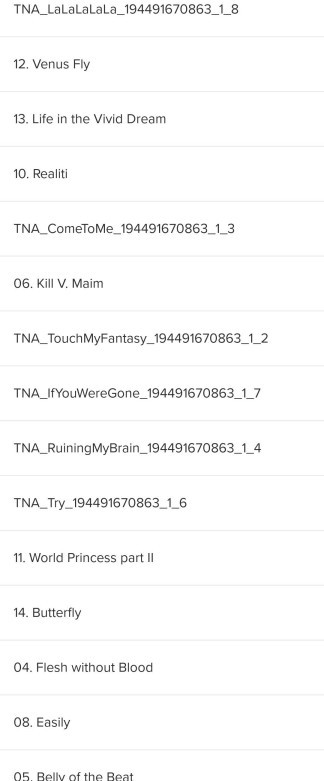
None of the three playback modes (single repeat, playlist repeat, shuffle) resolves this. To listen to an album in its intended order, the only option is to rebuild it as a playlist in the Suunto app, track by track.
Three possible additions come to mind - any one would solve it:
Respect folder structure. Let the watch browse folders and play them as a queue.
Read .m3u / .m3u8 files from the music folder. Playlists built in a desktop tool could just be dropped onto the watch.
Sort the flat library deterministically. By filename, or by Track Number / Album tags.
Adding sorted playback wouldn’t take anything away: shuffle mode already exists for anyone who wants to listen in a random order. -
@Preteen just popping in to say that my experience matches yours. I’ve tried various combinations of things, none of which seems to matter:
- File name
- Folder heirarchy
- File modify date time
- File create date time
- MP3 ID3V2 Tag album name and track number
Various AI tools (Gemini, Anthropic) claim that on Chinese region support forums which I can’t navigate to (https://www.suunto.com/zh-chs/Support/Product-support/suunto_race_s/suunto_race_s/widgets/media-controls/) there is claim that metadata album name and track number should affect the default order, but I’ve not been able to find a pattern or have success with the typical MP3 ID3V2 tags.
Happy to learn what you’ve tried, if anything, beyond your post.
-
Z zrooo referenced this topic
Hello! It looks like you're interested in this conversation, but you don't have an account yet.
Getting fed up of having to scroll through the same posts each visit? When you register for an account, you'll always come back to exactly where you were before, and choose to be notified of new replies (either via email, or push notification). You'll also be able to save bookmarks and upvote posts to show your appreciation to other community members.
With your input, this post could be even better 💗
Register Login